Kubernetes Cost Optimization: Strategies To Reduce Cost By 40%


Last Updated on March 12, 2024
Quick Summary
Gain insights into Kubernetes Cost Optimization, explore the associated costs that fuel the fire, challenges that take a hit on revenue, and proven strategies that ensure you stay afloat amidst potential financial pitfalls.
Table of Contents
Introduction
Research indicates that a staggering 68% of businesses struggle with Kubernetes management, with a mere 12% effectively slashing their expenses, while 20% still grapple with ongoing cost management challenges.
But why is Kubernetes Cost Management proving to be such a challenge?
The crux of the issue lies in networking, storage, and utilizing multiple cloud providers. Despite these challenges, organizations seek viable solutions to optimize costs in Kubernetes.
We understand the concerns about running Kubernetes; let our Kubernetes ninjas help you craft a cost-effective architecture while you sit back and discover how you can achieve incredible savings of up to 40% on Kubernetes costs through our optimization solutions. But first, let’s understand why Kubernetes cost optimization is essential.
Why Is Kubernetes Cost Optimization Important?
Kubernetes cost optimization involves refining your Kubernetes infrastructure to boost efficiency and cut expenses. It entails examining your existing setup, identifying areas for enhancement, and making adjustments to enhance performance and reduce costs. Cost optimization is a process followed by organizations using Kubernetes to avoid unnecessary spending and ensure efficient resource utilization. The primary objective is to maximize the value derived from Kubernetes infrastructure while keeping costs in check.
Understanding Kubernetes Cost-Factors
Below are the primary factors contributing to the costs associated with Kubernetes.
1. Compute-Costs
Compute costs refer to the expenditures related to the computational resources necessary for operating containerized applications. Within Kubernetes, this primarily encompasses the expenses associated with virtual machines (VMs) or physical servers hosting nodes and pods.
Key factors impacting compute costs
- Cluster scale, determined by the number of nodes and pods active in the environment.
- VM or server specifications, including their size and type.
- Allocation of CPU and memory resources to individual pods.
2. Storage Costs
Storage costs represent the charges linked to retaining data for containerized applications, covering both persistent (e.g., databases) and ephemeral (e.g., temporary files) storage.
Key elements impacting storage expenses
- Data volume under storage.
- Storage solution variety (e.g., block, file, or object storage).
- Performance attributes of the storage solution (e.g., IOPS, throughput, latency).
3. Network Costs
Network costs encompass the charges associated with data transfer and networking resources essential for operating your Kubernetes setup. It involves both inbound and outbound traffic, alongside expenses for load balancing and additional networking services.
Key elements impacting network expenses
- Data volume transferred to and from your cluster.
- Geographic distribution of users and data center placement for your Kubernetes infrastructure.
- Various networking services are utilized (e.g., load balancers, DNS, VPNs).
Challenges of Kubernetes Cost Management
Kubernetes cost Management presents several challenges that organizations need to address to ensure efficient resource utilization and cost management. Here are some key challenges:
1. Complex Resource Allocation
There could be uncertainty regarding resource management because of fluctuating demand. For instance, over-provisioning results in unnecessary infrastructure costs, whereas under-provisioning leads to a waste of resources. Various types of resources, such as storage and CPUs, have different pricing. Implement proactive monitoring and adjust resource allocation dynamically to match actual demand.
2. Multi-Cloud Provider Service
The container orchestrators run on multiple clouds. As beneficial as it seems, managing costs in a multi-cloud service environment adds complexity. Every provider has their pricing model, bill mechanism, and cost structures, which are daunting to manage. The intricacies of numerous cloud platforms involve data transfer costs and understanding different pricing tiers, making it a time-consuming and intimidating task to compare prices. Utilize cloud cost management tools and establish standardized cost control measures across all cloud providers.
3. Detecting Cost Anomalies
Businesses investing in Kubernetes often face the challenge of unexpected expenses, known as “bill shock.” To mitigate this issue, anomaly detection systems continuously monitor usage and cost data, instantly alerting relevant stakeholders to take corrective measures.
Anomalies can stem from various factors, such as:
- New deployments consume more resources than previous ones.
- Addition of new pods to the cluster.
- Inefficient scaling rules lead to suboptimal scaling.
- Misconfigured or unspecified pod resource requests.
- Affinity rules cause unnecessary node additions.
Implementing Kubernetes anomaly detection and alerting mechanisms is essential for preventing end-of-month invoice surprises and efficient Kubernetes Cost Management.
4. Lack of Visibility
Understanding container cost and usage data is crucial for effective Kubernetes Cost Management. This visibility is essential across various levels of your Kubernetes deployment, including clusters, nodes, pods (including namespaces, labels, and deployments), and containers.
Deep visibility enables you to:
- Prevent cloud cost surprises by identifying overspending promptly.
- Detect anomalies in usage or spending patterns.
- Discover opportunities for further cost optimization.
For instance, visibility helps identify idle Dev clusters for pausing during off-business hours in development environments. In production, it aids in pinpointing cost spikes due to new releases, assessing application costs, and determining costs per customer or business line.
5. Misaligned Incentives
Within numerous organizations, teams overseeing Kubernetes infrastructure often lack direct responsibility for the associated costs. This limitation can lead to infrastructure teams prioritizing performance and reliability over cost optimization. To address this issue, organizations must strive to align incentives, ensuring that all teams engaged in managing Kubernetes infrastructure are equally vested in optimizing costs.
6. Dynamic and Complex Infrastructure
Managing Kubernetes infrastructure can be challenging due to its dynamic and intricate nature, leading to cost fluctuations. Organizations should prioritize tools and procedures like infrastructure as a code (IaC), configuration management, and automation to handle complexity and cost tracking effectively to overcome this.
Proven Strategies to Enhance Kubernetes Cost Optimization
Follow these key techniques & strategies to enhance Kubernetes cost optimization:
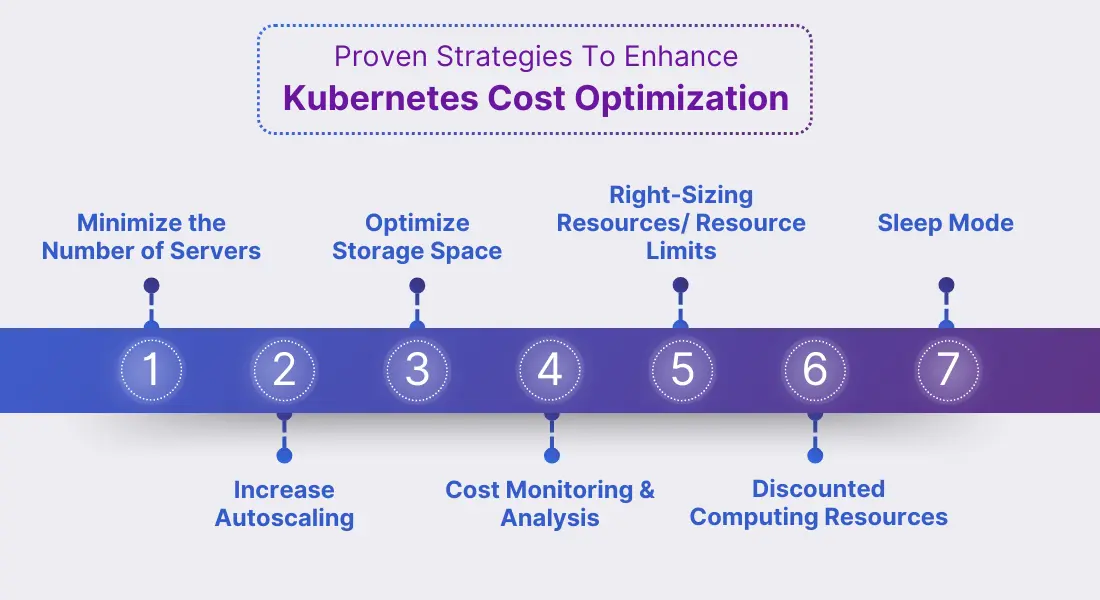
1 Minimize the Number of Servers
Optimize your Kubernetes infrastructure cost by reducing services in the environment. Businesses can determine the number of servers required to run their applications by evaluating workload and capacity requirements. With a minimum number of servers, you can eliminate unnecessary expenses, decrease power consumption, and use resources efficiently.
PERK – Save up to 30% on hardware expenses and reduce the number of servers
2 Increase Autoscaling
Automating repetitive tasks and scaling infrastructure according to demand can minimize costs while ensuring resource efficiency. Leveraging cloud provider-specific autoscaling solutions such as AWS Auto Scaling or Google Cloud Autoscaler can further enhance flexibility and efficiency in managing Kubernetes clusters.
Automation and scaling opportunities within Kubernetes encompass
- Autoscaling nodes and pods to adjust resources dynamically based on demand.
- Leveraging infrastructure-as-code (IaC) and configuration management tools for automated provisioning and management of Kubernetes infrastructure.
- Implementing automated monitoring and alert systems to rapidly detect and resolve performance or cost-related issues.
PERK – Potentially reduce 50% of costs by increasing autoscaling resources.
Opt for our Kubernetes consulting services & say goodbye to conventional constraints and hello to optimized efficiency!
3 Optimize Storage Space
Decreasing the storage space allocated to the Kubernetes cluster can reduce costs. By eliminating unused and redundant storage space, you can streamline your Kubernetes storage.
Strategies for better storage efficiency include:
- Utilizing tiered storage systems that automatically shift data between different storage types based on usage patterns.
- Employing data compression and deduplication to minimize storage needs.
- Regularly assess and remove redundant or outdated data to free up storage.
PERK- Potentially decrease cost by 20% by minimizing Kubernetes storage space.
4. Resource Limits
Setting resource limits in Kubernetes is crucial for preventing unexpected cost spikes and ensuring fair resource allocation. In self-service Kubernetes platforms, limits promote fair sharing of resources among users, preventing one user from monopolizing resources. However, it’s essential to set limits correctly – too low limits can hinder work, while excessively high limits are wasteful. Kubernetes monitoring tools can help determine optimal limits for different scenarios. Use Kubernetes-native features like Resource Quotas and Limit Ranges to implement these limits efficiently.
PERK – Potentially save costs up to 40% by leveraging right-sizing resources.
5 Monitoring and Analysis
Gain visibility into cost allocation, resource utilization, and performance metrics using robust monitoring tools and analyzing the practices. With Kubernetes cost analysis, you can identify areas of inefficiency and take measures to optimize costs. By implementing various Kubernetes cost optimization tools, you can acquire cost trends and usage patterns that help to improve the cost. Also, continuous monitoring and analysis can ensure maximum cost efficiency.
PERK – Potentially reduce excess cloud spending by 35% with monitoring
6. Discounted Computing Resources
Consider using discounted computing resources from major public cloud providers. AWS offers Spot instances, GCP has Preemptible VMs, & Azure has Azure Spot VMs, all offering heavily discounted resources that are surplus capacity. However, these prices fluctuate based on demand, and instances shall stop if the prices exceed the limit or capacity runs out. These options are best suited for temporary workloads. Choose the discount based on your application needs and consider using a combination of different use cases.
PERK – Use resources permanently for a specific period (1-3 ) years to get discounts upto 40-60%.
7. Sleep Mode
Clusters, VClusters, and namespaces in Kubernetes often continue running and incurring costs unnecessarily, especially during development, testing, or CI/CD processes. For instance, a developer’s Kubernetes environment in the cloud might only need activation during their working hours; shutting down these environments when not in use potentially saves significant costs.
Automating this process with a “sleep mode,” which automatically scales down unused namespaces and virtual clusters, is advisable. This process ensures environment states are preserved, and systems can quickly “wake up” when needed, minimizing workflow interruptions. You can implement sleep mode through scripts or tools like ‘Loft’.
PERK – Potentially save up to 75% of costs by shutting down environments when not in use.
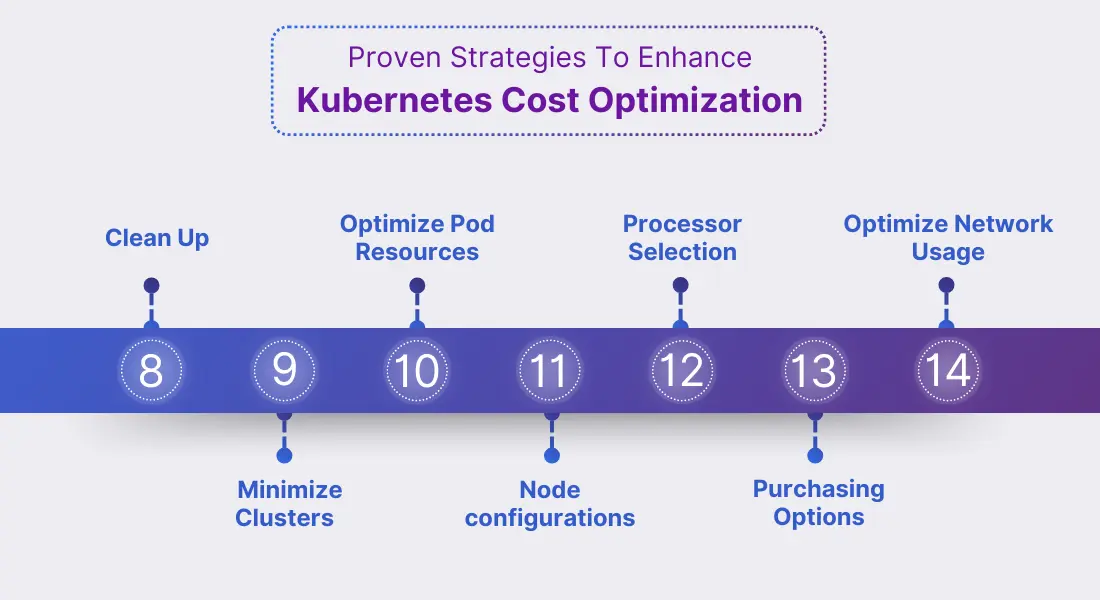
8. Clean Up
Alongside implementing a sleep mode to scale down temporary computing resources, regular cleanup of your Kubernetes system is crucial. Unused namespaces or clusters, especially those created on demand or for CI/CD, can accumulate and incur unnecessary costs. While a sleep mode preserves the state of temporarily unused resources, keeping the state for CI/CD or testing is often unnecessary. Thus, it’s beneficial to delete these environments when not in use.
This cleanup process can be automated using scripts or tools like Loft, which offers an auto-delete feature. Additionally, deleting unused environments improves system oversight for admins, indirectly saving costs.
PERK – Cleaning up unused Kubernetes resources can save around 20-30% on costs, depending on resource usage and cleanup frequency.
9. Minimize Clusters
Reducing the number of Kubernetes clusters is a cost-saving approach that offers several benefits. Organizations can optimize resource utilization and minimize management overhead by consolidating resources and promoting cluster sharing. This approach is particularly beneficial in multi-tenancy setups, where shared clusters enable efficient resource allocation among users and applications.
Additionally, fewer clusters mean reduced cluster management fees, especially in cloud environments. However, it’s essential to strike a balance between efficiency and stability, ensuring that the chosen number of clusters meets the system’s needs without compromising reliability. Implementing virtual Kubernetes clusters further enhances cost savings by providing better isolation than namespaces while reducing infrastructure and management costs. Overall, carefully evaluating the cluster requirements for each application and user group and leveraging virtual clusters can significantly reduce Kubernetes costs while maintaining system stability.
10. Optimize Pod Resource Requests
Establish organizational guidelines for configuring pod CPU and memory requests and limits within YAML definition files. After containers are deployed, monitor resource usage across Namespaces, labels, nodes, and pods to gain insight into cluster utilization and costs. Adjust resource requests and limit values based on actual utilization metrics to ensure efficient allocation. Kubernetes offers fine-grained control over resource allocation, enabling optimization without overprovisioning and minimizing resource underutilization.
PERK – Implementing this strategy can save 20-50% by optimizing pod resource allocation in Kubernetes environments.
11. Node Configurations
When configuring nodes, optimize costs and performance by considering factors such as CPU and memory resources, operating system choice, processor type, disk space, and network cards.
- Optimize node configuration for cost and performance.
- Use open-source OSes to avoid costly licenses.
- Prefer cost-effective processors (e.g., Graviton for AWS, Tau for GCP).
- Choose nodes matching pod resource needs (vCPU and memory).
- Prioritize nodes with the desired vCPU to memory ratio (e.g., AWS R instances, Azure Edv5 VMs, GCP n2d-highmem-2).
PERK – These strategies can lead to savings ranging from 10% to 50% or even more, depending on your starting point and the effectiveness of your optimization efforts.
12. Processor Selection
Recently, major cloud providers like AWS, Azure, and GCP have expanded their processor options beyond Intel to include AMD-powered and Arm-based Graviton instances. This shift offers significant cost benefits, with AMD instances typically 10% cheaper and Graviton instances 20% cheaper than their Intel counterparts. To leverage these savings and improve performance, developers should create multi-architecture containers capable of running on Intel, AMD, and Graviton instances. By doing so, they can tap into reduced instance costs while enhancing application performance.
PERK – AMD instances offer roughly 10% savings compared to Intel, while Graviton instances offer about 20% savings.
13. Purchasing Options
Cloud providers (AWS, GCP, Azure) offer varied purchasing options:
- On-Demand: Standard pricing.
- Commitment-Based: Savings Plans, Reserved Instances, and Commitment Use Discounts for pre-purchased capacity.
- Spot: Utilizes spare capacity at steep discounts (up to 90% off On-Demand pricing).
Prioritize Spot instances for cost savings when suitable. Choose commitment-based options for steady availability if Spot instances aren’t viable. Aim to minimize On-Demand usage without commitments.
PERK – Potential savings vary: Save Up to 90% with Spot instances for flexible workloads and 20-75% with commitment-based options for steady uptime, emphasizing cost-workload balance.
14. Optimize Network Usage
For k8s cost optimization, you need to cut costs and arrange your network so that communication mainly occurs within each area (availability zone). Optimize pod communication across zones to reduce data transfer charges. Set up namespaces for each zone to simplify deployments. This process ensures pods mainly communicate within their zone, minimizing transfer costs. Additionally, it maintains application resilience across zones for high availability. It’s like grouping neighbors together to talk locally, reducing the need for long-distance communication and saving money while ensuring the system stays strong even if one area encounters issues.
PERK – Consolidating clusters can potentially save around 15-25% on Kubernetes cost management
So these were the proven Kubernetes Cost Optimization strategies; you can enhance your strategies by integrating a Kubernetes cost calculator tool, enabling precise estimation of resource utilization and corresponding expenses. It facilitates informed decision-making and proactive modifications to enhance cost efficiency further.
Conclusion
Kubernetes cost optimization is not just about reducing expenses—it’s about maximizing the value of your infrastructure. By fine-tuning your Kubernetes setup, identifying areas for improvement, and implementing strategic changes, you can achieve greater efficiency, enhanced performance, and significant cost savings. Embracing these cost optimization practices ensures that your organization is making the most of its resources, allowing you to innovate and grow without being held back by unnecessary expenses. With the right approach, you can pave the way for long-term success and prosperity in your cloud infrastructure journey.
Frequently Asked Questions (FAQs)
Yes, Kubernetes can be cost-effective, but only if strategies are implemented efficiently.
You can estimate costs by considering the following factors:
- Storage requirements
- Resource needs
- Network traffic
- Cloud tools
Kubecost, Kubecube, Kost, and cloud providers such as AWS, Azure, and Google Clouds are the cost management tools designed for Kubernetes.
You can ensure cost predictability by setting up a budget to track expenses, plan cost allocation, and leverage spot instances for cost efficiency in Kubernetes environments.


Expand Your Digital Horizons With Us
Start a new project or take an existing one to the next level. Get in touch to start small, scale-up, and go Agile.
Your Success Is Guaranteed !
We accelerate the release of digital product and guaranteed their success
We Use Slack, Jira & GitHub for Accurate Deployment and Effective Communication.