Howdy, today I am going to talk about the versioning. How to specifically version your models? So wondering what I am talking about? What are that versioning and my models?
Let me explain you with an example.
If you have created a specific document that many people can edit; yes, just similar to Google Docs. Let’s say, it’s a client proposal and you want your colleagues to do have a look and if required then make the validate changes. After sharing the document with your colleagues, in case someone does @#$%***&% to your doc or if someone has updated your doc with the required changes, then you will not be able to see all the previous versions of the doc and who changed it. This is the most common scenario as it creates a big mess.
How To Track changes to your models’ data
To help you out and track all the changes as well as who has done this, we’re going to use PaperTrail gem. It is a simplified version of Google Docs. A very, very simplified. This gem lets you track all the changes, as the purpose of editing and versioning. And making use of it, you can be able to see all the previous versions of the file and if required you can rollback to a previous version of your choice. You can even undo all the changes after a record has been destroyed so as to restore it completely.
Why Papertrail?
It’s a one-stop solution for text data:
- It helps to focus on what to look for. Helps to focus on auditing or versioning.
- Relevant data is split across directories, multiple apps, and systems. So instead of source, they can be managed by username, IP address, message ID.
Setup The App
I am not going to build the application from scratch. Instead, have pulled the code from Github.
Git clone: https://github.com/
Run the migration, bundle and start the app
rake db:migrate
bundle install
rails server
If you head over to localhost:3000, you should see the following :

PaperTrail
PaperTrail to automatically keep track of what happened to our documents.
# Gemfile
gem 'paper_trail'
Now, 3 steps in one line to get it to work :
bundle install && bundle exec rails generate paper_trail:install && bundle exec rake db:migrate
Restart your server before continuing.
After that, add PaperTrail to the model we want to version :
# app/models/document.rb
class Document < ActiveRecord::Base
  belongs_to :user

  has_paper_trail

  def user_name
    user ? user.name : ''
  end

end
And that’s it ! Every time we save our model, we’ll get the previous version saved by PaperTrail :
PaperTrail::Version.all
# => #<ActiveRecord::Relation [#<PaperTrail::Version id: 1, item_type: "Document", item_id: 1, event: "update", whodunnit: "1", object: "---\nid: 1\nname: Abcz\ncontent: aaa\nuser_id: 1\ncreat...", created_at: "2014-09-26 15:38:14">]>
Listing the previous versions
# app/helpers/documents_helper.rb
module DocumentsHelper
  def find_version_author_name(version)
    user = User.find_version_author(version)
    user ? user.name : ''
  end
end

# app/models/user.rb
class User < ActiveRecord::Base
  has_many :documents
  def self.find_version_author(version)
    find(version.terminator)
  end
end
Now, let’s add the actual list of versions to the edit document view as a partial :
Ruby
# app/views/documents/_versions.html.erb
<h2>Previous Versions</h2>

<table class='table'>
  <thead>
    <tr>
      <th>Index</th>
      <th>Date</th>
      <th>Author</th>
      <th>Event</th>
      <th></th>
      <th></th>
      <th></th>
    </tr>
  </thead>

  <tbody>
    <%- document.versions.reverse.each do |version| %>
      <tr>
        <td><%= version.index %></td>
        <td><%= version.created_at %></td>
        <td><%= find_version_author_name(version) %></td>
        <td><%= version.event.humanize %></td>
        <td><%= link_to 'Diff', '' %></td>
        <td><%= link_to 'Rollback', '' %></td>
      </tr>
    <% end %>
  </tbody>
</table>
And render this partial after the Document form :
# app/views/documents/edit.html.erb
...
<%= render 'form' %>
<%= render 'documents/versions', document: @document %>
Now you can udpate any document a few times. You should see the list of versions growing!
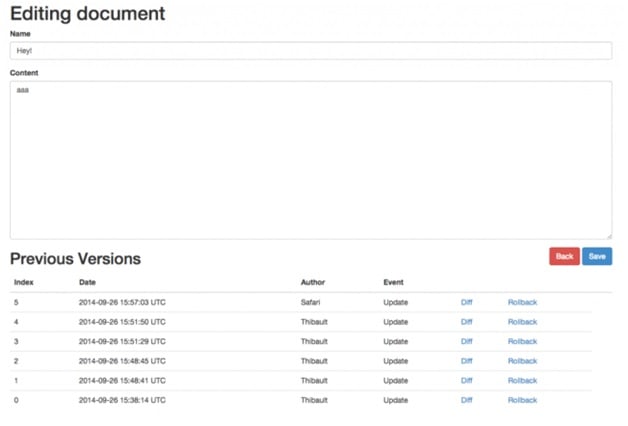
Add Diff & Rollback
First, we’re going to update the edit document view to add action to the links :
# app/views/documents/_versions.html.erb
<%= link_to 'Diff', diff_document_version_path(document, version) %>
<%= link_to 'Rollback', rollback_document_version_path(document, version), method: 'PATCH' %>
Then we need the routes :
# config/routes.rb
resources :documents do
  resources :versions, only: [:destroy] do
    member do
      get :diff, to: 'versions#diff'
      patch :rollback, to: 'versions#rollback'
    end
  end
end
And finally, we create the controller :
# app/controllers/versions_controller.rb
class VersionsController < ApplicationController
  before_action :require_user
  before_action :set_document_and_version, only: [:diff, :rollback, :destroy]

  def diff
  end

  def rollback
    # change the current document to the specified version
    # reify gives you the object of this version
    document = @version.reify
    document.save
    redirect_to edit_document_path(document)
  end

  private

    def set_document_and_version
      @document = Document.find(params[:document_id])
      @version = @document.versions.find(params[:id])
    end

end
You can also rollback to a previous version! Pretty cool, huh! So for that we’re going to use the very nice gem Diffy. Diffy gives us an easy way to diff content (files or strings) in Ruby by using Unix diff.
Diff with Diffy
Add the gem to your Gemfile :
 # Gemfile
 ...
 gem 'paper_trail'
 gem 'diffy'
 ...
bundle install and restart your server.
# app/helpers/documents_helper.rb
def diff(content1, content2)
   changes = Diffy::Diff.new(content1, content2,
                             include_plus_and_minus_in_html: true,
                             include_diff_info: true)
   changes.to_s.present? ? changes.to_s(:html).html_safe : 'No Changes'
end
Now the actual diff view is pretty simple to build. We’re going to create it in app/views/versions/ :
# app/views/versions/diff.html.erb
<div class='row mt'>
  <div class='col-sm-12'>
    <h2><%= "Diff between Version #{@version.id} and Current Version" %></h2>
    <style><%= Diffy::CSS %></style>
    <div class='well diff'>
      <p>
        <strong>Name:</strong>
        <%= diff(@version.reify.name, @document.name) %>
      </p>
      <p>
        <strong>Content:</strong>
        <%= diff(@version.reify.content, @document.content) %>
      </p>
    </div>
    <p>
    <%= "Version authored by #{find_version_author_name(@version)} on #{@version.created_at} by '#{@version.event.humanize}'." %>
    </p>
  </div>
</div>
<div class='fr'>
  <%= link_to 'Back', edit_document_path(@document), class: 'btn btn-danger' %>
  <%= link_to 'Rollback', rollback_document_version_path(@document, @version), class: 'btn btn-primary', method: 'PATCH' %>
</div>
If you try it, you should see something like that:.
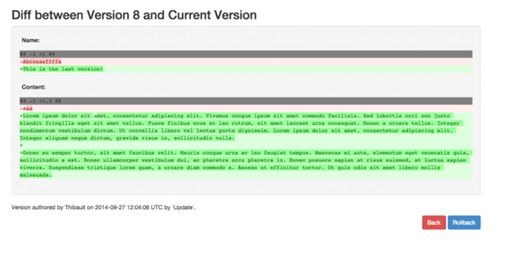
Very nice! Now, our app is missing one very important feature. Its a way to bring back documents from the graveyard!
Custom Version Class
Adding a custom version class is actually quite easy. First, we need to generate a migration :
rails g migration create_document_versions
You can paste this in it :
class CreateDocumentVersions < ActiveRecord::Migration
  def change
    create_table :document_versions do |t|
      t.string   :item_type, :null => false
      t.integer  :item_id,   :null => false
      t.string   :event,     :null => false
      t.string   :whodunnit
      t.text     :object
      t.datetime :created_at
      t.string   :author_username
      t.integer  :word_count
    end
    add_index :document_versions, [:item_type, :item_id]
  end
end
The corresponding model:
# app/models/document_version.rb
class DocumentVersion < PaperTrail::Version
  self.table_name = :document_versions
  default_scope { where.not(event: 'create') }
end
Note the default_scope I added.
# app/models/document.rb
...
has_paper_trail class_name: 'DocumentVersion'
...
Bring back Documents
Rails.application.routes.draw do
  resources :documents do
    collection do
      get :deleted # <= this
    end

    resources :versions, only: [:destroy] do
      member do
        get :diff, to: 'versions#diff'
        patch :rollback, to: 'versions#rollback'
      end
    end
  end

  resources :versions, only: [] do
    member do
      patch :bringback  # <= and that
    end
  end

  resources :sessions, only: [:new, :create] do
    delete 'logout', on: :collection
  end
  root to: 'documents#index'
end
The actions in our controllers
# app/controllers/documents_controller.rb
...
# Get all the versions where the event was destroy
def deleted
  @documents = DocumentVersion.where(event: 'destroy')
end
...
and :
# app/controllers/versions_controller.rb
...
def bringback
  version = DocumentVersion.find(params[:id])
  @document = version.reify
  @document.save
  # Let's remove the version since the document is undeleted
  version.delete
  redirect_to root_path, notice: 'The document was successfully brought back!'
end
...
And a view to list the deleted documents :
# app/views/documents/deleted.html.erb
Bring back documents
<table class='table'>
  <thead>
    <tr>
      <th>ID</th>
      <th>Name</th>
      <th>Description</th>
      <th>Deleted by</th>
      <th>At</th>
      <th colspan="3"></th>
    </tr>
  </thead>
  <tbody>
    <% @documents.each do |document_version| %>
      <%- document = document_version.reify %>
      <tr>
        <td><%= document.id %></td>
        <td><%= document.name %></td>
        <td><%= document.content %></td>
        <td><%= find_version_author_name(document_version) %></td>
        <td><%= document.created_at %></td>
        <td><%= link_to 'Bringback', bringback_version_path(document_version), method: 'PATCH' %></td>
      </tr>
    <% end %>
  </tbody>
</table>
<br>
<%= link_to 'Back', documents_path %>


And finally, a link to access this view!

# app/views/documents/index.html.erb
...
<%= link_to 'See Deleted Documents', deleted_documents_path %>
<br/>
<%= link_to 'New Document', new_document_path %>
Now try it! Delete a document and it will appear in the list of deleted
MetaData
Remember when we created the migration for you custom DocumentVersion model ? We’re going to use those!
# app/models/document.rb
...
has_paper_trail class_name: 'DocumentVersion',
                meta: { author_username: :user_name, word_count: :count_word }
When PaperTrail generates a new version, it will call the defined methods (user_name) on document an save it in the specified field (author_username).
We need to add a method named count_word
def count_word
  content.split(' ').count
end
def count_word
  content.split(' ').count
end
And since we added all those information, we should show it in our list of versions.
# app/views/documents/_versions.html.erb
...
<th>Index</th>
<th>Date</th>
<th>Author</th>
<th>Event</th>
<th>Word Count</th>
...
<td><%= version.id %></td>
<td><%= version.created_at %></td>
<td><%= version.author_username %></td>
<td><%= version.event.humanize %></td>
<td><%= version.word_count %></td>
And save a few versions to see the metadata!
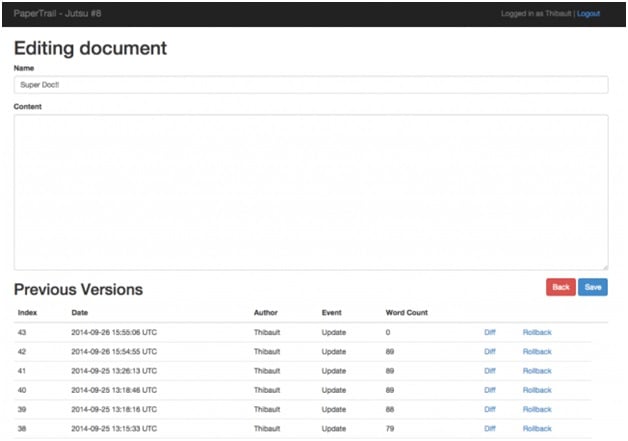
Who needs 100 versions ?
The last trick, We probably don’t need the 100 previous versions, 10 to 30 should be enough. You can define that in PaperTrail configuration :
# config/initializers/paper_trail.rb
PaperTrail.config.version_limit = 10
Source code – https://github.com/airblade/paper_trail#1c-basic-usage
Features
- Stores every update and destroy.
- Only store updates that has been changed.
- You can have all the version, including the original, if it even destroyed once.
- You can get every version even if the schema has since changed.
- Automatically record a responsible controller current_user method.
- Allows you to set who is responsible at model-level (useful for migrations).
- No configuration necessary.
- Can be turned off/on
- Everything can be stored in a single database table
- Thoroughly tested.
Interested in installation
Bacancy Technology has been providing ruby on rails development services from past 5 years. We own a strong ROR workforce and have successfully completed 200+ Rails Application. Our developers have in-depth knowledge and skillful expertise in doing all kinds of Ruby on Rails development work and dealing with any kind of project.
Numbers of big organizations have made their way to the top using Rails, and possibly you can be the next, with the help of Ruby on Rails. Hire Ruby on Rails Developer Now!


