Quick Summary
In the Cursor vs Claude Code comparison,
- Cursor is better for daily coding inside an IDE, while Claude Code is better for autonomous coding tasks across large codebases.
- Use Cursor if your team needs real-time autocomplete, inline bug fixes, and faster feature development directly inside the editor.
- Use Claude Code if you need multi-file refactoring, repository analysis, and AI-driven task execution from instructions.
- Engineering teams use both together: Cursor for fast coding and Claude Code for deeper project-level analysis and automation.
Table of Contents
Introduction
AI coding assistants are quickly becoming a core part of modern development workflows. According to a recent 2026 developer survey, about 73% of engineering teams use AI coding tools daily, compared to past years. (Source) This shows that AI is becoming a standard part of modern development workflows.
Engineering teams now rely on them to write code faster, review changes, and navigate large codebases more efficiently. This shift is also changing how developers interact with code, moving toward a more intent-driven and assisted approach, often referred to as vibe coding.
Two tools that often come up in developer discussions are Claude Code and Cursor. While both promise faster development, they take very different approaches to coding assistance.
If you’re wondering between the Cursor vs Claude code tool comparison, which is better, this guide compares both tools to help you decide which fits your development workflow.
What Is the Core Difference Between Claude Code vs Cursor?
Claude Code works more like an AI assistant that you give instructions to. You tell it what you want to change or build, and it can look through your project and make updates across multiple files. It is designed to handle bigger tasks and work more independently. Because of this capability, many developers consider it one of the best AI coding assistants for developers.
Cursor is different. It is a code editor with AI built into it. You open it like any other editor and start coding. This AI will suggest changes and assist you while you are coding.
Claude Code vs Cursor: Quick Table of Comparison
This table breaks down Cursor vs Claude Code for teams, making it easier to see the differences and choose the right tool for your development needs.
| Feature | Cursor | Claude Code
|
|---|
| Type
| AI-powered code editor
| AI coding assistant/agent
|
| Primary Function
| Helps developers write, edit, and refactor code inside the IDE
| Executes coding tasks across projects based on instructions
|
| Integration
| Integrated directly into IDEs like VS Code or JetBrains
| Works via terminal, CLI, or command-driven workflow
|
| Debugging Support
| Helps identify errors, suggest fixes inline
| Can suggest fixes across modules, detect cross-file conflicts
|
| Scope
| Focused on file-level and module-level improvements
| Can handle larger project-wide changes across multiple files
|
| Best Use Case
| Day-to-day coding, real-time suggestions, quick refactoring
| Autonomous coding, system-wide updates, complex logic changes
|
| Learning Curve
| Easy for developers familiar with modern IDEs
| Requires learning prompt-driven or CLI-based workflows
|
| Team Collaboration
| Enhances individual developers’ workflow inside the IDE
| Can be used to handle tasks across a team or repository remotely
|
| Max Context Window
| Supports large context windows for repository-aware editing
| Supports very large context windows, depending on the Claude model used
|
| Models Available
| Multiple models available depending on plan (e.g., Claude models and others)
| Uses the Claude models provided by Anthropic
|
| Offline Support
| Requires an internet connection for AI features
| Requires an internet connection for model access
|
| Security / Privacy Mode
| Enterprise plans may include security controls and data handling options
| API and enterprise usage allow configurable data policies
|
| Free Tier Limits
| Free plan includes limited AI requests and completions
| CLI tool is free; model usage may require a subscription or API billing
|
| Mobile Support
| No dedicated mobile development environment
| Not designed for mobile usage
|
Cursor vs Claude Code: Feature-by-Feature Breakdown
Let’s now understand in depth how Cursor vs Claude Code differ. This section dives into their key features, workflow approaches, and technical strengths to decide which is the best AI coding tool for developers in 2026.
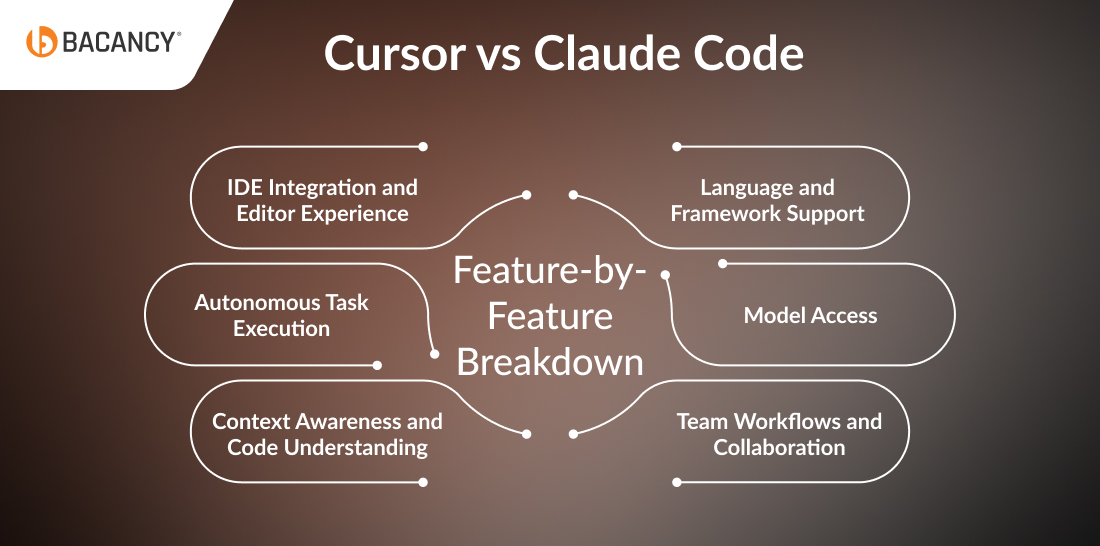
IDE Integration and Editor Experience
When comparing Claude Code vs Curosr for IDE integration and editor experience, Cursor is fast to get started. Since it’s built into VS Code, setup takes only a few minutes. Your existing extensions, keybindings, and project settings work right away. The AI works directly inside your editor while you code.
Claude Code works differently. It runs in the terminal alongside your IDE. This gives flexibility, but you need to adjust how you work. Instead of inline suggestions, you give instructions, and the AI carries them out on its own.
Autonomous Task Execution
Claude Code stands out for handling bigger tasks on its own. This Claude Code autonomous coding approach allows developers to assign complex tasks like refactoring modules, fixing tests, and updating dependencies across multiple files.
Cursor can manage multiple file edits, too, but it mainly waits for your input. It doesn’t run independently across a project like Claude Code.
Context Awareness and Code Understanding
Both tools understand your code. Cursor gives context-aware suggestions within the editor. Claude Code can hold more of your code in memory at once, which is helpful when working across many connected files or debugging complex systems.
Cursor helps you write standard code faster with helpful suggestions. Claude Code can track multiple files at once, making it easier to catch issues across large projects.
Language and Framework Support
Both support major programming languages. The difference is in tricky cases. Claude Code handles legacy code, poorly documented projects, and mixed-language systems better. Cursor works well for standard codebases but can struggle with unusual patterns.
Claude Code works well with complex, older projects. Cursor is ideal for clean, standard code.
Model Access
Cursor lets you choose from multiple AI models, including GPT-4, Claude, and its own small model optimized for speed. This is helpful if your team has preferences or API credits.
Claude Code only uses Anthropic’s Claude models. If you want strong reasoning and high-quality code from a single model, this is a plus. Cursor is better if you want model flexibility.
Team Workflows and Collaboration
For teams, the choice depends on workflow. Cursor’s Business plans include admin controls, centralized billing, and a privacy mode so your code isn’t stored or used for training. New team members can start coding quickly with minimal setup.
Claude Code works well for automating bigger tasks. It fits naturally into teams already using AI workflow automation tools, especially for streamlining CI/CD pipelines or for repeatable, scripted tasks. Teams with large, complex projects benefit from its ability to reason across multiple files and execute multi-step changes.
Neither tool currently supports real-time AI collaboration across multiple developers.
Cursor vs Claude Code Pricing Comparison (Verified March 2026)
Prices verified from official product pages and documentation as of March 2026 to ensure accurate Claude Code pricing 2026 details.
| Pricing Factor
| Cursor
| Claude Code
|
|---|
| Base Tool Cost
| Free plan available
| The CLI tool is free
|
| Individual Plan
| $20/month (Pro) | Included with Claude subscriptions
|
| Higher Usage Plans
| $60/month (Pro+) and $200/month (Ultra)
| $100/month (Max 5x) or $200/month (Max 20x)
|
| Team Plan
| $40/user/month
| Team pricing varies depending on the Claude plan
Team Plan
|
| Pricing Model | Subscription tiers with usage limits
| Subscription access or API usage billing
|
| Typical Monthly Cost for Developers
| $20–$200 depending on plan
| ~$100–$200/month for most active users
|
| Cost Driver
| AI request limits and usage multipliers
| Token usage from Claude models
|
Cursor vs Claude Code vs GitHub Copilot vs Windsurf: Comparison With Other AI Tools
To understand how these AI coding tools compare, the table below breaks down Cursor vs GitHub Copilot vs Claude Code vs Windsurf, highlighting their key capabilities and where each tool fits best.
| Feature
| Cursor
| Claude Code
| GitHub Copilot
| Windsurf
|
|---|
| Core Concept
| AI-native code editor built on a VS Code base
| AI coding agent focused on reasoning and large-scale code tasks
| AI autocomplete assistant integrated into IDEs
| AI-first development environment with agent workflows
|
| Primary Interface
| Full IDE with built-in AI chat and editing tools
| Command line / prompt-driven coding workflow
| IDE extensions (VS Code, JetBrains, etc.)
| AI-powered IDE
|
| Best Use Case
| Daily coding, refactoring, and feature development
| Architecture analysis, complex reasoning, and multi-file tasks
| Faster coding through real-time suggestions
| Managing larger workflows and AI-assisted development processes
|
| Codebase Understanding
| Strong repository awareness inside the editor
| Very strong multi-file reasoning across large codebases
| Limited to contextual suggestions
| Strong project-level understanding
|
| Real-Time Coding Help
| Yes, inline suggestions and edits
| Limited (not designed for live typing)
| Yes, real-time autocomplete
| Yes, AI assistance throughout the IDE
|
| Multi-File Refactoring
| Good
| Excellent
| Limited
| Good
|
| Architecture / System Design Help
| Moderate | Excellent
| Basic
| Moderate
|
| Learning Curve
| Low for developers familiar with VS Code
| Moderate due to CLI-style workflow
| Very low
| Moderate |
| Best For Teams That Want
| AI is built directly into the coding workflow
| Deep analysis and reasoning for complex codebases
| Quick productivity boost inside existing tools
| AI-driven development environment
|
| Typical Role in Workflow
| Daily development assistant
| Technical analysis and planning tool
| Code completion and small tasks
| AI-assisted coding environment
|
Common Mistakes Teams Make When Adopting AI Coding Tools
Adopting AI coding tools can boost productivity, but many teams face challenges along the way. Common mistakes include relying too heavily on suggestions, skipping proper integration, or overlooking workflow adjustments. Understanding these pitfalls early helps teams get the most value from AI-assisted development.
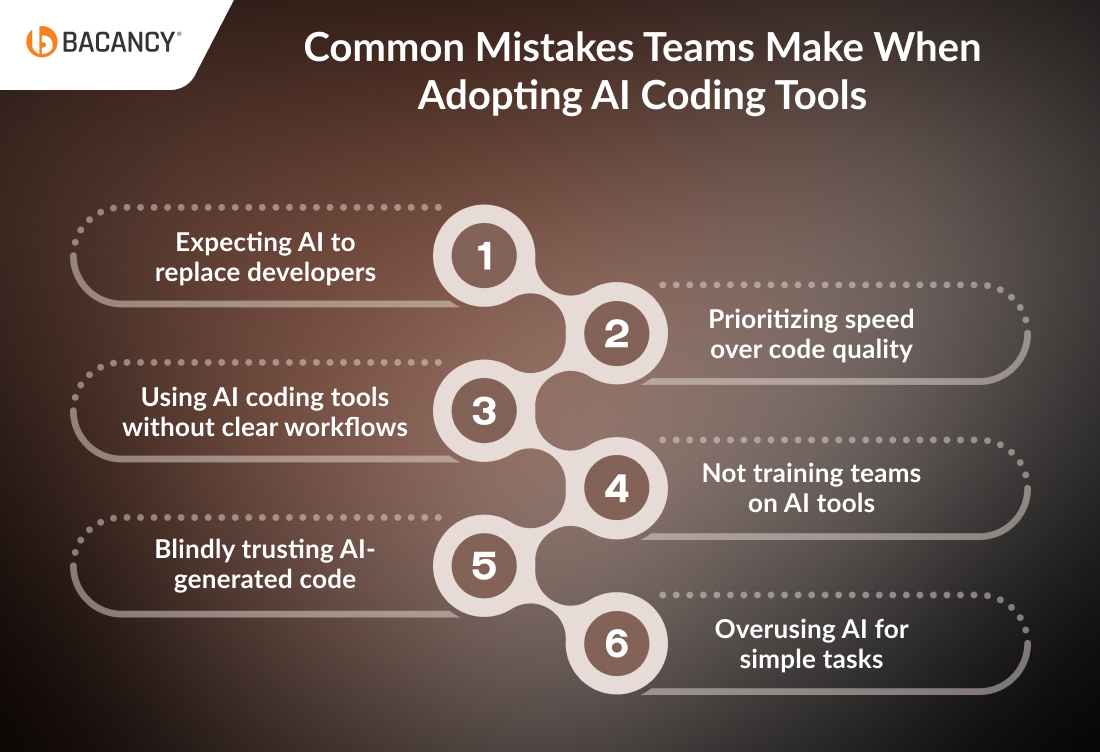
- Expecting AI to replace developers: Tools like Cursor and Claude help developers write code faster, but they cannot replace human expertise.
- Using AI coding tools without clear workflows: Without proper processes, teams may end up with inconsistent and messy code.
- Blindly trusting AI-generated code: AI outputs should always be reviewed and tested before using them in production.
- Prioritizing speed over code quality: Faster development is useful, but ignoring maintainability can create technical debt.
- Not training teams on AI tools: Developers need to learn how to use AI coding tools effectively to get the best results.
- Overusing AI for simple tasks: Sometimes writing small code manually is faster than generating it with AI.
Avoiding these common mistakes helps teams get real value from AI coding tools and sets a strong foundation for implementing vibe coding effectively.
Read more on Top 10 AI coding tools for software development
Real-World Projects Built At Bacancy With Cursor and Claude Code
Trusted by Global Clients
Bacancy has 14+ years of engineering expertise recognized worldwide by clients. We hold a 4.7/5 client rating on Clutch based on verified reviews, reflecting consistent delivery across AI, cloud, and software development projects.
Bacancy is also reviewed on platforms like G2, where businesses share feedback about their experience working with Bacancy’s development teams.
These independent reviews highlight our ability to deliver scalable solutions, maintain strong communication throughout projects, and help companies adopt modern technologies like AI-assisted development effectively.
Below are two of our major project examples showing when our teams choosed Cursor or Claude Code to accelerate development and deliver production-ready applications.
Case Study 1: Building a Calendly-Style Scheduling App Using Claude Code
Project Overview
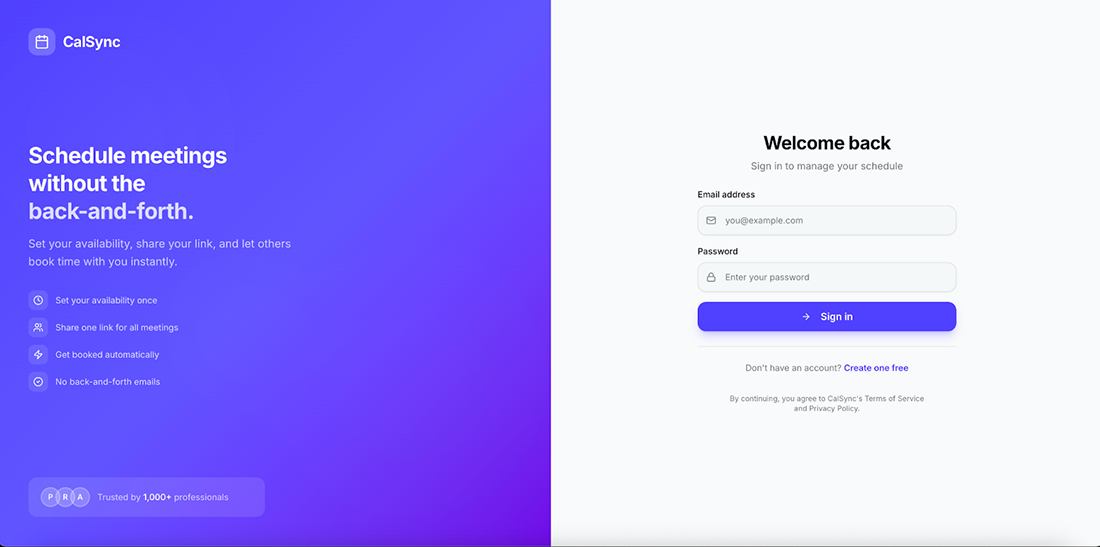
Calslot is a lightweight scheduling application inspired by tools like Calendly. The goal was to create a simple product that allows founders, consultants, and service professionals to share a booking link, display their availability, and accept meetings without back and forth emails.
What makes this project unique is that the entire application was built using an AI-assisted development workflow powered by Claude Code. Instead of manually implementing every component, Claude Code helped with architecture planning, database modeling, feature implementation, and scheduling logic.
The final result was a fully functional scheduling platform with authentication, public booking pages, availability management, and a host dashboard.
Challenges
Building a scheduling platform involves more complexity than it initially appears. Several technical challenges needed to be solved to ensure the system worked reliably.
Key challenges included:
- Designing a secure multi-user database structure
- Generating dynamic time slots based on availability
- Preventing double bookings
- Handling time zone conversions for global users
- Creating a public booking experience without requiring a login
- Providing hosts with a dashboard to manage bookings and schedules
Without a clear architecture, these features can easily become difficult to maintain or scale.
Solution
To accelerate development, the project followed an AI-assisted development approach using Claude Code.
Claude Code supported multiple stages of the development process:
- Architecture planning: The app structure defined clear routes, server components, and data flows between authentication, booking pages, and the host dashboard.
- Database schema design: The database includes tables for user profiles, event types, availability schedules, and bookings.
- Full-stack implementation: The system includes both the user interface and the backend logic required for features such as creating events, setting availability, and managing bookings.
- Scheduling utilities: Utility functions generate available time slots based on the host’s schedule and ensure that each time slot cannot be booked twice.
- Demo data automation: Seed scripts add demo users, event types, availability schedules, and sample bookings so the app is ready for testing or demos.
Using Claude significantly reduced development time while still producing a clean, modern full-stack architecture.
Outcomes
Using Claude-assisted development produced measurable efficiency gains:
- 60% faster initial development compared to traditional manual scaffolding
- MVP completed in 3 weeks instead of the estimated 6–7 weeks
- Handled 250+ simulated bookings per day during load testing
- Reduced scheduling logic development time by ~40% through AI-assisted code generation
These results allowed the team to ship a production-ready MVP quickly while maintaining a clean and scalable architecture.
Read more on How to Build an AI MVP in 30 Days or Less
Tech Stack Used
The application was built using a modern full-stack JavaScript architecture optimized for performance, scalability, and rapid iteration.
| Layer
| Technology
| Purpose
|
|---|
| Frontend Framework
| Next.js 14
| Server components and App Router for performance
|
| Programming Language
| TypeScript
| Type-safe frontend and backend logic
|
| Backend & Database
| Supabase
| PostgreSQL database, authentication, and APIs
|
| Styling
| Tailwind CSS
| Rapid UI development and responsive design
|
| Calendar UI
| react-big-calendar
| Visual calendar interface for bookings
|
| Deployment
| Vercel
| Fast global edge deployment
|
| AI Development Tool
| Claude
| Architecture design, code generation, and feature implementation
|
Note: All booking timestamps are stored as UTC and converted to the viewer’s local timezone in the browser to ensure accurate scheduling across regions.
Accelerate your next project with AI-assisted development using Claude.
Hire Claude code developers from Bacancy to build smarter, faster and scalable applications.
Case Study 2: KidzCamp: Multi-Vendor Marketplace for Kids’ Activities
Project Overview
KidzCamp is a multi-vendor marketplace platform connecting parents with kids’ activity and event providers across India. The platform allows vendors such as activity centers, camp organizers, tutors, and play zone operators to register, get verified, and list events on the platform. Parents can discover, browse, and book activities for their children, while administrators oversee the ecosystem by managing vendor approvals, content, payments, and analytics.
The platform functions as a centralized destination for kids’ events, replacing fragmented discovery methods such as social media pages, messaging groups, and word-of-mouth recommendations. Vendors gain a structured platform to promote events, while parents benefit from a streamlined discovery and booking experience.

Challenges
Building a platform of this scale involved several technical challenges:
- Supporting three distinct user roles (Admin, Vendor, Parent) with separate dashboards, permissions, and route protection
- Implementing OTP-based authentication for parents while maintaining secure email/password authentication for vendors and administrators
- Designing a flexible event management system capable of supporting multiple sessions, ticket tiers, add-ons, and age-based targeting
- Processing payments through multiple payment gateways while accurately calculating platform commissions, convenience fees, and vendor payouts
- Implementing a vendor verification workflow, including KYC document uploads and approval processes
- Building QR-based digital ticketing and check-in systems for real-world event entry
- Managing a large codebase containing 50+ frontend pages, complex forms, and a relational database with 30+ tables
Solution
The platform was built using a modern full-stack JavaScript architecture with AI-assisted development powered by Cursor to accelerate development and maintain consistency across a large codebase.
Architecture & System Design
- Built with React 18 frontend and Node.js (Express.js) backend communicating via a versioned REST API
- Independent frontend and backend codebases allow modular development and easier scalability
- TypeScript is used across the stack for type-safe application logic
Database & Backend Infrastructure
- PostgreSQL database with Drizzle ORM for type-safe queries and schema migrations
- Database schema includes 30+ relational tables covering users, vendors, events, bookings, payments, categories, locations, and CMS content
- Backend APIs secured with JWT authentication and input validation
Authentication System
- Parents: OTP-based login using Twilio SMS for quick, passwordless access
- Vendors & Admins: Email/password authentication with bcrypt hashing and optional Google OAuth
- JWT tokens handle session management and route-level access control
Vendor Marketplace System
- Vendor onboarding includes business profile creation and KYC verification (PAN, GST, business documents)
- Admin approval workflow ensures only verified vendors can publish events
- Event creation system supports:
-> Multiple sessions with individual dates and capacities
-> Multiple ticket tiers with flexible pricing
-> Optional add-ons (meals, materials, merchandise)
-> Age-group targeting for activities
-> Venue configuration with location coordinates
-> Event amenities and accessibility information
Booking & Payment Infrastructure
- Guided booking flow: session selection → ticket selection → add-ons → order review → payment
- Payments integrated with Razorpay and ICICI Bank gateways
- Server-side calculations automatically determine platform commissions, convenience fees, taxes, and vendor payouts
- Each booking generates a digital ticket with a unique QR code
Ticket Validation & Event Check-In
- Built-in QR-based ticket validation system for venue entry
- Vendors or admins can scan tickets using browser-based QR scanning tools
- Each scan records the timestamp, operator identity, and usage count to prevent duplicate check-ins
Admin & Platform Management
Comprehensive admin dashboard for managing platform operations:
- Vendor approvals and KYC verification
- Event moderation and listing management
- Category and location configuration
- Vendor payout tracking
- Blog CMS and static page management
- Platform analytics and reporting
Outcomes
AI-assisted development enabled a lean team to deliver a large marketplace platform within an aggressive development timeline.
Key results included:
- Successful delivery of a full marketplace platform supporting vendors, parents, and administrators
- Implementation of a scalable architecture with over 50 frontend pages and 30+ relational database tables
- Automated vendor onboarding with KYC verification workflows
- Integrated QR-based ticketing system for real-world event check-ins
A payment system supporting multi-ticket orders and automated revenue calculations
These improvements enabled the team to launch a production-ready marketplace platform capable of supporting complex event booking workflows and multiple stakeholder roles.
Book a free 30-minute Vibe Coding assessment with a Bacancy senior Vibe Coding developer. We’ll review your current development stack, team size, and project type, then recommend an AI coding tool workflow tailored for your team that you can start using immediately.
Tech Stack Used
| Layer
| Technology
| Purpose
|
|---|
| Mobile Framework
| React Native + Expo
| Cross-platform iOS/Android development
|
| Programming Language
| TypeScript
| Shared type-safe code with the web platform
|
| State Management
| Redux Toolkit + Redux Persist
| Centralized state management across sessions
|
| Server-State Management
| React Query
| Efficient API data caching and synchronization
|
| Styling
| Tailwind CSS + React Native styling
| Rapid and consistent mobile UI
|
| QR Code
| react-native-qrcode-scanner
| Venue ticket scanning
|
| Push Notifications
| Firebase Cloud Messaging
| Event updates and booking alerts
|
| Payment Integration
| Razorpay + ICICI SDK
| Secure in-app payments
|
| AI Development Tool
| Cursor AI
| Accelerated code generation and mobile workflow replication
|
Bring your app ideas to life faster with AI-powered development using Cursor.
Hire Cursor developers from Bacancy to build efficient, scalable, and feature-rich applications.
Development Metrics Observed at Bacancy
Based on internal development workflows at Bacancy, our engineering teams observed measurable productivity improvements when building projects with Claude Code and Cursor.
Internal observations include:
- 200–400 lines of usable code generated per session using Claude Code
- 60% faster multi-file refactoring during architecture changes
- 60% faster feature implementation when using Cursor for frontend and API work
- 25% fewer debugging cycles during complex form and UI development
- 20-25 developer hours saved per week on repetitive coding tasks
While results vary by project complexity, these internal metrics show how AI-assisted development can significantly reduce implementation time and improve developer productivity.
Claude Code vs Cursor: Final Take on When To Use Which
Choosing between Claude and Cursor really depends on how you work and what kind of tasks you’re handling. One is better for deep thinking and big-picture tasks, while the other shines during fast, everyday coding inside your editor. Here’s when to choose each.
You can choose Claude Code when you need:
- Deep reasoning for complex logic or major architectural changes across multiple files.
- Stronger first-pass solutions so you don’t have to refine the output repeatedly.
- Help writing documentation or explanations in clear, simple language.
- To review large logs or multiple files at once and get a structured breakdown.
- A more task-focused experience where you can assign a full job and let it think it through.
You can choose Cursor when you need:
- Fast suggestions that appear as you type and real-time autocomplete inside your editor.
- AI is built directly into your IDE, so you don’t have to switch tools.
- Quick feature development with smooth back-and-forth edits.
- The option to switch between different AI models based on what works best.
- Clear visual edits and diffs that show exactly what changed in your code.
When to Choose Both: A Hybrid Approach
If u are wondering how to use Cursor and Claude Code together, here’s a simple example of how a Bacancy development team might use both tools together on a typical project.
During daily development, engineers work primarily in Cursor. They implement new features, fix bugs, and refactor functions directly inside the editor. Cursor’s AI suggestions help them write code faster, generate small code blocks, and quickly iterate on ideas without interrupting their workflow.
At the end of the week or during a major milestone, the team switches to Claude Code for broader analysis. The tech lead might ask Claude Code to review multiple modules, examine architecture decisions, or suggest improvements for scalability and maintainability. Because Claude Code can process larger sections of the repository and reason across files; it becomes a useful tool for deeper technical reviews.
Using Cursor and Claude Code together creates a balanced development process. Cursor keeps everyday coding fast and efficient, while Claude Code helps the team step back and make better long-term architectural decisions.
Finally, What’s Changed in 2026: Major Updates
Updates in 2026 for Claude Code and Cursor focus on improving repository understanding, automation, and developer workflows rather than introducing a completely new product.
As for Claude Code:
- Now supports larger context windows, allowing it to analyze bigger codebases and understand multi-file dependencies more accurately.
- Improved reasoning for code tasks, making architecture planning, refactoring, and debugging more reliable in one pass.
- Usage expanded through the Claude platform, reducing the need to rely only on terminal-based workflows.
- Improved repository-wide awareness, helping developers apply edits across multiple files directly from the editor.
As for Cursor:
- Introduced automation agents, enabling AI-driven workflows such as pull request analysis and automated code suggestions triggered by GitHub events.
- Expanded model flexibility, allowing developers to switch between multiple AI models depending on the task, cost, or performance needs.
- Both tools now support larger project workflows, moving beyond simple autocomplete to handle refactoring, documentation generation, and cross-file changes.
How Can We Help You?
When you compare Cursor vs Claude Code, it really comes down to how your team works day to day. Cursor is perfect for developers who spend hours inside their IDE and need help fixing bugs, refactoring code, and speeding up real projects. It directly boosts engineering output.
Claude Code feels more like a thinking partner. It assists with system design ideas, writing clear documentation, explaining complex logic, and even supporting broader business discussions.
So, choosing between Cursor and Claude Code isn’t about which tool is “better.” It’s about whether your team needs deeper, in-editor coding support or broader, big-picture thinking support
Frequently Asked Questions (FAQs)
Workflow and Productivity
Cursor gives suggestions, autocompletes code, and highlights errors as you type. This reduces repetitive work, speeds up coding, and helps you focus on logic instead of syntax.
Claude Code handles multi-step or project-wide tasks on its own. For example, it can refactor modules, fix tests, or document code across files. This frees up developers to focus on higher-level planning and reduces manual effort.
It depends on the type of work you are doing. Claude Code is better for complex tasks such as architecture analysis, large-scale refactoring, and reasoning across multiple files. Cursor is better for everyday coding because it provides real-time suggestions and autocomplete inside the editor.
Yes. Teams often use Cursor for day-to-day coding and Claude Code for larger automated tasks. This hybrid approach balances speed in the editor with deeper reasoning for complex changes.
Features and Technical Use
Claude Code is better for projects with multiple files, legacy code, or mixed languages because it can reason across the entire codebase. Cursor is best for file-level or module-level tasks, providing quick suggestions while you code.
Yes. Both support languages like Python, JavaScript, Java, C#, and more. Claude Code performs better in mixed-language or poorly documented projects, while Cursor works best with well-structured codebases.
GitHub Copilot focuses mainly on autocomplete and real-time code suggestions inside IDEs. Claude Code works more like an AI coding agent that can analyze repositories, refactor modules, and complete multi-file tasks based on instructions.
Team Collaboration
Neither tool currently allows real-time multi-developer collaboration. But teams can use Cursor for individual in-editor help and Claude Code to automate tasks across a project, helping teams work more efficiently.
Cursor is easy for new team members to start with and works well for daily coding. Claude Code is better for teams managing large projects with repeated or automated tasks. Using both together gives teams speed and flexibility.
Integration and Compatibility
Yes. Cursor supports multiple AI models, including models from Anthropic. Developers can switch between Claude models and other AI models depending on their workflow and performance needs.
Claude Code is not built as a typical extension for Visual Studio Code. Instead, it usually runs through a CLI or terminal workflow alongside the editor, where developers give instructions, and the AI performs coding tasks across the repository.
Pricing and Practical Value
Claude Code itself is free to install as a CLI tool. However, running coding tasks requires access to Claude models, which usually involves a paid subscription or API credits, depending on how you access the models.
Cursor offers a free tier, a Pro plan for around $20 per month, and team plans for larger organizations. Claude Code pricing depends on the Claude subscription or API usage from Anthropic.