Quick Summary
Web app development cost vary for each project due to features, complexity, functionalities, and scope changes. In this blog, we will cover every aspect of web app development cost in 2026. We will delve into factors that impact the budget, its different types, how you can reduce it with strategies, and its overall process cost. Also, learn how to calculate the cost to develop a web app.
Table of Contents
Introduction
Developing a web application is not a simple task. Whether you plan to launch a new product or streamline operations, the price of a custom-built web app can be a challenge. As the saying goes, ‘you get what you pay for,’ and when it comes to web app development cost, it is the same scenario.
However, there’s a catch! According to a study conducted by McKinsey, 66% of enterprise projects have cost overruns. 1 out of 3 go beyond estimation, and nearly 20% fall back on promised benefits.
But how can you avoid unnecessary expenses while ensuring a high-quality product? Let’s explore the factors that drive costs, break down the development process, and help you ensure that your investment is worth it and leads to a successful business.
How Much Does It Cost to Develop a Web App in 2026?
The cost to develop a web app in 2026 typically ranges from $10,000 to $500,000+, depending on complexity, features, and scale. MVPs start around $10,000, while enterprise applications with advanced integrations and AI can exceed $500,000.
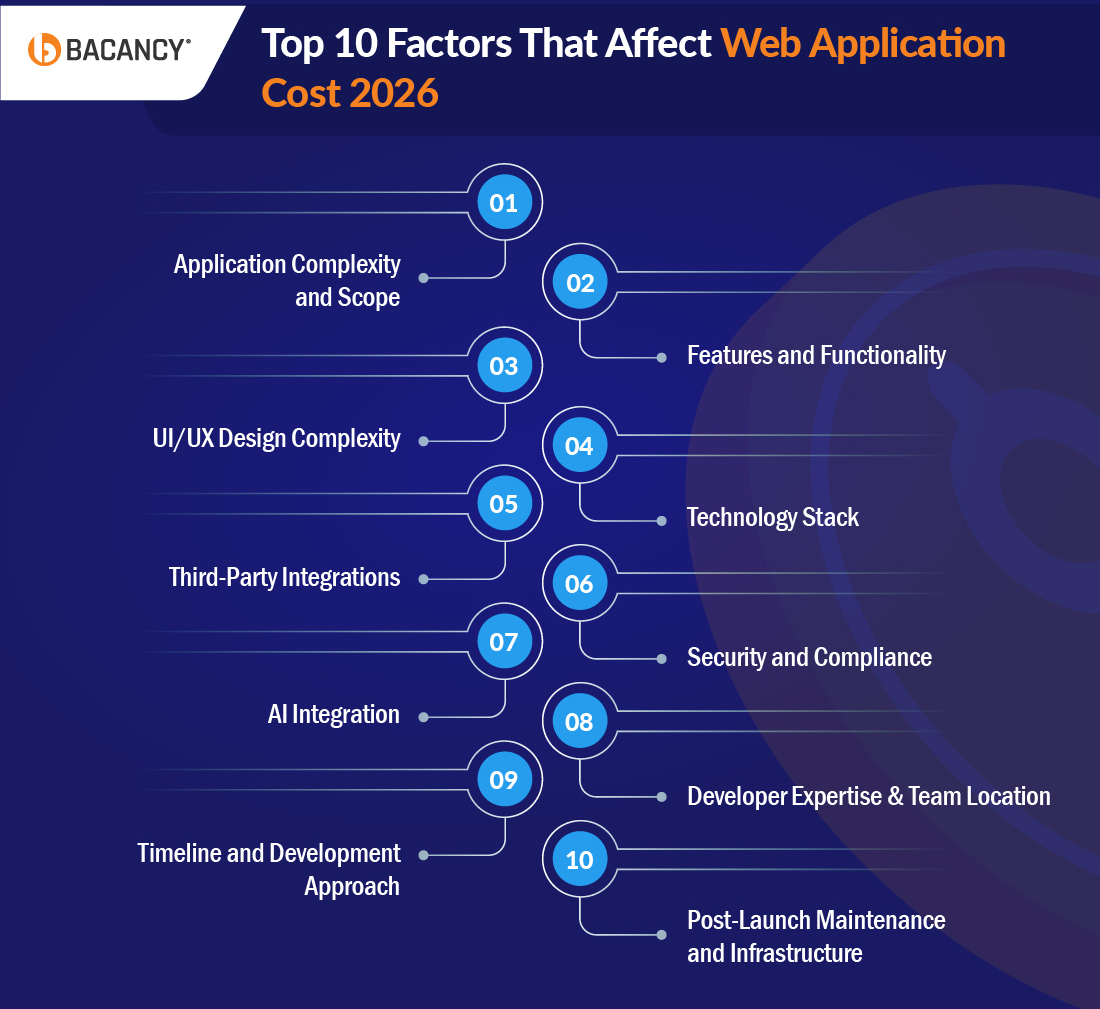
Top 10 Factors That Might Affect Web Application Cost
Various factors shape your web app development cost. Understanding each one helps you allocate budget accurately, set realistic expectations, and avoid the cost overruns that catch most businesses off guard.
1. Application Complexity and Scope
Complexity is the single biggest cost driver. What matters most is not the number of features but how many workflows, dependencies, and edge cases they introduce.
Linear user flows are relatively inexpensive to implement, but conditional logic, background processes, and complex state handling cause development and testing effort to grow significantly.
| Complexity Level
| Description | Approx Cost
|
|---|
| MVP / Prototype
| Core features only, no polish, built to validate
| $10,000–$50,000
|
| Basic App
| Static pages, simple forms, basic auth
| $10,000–$30,000
|
| Mid-Level App
| Dashboards, payments, user roles, APIs
| $30,000–$150,000
|
| Enterprise Solutions
| Enterprise logic, AI, real-time, multi-system
| $150,000–$500,000+
|
2. Features and Functionality
Every feature adds design, development, and testing time. Cost scales with feature depth, not just feature count:
| Feature Type
| Examples | Cost Range
|
|---|
| Basic | Auth, navigation, static pages
| $3,000–$8,000
|
| Advanced | Payments, real-time chat, geolocation
| $8,000–$25,000
|
| Custom/Enterprise
| AI search, CRM dashboards, multi-tenant
| $15,000–$60,000
|
3. UI/UX Design Complexity
A clean, minimal UI can account for 15–20% of total project cost. Advanced design with micro-interactions, custom animations, and full responsive optimization across all devices can raise that to 30–50% of the total cost.
Design is no longer just aesthetic in 2026; it directly affects usability, conversions, retention, and accessibility compliance.
4. Technology Stack
Your choice of frontend, backend, database, and infrastructure tools directly impacts both development cost and long-term scalability:
| Technology | Cost Impact
|
|---|
| React / Angular / Vue
| Medium |
| Node.js / Python / Ruby on Rails
| Medium |
| AI / LLM Integration
| High (+20–40% to total)
|
| Real-time Infrastructure (WebSockets)
| High |
| Cloud Infrastructure (AWS/Azure/GCP)
| Medium–High
|
| Blockchain | Very High
|
Note: Open-source frameworks like React and Node.js reduce licensing costs and benefit from large developer communities that accelerate development timelines.
5. Third-Party Integrations
Each external integration adds development time, testing complexity, and in many cases, ongoing subscription costs:
| Integration Type
| Cost to Integrate
|
|---|
| Payment gateways (Stripe, PayPal, Razorpay)
| $1,500–$5,000 per gateway
|
| CRM (Salesforce, HubSpot)
| $2,000–$8,000
|
| Social login / OAuth (Google, Apple)
| $500–$2,000
|
| ERP / Legacy system integration
| $10,000–$40,000+
|
| Analytics platforms
| $1,000–$5,000
|
6. Security and Compliance
Security is not a phase; it is a cost center that runs through the entire project. In 2026, security configuration, compliance preparation, and infrastructure setup are standard budget items. Compliance validation failures result in expensive rework cycles.
Regulatory requirements such as GDPR, HIPAA, SOC 2, and PCI-DSS add meaningful engineering overhead to any project operating in regulated industries. Budget 10–20% of the total development cost for security implementation and compliance readiness.
7. AI Integration
Advanced AI and machine learning features can raise the cost to build a web application by 20–40%, especially when custom AI models or real-time processing are involved.
In 2026, AI-powered features, chatbots, recommendation engines, predictive analytics, and LLM-based search have shifted from differentiators to user expectations in many product categories.
Here is what individual AI features typically cost to integrate:
| AI Feature
| Estimated Cost Range
|
|---|
| AI Chatbot
| $5,000–$25,000
|
| Recommendation Engine
| $10,000–$40,000
|
| Predictive Analytics
| $15,000–$50,000
|
| LLM-based Search
| $8,000–$30,000
|
| Computer Vision / Image Recognition
| $20,000–$60,000
|
These ranges assume integration of existing AI APIs (e.g., OpenAI, Google Vertex). Custom-trained models add a further $30,000–$150,000+, depending on dataset size and compute requirements.
8. Developer Expertise and Team Location
Typical Hourly Rates by Role (Web App Development)
| Role | Hourly Rate (USD)
| Bacancy’s Hourly Rate (USD)
|
|---|
| Backend Developer
| $40 – $120/hr
| $22–$70
|
| Frontend Developer
| $35 – $90/hr
| $22–$70
|
| Full-Stack Developer
| $50 – $150/hr
| $22–$70
|
| UI/UX Designer
| $30 – $80/hr
| $22–$60
|
| QA Engineer
| $25 – $60/hr
| $22–$50
|
| DevOps Engineer
| $50 – $130/hr
| $22–$70
|
| Project Manager
| $40 – $100/hr
| $35–$70
|
| Business Analyst
| $30 – $80/hr
| $35–$70
|
Also, along with the developer expertise, where your team is based significantly affects your hourly rate and, therefore, the total cost:
| Region
| Junior ($/hr)
| Mid-Level ($/hr)
| Senior ($/hr)
|
|---|
| North America
| $80–$100
| $100–$150
| $150–$200+
|
| Western Europe
| $60–$80
| $80–$120
| $120–$180
|
| Eastern Europe
| $30–$50
| $50–$80
| $80–$120
|
| India / South Asia
| $20–$35
| $35–$60
| $60–$90
|
| Latin America
| $30–$50
| $50–$75
| $75–$110
|
Note: The lowest hourly rate does not produce the lowest total cost. Communication overhead, rework, and missed deadlines from poorly managed offshore engagements consistently produce higher final invoices than mid-range partners with strong engineering culture and delivery track records.
9. Timeline and Development Approach
Compressed timelines require larger parallel teams, which increases cost by 20–50%. Conversely, an MVP-first approach, launching with core features and deferring non-critical functionality, is consistently the most cost-efficient strategy for startups and growth-stage products.
Agile delivery with two-week sprint cycles also reduces budget risk by producing working software incrementally rather than billing for months of invisible progress.
10. Post-Launch Maintenance and Infrastructure
The development invoice is not your total cost. Annual maintenance typically runs 15–20% of the initial build price, alongside ongoing server hosting, third-party API subscriptions, and infrastructure scaling costs.
A $100,000 web app will typically require $15,000–$20,000 per year to maintain, secure, and improve after launch. This is a line item that almost every project budget omits until it arrives as a surprise.
Hiring Model Comparison: In-House vs Freelancer vs Development Agency
One of the most overlooked cost decisions in web app development is how you structure your team. Your hiring model alone can swing the final cost by 40–60%, yet most cost guides ignore this entirely.
| Factor | In-House Team
| Freelancer | Development Agency
|
|---|
| Annual Cost (senior dev)
| $175,000–$285,000 (salary + benefits + tools + HR)
| $50–$150/hr, project-based
| $60–$200/hr depending on region
|
| Ramp-up Time
| 3–6 months
| 1–2 weeks
| 1–2 weeks
|
| Quality Consistency
| High (after ramp-up)
| Variable | High (with right partner)
|
| Scalability
| Slow and expensive
| Moderate | Fast |
| Security | Highest | Medium | Medium |
| Best For
| Long-term core products
| Small or one-off features
| Startups to enterprise, full builds
|
No-Code / Low-Code vs Custom Development
In 2026, no-code and low-code platforms like Webflow, Bubble, and OutSystems have matured enough to be a genuine option for many use cases. Before investing in custom development, it’s worth understanding what each approach actually costs and where each one breaks down.
| Approach | Best For
| Approx Cost
|
|---|
| No-code (Webflow, Bubble, Glide)
| Landing pages, simple internal tools, MVPs
| $0–$2,400/year in platform fees
|
| Low-code (OutSystems, Mendix, AppGyver)
| Internal tools, workflow automation, simple portals
| $15,000–$60,000 project cost
|
| Custom Development
| SaaS platforms, enterprise apps, complex business logic
| $25,000–$500,000+
|
When to choose no-code or low-code: You need a working prototype fast, your logic is straightforward, or you’re testing a concept before committing to a full build.
When to choose custom development: You need full control over performance, security, integrations, or you’re building a product that needs to scale beyond what a platform’s constraints allow.
Read more in detail about our take on No Code Tools For App Development
Types of Web Applications and Their Development Cost in 2026
There are various web applications; hence, before jumping into cost, understand the types of web applications and their web app architecture. We have simplified the process by separating different web applications and their costs for better clarity regarding the overall budget.
Quick Comparison: All Web App Types at a Glance
| Type | Best For
| Cost Range (2026)
| Complexity |
|---|
| Static Web App
| Portfolios, landing pages
| $3,000–$15,000
| Low |
| Dynamic Web App
| Blogs, CMS, news portals
| $10,000–$50,000
| Medium |
| Single-Page App (SPA)
| Dashboards, SaaS tools
| $80,000–$150,000+
| Medium–High
|
| Multi-Page App (MPA)
| eCommerce, education portals
| $40,000–$150,000+
| Medium–High
|
| Progressive Web App (PWA)
| Mobile-first, offline apps
| $30,000–$120,000
| High |
| E-Commerce Web App
| Online stores, marketplaces
| $15,000–$150,000+
| Medium–High
|
| SaaS Web Application
| Subscription platforms
| $40,000–$250,000+
| High |
| Enterprise Web App
| ERPs, CRMs, internal tools
| $75,000–$500,000+
| Very High
|
1. Static Web Applications
Static web applications are direct and consist of pre-rendered HTML, CSS, and JavaScript files delivered to the users. These apps are suitable for basic websites like portfolios, landing pages, or small business sites where the content doesn’t change often. Moreover, they are quick to develop, highly reliable, and need minimal maintenance. However, they lack dynamic functionality and are unsuitable for interactive or data-driven use cases.
Cost: Approx around $3,000 and $15,000, depending on design and the number of pages.
2. Dynamic Web Applications
Compared to other web applications, dynamic web applications are more interactive and update their content based on user interactions or external data. For instance, blogs, forums, and content management systems like WordPress help connect to a backend database, enabling real-time updates and customization. The apps will enhance user engagement but demand a more complex development process and ongoing maintenance to ensure performance and security.
Cost: Usually, it ranges from $10,000 to $50,000, depending on the app’s complexity.
3. E-Commerce Web Applications
E-commerce web applications are the platforms where you can sell and buy products. The essential features include product catalogs, secure payment gateways, shopping carts, and order tracking systems. It also often integrates with third-party tools for shipping, inventory management, and customer support. Moreover, advanced features like personalized recommendations and multi-language support.
Cost: Ranges from $80,000 to $150,000+, depending on feature complexity, real-time data requirements, and the depth of backend API integration.
4. Single-page Applications (SPAs)
Multi-page applications load a new page from the server whenever the user performs an action or navigates to another section. Each page operates independently, which makes them suitable for large websites with extensive content and multiple categories.
They are widely used for platforms like online stores, education portals, and corporate websites where structured navigation and SEO visibility are essential. While MPAs can handle complex workflows and large datasets, they require careful performance optimization to avoid slower load times.
Cost: Development costs usually range from $40,000 to $150,000+, depending on the size of the application and the number of integrated features.
5. Progressive Web Applications (PWAs)
Progressive Web Applications (PWAs) combine the best of web and mobile apps, offering offline functionality, push notifications, and fast loading speeds. Users can access them directly through their browsers without needing installation, making them highly accessible. PWAs are versatile, scalable, and excellent for businesses targeting mobile users without investing in native app development.
Cost: Progressive web app development cost typically range between $30,000 and $120,000, depending on features and scalability.
6. Enterprise Web Applications
Developed to manage and optimize complex business operations. These apps often feature CRM systems, ERP integrations, and analytics dashboards designed to securely handle large datasets and multiple user roles. Enterprise web applications are tailored to an organization’s needs; these apps require extensive planning, compliance measures, and robust testing to ensure efficiency.
Cost: Development costs range from $15,000 to $150,000, depending on the scale and features.
7. SaaS Web Applications
SaaS (Software-as-a-Service) web applications deliver software through a subscription-based model accessible through the browser. Examples include project management tools, CRM platforms, and marketing automation systems.
These applications require features such as user authentication, subscription management, multi-tenant architecture, data security, and scalable infrastructure. Because they must support continuous updates and large numbers of users, development is more complex compared to typical web apps.
Cost: SaaS web application development usually ranges from $40,000 to $250,000+, depending on features, scalability, and infrastructure requirements.
8. Enterprise Web Applications
Developed to manage and optimize complex business operations. These apps often feature CRM systems, ERP integrations, and analytics dashboards designed to securely handle large datasets and multiple user roles. Enterprise web applications are tailored to an organization’s needs; these apps require extensive planning, compliance measures, and robust testing to ensure efficiency.
Cost: Enterprise web application development costs usually start at $75,000 and can exceed $500,000 for large-scale implementations.
Transform Your Web App into Visually Stunning and High-Performance
Leverage our comprehensive application development services to ensure seamless functionality and exceptional user experience.
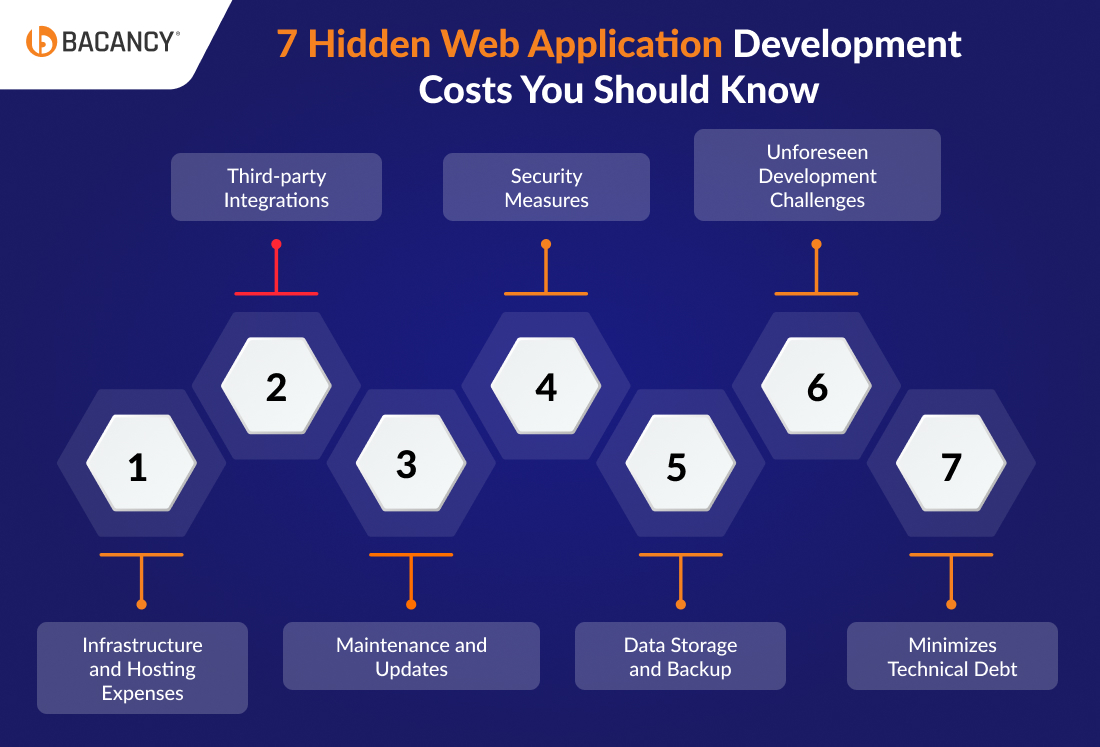
7 Hidden Mistakes That Increase Web App Cost by 2x
While upfront costs like design and development are quite obvious, there are several hidden expenses that can catch businesses off guard. These costs often arise during and after the development process, which eventually impacts the overall budget and timeline. Here’s a breakdown of the most common hidden web app development costs:
1. Infrastructure and Hosting Expenses
Every web app requires hosting and server resources to operate. While initial hosting may seem affordable, scaling as your app grows can lead to significantly higher costs. Cloud platforms like AWS or Azure, while efficient, may charge based on bandwidth, storage, or usage, causing unpredictable expenses.
Example: AWS’s pay-as-you-go model can generate $200+ monthly for mid-scale apps with moderate traffic.
2. Third-party Integrations
Using APIs for features like payment processing, like Stripe and PayPal, geolocation like Google Maps, or social logins comes with licensing or usage fees, which are often overlooked during budgeting.
Example: Google Maps API charges $5–$10 per 1,000 requests.
3. Maintenance and Updates
Post-launch maintenance is critical for bug fixes, performance optimizations, and ensuring compatibility with new technologies or browsers. Businesses often underestimate these recurring costs, which can total 15–20% of the initial development cost annually.
Example: Businesses can invest 10% or more for updates and maintenance.
4. Security Measures
Implementing and maintaining robust security protocols, including SSL certificates, vulnerability scanning, and compliance with regulations (like GDPR or HIPAA), can incur hidden costs.
Example: SSL certificates range from $50 to $1,000 annually, while compliance auditing can cost thousands.
5. Data Storage and Backup
Managing large volumes of data or ensuring data redundancy for reliability can add unexpected expenses. It is particularly true for apps handling user-generated content or real-time interactions.
Example: Storing moderate volumes of data in cloud storage can cost around $120–$200 annually, depending on usage.
6. Unforeseen Development Challenges
Delays caused by changing requirements or unforeseen technical complexities are common web development challenges that can inflate costs. For instance, adding a new feature mid-development might require reworking the architecture, which increases both timelines and budgets.
Example: Few undiscovered expenses that can occur due to bugs or technical issues.
7. Marketing and Launch Expenses
Launching a web app isn’t just about development; effective marketing, user acquisition campaigns, and SEO optimization require investment. Many businesses overlook these costs during the initial planning phase.
Example: A basic marketing campaign can cost $5,000–$10,000.
6 Expert Strategies to Reduce Web App Development Costs
To avoid budget overruns and hidden costs, businesses can adopt several strategies to minimize expenses while maximizing value. Following are a few actionable tips.
1. Start with an MVP
Building an MVP (Minimum Viable Product) will allow you to focus on core features, launch quickly, and gather user feedback before investing in additional functionality. It reduces the risk of over-investing in features that users may not need.
Read more on How to Build an MVP in 30 Days
Using open-source frameworks like React.js, Django, or Laravel eliminates licensing fees and accelerates development. These tools also have large developer communities, providing free resources and plugins.
3. Use Cloud Services Smartly
Instead of pre-purchasing server capacity, use AWS, GCP, or Azure on a pay-as-you-go basis and set up auto-scaling from day one. Monitor usage with Cost Explorer (AWS) or Cloud Billing (GCP) monthly.
Most early-stage apps overprovision by 40–60%, rightsizing your infrastructure based on actual traffic can save $200–$800/month within the first 6 months of launch.
4. Outsource Strategically
Outsourcing to Eastern Europe or South Asia, where senior developers charge $60–$90/hr vs $150–$200/hr in North America, can reduce your total development bill by 40–60% on equivalent work.
The key is choosing a partner with a strong delivery track record, not just the lowest hourly rate. Poorly managed offshore engagements consistently produce higher final invoices due to rework, missed deadlines, and communication overhead.
Maximize your ROI and accelerate project delivery by outsourcing strategically with Bacancy’s expertise.
Hire web developers from Bacancy to get top-quality solutions, effortless collaboration, and reliable results every time.
5. Use Pre-built Templates and Components
Using pre-built templates can save time and money for front-end designs or common features. Platforms like ThemeForest or Bootstrap offer affordable templates that reduce design costs.
6. Automate Testing and Deployment
Automated QA tools like Selenium, Cypress, or Playwright can reduce manual testing hours by 30–40%. In a mid-size project with $20,000 allocated to QA, that translates to $6,000–$8,000 in direct savings, while also catching regressions faster and reducing post-launch bug fix costs.
CI/CD pipelines (via GitHub Actions, Jenkins, or CircleCI) further reduce deployment errors and accelerate release cycles by 20–30%
Web App Development Process Stage-Wise Cost & Timeline Overview
Building a web application involves multiple phases, and each contributes differently. That’s why understanding these phases and their associated expenses can help you allocate your budget wisely and plan for both expected and unpredictable costs.
| Development Stage
| Estimated Cost
| % of Total Budget
| Timeline |
|---|
| Planning & Discovery
| $2,000 – $10,000
| 5–10%
| 2–4 Weeks
|
| UI/UX Design
| $3,000 – $15,000
| 15–20%
| 3–6 Weeks
|
| Frontend Development
| $10,000 – $50,000
| 20–25%
| 4–8 Weeks
|
| Backend Development
| $15,000 – $80,000
| 25–30%
| 8–12 Weeks
|
| Testing & QA
| $5,000 – $20,000
| 15–20%
| 2–4 Weeks
|
| Deployment | $2,000 – $10,000
| 5–8%
| 1–2 Weeks
|
| Maintenance & Updates
| 15–20% of dev cost/year
| Ongoing | Recurring |
Note: Costs vary significantly based on team location, project complexity, and tech stack. See the location-based rate breakdown further below.
1. Discovery and Planning Phase
Before writing a single line of code, the foundation of a successful web app begins with thorough planning and research.
What this phase covers:
- Understanding business goals.
- Competitor analysis.
- Market research and user personas creation.
- Drafting requirements and a project roadmap.
- Wireframing or creating prototypes.
Expert Tip: Treat discovery as an investment, not an overhead. A $3,000–$5,000 discovery engagement can save you much later on in the costs downstream.
2. UI/UX Design Phase
Delivering an intuitive and visually appealing user experience plays a crucial role in the success of web applications.
What this phase covers:
- Creating user interface (UI) designs.
- Ensuring seamless navigation (UX).
- Design testing through user feedback.
Expert Tip: Finalizing designs before development begins is critical. Mid-development design changes are one of the most expensive and avoidable cost drivers in web app projects.
3. Development Phase
The most substantial and resource-intensive phase involves actual coding and integration.
What this phase covers:
- Backend development (server, database, and API).
- Frontend development (user interface, responsive design).
- Third-party service integrations (payment gateways, APIs).
- Developing core functionalities and features.
Expert Tip: Using established component libraries like React with Bootstrap or Tailwind CSS can reduce frontend development time by 20–30% without compromising quality.
4. Quality Assurance and Testing Phase
Thorough testing ensures a bug-free and smooth experience for users.
What this phase covers:
- Manual and automated testing for functionality, usability, and performance.
- Load testing to ensure the app can handle high traffic.
- Security testing to identify vulnerabilities.
Expert Tip: If budget is a concern, consider starting with a Minimum Viable Product (MVP), building only the core backend features needed to validate your idea. An MVP backend typically costs 40–60% less than a fully-featured build and can be expanded iteratively based on real user feedback.
5. Deployment Phase
The app is prepared for release, including hosting and making it accessible to users.
What this phase covers:
- Cloud infrastructure setup (AWS, Google Cloud, Microsoft Azure)
- CI/CD (Continuous Integration / Continuous Deployment) pipeline configuration
- Domain setup, SSL certificate installation, and DNS configuration
- Final production environment testing
Recurring deployment costs to budget for:
- Cloud hosting: $20–$500+ per month, depending on traffic and infrastructure
- SSL certificate: Free–$200/year, depending on security level
- Domain renewal: $10–$70/year, depending on the domain extension
- CDN services: $0–$200+/month depending on traffic and provider
Expert Tip: Automating deployment using CI/CD pipelines helps reduce manual errors and speeds up release cycles. Teams that adopt automated deployment processes can ship updates faster and maintain more stable production environments.
6. Maintenance and Updates
Ongoing updates and maintenance will assist to keep your app relevant, secure, and efficient.
What this phase covers:
- Fixing bugs and improving performance.
- Adding new features based on user feedback.
- Ensuring compatibility with updated technologies.
Expert Tip: Plan maintenance as a long-term investment rather than an afterthought. Regular updates, security patches, and performance optimizations prevent larger technical debt issues that could become far more expensive to fix later.
Web App vs Website: What's the Cost Difference and Why It Matters
Buyers often ask whether they need a website or a web application, and the answer directly affects the budget. Here’s how the two compare:
| Type | What It Is
| Estimated Cost (USD)
|
|---|
| Informational Website
| Static or CMS-driven content site, no user logic
| $1,000–$5,000
|
| Business Website
| Multi-page site with contact forms, basic CMS
| $3,000–$20,000
|
| eCommerce Website
| Product catalog, cart, payment, order management
| $5,000–$100,000+
|
| Blogging / Content Site
| CMS, author roles, categories, SEO structure
| $2,000–$15,000
|
| Simple Web App (MVP)
| User auth, core feature set, basic dashboard
| $10,000–$50,000
|
| Full-Featured Web App
| Roles, APIs, payments, real-time features
| $30,000–$150,000
|
| Enterprise Web App
| Multi-system integration, compliance, scale
| $100,000–$500,000+
|
The key difference: A website delivers content. A web application processes data, responds to user actions, and executes business logic. If users can log in, submit forms that trigger backend processes, or interact with data, you’re building a web app, not a website. Budget accordingly.
Calculate Your Web App Development Costs Right from Day One with Bacancy
Estimating web application development costs becomes much easier when the project scope is clearly defined from the start. At Bacancy, we help businesses break down their ideas into practical development requirements so they can understand the real cost before development begins.
Here’s how we help you estimate the right cost from day one:
- Feature Identification: We identify the core features your web app needs, such as user authentication, dashboards, payment systems, or integrations.
- MVP Planning: We help prioritize essential features first so you can launch a Minimum Viable Product (MVP) without overspending.
- Effort & Timeline Estimation: Our team evaluates the development effort required for each feature to estimate realistic timelines and budgets.
- Technology & Infrastructure Planning: We account for infrastructure costs like hosting, APIs, and third-party services early in the planning stage.
- Scalability Consideration: We ensure your app architecture allows future growth without requiring expensive rebuilds later.
To avoid surprises, we also recommended keeping a 10–20% contingency budget for evolving requirements. Want an exact cost for your app? Get a tailored estimate in 24 hours. Connect with our web app development company, which can help you plan features, define scope, and build a cost-effective roadmap from the start.
Conclusion
So far, it is evident that web app development cost include multiple aspects and elements. By breaking down every factor, such as location, developers, team, features, functionalities, technical expertise, and technologies will help you make informed decisions. Moreover, web app development cost in 2026 require a well-planned approach, optimizing investment to maximize return. You can also opt for application modernization services to upgrade your system, improve performance, and align your web app with modern standards.
Frequently Asked Questions (FAQs)
Web app development cost began around $10,000 to $150,000. It is divided into three parts-
1. Simple web apps: $10,000–$30,000
2. Medium-complexity apps: $30,000–$80,000
3. Highly complex apps: $80,000–$150,000
You can reduce the cost of web app development by focusing on a Minimum Viable Product (MVP) to prioritize essential features. You can also outsource development to countries with lower labor costs. Utilizing open-source tools and frameworks can eliminate additional resource expenses.
A simple web app will take 1-2 months, medium complexity 3-6 months, and advanced web applications with complex features will take at least 6 to 12 months or longer. The time durations will be determined based on your project scope, functionalities, type of features, and complexity.
Outsourcing web development is a cost-effective option with global talent and flexibility. On the other side, in-house development will be a comparatively expensive option because of salaries and operational costs.