Last Updated on June 23, 2025
Last Updated on June 23, 2025
Quick Summary
Web development can be considered an exciting, but intense ride of a rollercoaster – fast-paced and full of challenges. It can feel like a tricky, too hard, and formidable task, especially for small businesses and entrepreneurs just starting out. As in the middle of every difficulty lies opportunity, every web development obstacle has a solution.
This blog post discusses the 13 biggest web development challenges and practical solutions to overcome them. Go through the technical and non-technical hurdles businesses face, how to tackle them, and helpful tips to avoid making costly mistakes.
Table of Contents
Building and launching a website that creates an engaging experience for the user can be easier said than done. Looking at the statistics, nearly 70% of consumers say that page speed influences their purchasing decisions, and 88% of users are less likely to return to a site after a bad experience. That’s the reason why it is essential to ensure your website not only looks great but also performs seamlessly across devices.
However, achieving such a perfect balance is not always easy. Many entrepreneurs, especially small business owners, often underestimate the variety of challenges that come along with web development. Without proper planning and awareness, these issues can lead to missed deadlines, extra expenses, and a website that is not aligned with your expectations.
Navigating through the biggest and most common challenges in web development helps SMEs and businesses prepare in advance, make informed decisions, and ensure a smoother, user-friendly experience. In the next section, we are going to understand top web development challenges, one by one, and learn how to resolve them effectively.
The web development landscape is filled with numerous complexities that require technical expertise along with creative vision to build websites that are fast, functional, secure, and scalable across devices and platforms. Below are some of the most common technical web development challenges that you should be aware of:
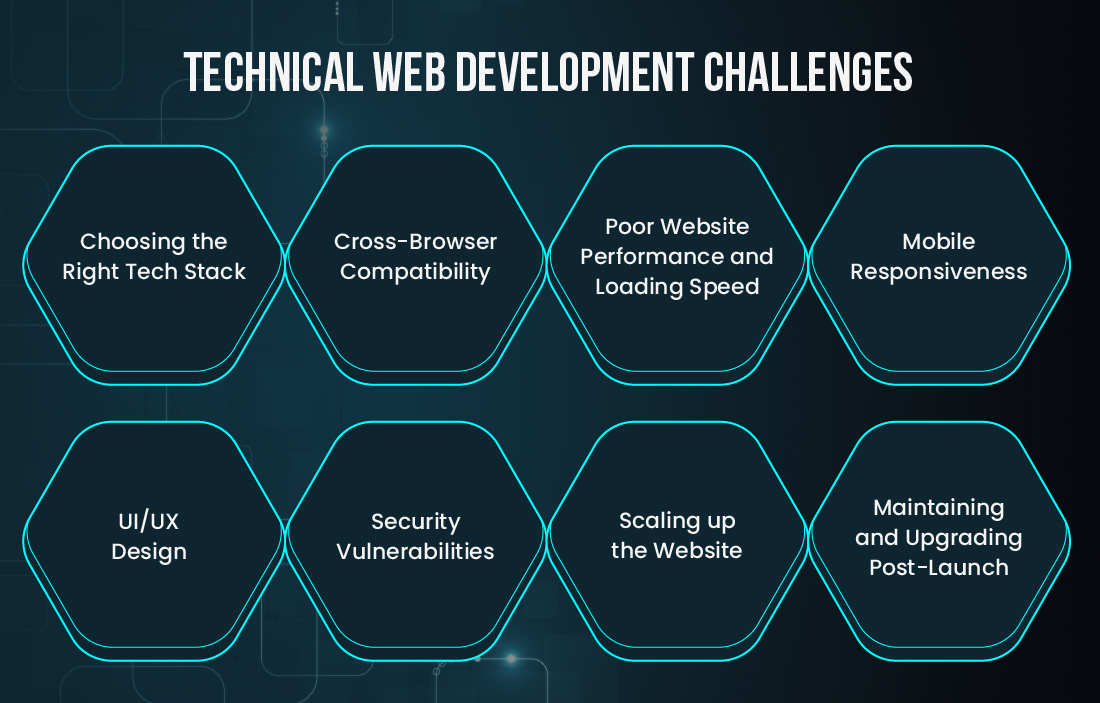
The first common challenge in web development that we are going to discuss is choosing a tech stack that doesn’t align with your business goals and needs.
For example, if you are starting out with a platform that works fine for a basic website, but the platform begins to slow down or crash as soon as your business scales. That’s because you have selected the wrong tech stack for web development, and it directly affects the development costs and leads to performance issues.
To select the right tech stack, you can:
Another one in our list of top web development challenges is cross-platform compatibility. Every individual who has been thinking about developing a website or web application should know that each and every browser is made differently.
Your website may look completely normal to view in Chrome browser, but it would look messy in Firefox or Safari. That’s why cross-browser compatibility is an essential challenge to resolve.
To handle this compatibility issue, you can:
If your page takes more than 3 seconds to load, visitors may lose interest and bounce off. This is a considerable challenge in web development that directly impacts your website’s effectiveness. Website performance optimization is therefore an essential aspect to improve user experience, conversion rate, and SEO visibility as well.
To improve your website’s speed and performance, you can:
“When I was working on a client’s project, I noticed their bounce rate was unusually high. So, I ran a performance audit and found uncompressed images and bloated scripts. After implementing website performance optimization best practices, such as implementing lazy loading, image compression, and switching to a better host, I helped the client cut page load times by 50 percent and achieve a significant increase in user engagement and conversions.”
Mehul Virani
(Lead Web Developer, 7+ years of experience)
Mobile responsiveness is integral to delivering a seamless user experience across all screen types and sizes. With the majority of users accessing websites on their smartphones or tablets, it is crucial to ensure that a website is mobile-friendly. A non-responsive site can be the reason for frustration for your users.
To overcome this web development hurdle and make your website mobile-friendly and fully responsive, you can:
It may feel like a daunting and resource-intensive task to design an intuitive user interface for your website that delivers an eye-soothing user experience. A good UI/UX design can certainly help users easily understand and navigate through the website, improving the engagement rate.
Poor UI/UX design aspects, such as confusing navigation, cluttered layouts, and complex readability, can lead to a bad user experience.
To improve the UI/UX design of your website, you can consider the following:
Security is and will always be a priority for SMEs (Small and Medium-sized Enterprises), especially when building a website or web application. With notable cyber threats on the rise, safeguarding user data and business-critical information is paramount now more than ever. Small business websites are often targeted as they tend to have limited security mechanisms and compliance in place.
To strengthen your website’s security and make it unbreachable, you must:
As your business grows, so do the evolving requirements due to the increasing website traffic. A site that works perfectly for small businesses might not be up to the mark for enterprises. That’s why website scalability is a crucial aspect to consider during the development stage.
When you scale up the site, issues like slow load times, crashes during peak hours, or limited storage can affect the user experience and business operations.
To make sure your website is built for growth and scalability, you can:
Launching your website is just the thing that you begin with. Your website will become outdated, vulnerable to attacks, and eventually unusable, sooner than you will even realize it. Without regular maintenance, performance issues may creep in, security risks increase, and your site may no longer meet evolving user expectations or business needs.
To keep your website secure and performing well even after years from its launch, you can:
Hire web developers who can turn challenges into opportunities. Let tech experts help you overcome web development hurdles with ease and get your project moving faster.
Not all challenges in web development are related to technical aspects. In fact, many small business owners also have to deal with non-technical web development issues. Let’s go through the non-tech hurdles that may derail your timeline, budget, and final outcomes if not resolved early on.
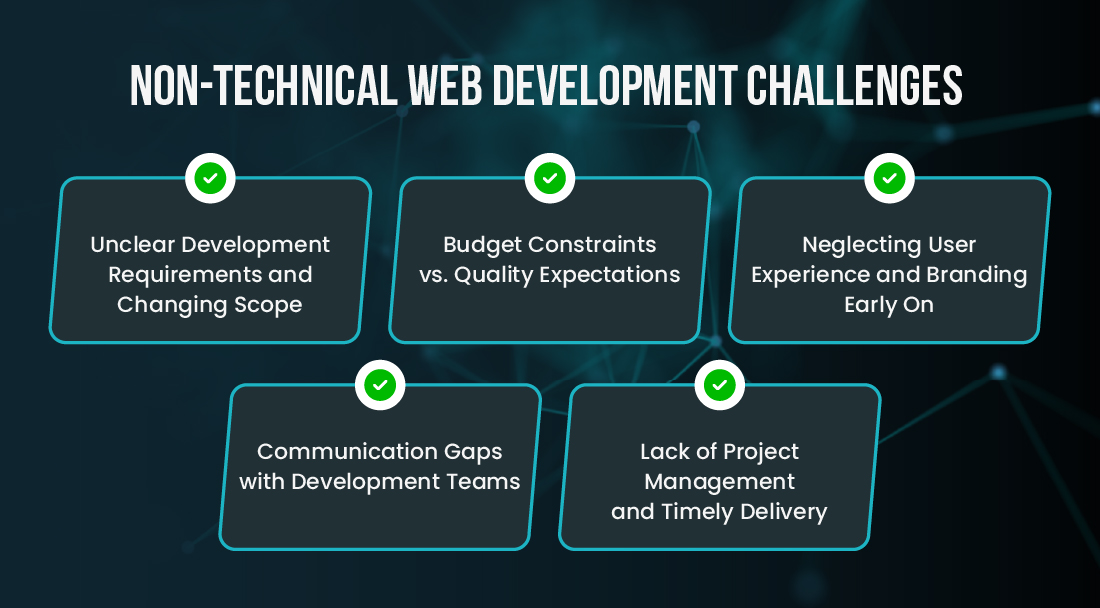
Whenever you are beginning with web development without clearly defined goals, it is more like starting to build a house without a blueprint or design plans. Not only is defining the project requirements prior crucial, but you also need to avoid changing them mid-project.
Frequent changes in scope can lead to delays, confusion, and increased costs. A lack of clarity can certainly be the reason for a mismatch between the vision you have in mind and the final output you get.
To avoid scope creep and confusion, you should:
It is a basic mindset for any business owner to want the best website that delivers an optimal experience, and that too, at the lowest possible cost. However, it is certain that trimming down the costs can result in compromised quality, functionality, and reliability of the product you are aiming for.
To strike the perfect balance between budget constraints and meeting quality expectations, you should:
With so many things on the plate, it is natural to rush to make the website live. In the meantime, it would not be surprising to overlook the importance of user experience (UX) and consistent branding.
Remember, a website that is difficult to navigate or visually unappealing can cost you credibility and conversions. Mismatched colors and inconsistent layouts make your business site seem less trustworthy.
To ensure your site reflects your brand and offers a seamless user journey, you should:
If the communication with the development team is delusive, even a well-planned project can derail from the tracks. Misunderstandings, missed updates, or delays in feedback can truly result in errors or wasted efforts. Consistent, transparent, and clear communication is the key to successful web development.
To bridge the communication gap among your diverse development teams, you can:
The last non-technical web development challenge you may face is poor project management. Without a clear roadmap, proper task tracking, and predefined roles, the entire process can become chaotic. Poor coordination not only impacts your launch timeline but also inflates your budget and reduces overall quality.
To make sure your project stays on launch schedule and is delivered as planned, you must:
“The best way out is always through.” This quote perfectly relates to how small businesses and entrepreneurs would have to navigate through the web development challenges to understand and overcome them. By staying proactive and avoiding common mistakes, you can build the site smartly and successfully.
Here are a few tips to steer clear of costly web development mistakes:
Web development indeed comes with many challenges, and it can feel truly overwhelming to tackle them all. From selecting the right tech stack to optimizing for mobile and desktop users, all the web development challenges can slow down your business goals if not addressed strategically.
If you are a small business owner or an entrepreneur, your focus should be on growing your business and not getting stuck with challenges in web development. Consider partnering with a leading web development company that can help you tackle every web development roadblock. A trusted partner can help you avoid costly mistakes, speed up the launch, and scale up your business, all while building a customized, mobile-responsive, and user-friendly website for you.
Partnering with a web development company gives you access to a team of professionals who can handle both technical and strategic aspects of your project. They have hands-on experience and proven expertise to understand your business vision and solve complex development problems.
The most difficult web development challenge for many small businesses is balancing functionality with scalability while avoiding scope creep. It is easy to underestimate how quickly project requirements evolve. Without clear planning and process, it can lead to development delays, budget overruns, and outcomes that do not align with long-term goals.
It is simple. If you have to balance web development expenses with expected quality standards, you need to have clearly defined goals, a list of must-have features, and practical budget allocations. Begin by building an MVP (Minimum Viable Product) instead of packing in every feature at once. Prioritize cleaner code, better UI/UX, excellent responsiveness, and optimal performance right from the start.

Tech Geek at Bacancy
Tech-Maverick expert in AI, ML, Data Science, LLM, and Automation.
MORE POSTS BY THE AUTHOR
Your Success Is Guaranteed !
We accelerate the release of digital product and guaranteed their success
We Use Slack, Jira & GitHub for Accurate Deployment and Effective Communication.