Quick Summary
Integrating multiple SaaS tools can slow your business, create data silos, and frustrate tech teams. This blog explores the top 23 SaaS integration challenges faced by project managers, CTOs, and developers, while sharing practical ways to simplify integrations and reduce development time using low-code platforms, AI-assisted (Vibe) coding, and unified APIs. From API optimization to secure data management, it helps you build a seamless, scalable SaaS ecosystem that works efficiently without disrupting operations.
Table of Contents
Introduction
Your team brings fresh ideas and aims to innovate, but then SaaS integrations fail. Workflows stop, resources get wasted, and progress stalls. Frustrating, right?
When did your team last focus on growth and scale rather than troubleshooting tools?
Over 70% of companies report that integrating multiple SaaS tools slows operations and creates data inconsistencies. Project managers juggle missed milestones, CTOs navigate compliance and security risks, and developers spend hours fixing broken APIs instead of building new features.
This blog sheds light on the most common 23 SaaS integration challenges for project managers, CTOs, and developers. It also provides proven solutions for both basic and advanced issues, helping you turn integration problems into smooth, scalable workflows.
What Is SaaS Integration and Why Does It Matter?
SaaS integration is a process that connects one system to your existing or new SaaS app to add new features, share data, and work together seamlessly. Instead of each tool functioning as an isolated system, the integration into SaaS ensures that information flows automatically.
It decreases manual effort, removes data silos, and helps you make informed decisions. For instance, when a CRM automatically syncs with a sales automation platform, the team gains a complete view of the project. Moreover, it gathers all data in one place, which helps you to understand more about your project.
Now, coming to the critical part of SaaS integration, why does this matter? Well, several organizations, whether startups or enterprises, run multiple projects on SaaS applications. For instance, strategies like ETL (extract, transform, and load) are available for SaaS integrations. But they need high levels of training and technical expertise.
Without performing integration correctly, each tool can create its own data silos, which leads to delays, inefficiencies, and misalignment among teams. Moreover, poor team integration slows down the workflow and impacts the scalability, security, and compliance of innovative work.
Another reason is that it transforms the disconnected tech stack into an illuminated ecosystem, which gives your organization the agility and efficiency to keep up with the fast-evolving market.
Top 23 SaaS Integration Challenges Every Business Faces But Hardly Think of Solving
This section highlights the most common challenges businesses face when integrating multiple SaaS applications. It covers the main integration issues that help you understand where integration efforts can get complicated.
1. Data Silos and Inconsistencies
SaaS data fragmentation and silos are one of the common challenges in SaaS integrations because SaaS often doesn’t communicate properly and ends up storing inaccurate data. As a result, it stacks up silos that lead to duplication, inaccuracies, and frustration across various teams.
For instance, a sales team may rely on outdated CRM records while the finance team utilizes a different database. This inconsistency causes operational inefficiencies and big data errors.
How to Fix It: You must centralize data with a master data management system or integration platform. Automate synchronization across all tools, implement validation rules, and ensure a single source of truth so all teams work with consistent, accurate information.
2. Complex API Compatibility
APIs are the backbone of SaaS integration, but it is rarely consistent. Meanwhile, it is a huge challenge because different applications utilize unique protocols, authentication methods, and data formats.
For instance, developers often spend hours with every update. However, what looks like a small connection task can become a time-consuming and expensive engineering effort.
How to Fix It: Use middleware or integration platforms to standardize API communication. Adopt universal data formats, robust error handling, and version control. Doing so reduces SaaS integration issues and prevents future common SaaS integration hurdles.
3. Security and Regulatory Exposure
Security and compliance are crucial aspects of SaaS integration. Each integration point introduces new potential vulnerabilities and can expose sensitive information, such as misconfigured APIs, insecure data flows, and weak authentication mechanisms.
For CTOs, the stakes are even higher when compliance regulations like GDPR, HIPAA, or SOC 2 apply. Without careful planning, integrations can inadvertently create gaps that put customer trust and organizational reputation at risk.
How to Fix It: Implementing end-to-end encryption, secure authentication, and audit trails can reduce this challenge in SaaS integration. Regularly review access permissions and compliance standards to ensure data protection and regulatory compliance.
As the number of SaaS integration hurdles increases, the complexity of data flow increases. Poorly designed or overloaded integrations can slow down systems, delay data synchronization, and disrupt critical workflows.
For instance, a performance bottleneck in your SaaS application can directly impact user experience, causing delays, downtime, and frustrated teams that can’t rely on tools to perform when they need them most.
How to Fix It: Implement asynchronous processing and batch updates for non-critical tasks. Monitor performance continuously, optimize data flows, and scale infrastructure dynamically to handle increased load without slowing down systems.
5. Ongoing Maintenance Overhead
Let’s break the myth that integration is a one-time project. The truth is, it requires constant oversight because of API changes, SaaS vendor roll out updates, and evolving business processes. Also, integrations that once worked smoothly can break overnight without proactive monitoring and maintenance.
For instance, a project manager faces missed milestones, developers get pulled into endless fixes, and CTOs struggle to maintain stability while scaling operations.
How to Fix It: Establish proactive monitoring and automated testing for all integrations. Schedule routine maintenance and assign dedicated personnel to manage updates, which ensures integrations remain reliable and up-to-date.
6. Shadow SaaS and Hidden Risks
Shadow SaaS indicates the unauthorized or unsanctioned SaaS applications that employees use without IT’s knowledge. These hidden tools cause security vulnerabilities, duplicate data, and make it challenging to track compliance.
For instance, a marketing team might use an unapproved analytics tool, storing customer data outside the controlled environment.
How to Fix It: Conduct a SaaS discovery audit to identify all applications in use, including unsanctioned ones. Implement a centralized SaaS management platform to monitor usage, enforce approvals, and educate teams about security and compliance risks. It reduces hidden vulnerabilities and keeps all tools under control.
Tired of constant fixes, delays, and missed milestones?
Hire SaaS developer to manage your integrations efficiently, ensuring smooth, reliable, and scalable workflows for your team.
Challenges in SaaS Integration for Project Managers
It is difficult for a project manager to meet deadlines, juggle timelines, resources, and unexpected technical issues. Here are the challenges in SaaS integrations faced by project managers:
1. Scope Creep & Shifting Requirements
SaaS projects often evolve as new tools are added or business needs change. Project managers must constantly adjust plans, update workflows, and manage expectations, which can lead to scope creep. Without clear boundaries, small additions can expand into major delays and resource strain.
How to Fix It: Implement a formal change management process. You should clearly define project boundaries, prioritize new requests, and communicate the impact of changes to all stakeholders. This prevents small additions from snowballing into major delays.
2. Timeline Delays Due to Dependencies
Integrations are rarely isolated; they rely on multiple teams, tools, and systems. Delays in one component, like a third-party API or vendor deliverable, can ripple across the project timeline, which makes it quite challenging for project managers to meet deadlines.
How to Fix It: Map all dependencies early in the project and identify critical paths. Add buffer time for external delays and conduct regular progress check-ins to detect bottlenecks before they impact deadlines.
3. Budget Overruns from Hidden Costs
Integration costs often exceed initial estimates. Also, custom connectors, middleware, and ongoing maintenance can create hidden expenses. Project managers must monitor budgets carefully to avoid overruns while still ensuring the integration delivers value.
How to Fix It: Create a comprehensive budget that includes hidden costs, subscriptions, and ongoing maintenance. Track spending in real time, and consider phased deployment to control costs while delivering value.
4. Stakeholder Alignment Struggles
Different teams and departments have varying priorities and expectations. It becomes a crucial challenge to align stakeholders on requirements, timelines, and responsibilities. As a result, it requires constant communication and negotiation to keep the integration on track.
How to Fix It: Use regular cross-functional meetings and visual dashboards to maintain transparency. Define shared objectives and document agreements to ensure alignment and minimize conflicts.
5. Vendor Coordination Challenges
SaaS projects frequently involve multiple vendors or third-party services. Coordinating schedules, resolving technical conflicts, and managing vendor dependencies adds complexity that project managers must navigate to ensure a smooth integration process.
How to Fix It: Assign a dedicated vendor coordinator and standardize communication. Set escalation paths and track deliverables to manage dependencies efficiently and avoid delays.
SaaS Integration Challenges for CTOs and Tech Leaders
CTOs and technology leaders face critical decisions when integrating SaaS solutions. These challenges can affect scalability, system reliability, and long-term technology strategy, from technical debt and security concerns to vendor limitations and architectural choices.
1. Integration Complexity Leading to Technical Debt
Connecting multiple SaaS tools often requires custom code or middleware. Over time, these temporary solutions can accumulate as technical debt, making the system harder to maintain, scale, and troubleshoot.
How to Fix It: Use a modular architecture and reusable integration components. Document all connections and schedule periodic refactoring to reduce technical debt and ensure long-term maintainability.
2. Security, Compliance, and Governance Concerns
Every integration introduces new points of access for sensitive data. CTOs must ensure that data flows comply with regulations like GDPR, HIPAA, or SOC 2, and that proper governance policies are in place.
How to Fix It: Enforce role-based access control, encryption, and continuous compliance audits. Centralize governance policies to maintain control over data flows and reduce regulatory risk.
3. Vendor Lock-In Limiting Flexibility
Relying heavily on a single SaaS vendor or ecosystem can limit future flexibility. Migrating away from a vendor or swapping tools becomes difficult and expensive.
How to Fix It: Design integrations using vendor-agnostic platforms and standard APIs. Build modular workflows that allow easy tool replacement without disrupting the system.
Choosing between batch processing and real-time data synchronization affects system performance and user experience. Batch processes reduce API load but delay insights, while real-time integration provides immediate data at the cost of higher complexity and potential instability.
How to Fix It: Use real-time processing for critical operations and batch updates for non-urgent workflows. Monitor system load and adjust strategies to balance speed and reliability.
5. Build vs Buy Dilemma for Integrations
CTOs must decide whether to build custom integrations in-house or leverage third-party integration platforms. While building provides control and customization, but increases development overhead, while buying accelerates deployment but can introduce limitations and recurring costs.
How to Fix It: Conduct a thorough cost-benefit analysis. Build custom integrations for core differentiators and use third-party solutions for standard processes to save time and resources.
6. Future-Proofing SaaS Infrastructure
SaaS ecosystems evolve rapidly, with new tools, APIs, and regulations emerging frequently. CTOs must design flexible and scalable integration strategies to prevent obsolescence, reduce rework, and ensure long-term ROI.
How to Fix It: Design modular, flexible integration strategies, monitor vendor updates, and train teams to adapt quickly. Plan for future expansions to reduce rework and maintain scalability.
SaaS Integration Challenges for Developers
Developers play a crucial role in connecting multiple SaaS applications, but they face a range of challenges that can slow progress and increase project complexity. From API limitations to complex workflows, these issues demand careful attention to ensure integrations run smoothly and reliably.
1. API Limitations, Poor Documentation, Rate Limits
APIs differ widely in functionality and quality. Some provide incomplete information, unclear instructions, or strict rate limits that make integration difficult.
How to Fix It: Use API wrappers or SDKs, implement caching, and collaborate with vendor support. Incorporate retries and robust error handling to maintain synchronization despite limitations.
Each SaaS tool stores data differently, which forces developers to map fields and transform formats to ensure consistency. This often leads to data mismatches, reporting errors, and extra effort in maintaining clean datasets.
How to Fix It: Implement automated data transformation pipelines or ETL tools. Validate and normalize data to ensure consistency across all platforms.
3. Debugging Failures Across Multiple Systems
When an integration fails, the cause often spans several tools and services that make troubleshooting challenging. Also, teams lose valuable time digging through disconnected logs, which delays fixes and disrupts operations.
How to Fix It: Centralize logs and use distributed tracing to quickly identify the root cause. This minimizes downtime and reduces time spent chasing errors across multiple systems.
4. Testing Integrations in Realistic Environments
Sandbox environments rarely match the complexity of production, which can hide real-world issues. This results in unexpected failures after deployment, affecting user experience and business workflows.
How to Fix It: Mirror production environments in staging, use realistic test data, and automate regression tests to ensure workflows work reliably after deployment.
5. Ongoing Maintenance Due to API/SDK Changes
SaaS vendors frequently update their APIs and SDKs, which can break existing integrations. These constant changes create hidden technical debt and force teams into a cycle of reactive fixes.
How to Fix It: Subscribe to vendor update notifications, automate regression testing, and plan for regular maintenance cycles to handle changes proactively.
6. Workflow Orchestration & Sequencing Issues
Complex integrations require precise task sequencing to ensure correct operation. Moreover, even a single task failure can ripple through the system, causing bottlenecks and incomplete workflows.
How to Fix It: Use workflow orchestration tools to define task dependencies and automate sequences. Set alerts for failures to ensure tasks execute in the correct order.
How to Simplify SaaS Integration? [Best Practices]
To tackle the most common SaaS integration challenges, follow this checklist to secure SaaS applications.
| Best Practices | Action Steps |
|---|
| Map Your SaaS Ecosystem | Inventory all SaaS tools currently in use
Identify overlapping functionalities
Highlight critical apps for integration
|
| Set Clear Data Ownership | Assign responsible teams for each dataset
Define update and access rules
Avoid duplicate or conflicting data entries
|
| Use Integration Templates | Use Integration Templates
Document reusable workflows
Reduce custom coding for common patterns |
| Establish Real-Time Alerts | Set up notifications for failed syncs
Monitor API errors or slow responses
Escalate recurring issues promptly |
| Educate Teams on SaaS Usage | Share best practices for tool usage
Provide guidelines for new app adoption
Reduce reliance on shadow SaaS tools |
| Backup & Recovery Planning | Ensure data syncs are backed up
Test recovery procedures
Mitigate risks from failed integrations |
| Automate Routine Workflows | Identify repetitive tasks across tools
Build automation using integration platforms
Free up teams for higher-value tasks |
| Keep track of the integration often | Document all integrations, workflows, and exceptions
Maintain versioned updates
Use as an onboarding guide for new team members |
How to Reduce Development Time When Integrating SaaS Apps?
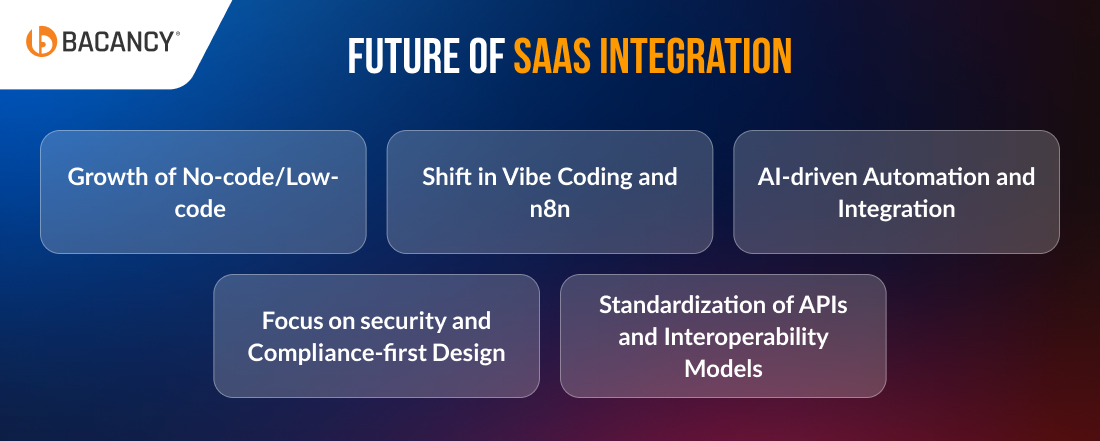
As SaaS continues to evolve, integration strategies must keep pace. Understanding emerging trends helps project managers, CTOs, and developers stay ahead, streamline operations, and drive innovation.
No-code and low-code tools enable non-technical teams to create integrations quickly, reducing dependency on developers and accelerating time-to-value. Leaders should evaluate platforms that allow safe, scalable citizen integrations.
2. Shift Toward Vibe Coding and n8n
Modern integration frameworks like Vibe Coding and n8n provide flexible, workflow-based orchestration with minimal code. Organizations can design complex automation visually while controlling data flows and processes.
3. AI-Driven Automation in Integrations
AI is increasingly used to monitor workflows, predict failures, and optimize data routing across SaaS apps. CTOs and PMs should explore AI-powered tools that proactively detect issues and reduce manual intervention.
4. Increasing Focus on Security and Compliance-First Design
With stricter regulations and growing data privacy concerns, future integrations will prioritize security and compliance from the ground up. Embedding encryption, access controls, and auditability into integration design is no longer optional.
5. Standardization of APIs and Interoperability Models
As SaaS ecosystems grow, standardized APIs and interoperability models will make integrations more reliable and maintainable. Leaders should push for common data standards and API contracts to future-proof their systems.
How Bacancy SaaS Developers Prevent Integration Challenges?
SaaS integration issues like disconnected tools, slow workflows, and security risks can stall growth and drain resources. Bacancy, as a prominent SaaS development company, delivers practical solutions to turn these obstacles into seamless operations. Here’s how we help:
- Unified Data Access: We merge information from multiple systems to eliminate silos and provide consistent, reliable data for all teams.
- Seamless API Connectivity: Our experts ensure all applications communicate smoothly through custom API integration and alignment.
- Secure Systems: We apply robust security measures to protect sensitive data across every platform.
- Optimized Performance: We build scalable, high-performing architectures that handle growth without disruption.
- Tailored Integration Strategy: Each solution is customized to match your business processes, technology stack, and growth goals.
With Bacancy, your SaaS tools work together as a connected ecosystem, boosting efficiency, cutting costs, and enabling faster, smarter business decisions.
Frequently Asked Questions (FAQs)
The cost varies on the number of applications, the complexity of APIs, data volume, and whether you need custom features. A detailed assessment of your existing systems and business goals helps you provide an accurate estimate.
Watch out for poor documentation, slow or unreliable API responses, lack of version updates, weak security measures, and restricted data access. These issues can create delays and integration problems within your SaaS projects.
A CTO can manage technical debt by prioritizing maintainable, scalable integrations, documenting workflows, and performing regular audits. Even upgrading systems in phases without slowing down innovation can help you balance advancement.
Custom integration is a solution built specifically for your business needs, offering full control. iPaaS is a ready-made platform that connects multiple applications quickly, but it may have limitations for complex workflows.
Integration timelines vary. Simple connections can take a few weeks, while complex multi-application integrations may take several months, depending on system complexity and data migration needs.
iPaaS works well for small to medium businesses that need fast deployment. Large enterprises or complex operations benefit from custom integrations for full control, flexibility, and scalability.
Yes, experienced SaaS developers implement best practices for encryption, data protection, and regulatory compliance, such as GDPR, HIPAA, or SOC 2, ensuring secure integration.
Common mistakes include skipping proper planning, ignoring data consistency, underestimating API limitations, neglecting security measures, and failing to plan for scalability.