Quick Summary
In this guide, we’ll walk through everything you need to know about the DevOps lifecycle, starting with what it is, followed by a detailed look at each phase of the DevOps cycle from planning to monitoring. Let’s explore the tools that support every stage of the process, discuss the key benefits and common challenges, and share practical best practices to help teams implement DevOps effectively.
Table of Contents
Introduction
Today, technology is advancing faster than ever imagined, and to keep up, businesses must quickly adapt to shifting market demands, customer expectations, and emerging technologies. DevOps plays a critical role in helping businesses achieve this agility. It bridges the gap between development and operations, ensuring both teams work together to drive continuous improvement.
According to the 2024 Accelerate State of DevOps Report by DORA, elite teams release software up to 182 times more frequently and recover from failures 2,293 times faster than low performers.
Additionally, a survey by Spacelift indicates that 99% of organizations that implemented DevOps reported positive results, with 61% of them reporting enhanced quality in their deliverables.
A major reason behind these results is the DevOps lifecycle, a structured approach that supports continuous delivery, automation, and collaboration throughout the software development process.
But what exactly is the DevOps lifecycle? Let’s explore its key phases, benefits, best practices, and tools that can help achieve continuous delivery and ongoing quality improvements.
What is the DevOps Lifecycle?
The DevOps lifecycle is a continuous process that brings development and operations teams together to build, test, release, and manage software more efficiently. It covers everything from planning and writing code to testing, deployment, and continuous monitoring. The goal is to deliver better software faster by using automation, improving collaboration, and making updates based on what the team learns during each step.
The primary goal of the DevOps lifecycle is to unify development and operations under a shared framework of collaboration, continuous improvement, and joint accountability. This approach leads to faster releases, fewer failures, and improved software reliability, ultimately driving better business outcomes.
Core Principles Driving the DevOps Lifecycle
The DevOps lifecycle is built on a foundation of key principles that ensure consistency, reliability, and continuous value delivery. These principles help align teams, reduce manual overhead, and improve overall software performance.
- 1. Collaboration: DevOps eliminates silos between development and operations teams. Both functions work together from the outset, sharing responsibility for code quality, system stability, and delivery timelines. This integrated approach improves coordination and accelerates issue resolution.
- 2. Automation: Automation is central to DevOps. By automating tasks, such as testing, integration, and deployment, teams reduce the likelihood of human error, ensure consistent results, and increase development velocity.
- 3. Continuous Integration (CI): In a CI environment, developers frequently commit code to a shared repository. Each update is automatically tested, allowing teams to detect and address integration issues early in the development process.
- 4. Continuous Delivery (CD): Continuous Delivery extends CI by enabling automated, reliable deployment of code to production environments. This ensures that software updates can be delivered to end users quickly and with minimal risk.
- 5. Monitoring and Feedback: Continuous monitoring provides visibility into system performance across the lifecycle. Real-time feedback allows teams to proactively identify and address issues, ensuring software performs as expected in production.
Key Phases of the DevOps Lifecycle
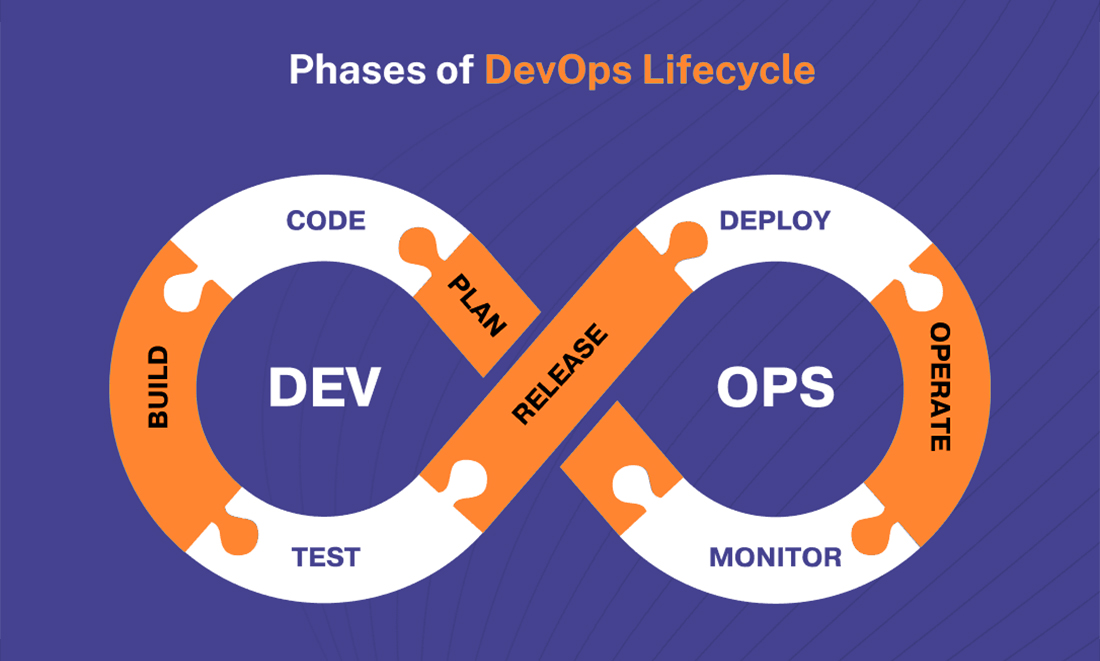
The DevOps Lifecycle comprises a series of interdependent phases, each playing a vital role in the development and delivery process. From planning to deployment and beyond, every phase is interconnected, with feedback loops that enable continuous improvement and facilitate rapid adaptation to changing requirements.
Below is a detailed breakdown of each phase of the DevOps Lifecycle:
1. Plan
No one realizes that the first phase of the DevOps cycle is planning. It’s where the project goals are defined, prerequisites are gathered, and development and operations teams are aligned. In this phase, after agreeing on a common timeline and project objectives, we meet stakeholders from both sides to discuss the project scope.
Key activities include:
- Identifying user needs and business objectives.
- Defining feature requirements.
- Estimating timelines and resources.
- Aligning teams for collaboration.
Effective planning ensures the development process has a clear direction, setting the stage for a smoother workflow across subsequent phases.
2. Code
The coding phase is where the actual application development takes place. Developers collaborate to develop the specifications laid out during the planning phase.
Key activities include:
- Writing clean, efficient code.
- Using version control systems (e.g., Git) to manage code changes.
- Implementing continuous integration (CI) practices ensures code is merged and tested regularly.
Collaboration and version control mean all developers work on the same codebase, thus eliminating conflicts and shortening the development process.
3. Build
After building the code, the build phase comes up, which compiles and packages the application into runnableware. This is crucial if the code you’re working on needs to be transformed into a deployable unit, such as a container or a binary file.
Key activities include:
- Compiling the source code into executable artifacts.
- Packaging the code into deployment-ready formats (e.g., Docker containers, binary files).
- Ensuring dependencies are correctly resolved.
This phase in the DevOps cycle ensures the produced code is ready for testing and deployment.
4. Test
After the code is built and integrated, it enters the test phase. In this phase, the code undergoes rigorous testing to identify bugs, verify functionality, and ensure the application performs as expected across different scenarios.
Key activities include:
- Running unit, integration, and end-to-end tests to identify defects early.
- Using automated testing tools (e.g., Selenium, Jenkins) for continuous testing.
- Manually testing for edge cases and user experience.
Automated testing in DevOps ensures that fewer bugs are discovered in a later stage, which can minimize the company’s expenses.
5. Release
When you can thoroughly test your application, you’re ready for the release phase. In this phase, your tested application is prepared and ready to be deployed for production. The release phase checks that all the needed configurations are ready and that the code is prepared to deploy.
Key activities include:
- Finalizing configurations and deployment scripts.
- Packaging the release for deployment.
- Ensuring all security and compliance checks are met.
Effective release management ensures that deployment is smooth and reliable.
6. Deploy
This is where the application is being moved into production. DevOps focuses on automating Deploy phase to decrease the probability of human error and quicken deployment.
Key activities include:
- Automation tooling (e.g., Kubernetes, Ansible, Docker) to deploy code into production environments and some simple pipelines.
- Continuous deployment (CD) pipelines for painless and frequent deployments.
- Ensuring the deployment process is repeatable and reliable.
Automation in the deployment phase ensures that updates can be pushed to production frequently and without disruption.
7. Operate
Once deployed, the application enters the operate phase, where it is actively monitored and maintained to ensure stability, performance, and availability in the live environment.
Key activities include:
- Monitoring application performance using DevOps tools like Prometheus or Nagios.
- Addressing performance issues and scaling the application based on user demand.
- Infrastructure is managed effectively using Infrastructure as Code (IaC).
This phase helps ensure the application remains stable, secure, and efficient after deployment.
8. Monitor
The monitoring phase of the DevOps cycle is the last phase, when continuous feedback is collected to identify areas for improvement. By monitoring, teams can tackle problems at the prevention stage and improve an app for potential iterations of the product.
Key activities include:
- Collecting end-user feedback through monitoring tools (e.g., New Relic, Grafana).
- Analyzing system performance and identifying areas for optimization.
- Feedback informs the required iterations in line with the application development process.
This feedback loop is complete now, so teams can rely on data to make decisions and improve the application for the next release.
Tools To Enhance Productivity Throughout the DevOps Lifecycle
Using the right tools is essential to automate tasks, improve collaboration, and maximize efficiency across the DevOps lifecycle. Below is a curated list of key DevOps Lifecycle tools, along with their primary functions, to help you make informed decisions about enhancing your DevOps workflows.
1. Version Control and Collaboration Tools
- Git: A powerful version control system that allows developers to track and manage code changes.
- GitHub, GitLab, and Bitbucket: Platforms that provide source code management, collaborative features, and seamless workflow integration.
2. Continuous Integration and Build Tools
- Jenkins: Automates the process of building, testing, and deploying applications for faster and more reliable releases.
- Travis CI: A cloud-based CI service that simplifies and accelerates CI pipeline configuration.
- CircleCI: Known for its speed and robust integrations, CircleCI enhances the automation of testing and deployment pipelines.
3. Automated Testing Tools
- Selenium: Can automate browser-based application testing for functional consistency.
- JUnit: A unit testing framework for Java applications that supports test-driven development (TDD).
- Cucumber: A tool for behavior-driven development (BDD) testing.
4. Containerization and Orchestration Tools
- Docker: Easily packages applications into containers, confirming consistency across environments and streamlined deployment processes.
- Kubernetes: Automates the orchestration, scaling, and management of containerized applications.
5. Monitoring and Logging Tools
- Prometheus: For collecting and querying metrics, with integrated alerting capabilities.
- Grafana: A visualization tool that integrates with Prometheus and other data sources to create interactive, real-time dashboards.
- ELK Stack (Elasticsearch, Logstash, Kibana): A powerful suite for centralized logging, enabling comprehensive data analysis and real-time monitoring.
6. Security Tools (DevSecOps Integration)
- SonarQube: Analyzes code quality and identifies security vulnerabilities.
- Aqua Security: Provides security for containerized applications, with a focus on runtime protection and compliance.
- Snyk: Detects vulnerabilities in dependencies and container images, to help teams address security issues early in the development process.
7. Feedback and Collaboration Tools
- Slack: Facilitates seamless team communication with integrations that bring DevOps notifications and updates into channels
- JIRA: A project management tool to track tasks, workflows, and sprint progress.
Need Expert Help Selecting the Right DevOps Tools for Your Business Needs?
Hire DevOps developers from us to choose and implement the best tools for your DevOps lifecycle that align with your business objectives.
Top 4 Benefits of the DevOps Lifecycle
The DevOps cycle offers many advantages to organizations that want to simplify software delivery. It enables faster, more reliable, and scalable software releases, better collaboration, automated processes, and faster feedback.
1. Faster Time-to-Market
Automation and continuous integration help speed up software delivery with DevOps. Teams that perform well deploy code on demand, restoring service faster and significantly reducing time to market.
2. Improved Collaboration
DevOps also eliminates centralized departments that separate the development and operations teams. Hence, it enables smooth communication between developers and operation teams and performs faster detection of issues. Doing it this way results in a faster issue resolution and a more stable product.
3. Reduced Failure Rates and Increased Reliability
Continuous testing and monitoring are part of the DevOps process that attempts to reduce production failures. Rollbacks happen fast with automation, and downtime is minimal.
4. Enhanced Scalability and Flexibility
With DevOps, we can be scaled seamlessly using cloud services combined with containerization (especially docker & Kubernetes). In addition, it becomes more agile, adapting quickly to new business needs and customers’ demands.
Challenges in Implementing the DevOps Cycle
DevOps is an undeniable benefit, but implementing the DevOps cycle is challenging for some organizations. Transitioning from a pure DevOps environment to a fully integrated DevOps creates challenges, but these challenges can be countered with proper techniques and tools. Here are some DevOps challenges you might face during its implementation:
1. Resistance to Cultural Change and Adoption
Resistance to cultural change is the main barrier to DevOps adoption. Teams often get stuck in the race from tradition to collaboration and sharing of responsibility. Clear communication, strong leadership support, and highlighting long-term benefits like faster delivery and improved quality can ease this transition.
2. Lack of Skillsets Within Teams
DevOps demands expertise in automation, cloud management, containerization, and CI/CD, but many organizations lack these skills, delaying adoption. Training, upskilling, or hiring consultants can help bridge this gap.
3. Toolchain Complexity and Integration Challenges
DevOps operators use many tools for version control, CI/CD, testing, and monitoring; however, integrating it all into a cohesive toolchain is complex, especially with legacy systems. Smooth integration is key to a successful strategy.
4. Security Concerns in Automated Pipelines
While automation in testing and deployment is a key advantage of DevOps, it can also expose systems to risks like data breaches and configuration errors. Adopting DevSecOps helps embed security into every pipeline phase, ensuring it remains a priority.
Best Practices for a Successful DevOps Lifecycle
Organizations should adopt best practices that foster collaboration, skill development, and continuous improvement to implement and maintain a DevOps development lifecycle successfully. These practices help streamline workflows, enhance productivity, and ensure teams can adapt to changing demands.
1. Foster a Collaborative Culture
Teamwork is an essential element of DevOps, and it thrives on the ability to develop with the operations teams to ensure timely and efficient application delivery. Open communication, setting goals, and a closed feedback loop make this collaboration possible. Regular calls, along with tools such as Slack and Microsoft Teams, are essential. It’s been proven that teams with skills are 20 to 30 percent more productive than individuals working alone.
2. Invest in Training and Skill Development
Since DevOps is growing so rapidly, tools and techniques are evolving as fast, and your responsibility is to keep up with them. It is mandatory to seek and provide regular training and skill development initiatives in automation, cloud computing, and security. Organizations can offer focused learning through tool-specific workshops, monthly expert sessions, or internal knowledge-sharing meetups to help teams stay updated with DevOps trends.
3. Adopt Robust Monitoring and Feedback Mechanisms
DevOps success depends on the monitoring and the feedback. Tools such as Prometheus, Grafana, and Nagios provide real-time insights into what is happening, which allows us to identify and fix the problems before they become huge as they find a way to stabilize the application quickly. Quick fixes and automated feedback loops ensure seamless app performance and user satisfaction.
4. Start Small and Scale Gradually
Starting with a pilot project or small team helps organizations test DevOps practices before scaling them across the company. This approach minimizes risks and challenges, allowing teams to fine-tune processes and gain valuable experience.
Conclusion
The DevOps lifecycle continues to evolve around automation, integrated security, and emerging technologies like AI, edge computing, IoT, etc. Adopting these trends helps teams release software faster, increase reliability, and scale with less effort.
To stay ahead, teams need to review and improve their DevOps process regularly. This means using the right tools, improving team collaboration, and focusing on small, ongoing improvements.
A strong DevOps strategy leads to faster delivery, better software quality, and more efficient workflows.
If your team wants to improve its DevOps approach, consider leveraging DevOps consulting services. The right guidance can help you streamline operations, choose the right tools, and build a lifecycle that supports long-term growth and success.
Frequently Asked Questions (FAQs)
The DevOps lifecycle is a set of steps that runs through the software development and operations process. It includes planning, development, testing, release, deployment, monitoring, and maintenance to improve collaboration, efficiency, and delivery speed.
The key phases of the DevOps lifecycle include:
● Plan: Gathering requirements and planning.
● Develop: Writing and managing code.
● Build: Compiling and packaging the code.
● Test: Testing for quality assurance.
● Release: Preparing for deployment.
● Deploy: Automating deployment processes.
● Operate: Managing and monitoring post-deployment.
● Monitor: Gathering feedback for improvements.
Manually performing these repetitive tasks is time-consuming, which is where DevOps tools come in. Automating these tasks increases productivity through collaboration, enhances code deployment, and tracks application performance. Git, Jenkins, Selenium, and Docker are tools that accelerate the software delivery process.
Implementing a DevOps lifecycle leads to:
● Faster time-to-market for applications.
● Improved team collaboration.
● Reduced failure rates.
● Greater scalability and adaptability to business needs.
Resistance to cultural change, lack of skilled professionals, complexity in the integration of tools, and security concerns within the automated pipeline are common challenges an organization faces in implementing the DevOps lifecycle.
This article will discuss the best way to increase adoption rates, reduce risks, and increase the efficiency of software delivery through DevOps best practices such as collaboration, promoting training, robust monitoring, and starting small and scaling up gradually.
As advancements like AI, automation, DevSecOps (embraced security), and the realization of edge computing and IoT are occurring; the DevOps lifecycle is evolving faster to be more adaptive, secure, and efficient.