Last Updated on January 5, 2026
Last Updated on January 5, 2026
Quick Summary
This blog explores 12 ways to use ChatGPT for DevOps automation. From code generation and CI/CD pipelines to monitoring and incident response, we have covered how AI can boost speed, accuracy, and reliability. Learn how DevOps teams can leverage ChatGPT to streamline workflows and maximize productivity.
Table of Contents
In November 2024, Reddit’s engineering team faced a major outage caused by a seemingly simple Kubernetes DaemonSet rollout. The update unintentionally overloaded their control plane, causing widespread request failures across critical services until engineers stepped in to roll it back (source).
This kind of incident isn’t unique to Reddit; it’s a daily reality for DevOps teams managing complex pipelines, microservices, and multi-cloud infrastructure. Even the smallest misconfiguration can snowball into downtime, customer impact, and revenue loss.
Imagine if, before that rollout, an AI assistant had highlighted the risky part of the YAML, explained the potential issue, and suggested a safer rollout approach. ChatGPT can act as that assistant, helping DevOps teams catch problems early, recommend safer strategies, and provide actionable guidance without replacing engineers.
ChatGPT does not replace DevOps engineers. It supports automation by adding guidance, context, and checks to workflows, helping prevent errors and improve reliability.
In this blog, we will explore how teams can leverage ChatGPT for DevOps automation to enhance workflows, reduce errors, and accelerate software delivery. But let’s start by understanding the basics!
ChatGPT is an AI language model that can understand natural language instructions and generate useful outputs, such as code snippets, scripts, documentation, and insights.
In the context of DevOps, ChatGPT acts as an intelligent assistant that supports engineers in automating repetitive tasks, reviewing code, generating infrastructure templates, analyzing logs, and even troubleshooting issues.
By integrating ChatGPT into DevOps workflows, teams can reduce human errors, accelerate deployments, improve system reliability, and free engineers to focus on strategic, high-value tasks rather than repetitive manual work. It enhances DevOps processes without replacing engineers’ expertise.
Have a look at the ways you can use ChatGPT for DevOps Automation.
Discover how you can use ChatGPT for DevOps automation to streamline tasks, reduce errors, and speed up software delivery. These 12 use cases show how teams can leverage AI to work smarter and faster.
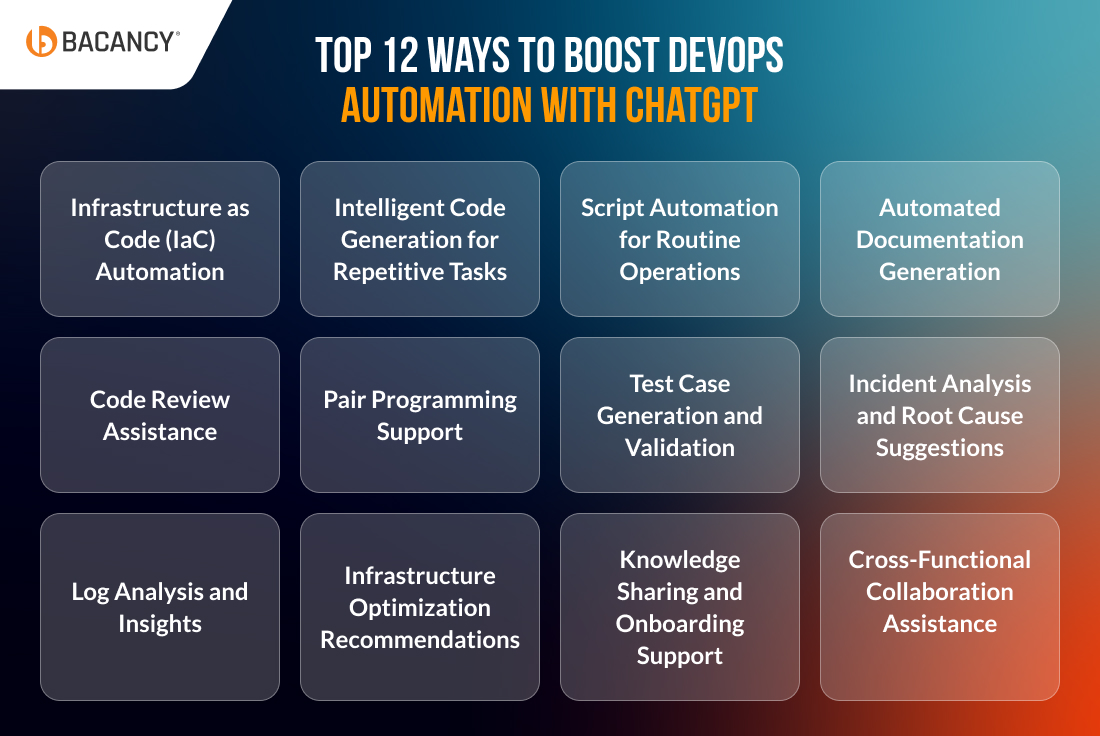
Managing cloud infrastructure manually can be complex and error-prone. Even small misconfigurations in Terraform, CloudFormation, or ARM templates can lead to downtime, security vulnerabilities, or performance issues.
ChatGPT acts as an AI assistant for IaC, providing:
Create a Terraform module for a secure AWS VPC with public and private subnets, load balancers, and IAM policies.
DevOps engineers often spend hours writing repetitive scripts, such as checking database connectivity, automating deployments, or setting up monitoring. Manual coding increases the risk of errors, inconsistent standards, and slower release pipelines.
ChatGPT acts as an AI assistant for code generation, providing:
Compose a Python script to check MySQL connectivity from server XYZ, including error handling and logging.
Routine DevOps tasks, like database backups, environment setup, or log rotations, consume valuable time and are prone to human error. Automating these operations improves efficiency and reliability.
ChatGPT acts as an AI script automation assistant, offering:
Write a bash script to automate daily MySQL database backups with error logging.
Maintaining up-to-date documentation for code, APIs, or infrastructure is tedious and often neglected. Missing or outdated docs create knowledge gaps, slow onboarding, and increase errors when teams modify or extend systems.
ChatGPT acts as an AI documentation assistant, providing:
Create a documentation file explaining the use cases for all stored procedures in our database for new developers.
Manual code reviews are time-consuming; even experienced teams can miss performance bottlenecks, inefficiencies, or security vulnerabilities. Delays in reviewing can slow down releases and increase risks in production.
ChatGPT acts as an AI code review assistant, providing:
Review this Python function and suggest improvements for performance and security.
Hire ChatGPT developer who can help you automate workflows, boost reliability, and speed up delivery.
Context switching, complex system setups, or gaps in knowledge can slow pair programming. When working with microservices, multiple databases, or intricate workflows, developers may spend more time understanding code than writing or optimizing it, reducing efficiency and collaboration quality.
ChatGPT acts as a real-time coding assistant for pair programming:
Extend this Python application to compare the performance of a stored procedure with that of batch queries.
Creating comprehensive test cases, including edge scenarios, is repetitive, time-consuming, and often incomplete. Missing edge cases or untested paths can lead to undetected bugs, performance issues, or deployment failures, impacting application reliability.
ChatGPT can act as an AI-assisted test engineer by:
Generate a Python unit test for this function and include edge cases for invalid inputs.
Diagnosing performance issues, outages, or intermittent errors in complex DevOps environments is time-consuming and prone to human error. Identifying root causes can increase downtime, affect service reliability, and impact business operations.
ChatGPT can function as an AI-driven incident analyst. It can:
Analyze this server log and suggest the possible root cause for intermittent MySQL connection failures.
Server and application logs hold crucial information about system performance, errors, and potential vulnerabilities. Manually reviewing these logs is time-consuming, error-prone, and often reactive, making it difficult to identify patterns or proactively prevent issues.
ChatGPT can act as an AI-powered log analyst. It can:
Review server logs and highlight frequent errors, providing possible causes and recommended solutions.
Designing and maintaining optimal cloud infrastructure is complex. DevOps teams must balance cost, scalability, performance, and maintainability. Making suboptimal choices can lead to overspending, resource bottlenecks, and performance issues in production environments.
ChatGPT can serve as a virtual cloud architect and advisor. It can:
Compare AWS Lambda vs Amazon ECS for deploying our microservices in terms of cost, scalability, performance, and maintenance requirements.
Bringing new DevOps engineers up to speed is often slow and resource-intensive. New team members may struggle with unfamiliar tools, CI/CD pipelines, infrastructure setups, or internal best practices. It can lead to errors, delayed deployments, and reduced overall team productivity.
ChatGPT acts as a personalized knowledge assistant and onboarding companion. It can:
Create a step-by-step guide for setting up a CI/CD pipeline in Jenkins for a Maven Java project, including build triggers, test execution, and deployment steps.
In DevOps, teams often need to communicate complex technical details, like microservices architecture, Kubernetes deployment strategies, or CI/CD workflows, to non-technical stakeholders, product managers, or other departments.
Miscommunication can cause delays, misaligned priorities, or poor decision-making, especially when stakeholders don’t fully understand technical trade-offs.
ChatGPT acts as a technical translator and collaboration enhancer. It can:
Summarize the Kubernetes deployment strategy and benefits for upper management in simple, non-technical terms and highlight why it reduces operational overhead.
Here are the top best practices for making the most of DevOps automation with ChatGPT and ensuring your AI-assisted workflows are efficient, accurate, and secure.
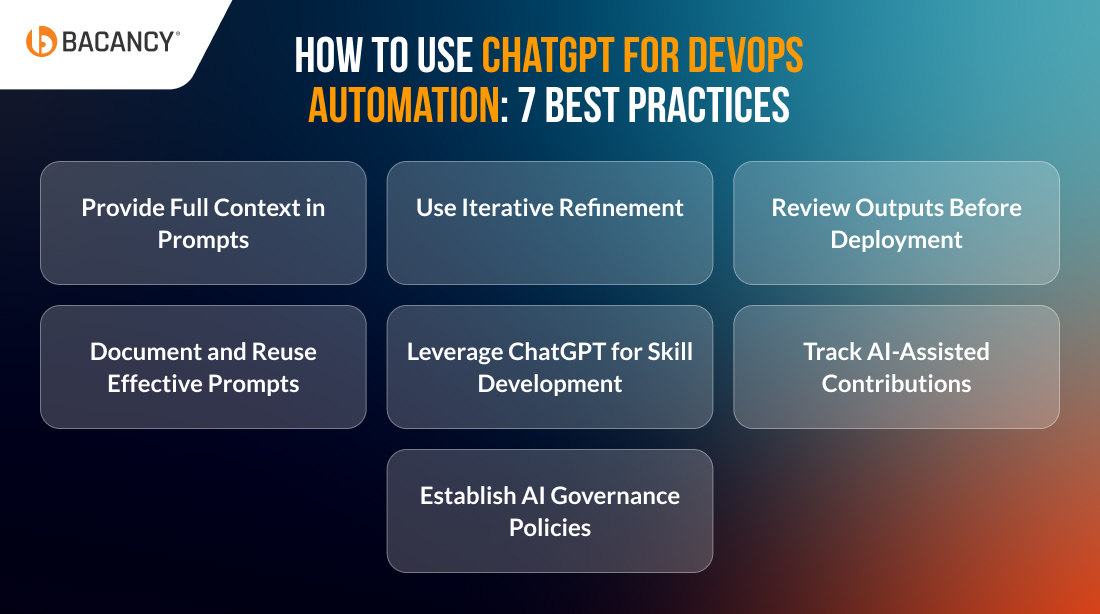
Always give ChatGPT detailed information about your environment, tools, coding standards, and expected outcomes. This ensures AI-generated outputs align with your workflows and reduces the need for extensive manual corrections.
Break complex tasks into smaller prompts and refine responses gradually. Iterative prompting helps achieve precise, production-ready results while avoiding generic or incomplete outputs.
Before deploying AI-generated code, scripts, or configurations, validate them for correctness, performance, and security. Integrate outputs with your CI/CD pipelines, linting tools, and automated testing frameworks to maintain reliability.
Maintain a library of prompts that consistently produce high-quality results. This saves time, ensures consistency across teams, and serves as a shared resource for onboarding new engineers.
Use ChatGPT to explain complex workflows, architecture patterns, or code snippets to your team. This fosters learning, reduces knowledge gaps, and accelerates onboarding without replacing hands-on experience.
Clearly annotate AI-generated changes in version control. Tracking outputs ensures accountability, transparency, and easy rollback if necessary, while helping teams differentiate between manual and AI-assisted work.
Define clear rules for how ChatGPT outputs are used in your DevOps workflows. Include mandatory review steps, compliance checks, and security validations to ensure responsible adoption without overreliance.
By following these best practices, you can unlock the full potential of ChatGPT in DevOps automation. However, you can also take help of experienced DevOps consultants, who can guide you in building secure, scalable, and efficient AI-assisted workflows tailored to your business needs.
While DevOps automation with ChatGPT can boost efficiency, teams may face challenges such as accuracy issues, a lack of context, and security risks. Here are the key challenges with practical solutions to use ChatGPT effectively.
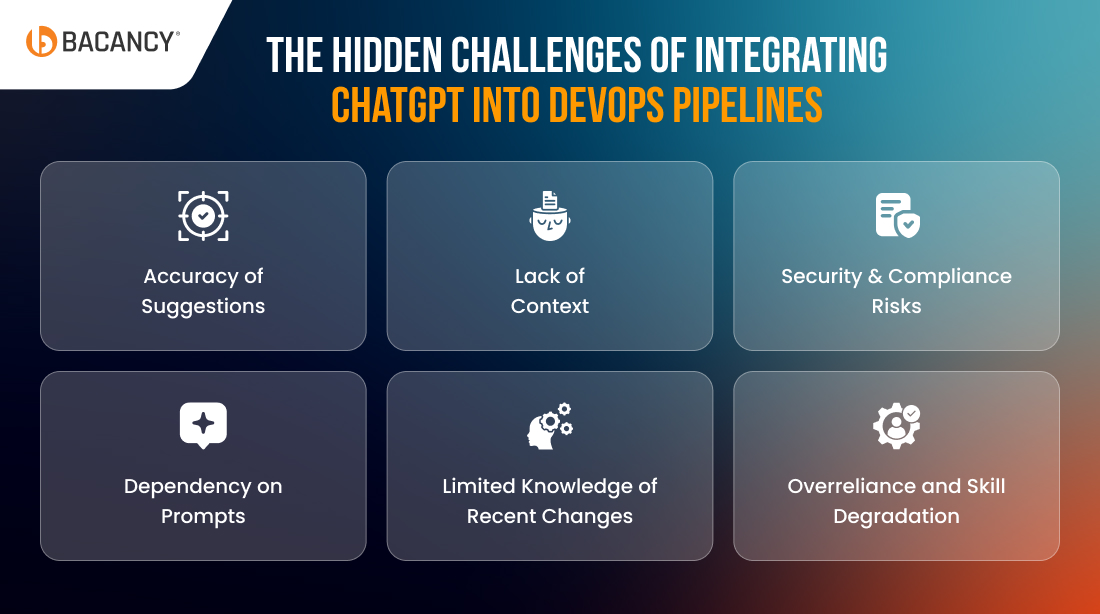
Challenge: ChatGPT may sometimes generate code, scripts, or configurations that are incorrect, outdated, or not optimized for your specific environment. Blindly trusting its suggestions can introduce bugs or security risks.
Solution: Always review and test outputs before deploying. Pair ChatGPT-generated code with automated CI/CD testing, linting, and security scans. Treat ChatGPT as a coding assistant, not the final decision-maker.
Challenge: ChatGPT doesn’t automatically understand your environment, infrastructure setup, or organizational practices. Generic prompts may lead to outputs that don’t fit your pipelines.
Solution: Provide detailed prompts including environment specifics, tools in use, and coding standards. Use grounding techniques or integrate internal documentation so ChatGPT can reference your team’s rules and conventions.
Challenge: AI-generated scripts or configuration suggestions may inadvertently violate compliance rules or security best practices, especially in regulated environments.
Solution: Always review AI outputs with security teams, and enforce automated policy checks (e.g., using Terraform compliance rules, Azure Policy, or AWS Config). Use ChatGPT to suggest secure templates, but never deploy them directly without review.
Challenge: The quality of ChatGPT’s output depends heavily on prompt clarity. Vague instructions often result in incomplete or unusable responses.
Solution: Train teams to write precise prompts. Include examples, constraints, and the desired outcome. Over time, develop a library of effective prompts for repeated DevOps tasks.
Challenge: Beyond its training cutoff, ChatGPT’s knowledge may not include the latest tool updates, cloud features, or DevOps best practices.
Solution: Combine ChatGPT with up-to-date documentation or retrieval-augmented generation (RAG) tools to reference current knowledge. Always validate AI suggestions against official docs or change logs.
Challenge: Teams might start relying too heavily on ChatGPT, which could reduce hands-on expertise in debugging or scripting critical DevOps workflows.
Solution: Position ChatGPT as a productivity enhancer, not a replacement for expertise. Encourage engineers to review and adapt AI-generated solutions to maintain skills and ownership.
Integrating DevOps automation with ChatGPT can streamline workflows, reduce errors, and boost team productivity. Here’s a step-by-step guide to effectively embed ChatGPT into your DevOps toolchain for maximum impact.
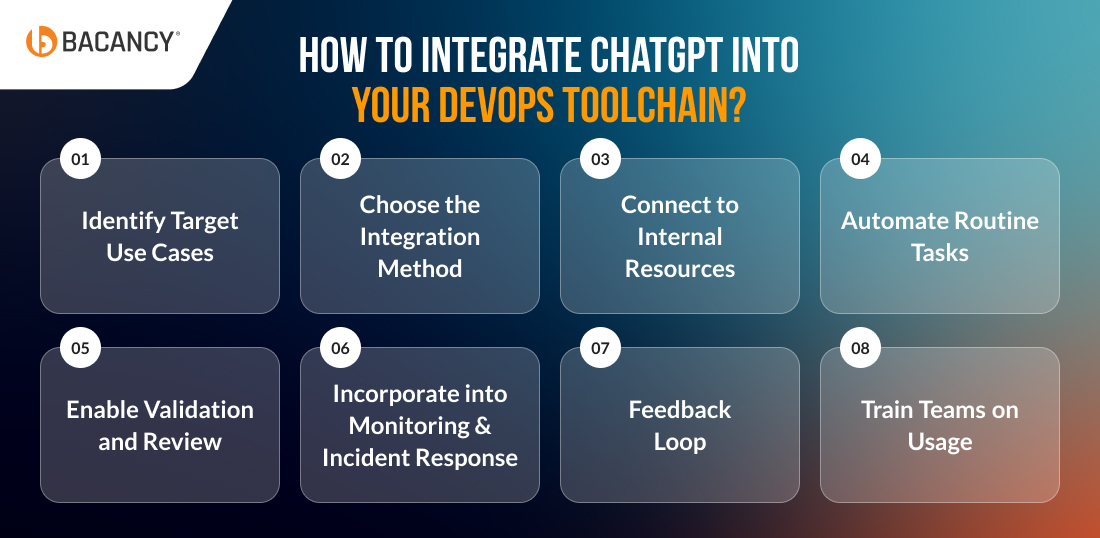
Start by deciding where ChatGPT will bring the most value. Typical areas include code generation, IaC validation, test case creation, log analysis, documentation drafting, and incident response. This focus prevents wasted effort on low-impact tasks.
Decide how ChatGPT will plug into your toolchain. Use the API with scripts or middleware for CI/CD tools (Jenkins, GitHub Actions, GitLab CI), add IDE extensions (VS Code, IntelliJ) for real-time coding support, and connect it to Slack or Teams for quick Q&A and workflow assistance.
Provide ChatGPT with access to your internal documents, wikis, templates, and best practices using Retrieval-Augmented Generation (RAG). This ensures AI suggestions align with your company’s standards and avoid generic answers.
Use ChatGPT to handle repetitive DevOps tasks automatically. Examples include generating IaC templates, deployment scripts, unit/benchmark tests, and updating documentation. This speeds delivery and reduces manual errors.
Configure ChatGPT to review code, scripts, or configuration changes before they move to production. Combine AI checks with CI/CD linting, security scans, and compliance rules for safer deployments. Always require a final human review.
Integrate ChatGPT into your monitoring setup. Stream logs, alerts, and incident reports for AI-driven summaries, prioritization, and troubleshooting suggestions. Keep engineers (or your DevOps team) in the loop to confirm actions and prevent false positives.
Continuously refine how ChatGPT is used. Collect team feedback, fine-tune prompts, and save successful responses as reusable patterns. This iterative process improves reliability and adoption over time.
Equip your DevOps team with the skills to use ChatGPT effectively. Provide guidance on writing clear prompts, verifying AI-generated outputs, and applying recommendations responsibly. Structured training ensures adoption, builds confidence, and prevents misuse.
At Bacancy, we use ChatGPT for DevOps automation to transform workflows into efficient, error-resistant processes. By blending AI-driven intelligence with our proven DevOps automation services, we empower teams to accelerate delivery, minimize risks, and achieve higher productivity.
By integrating ChatGPT into DevOps pipelines, Bacancy ensures that automation is not just faster, but smarter, helping organizations achieve reliability, agility, and measurable productivity gains.
DevOps automation with ChatGPT leverages AI to support engineers in handling repetitive and time-consuming tasks. From code generation and infrastructure setup to testing and documentation, it helps streamline workflows, reduce errors, and speed up deployments, while engineers retain full control over decisions.
ChatGPT is designed to assist rather than replace human expertise. It provides suggestions, generates scripts, and automates repetitive tasks, but the strategic thinking, troubleshooting skills, and decision-making required in DevOps still rely on experienced engineers.
By analyzing code and offering recommendations, ChatGPT can help teams spot inefficiencies, potential errors, and areas for improvement. This support allows engineers to maintain consistent coding standards and accelerate code reviews without compromising quality.
It’s important to treat AI-generated outputs as starting points rather than final solutions. Scripts and templates should be tested and validated in staging environments before production, combining AI assistance with CI/CD checks to ensure reliability and security.
ChatGPT can process logs, summarize incidents, and highlight recurring patterns or anomalies. This insight helps engineers identify root causes faster, prioritize fixes effectively, and reduce downtime, while keeping humans in charge of final decisions.
Tasks that are repetitive, prone to errors, or heavy on documentation gain the most from AI support. Examples include generating IaC templates, creating unit tests, analyzing logs, drafting deployment scripts, setting up environments, and facilitating knowledge transfer.
Security remains a human responsibility. Teams can use AI-generated suggestions as guidance, but all outputs should undergo review, policy checks, and integration into secure CI/CD pipelines to ensure compliance and avoid potential vulnerabilities.
New engineers can benefit from AI-generated guides and explanations tailored to the team’s tools and workflows. By providing step-by-step instructions and context-aware guidance, ChatGPT makes onboarding faster and reduces dependency on senior team members.
ChatGPT can translate technical processes into plain, understandable language for non-technical stakeholders. It can also create diagrams, reports, or executive summaries, helping teams communicate complex DevOps concepts clearly and make more informed decisions.
While ChatGPT enhances productivity, it may not always reflect the latest updates in tools or cloud services. Clear, detailed prompts are essential, and human oversight remains crucial to ensure outputs are accurate, secure, and aligned with organizational practices.

Tech Geek at Bacancy
Tech-focused writer specializing in innovation, AI, and cloud frameworks.
MORE POSTS BY THE AUTHOR
Your Success Is Guaranteed !
We accelerate the release of digital product and guaranteed their success
We Use Slack, Jira & GitHub for Accurate Deployment and Effective Communication.