Quick Summary
The blog covers an expert-curated list of key focus areas post-migration optimization: what to prioritize, common mistakes to avoid, tools to use, and key metrics to measure your success post-optimization.
Table of Contents
Introduction
Migrating to the cloud is usually the first step; what comes next determines your success or failure. Without a strategic post-migration optimization plan, you risk overspending your budget on unused resources, exposing your systems to security threats, and losing a competitive edge due to performance issues. More importantly, a well-structured optimization approach can drastically reduce your Total Cost of Ownership (TCO) and boost Return on Investment (ROI) by aligning cloud resources with real business needs.
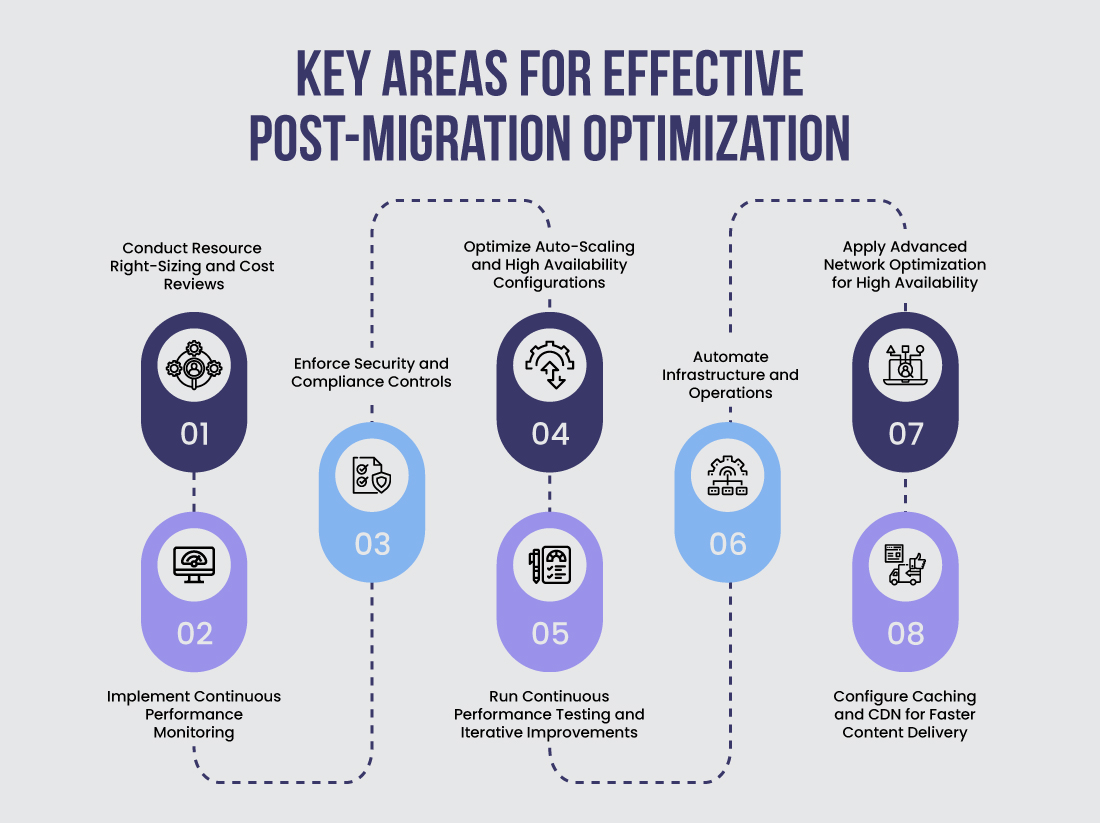
Focusing on the right areas is the key to saving costs, improving speed, and keeping your systems safe. In this blog post, we cover 8 key areas where post-migration optimization is a must to maximize the value of your cloud investment.
Key Areas for Effective Post-Migration Optimization
Here are the key areas to focus on for effective cloud performance optimization, which helps you maximize performance, control costs, and ensure security.
1. Conduct Resource Right-Sizing and Cost Reviews
Once your applications are live in the cloud, post-migration cost optimization becomes a priority. Here’s how to optimize for maximum impact:
Analyze cloud spend trends post-migration to pinpoint spikes, inefficiencies, or anomalies in cost.
Identify unused or underutilized resources like over-provisioned VMs or idle databases that do not deliver any value.
Use cost-saving models such as Reserved Instances, Spot Instances, or Savings Plans to cut down ongoing expenses.
Remove unused resources, such as unattached EBS volumes, unused IP addresses, and idle instances, that gradually increase your bill.
Tag cloud resources clearly to track usage, allocate costs, and support efficient management.
Optimize storage by moving data to appropriate tiers, cleaning up old backups, and automating data lifecycle management.
Common Mistakes To Avoid
Retain lift-and-shift configurations without resizing resources; this often wastes money and reduces efficiency.
Assign the same instance types to every workload without testing their actual performance needs.
Skip regular cost and usage reviews, which can hide unnecessary spending.
Let unused storage pile up; this increases your bill without adding value.
Ignore monitoring tools, making it harder to spot performance issues or rising costs in time.
Tools To Use
For effective cloud cost optimization post-migration, you can use tools such as AWS Cost Explorer, Azure Cost Management, GCP Billing Reports, CloudHealth, CloudCheckr, Spot by NetApp, Datadog, New Relic, and Kubecost.
Key Metrics To Measure Success
CPU and Memory Usage to ensure resources match workload needs and avoid waste.
Idle Resource Percentage to spot unused resources and cut costs.
Cost per Workload/Application to find which workloads consume the most budget.
Reserved/Spot Instance Savings to track savings from discounted pricing models.
Storage Usage Efficiency to use the right storage tier and reduce expenses.
Cloud performance optimization is critical for user satisfaction and operational efficiency. As part of post-migration optimization in the cloud, continuous monitoring helps detect issues early and keeps your systems running smoothly. Here’s how to optimize for maximum impact:
Establish performance baselines by tracking key metrics such as response time, throughput, and error rates.
Use monitoring tools to collect baseline data, set thresholds, and detect real-time anomalies.
Identify bottlenecks and latency issues by monitoring both application and infrastructure layers.
Right-size cloud resources (CPU, memory, storage) by continuously analyzing usage patterns and adjusting accordingly.
Leverage auto-scaling and load balancing with clear scaling policies and traffic distribution rules to handle dynamic demand.
Optimize storage and network performance using strategies like caching, data deduplication, and tiered storage models.
Adopt managed cloud services to streamline monitoring and performance optimization.
Common Mistakes To Avoid
Don’t rely on manual monitoring or static reports; always use real-time insights.
Do not ignore early performance warnings or threshold breaches. Act before issues escalate
Avoid using one-size-fits-all scaling rules; always test against actual traffic patterns.
Don’t overlook backend services, databases, and APIs; monitor everything that impacts performance.
Never skip cross-regional or multi-zone checks; always ensure consistent global performance.
Tools To Use
You can use tools such as Amazon CloudWatch, Datadog, New Relic, Prometheus, Grafana, AppDynamics, Dynatrace, and Splunk.
Key Metrics To Measure Success
Response Time to measure how quickly the app responds to requests.
Throughput to monitor the number of transactions or requests handled per second.
Error Rate to track failed requests or exceptions over time.
Resource Utilization (CPU, memory, disk I/O) to ensure optimal provisioning.
Auto-Scaling Events to validate if scaling actions are timely and effective.
Network Latency to detect delays in data transmission across components.
3. Enforce Security and Compliance Controls
Keeping your cloud safe is key to cloud security post-migration optimization in the cloud. You should strengthen cloud security posture management, follow security rules, and protect your data. Here’s how to optimize for maximum impact:
Audit and update security policies and firewall rules regularly to adapt to evolving threats.
Review and refine access controls, including IAM roles and policies, to ensure least privilege.
Continuously scan your cloud environment for vulnerabilities and misconfigurations.
Apply encryption for data at rest and in transit to protect sensitive information.
Implement patch management by regularly updating OS, middleware, and dependencies.
Enable real-time threat monitoring and alerts for quick incident response.
Conduct frequent assessments and penetration testing to pin down and mitigate risks.
Monitor security logs actively to detect and respond to suspicious activities promptly.
To minimize human errors, provide ongoing security training and awareness programs for all teams.
Common Mistakes To Avoid
Do not grant broad or unnecessary permissions that increase security risks.
Avoid skipping encryption or leaving sensitive data unprotected.
Do not delay applying patches and updates, as this exposes your systems to vulnerabilities.
Avoid relying only on manual compliance checks, which limit detection and response.
Do not ignore security alerts or fail to investigate incidents promptly.
Avoid overlooking training and awareness programs, which lead to human errors.
Tools To Use
To enforce security and compliance effectively, use tools like AWS IAM, Azure Active Directory, Google Cloud IAM, AWS Key Management Service (KMS), Azure Security Center, AWS Security Hub, CloudTrail, Splunk, Tenable, Qualys, Palo Alto Prisma Cloud, and Checkmarx.
Key Metrics To Measure Success
Number of access violations to track unauthorized permission usage.
Encryption coverage percentage to measure how much sensitive data is encrypted.
Patch compliance rate to show the percentage of systems updated on time.
Number of security incidents to track threats detected and resolved within a set timeframe.
Compliance audit scores to reflect how well your environment meets regulatory requirements.
Mean Time to Detect (MTTD) to measure how quickly your team identifies security threats.
Mean Time to Respond (MTTR) to measure how fast incidents are resolved once detected.
4. Optimize Auto-Scaling and High Availability Configurations
Building resilience and uptime into your cloud is vital after migration. Post-migration optimization ensures your auto-scaling and high availability setups respond effectively during traffic spikes or failures. Here’s how to optimize for maximum impact:
Set up proactive monitoring, alerting, and logging using custom thresholds tailored to each workload.
Implement cross-region and cross-AZ disaster recovery with automated backup validation.
Simulate failure scenarios and test runbooks regularly to validate response times.
Apply Infrastructure as Code (IaC) tools like Terraform or AWS CloudFormation to maintain consistency and recoverability.
Common Mistakes To Avoid
Do not use static thresholds without analyzing traffic patterns.
Avoid deploying all workloads in a single zone; it limits availability.
Do not skip backup systems and scale settings to ensure smooth recovery and performance during real issues.
Avoid setting up health checks incorrectly; they can mark healthy systems as failed and trigger unnecessary recoveries.
Tools To Use
You can use tools such as AWS Auto Scaling, Azure Virtual Machine Scale Sets, and Google Instance Groups. For automation and infrastructure management, use Terraform, AWS CloudFormation, or Azure Bicep. For monitoring and alerts, use Prometheus, Grafana, Datadog, and PagerDuty.
Key Metrics To Measure Success
Instance uptime to track overall system availability.
Average response time to measure app speed during high traffic.
Scaling event frequency to monitor how often scaling occurs.
Scaling efficiency rate to measure how quickly and accurately the system adjusts to demand.
Failover success rate to assess how well the system recovers from failures.
Continuous testing is key to post-migration optimization to ensure your app runs smoothly under real-world traffic. It helps improve reliability and fix issues early. Here’s how to optimize for maximum impact:
Run scheduled load, stress, and soak tests using real-world traffic patterns.
Use ML-powered APM tools to detect latency, throughput, and resource utilization anomalies in real time.
Continuously optimize app code and configurations based on post-deployment metrics and feedback loops.
Common Mistakes To Avoid
Avoid running tests only during initial deployment.
Do not overlook performance issues in backend services like APIs and databases.
Tools To Use
For testing, you can use tools such as Apache JMeter, K6, Locust, and BlazeMeter. For monitoring and analysis, use New Relic, Dynatrace, AppDynamics, or Datadog.
Key Metrics To Measure Success
Response time to track how quickly the app responds under load.
Throughput to measure the number of requests handled per second.
Number of performance bottlenecks resolved to gauge improvements.
Mean Time to Optimize (MTTO) to measure how fast issues are fixed.
Resource utilization vs. performance gains to balance efficiency and speed.
6. Automate Infrastructure and Operations
Automation helps streamline cloud management and is essential for post-migration optimization. It reduces manual effort, boosts consistency, and improves deployment speed. Here’s how to optimize for maximum impact:
Implement end-to-end CI/CD pipelines using Jenkins, GitHub Actions, or GitLab CI for consistent delivery.
Use container orchestration platforms like Kubernetes and ECS for scalable, portable deployments.
Adopt GitOps workflows using ArgoCD or Flux for version-controlled and automated infrastructure changes.
Post-migration optimization starts with the right expertise.
Hire DevOps developers to automate, monitor, and scale your cloud for peak performance.
Common Mistakes To Avoid
Do not hard-code configurations that limit portability.
Avoid managing infrastructure manually without version control.
Do not skip rollout checks during automated deployments.
Tools To Use
To automate your CI/CD pipelines, you can use tools such as Jenkins, GitLab CI/CD, and GitHub Actions. For container orchestration, tools like Kubernetes, AWS ECS, and Docker help manage scalable and portable deployments. To implement GitOps workflows and automate infrastructure changes, use ArgoCD, Flux, and Helm.
Key Metrics To Measure Success
Deployment frequency and success rate to track delivery speed and stability.
Rollback rate and time to recovery to measure how quickly issues are fixed.
Configuration drift incidents to detect inconsistencies in infrastructure.
Pipeline failure rate to monitor CI/CD reliability.
7. Apply Advanced Network Optimization for High Availability
Ensuring seamless access and minimal downtime begins with building a resilient, high-performing network. Here’s how to optimize for maximum impact:
Design multi-region and redundant VPC and subnet setups to support failover and maintain availability.
Use secure, high-speed connections like VPNs, AWS Direct Connect, or Azure ExpressRoute.
Deploy CDNs and edge locations to reduce latency by bringing content closer to users.
Monitor network traffic in detail using flow logs and packet analysis tools.
Common Mistakes To Avoid
Avoid using a single region or network path, as it creates a single point of failure.
Avoid misconfigured routing tables or security groups, as they disrupt traffic and expose security risks.
Avoid skipping throughput and latency monitoring, as it delays detection of network issues.
Tools To Use
Use tools like AWS Global Accelerator, Azure Front Door, and Cloudflare for fast and reliable network traffic management. To monitor network traffic in detail, use VPC Flow Logs, NetFlow, and Wireshark. For advanced network insights, use ThousandEyes and Datadog Network Monitoring.
Key Metrics To Measure Success
Network latency to measure how quickly data travels between points.
Packet loss to track the percentage of lost or dropped data packets.
Availability zone failover time to measure how fast traffic shifts during an outage.
Bandwidth utilization to compare actual usage versus what’s provisioned.
CDN offload percentage to track how much traffic is handled by the CDN instead of your core network.
8. Configure Caching and CDN for Faster Content Delivery
Fast, reliable content delivery depends on smart caching and an optimized CDN setup. These steps cut latency and keep users seeing fresh content, making them essential for effective post-migration optimization. Here’s how to optimize for maximum impact:
Implement caching at multiple layers: application, database, and CDN to reduce latency and improve load times.
Configure CDN caching rules based on content type (static vs. dynamic) and content accuracy requirements to optimize delivery speed.
Use cache invalidation and TTL (Time to Live) policies to ensure users receive up-to-date content without unnecessary origin hits.
Common Mistakes To Avoid
Do not over-cache dynamic content that changes frequently.
Avoid misconfiguring cache headers and TTL values, which can lead to outdated or inconsistent content delivery.
Do not skip monitoring cache hit/miss ratios, as they affect overall performance and cost savings.
Tools To Use
To configure caching and CDNs effectively, use tools like Amazon CloudFront, Azure CDN, and Google Cloud CDN for global edge delivery. Pair them with in-memory caching tools like Redis, Memcached, or Varnish to reduce backend latency. Use providers like Fastly, Akamai, and Cloudflare for advanced performance and security.
Key Metrics To Measure Success
Cache Hit Ratio to track how often content is delivered from cache instead of the central server.
Time to First Byte (TTFB) to measure how quickly the server starts responding to a request.
CDN Bandwidth Savings to assess how much internet traffic is handled by the CDN instead of your server.
Cache Invalidation Rate to monitor how often cached content is refreshed to keep data accurate without overloading the server.
Focusing on these eight key areas can ensure your cloud environment is secure, cost-effective, high-performing, and future-ready. However, you should also follow cloud migration best practices to maximize cloud value while minimizing operational risks and inefficiencies after migration.
Level Up Your Post Cloud Migration Optimization Game Plan
Post-migration optimization is not just a step but an ongoing process that ensures your cloud environment performs efficiently and cost-effectively. By focusing on key areas like resource right-sizing, continuous monitoring, security, and automation, you can avoid common pitfalls and unlock maximum value from your cloud investment. Ignoring these optimization practices can lead to wasted spend, security risks, and degraded user experience.
That’s why partnering with a cloud migration service provider is essential for long-term success. They bring the right expertise to help you continuously refine and enhance your cloud setup. With the right post-migration cloud strategy and tools, your business can scale seamlessly while maintaining high availability and security. You can make cloud migration optimization a priority and turn your cloud journey into a strategic advantage.
Frequently Asked Questions (FAQs)
Network optimization plays a vital role in post-migration optimization by ensuring your cloud environment runs smoothly. It improves data flow with low latency, supports high availability, and enables seamless failover across regions, minimizing downtime and delivering a better user experience.
By storing frequently accessed content closer to users, it reduces load times and lowers server bandwidth.
Right-sizing ensures you only pay for the resources your workloads actually need, eliminating waste and improving efficiency.
They use machine learning to detect anomalies and predict real-time performance issues, enabling proactive optimizations.
A common post-migration strategy is to optimize cloud operations by:
Right-sizing resources
Setting up monitoring
Automating deployments
Strengthening security
Optimizing cloud costs
Enabling auto-scaling and failover
Running regular performance tests