Node.js 25, the latest Node js version, was released on October 15, 2025. Its key features include:
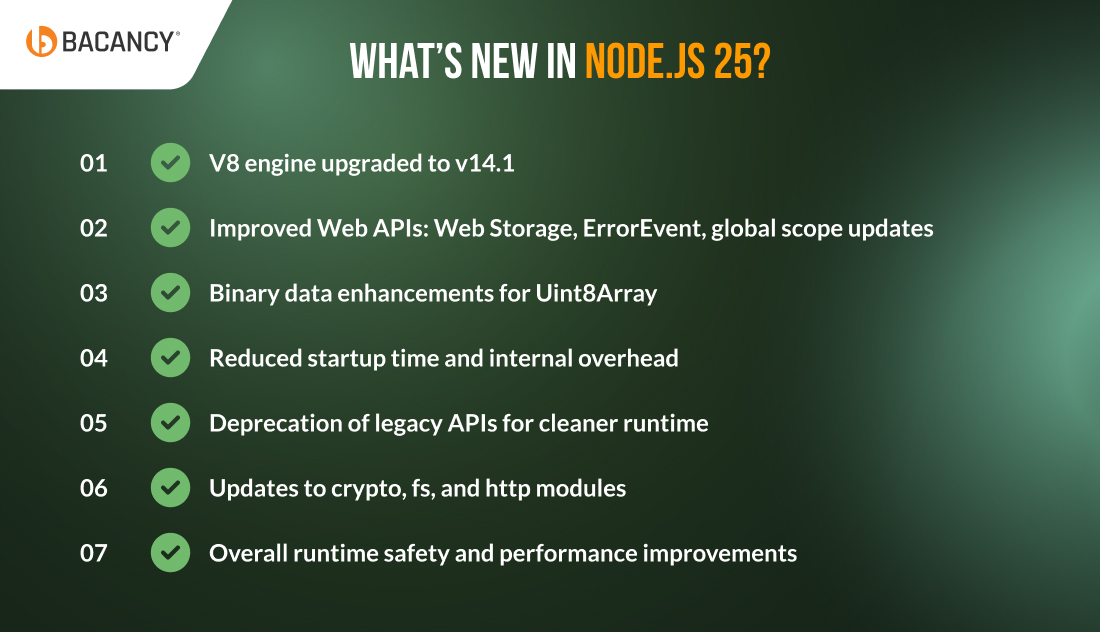
V8 engine upgrade to v14.1.
Improved Web APIs (Web Storage, ErrorEvent, global scope).
Enhanced binary data performance with Uint8Array improvements.
Reduced startup time and optimized event loop.
Core module updates across crypto, fs, and http.
Table of Contents
Introduction
Another promising Node.js version has been released. Node.js 25, launched on October 15, 2025, introduces several notable improvements that developers will appreciate.
The Node.js 25 release focuses on faster performance, stronger security, and a runtime that works more efficiently for modern applications.
If you have been using Node for a while, you know how every update can impact workflow. The new version gives teams a chance to explore improvements and prepare for the next LTS release, expected in October 2026.
Let’s explore what’s new in Node.js 25 and how this update can make your applications more innovative, reliable, and faster.
What’s New in Node.js 25: Latest Features and Functionalities
Node.js has introduced various improved updates and functionality that enhance the runtime, smooth developer workflow, and boost application performance. The following are the remarkable Node.js 25 features that every developer should know to maximize the latest version.
1. V8 Engine Upgrade: Faster and Modern JavaScript
The first in what’s new in Node.js 25 is the V8 engine update. It includes V8 engine v14.1, which comes with performance optimization and support for the newest JavaScript features. In this Node.js 25 update, you can achieve faster execution of JavaScript code, especially for large JSON operations and heavy computations.
Moreover, the developer will notice improvements in operations that involve large arrays, objects, and computational tasks. In addition to that, the version offers improved handling of modern language constructs, including logical assignment operators, private class fields, and optional chaining.
Node.js 25 comes up with enhancements in Web APIs, which bring the server-side JavaScript closer to browser standards. The key updates of the latest Web APIs include Web Storage, ErrorEvent, and updates to the global scope, making it easier to reuse code between client and server environments.
These changes allow your developers to adopt more standardized patterns, decrease the need for polyfills, and improve cross-platform consistency. Moreover, you can develop predictive Node.js applications along with modern frontend frameworks.
Example:
// Using Web Storage API
global.localStorage.setItem('theme', 'dark');
console.log(global.localStorage.getItem('theme')); // "dark"

// Handling errors via ErrorEvent
addEventListener('error', event => {
  console.error('Caught error event:', event.error);
});
3. Binary Data Enhancements for Uint8Array
Another Node.js 25 update is that it handles binary data for Uint8Array. It presents a new method that allows you to have easier conversion to base64 or hex formats without adding libraries.
It is especially useful for applications that work with buffers, network communications, encryption, and file processing. These enhancements reduce code complexity and improve performance for memory-intensive operations.
When you ask what’s new in Node.js 25, it also includes optimizations at the runtime level to decrease startup time and internal overhead. Moreover, it has a significant impact on serverless environments, CLI tools, and microservices that frequently start or require rapid execution.
By minimizing initialization delays, applications now boot faster, and runtime resources are used more efficiently. This provides developers and operations teams with a clear metric for comparing pre- and post-upgrade performance.
Example:
# Measure startup time for your Node.js application
time node index.js
5. Deprecation of Legacy APIs
One of the update Node.js developers were waiting for is the deprecation of legacy APIs. Its Callback-based functions in core modules are now being replaced by promise-based alternatives, which makes code cleaner and easier to maintain.
As a result, the developers can adopt async/await patterns without compatibility concerns. This change encourages developers to write modern, readable code while reducing the risk of errors and unexpected behavior.
Example:
 //
Legacy callback style
require('fs').readFile('file.txt', (err, data) => {
  if (err) throw err;
  console.log(data.toString());
});

// Modern Promise-based style
import { promises as fsPromises } from 'fs';
fsPromises.readFile('file.txt', 'utf8')
  .then(data => console.log(data))
  .catch(err => console.error(err));
6. Updates to Core Modules (crypto, fs, http)
Another significant update in the Node.js 25 release is the enhancement of several core modules, including crypto, fs, and http, for improved performance and security. These improvements allow your developers to implement secure, high-performance applications without relying on external dependencies.
For instance, crypto now supports improved algorithms and defaults that enhance security. FS and HTTP modules have optimizations to handle large file streams and network requests efficiently.
Node.js 25 deploys overall runtime safety enhancements, including better memory management, decreased potential for leaks, and enhanced concurrency handling. Moreover, your Node.js applications can benefit from a stable runtime environment.
In addition, it can also handle higher loads and complex asynchronous workflows more reliably and efficiently. This Node.js 25 highlights the improvements that are crucial for enterprise-grade applications where stability and predictable performance are non-negotiable.
Example:
import { performance } from 'perf_hooks';

const start = performance.now();
// Run heavy workload here
const elapsed = performance.now() - start;
console.log(`Workload execution time: ${elapsed.toFixed(2)} ms`);
Upgrade Your Node.js App Without Limits
Hire Node.js developers from us for seamless upgrade and boost speed, security, and scalability.
Node.js 25 vs Node.js 24: Is It Worth Making the Switch?
The Node.js 25 release has created excitement and enhancements. However, one question keeps coming up: should you upgrade to Node.js 25 or stick to Node.js 24? Let’s unpack what’s changed.
Features
Node.js 25
Node.js 24
V8 Engine Version
v14.1: Faster, especially in JSON.stringify
v13.6
Uint8Array Base64/Hex Support
Built-in
Not Built-in
Web Storage
Enabled by default
Experimental, opt-in
Permission Model
Gains --allow-net for finer network control
Stable with --permission
Deprecated API Cleanup
More deprecated features (e.g., SlowBuffer) have been fully removed/finalized
Outdated APIs removed
Test Runner
Same improvements as Node.js 24
Smarter, up to 40% faster than v20
LTS Roadmap
Not LTS (odd-numbered releases are typically non-LTS)
Becomes LTS in October 2025
Security
Updated TLS handling, experimental model
TLS updates and basic patches
NPM
Supports NPM 11
Fully compatible with npm v10 & v11
Use Cases
Early adopters, projects wanting cutting-edge performance and features
Mature, ready for production, LTS support
Pre-Upgrade Checklist: Prepare Your Environment
Before installing Node.js 25, ensure your development and production environments are ready:
1. Backup Everything
Create complete backups of your source code, configuration files, and databases. This ensures you can roll back if any issues arise during the upgrade.
2. Validate Dependencies
Check all NPM packages and native modules for Node.js 25 compatibility. Some older packages may require updates or replacements.
3. Update CI/CD Pipelines
Make sure your continuous integration and deployment (CI/CD) pipelines can test against Node.js 25. Running automated tests on the new version helps identify potential issues early.
4. Review Environments
Confirm that staging, development, and production environments support multiple Node versions if needed. Tools like nvm or n can simplify version management.
How to Upgrade to Node.js 25? A Step-by-Step Guide
Upgrading to Node.js 25 should be approached carefully to ensure a smooth transition, especially for enterprise projects. Here’s a comprehensive guide to the Node.js 25 upgrade process, covering preparation, installation, testing, and post-upgrade validation.
Step 1: Install Node.js 25
Use a Node version manager for a safe and flexible installation or download the latest version from the official website.
# Using nvm
nvm install 25
nvm use 25
node -v
You can also use n, an alternative Node version manager:
# Using n
sudo n 25
node -v
Verify that Node.js 25 is installed correctly:
console.log('Node.js 25 is running');
Step 2: Test Core Functionality
After installation, confirm that your applications work with Node.js 25:
Test core modules like fs, http, crypto, and stream.
Run simple scripts to check runtime stability.
Validate any custom scripts or server processes for errors or warnings.
Step 3: Implement Testing Strategies
To ensure a smooth upgrade, run comprehensive tests:
1. Unit Testing
Validate individual functions, classes, and modules. Look for unexpected behavior caused by Node.js 25 updates.
2. Integration Testing
Test API endpoints, database interactions, and external services to ensure workflows remain functional.
3. Regression Testing
Confirm that existing features continue to operate as expected. Automated test runners help detect subtle differences between Node.js 24 and 25.
Step 4: Post-Upgrade Validation & Monitoring
Once your applications run on Node.js 25, monitor performance and stability:
Track CPU and memory usage to identify potential bottlenecks.
Measure latency and response times to detect performance regressions.
Enable detailed logging and error reporting to catch runtime issues early.
Node.js 25 brings notable improvements in runtime performance, modern JavaScript support, and enhanced security that make it a strong choice for modern applications. Enterprises that adopt this version will experience faster startup times, reduced memory usage, and improved alignment with web standards. The upgrade ensures applications remain reliable and maintainable as projects scale.
As a leading Node.js development company, Bacancy helps businesses plan and execute smooth migrations to Node.js 25. Our expertise covers upgrade strategy, modernization, and performance optimization, allowing applications to maximize the new runtime improvements fully. A proactive upgrade positions projects for long-term stability, stronger security, and higher developer productivity.
Frequently Asked Questions (FAQs)
Node.js 25 introduces major updates like the V8 14.1 engine, enhanced Web APIs, improved binary data handling, and faster startup performance. It also enhances runtime stability, updates core modules such as crypto, fs, and http, and improves interoperability between ESM and CommonJS.
No, Node.js 25 is a current release, meant for testing and early adoption. It will remain in active development until the next LTS version (Node.js 26) is released in October 2026. For production systems requiring stability and long-term support, it’s advisable to continue using the latest LTS version.
Before upgrading, review breaking changes, validate dependencies, and test your codebase in a controlled environment. Use tools like nvm or n for managing multiple Node versions. Run comprehensive unit and integration tests, and monitor performance metrics after deployment to ensure smooth migration.
Upgrading to Node.js 25 enables access to faster performance, modern JavaScript features, improved security, and better compatibility with cloud and edge environments. For enterprises, it also means boosting developer productivity, reducing latency, and readiness for future workloads involving AI, real-time data, and microservices.
Native Module Recompilation: Modules that depend on V8 may need to be recompiled for Node.js 25.
Deprecated APIs: Some older Node.js functions no longer work and require code updates.
Permission Model Changes: Scripts or network access may behave differently due to stricter security rules.
To upgrade to Node.js 25 safely, follow these key tips:
Test in a staging environment before deploying to production to identify and address potential issues early.
Use nvm or n for easy version management and rollback if any problem arises.
Keep all dependencies updated to ensure compatibility with Node.js 25.
Automate testing to detect edge-case errors and maintain application stability.
Dipal Bhavsar
Tech Geek at Bacancy
Story-driven writer blending research, passion, and full-stack web clarity.