

Quick Summary: Of all the babbles around the RESTful APIs and how to build one on Node.JS, there are many of you who want to learn about the core concept of APIs. Have you wondered why Node JS is the right place to develop an API? Get your queries addressed in this blog which will acknowledge the following concepts: REST vs. SOAP, What exactly is Node.js, and a comprehensive tutorial guide on building Node.js REST APIs in 05 minutes.
Table of Index
2. Understanding APIs Differently
6. Getting Started with How to Build Secure Node.js Rest API
Introduction
Connectivity is an amazing thing. Today, we are tethered to the world just like a spider with its web. The Internet and networking have put the world at a one-hand distance; we are just a click away from anything we look upto. From our desktops or devices, we can post a thought on social media, purchase a refrigerator, book a flight ticket, make a reservation, and a lot more.
Don’t you get this question- how does data go from here to there? How do different smartphones, desktops, laptops, and other gadgets, and applications within connect with each other? The answer to these questions is our real-hero, the Application Programming Interface API. For your simplicity, let me explain the concept of APIs in non- IT terminology.
Understanding APIs Differently
Every time you go to a restaurant, you will find a waiter to show you your table, bring you the menu card, help you with today’s special dish, take your order, and serve you whatever you need. In any case, you need not enter the cookhouse of a restaurant. A waiter shields you from all the complicated stuff going behind the scenes. You don’t have to worry about the baking convection, dishes, pouring drinks, or managing stocks. The waiter is the interface between you and all other services of the restaurant. Hence, you can definitely interact with the restaurant yet be shielded from the complexity of the kitchen-management.

In this manner, you can consider the waiter as an API of the restaurant, and now you can indeed understand the importance of a waiter and an API. An API plays the role of a messenger- that takes your request to the system, tells the system what to do, and brings you back a response from the system.
Application Programmable Interface API is a language for software to communicate and gossip amongst each other. Some of the core functions of an API are: Accessing data, hiding complexity, extending functionality, and Providing security.
Henceforth, every time you will be using your weather widget, or playing music from Spotify while booking an Uber, or signing up for a new platform with the help of the ‘Log-in with Facebook’ feature, you will be grateful for APIs.
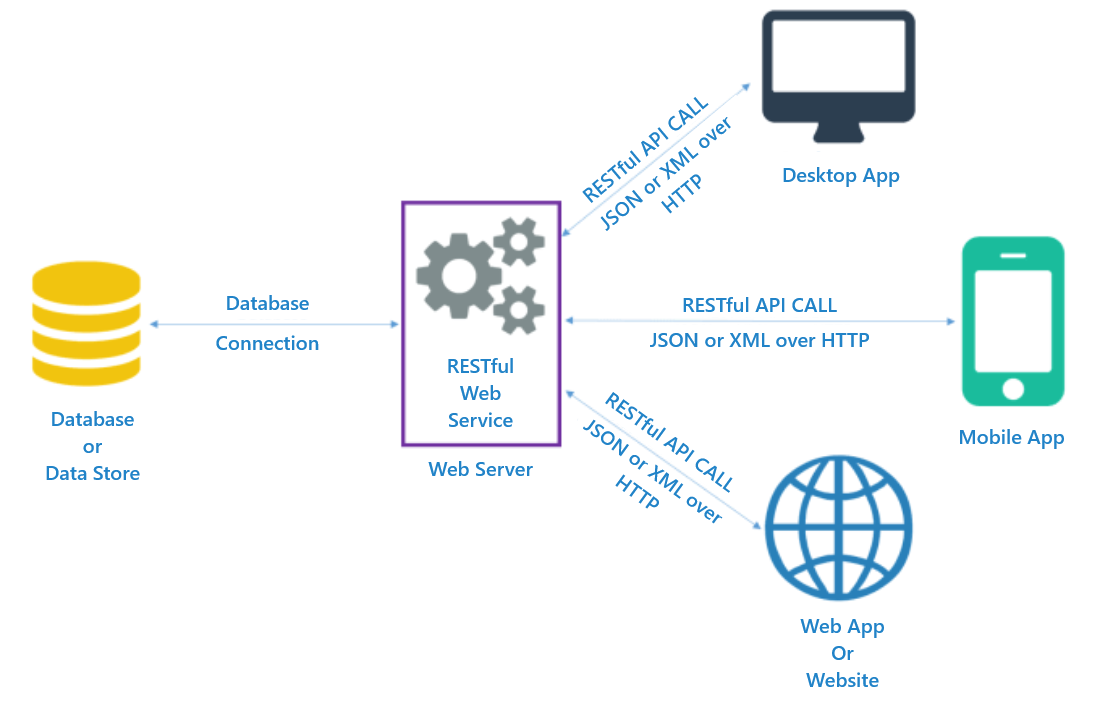
There are different types of APIs based on their utility. We focus on the APIs that enable various software and applications on our devices to communicate with each other. REST and SOAP are the most popular APIs to access web services.
First, you should know the difference between the two and why Node.js Restful APIs are these days considered preferable over the other.
What’s SOAP and REST?
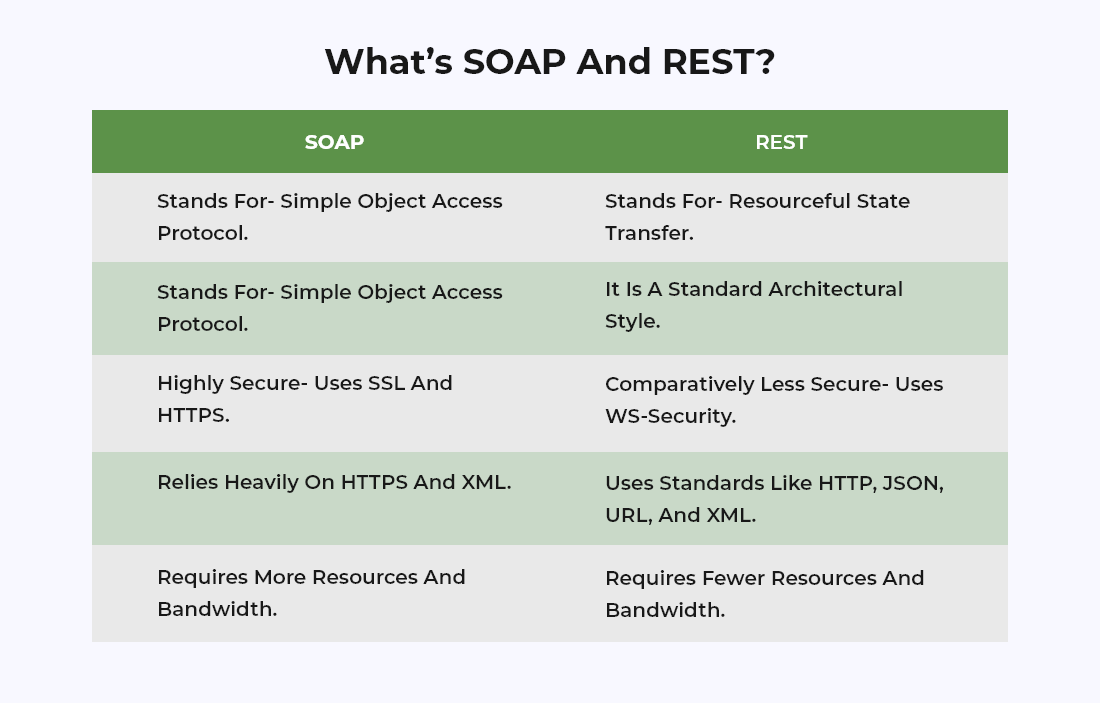
Developers have vastly adopted REST over SOAP because SOAP manipulates objects so that you can remotely access them, whereas, with REST you can focus on operations on the objects.
Another advantage of the REST architecture is that it inherits HTTP operations which makes it a convenient choice for Web APIs. Speed and lenience are added advantages when you consider REST over SOAP.
Looking for a helping hand to build restful APIs with Node.js and MongoDB?
Hire Nodejs API developer from us to build, secure and deploy RESTful Webservices with Node, Mongoose, Express, and PassportJs.
Build Now
Well, REST stands for Representational State Transfer. In simple words, it means that there lies no state between the server and the client. There are nill web pages that need to be parsed except for just the data. This provides you with the ultimate freedom that you will need. The only thing you need to do is to type some logic on a particular URL that is connected to a database and makes use of its logic for processing the entire data thereby sending it back in a JSON format. With this, your new client can be any of the following: – a Windows desktop application made in C#, an Android app made in Java, or an Arduino project.
This is exactly why REST is used. Making the connection completely stateless, REST further makes this data accessible to any client that uses the HTTP protocol. You can now illustrate the data anywhere you wish to by repeating it.
Let’s Node it!
Now, if we begin with Node JS, it is a runtime environment where JavaScript code can run, and with the invention of Node.js, JavaScript became a full-stack programming language.
Node.js can be defined as an open-source runtime environment for JavaScript. It is based on the Chrome V8 engine, which is a machine code generating engine for chromium-browser. Node.JS permits you to execute the programs that are noted in JavaScript on the server. Soon by 2014, Node.JS became one of the extensive tools that are used hugely for back-end development. Being an essential part of the popular MERN and MEAN JavaScript-centered technology stacks covering the whole of the web development pipeline, Node.JS has gained a lot of admiration in itself.
In the first place, you need to analyze and understand the major difference between serving data and serving static assets.
Basically serving static files means to serve your JavaScript, HTML and CSS pages as it is. It is named static files because they are kept unaltered and un-runned by the server. They are remanded back for parsing as files for your browser.
Express is a smart Node Framework. Developed to help and assist the JavaScript developers, Express builds the servers rapidly. Despite being server-side, Node.js can perform more than serving data and pages. Being an exclusively powerful platform, Node.js helps you to run JavaScript on your shell exactly like you would run Python.
There are several frameworks that are built for Node.JS. Few include Express JS, Sails, Meteor, and others. There are a plethora of reasons why the biggest companies use Node.JS. Let us delve into the strengths of Node.JS.
Advantages of Node.js
Let’s have a look at the advantages of Node.js and why you should use Node.js for next-gen web app development.
- Good for Microservice
- Easy to Learn
- Fast
- Packages
- Javascript on a Server
- Support and Community
Node.JS is extremely lightweight and highly scalable. This is another reason why it is the most loved source for microservice architectures. With the help of Node.JS modules, Node.JS fits perfectly for designing microservice architectures.
As Node.JS owns a huge number of javascript features along with its libraries, front-end developers will likely learn it in no time. In fact, with the popularity and huge community support, javascript owns a faster learning curve for all the newbies or the beginners who are new in the field of development.
Because of Chrome’s V8 engine, Node.JS is extremely fast. On several concurrent requests processing at a time, Node.JS is hugely efficient to process several requests with a lower CPU usage.
Only a few programming languages can boast this rich and hugely packaged ecosystem like Node.JS. Around thousands of tools and libraries that are used for JavaScript development are brought together on npm which is a default Node.JS package marketplace and manager. With consistent support from the large community, npm entirely focuses on motivating the users to add whole new packages. With this, you can achieve ready-made solutions for certain issues.
Node.JS has helped in javascript full-stack development. Having the advantages of javascript programming, Node.JS permits the engineers to utilize its libraries. As it is light in weight, it results in high performance. Additionally, the front-end and the back-end stay in sync as one single language is used on either side of the application. If noticed developer-wise, they can reuse and share codes with the help of node modules.
Back in 2015, companies like IDM, SAP, PayPal, Fidelity, Microsoft, etc; organized a foundation for Node.JS. As Node.JS is open-source, a huge community of developers comes along to solve issues on Github. If there is a huge community, you can always have more than one solution to all your problems.
All that you have been waiting for in this blog, it’s time to bring it here. Let’s have a look at how to develop the Node.js Rest API example.
Getting Started:Node.js Rest APIs
Step by Step guide on how to build secure Node.js rest APIs in 05 minutes.
Preparatory Instructions
For getting started, you need to download the most stable version and release of NodeJS. However, make sure you don’t download the latest version. This is because the latest version might carry certain features and bugs that can be wiped off from the final version.
Next, once you download the Node.js binaries, install them in your system with the help of a certain set of instructions noted on the page relative to your platform.
For confirming the installation process, close all or any of the cmd instances that are open or may be running in the background. Next, start a whole new instance.
For displaying the version of NPM and the installed Node, type the following 2 commands.
npm -v
node -v
(NPM is defined as the Node Package Manager. It is a tool that maintains, installs, and uninstalls the package modules for your application.)
Initializing a new app
Generally, there are 3 methods to create an Express application.
Below, we are going to discuss three of them in brief except for the second one that we are going to showcase Node js web API.
- Primarily, you can create the files by hand. A very basic Node app involves one .js file and one package.json file. To be more precise, the package.json file comprises certain features and properties.
- The first one is the name that carries the name of the app.
- The second one is the version that displays the version of your app along with the description and entry point.
- In case you wish to perform dependencies, repetitive tasks, author name, license, and devDependencies, you can run certain scripts that come along with it.
- The next method is to make use of an NPM tool. Though it takes time and is not the fastest way, it is the simplest one. All you need to do is open your cmd in that particular folder where you wish to create your app. Subsequently, type npm init to create your package.json file collectively.
- The third method is simple but can turn out to be complicated for the newbies or beginners. This is because it creates several files that might be entirely new to you if you are a beginner in the field of NodeJS.
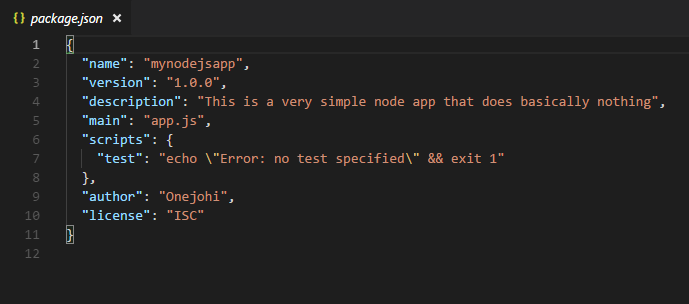
One important point is that package.json defines the app. While you upload your app, your dependencies will be registered in a way that avoids excessive transfer of data and duplicacy. Usually, a regular angular 6 app node module takes a huge amount of time to upload or download as its size is around 230MB. To avoid confusion, omitting these modules is better. Thenceforth, make use of the package.json for installing the modules whenever you require to run the app on a different machine or system.
Additionally, you even need to install the Express tool for generating an entire Express template and not the package.json individually.
npm install -g express-generator
This helps the express-generator tool to install, thereby generating a full express app. As discussed above, you must be knowing that NPM is a useful and important tool that you might require for installing modules. However, you might question what does the -g flag do?
While you install modules for javascript, you might want to use them in the same application. For instance, you will install mongoose so that you can make use of mongoose methods for querying data from your MongoDB instance. On the other side, you can even install such tools and modules that can be used anywhere on your system. These particular tools or modules are present on the command line but are only available if installed globally. The -g flags signify that you are willing to install the module globally for using it anywhere in your system or computer. If you skip the -g flag and do not use it, the tool or module will be installed in that particular folder and will be unavailable anywhere outside that very scope.
Installing Express
We advise using the second method for generating a package.json file as shown above.
The second stage that comes, is to install Express into the app.
(Note: We are not installing Express globally as we will be using it in this particular folder.)
To install Express, use the following command,
npm install express --save
With this, you can edit the JSON file as well as add Express as a dependency because you use the save flag. After you complete the installation process, open your package.json to look for the Express that will be listed as a dependency. Subsequently, you can simply forward your package.json file and code to a friend and ask them to make use of npm for installing dependencies on their system. You get to save data here. For installing, your friend requires to open cmd inside the folder and apply the command npm install.
Less Hassle. More Development
Let us turbocharge your back-end engine with our Node.js app development services so that you can precisely focus on core business activities.
Experience Now
Creating the app
Now, you need to create the app.js file. (you can name it with whatever you wish to, however, the default name is index.js). Later, add the code given below,
var express = require("express");
var app = express();
app.listen(3000, () => {
 console.log("Server running on port 3000");
});
With this, you have created your first ever useless Express server!
You must be now wondering why this server is useless and why it does not implement the REST protocol yet?
Well, the first line of the command needs Express and makes use of the express variable to illustrate it.
The next line initializes express with the use of brackets that initializes an express server and places the initialized server inside the variable app. Hence, from now, whenever you wish to use your express server, you first need to use the app variable that represents your app.
Moving ahead, set your app to listen to port 3000 and generate a callback. This step will verify that your server is currently running on port 3000.
To sum up, you can now access your app with http://localhost:3000. However, you cannot gain anything as you have not configured or customized your server for listening to any of the events.
Setting request handlers
The main job of the server is to receive a request, process it, and return a response. Therefore you should make use of routes for handling these requests.
However, the requests comprise 3 major types.
- GET request for getting data
- POST request to send the data safely and securely
- PUT request for updating the data
- DELETE request for deleting or erasing all the data.
Let us now generate a common GET request that will give back a list of users.
Under the var app=express(), type the code given below,
app.get("/url", (req, res, next) => {
 res.json(["Tony","Lisa","Michael","Ginger","Food"]);
});
This easy function leads the express app to make use of the URL handle “/URL” for activating the callback following it. This callback adopts three parameters.
- Req (the request body that holds all the information about the request)
- Res ( the response body that manages each of the response functions such as,)
- .render() for rendering templates.
- .json() for returning the JSON data.
Running your app
For running your app, type the command given below,
node app.js
Subsequently, when you run this command, your cmd looks like,
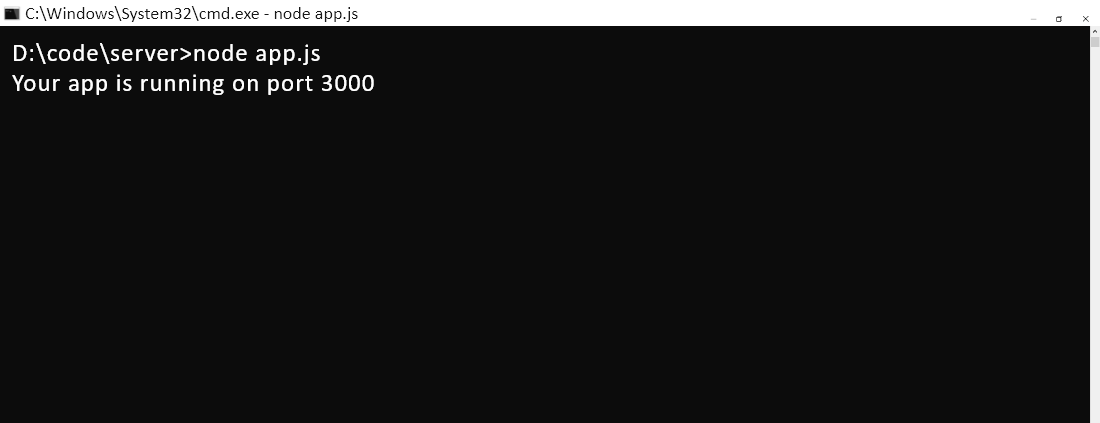
This further denotes that your app is now running on port 3000 favorably. In order to see the data, open your browser and type http://localhost:3000/url.
On entering, you will notice something like this on your screen.
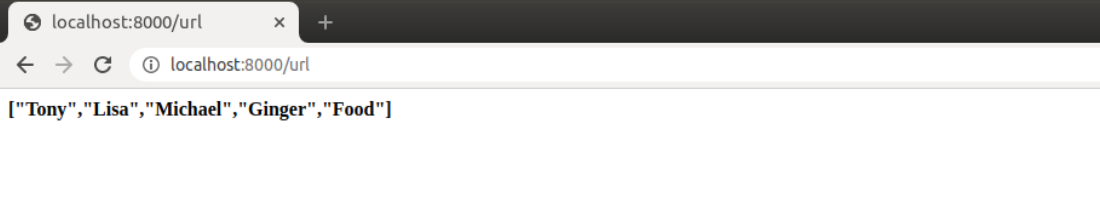
This is however raw data. The data that is sent back is an array of strings.
Conclusion
Isn’t it mind-boggling to see how to build secure Node.js Restful APIs? You simply request a certain endpoint and receive back the data in a stateless manner. Without any complications, this is the basic level of API that you need to execute for analyzing and understanding the working of REST APIs. I hope you found this blog to be useful and understood why RESTful APIs are best built with Node.js, and it is really convenient to build Node.js Rest APIs in under 05 minutes.
Choosing Bacancy Technology and hiring Node.js developers ensures you have access to skillful experts and adroit specialists. We assure you that you will never be disappointed when you hire node.js developer and leverage our Node.js development services.

