Quick Summary
This guide explores the best 18 AWS monitoring tools, including native and third-party AWS monitoring solutions. Whether you’re a startup focused on cost efficiency or an enterprise managing complex multi-cloud setups, the right monitoring solution can turn reactive troubleshooting into proactive cloud management.
Table of Contents
Introduction
Operating workloads on AWS is like managing a complex ecosystem. Every service, like EC2 instances, S3 buckets, RDS databases, and Lambda functions, must work seamlessly together. A small misconfiguration or delay can disrupt performance, increase costs, and create security vulnerabilities.
The challenge isn’t just keeping things running, but knowing what’s actually happening. Is your app slowing down because of a resource bottleneck? Are you overspending on unused capacity?
That’s exactly where the right AWS monitoring tools come in. AWS is holding a 29% share of the global cloud infrastructure market, ahead of Microsoft’s 20% and Google’s 13%. With such scale, effective monitoring isn’t optional; it’s essential for maintaining performance, optimizing costs, and ensuring reliability.
Let’s explore different AWS monitoring tools that can help you with a smooth analysis process.
What is AWS Monitoring?
AWS monitoring involves continuously observing the performance, security, and cost efficiency of AWS resources. Various AWS observability tools collect real-time data on resource usage, system health, and application performance to ensure smooth operations and quickly identify and resolve potential issues.
Why AWS Monitoring is Important?
- Performance Optimization: Tracking metrics like CPU and network usage ensures that applications run efficiently.
- Security: Tools like CloudTrail and Config detect threats and ensure compliance.
- Cost Management: Monitoring resource usage helps avoid overspending.
- Scalability: Tools like CloudWatch maintain system availability as demands grow.
- Troubleshooting: Real-time alerts help prevent downtime.
AWS performance monitoring tools play a pivotal role in monitoring the AWS environment. They help strengthen operations by enhancing performance, security, cost control, and scalability, assisting businesses in effectively meeting their infrastructure needs.
Let’s explore the top 18 AWS cloud monitoring tools and see how each helps optimize performance, security, and reliability.
Top 18 AWS Monitoring Tools to Simplify Your Cloud Management
The built-in tools of AWS allow effective monitoring with real-time visibility, automated alerts, and integration with the existing ecosystem. Nevertheless, with the development and increase in complexity of cloud environments, numerous teams can discover that they can no longer manage their systems using the tools provided by AWS alone.
They can use third-party and open-source monitoring platforms to gain deeper insights, more analytical aspects, and extended coverage in hybrid or multi-cloud configurations.
To make the right selection, we have categorized the best 18 AWS monitoring tools into two major groups:
1. Native Monitoring Tools: AWS native monitoring tools are specifically designed to be used with AWS and offer easy integration, real-time performance monitoring, and automatic scaling warnings. These are best suited when there is a need for simplicity and congruity with AWS services.
2. Open-Source and Third-Party Monitoring Tools: These tools are designed for teams that require enhanced observability, customizable dashboards, AI-driven insights, and visibility across multi-cloud or on-premise systems.
Native tools will streamline your monitoring, whereas third-party monitoring solutions will provide you with flexibility and control. It is essential to strike a balance between convenience and capability, and to find an approach that suits your cloud maturity, business objectives, and scalability requirements.
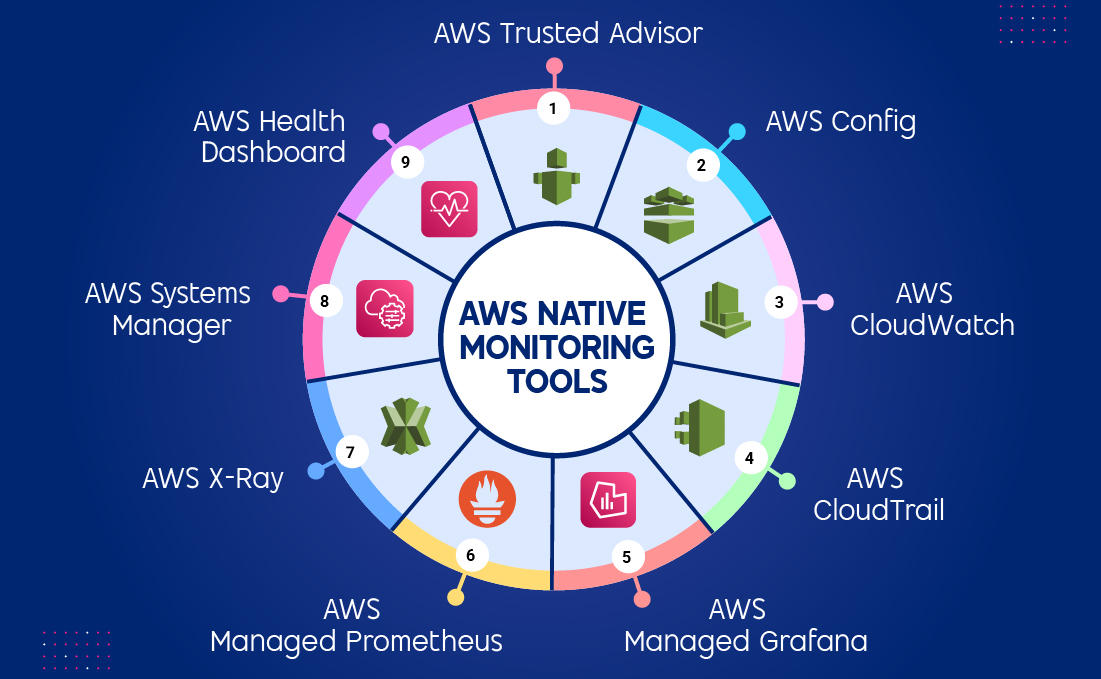
1. AWS Trusted Advisor: Your Cloud’s Smart Consultant
AWS Trusted Advisor is a real-time guidance tool and best practice advisor. It scans your AWS environment and provides actionable recommendations to improve performance, security, cost efficiency, and fault tolerance.
Essentially, it functions like your virtual cloud consultant that frequently checks your AWS setup against AWS best practices.
Key Features:
- Automated Recommendations: Suggests steps to reduce costs or enhance reliability (e.g., deleting idle resources, enabling MFA on root accounts).
- Dashboard Insights: It provides a consolidated view of your account’s health.
- Integration with AWS Organizations: Allows centralized visibility and management for multiple accounts.
Benefits:
- Optimizes cost, performance, and security with actionable recommendations.
- Provides real-time best practice checks across your AWS environment.
- Monitors account limits to prevent unexpected service disruptions.
- Improves governance and compliance through continuous auditing.
Use Cases:
- Identify underutilized EC2 instances or idle EBS volumes to reduce costs.
- Detect misconfigured IAM permissions or open security groups.
- Check service quotas before scaling to avoid downtime.
- Review infrastructure readiness for fault tolerance and disaster recovery.
- Monitor account compliance with AWS Well-Architected best practices.
2. AWS Config: Your Compliance and Configuration Tracker
AWS Config is a configuration tracking and compliance auditing tool. It records the configuration of AWS resources and evaluates them against desired settings or compliance policies. Whether you’re preparing for audits or maintaining strict governance, Config ensures every change is accounted for.
Key Features:
- Continuous Monitoring: Tracks configuration changes in AWS resources and relationships for all supported AWS resources.
- Resource Relationship Mapping: Automatically maps dependencies between resources (e.g., EC2 instance → Security Group → VPC).
- Custom Config Rules: Let you create custom compliance rules using AWS Lambda or AWS Managed Rules.
- Snapshot and Historical View: Provides complete visibility into the historical configuration of resources.
- Integration with AWS Systems: Centralized monitoring and compliance across multiple accounts.
Benefits:
- Ensures configurations align with regulatory frameworks (e.g., HIPAA, PCI DSS).
- Tracks configuration changes across all AWS resources in real time.
- Simplifies compliance management with custom and managed rules.
- Maintains a historical view of configuration states for audits.
- Enables automated remediation when non-compliant resources are detected.
Use Cases:
- Monitor and enforce encryption on S3 buckets.
- Track security group changes that open ports to the internet.
- Generate compliance reports for ISO or HIPAA audits.
- Trigger auto-remediation workflows when a rule violation occurs.
- Map dependencies across AWS services for better impact analysis.
3. Amazon CloudWatch: Your AWS Guardian
Amazon CloudWatch is a peculiar AWS Service that monitors resources and applications. Even 89% of AWS customers have selected CloudWatch as their go-to monitoring service for real-time observability, resource performance, and operational health across their cloud workloads. It automates responses to performance change by setting up pre-defined performance metrics. It can set alarms, react to changes, and optimize resources by utilizing the data insights collected across AWS resources, allowing it to gain a unified view.
Key Features:
- Metrics: Tracks performance data like CPU usage and network traffic.
- Logs: Monitors logs for insights into application behavior.
- Alarms: Set up alerts for specific conditions.
- Automation: Takes automatic actions based on predefined rules.
Benefits:
- Enables proactive alerting and automated responses to performance issues.
- Offers customizable dashboards for real-time insights.
- Supports anomaly detection and predictive analytics.
- Custom metrics monitoring for tailored business needs.
- Optimizes costs by tracking resource utilization and identifying underused services.
Use Cases:
- Track CPU and memory usage for EC2 instances.
- Set alarms for Lambda error rates or API latency spikes.
- Automate scaling actions when traffic increases.
- Centralize log monitoring across AWS services.
- Analyze long-term trends to optimize performance and cost.
4. AWS CloudTrail: Your AWS Activity Log
Amazon CloudTrail allows you to comprehensively track API requests and user interactions throughout your AWS setup. CloudTrail documents each action within the AWS setup, whether through the AWS Management Console or via AWS SDKs and APIs. Moreover, all these events are encrypted and stored in Amazon S3 by default.
Key Features:
- API Call Logging: Records all API calls made to your AWS account.
- Event History: Provides a chronological record of events.
- Compliance and Governance: Help with compliance efforts and governance initiatives.
- Security Analysis: Detects unusual activity or potential security threats.
Benefits:
- Provide continuous monitoring to identify unapproved access and malicious activities.
- Ensure compliance with regulatory requirements and adherence to industry standards.
- Track changes to your AWS resources and configurations.
- Identifying granular details from log files and utilizing them to diagnose specific issues.
Use Cases:
- Security monitoring for unauthorized access and suspicious activities.
- Auditing and compliance with industry regulations like HIPAA and PCI DSS.
- Incident investigation by analyzing historical API call records.
- Identity and access management analysis for user and role activities.
- Forensics and root cause analysis for security incidents and operational issues.
Here’s a detailed comparison between AWS CloudTrail vs CloudWatch.
Amazon Managed Grafana is a service for monitoring performance provided by AWS, utilizing the open-source Grafana platform to help users visualize and analyze data in a scalable manner.
Key Features:
- Managed Grafana: Utilize Grafana without the need to manage the underlying infrastructure.
- Integration with AWS Services: Seamlessly connect with AWS services to visualize data.
- Customizable Dashboards: Personalize dashboards to represent your data visually.
- Alerting: Create notifications triggered by conditions. Get alerts accordingly.
- Data Exploration: Explore your data by leveraging Grafana’s robust query language.
Benefits:
- Run Grafana without managing infrastructure.
- Create beautiful and informative dashboards.
- Monitor all your AWS assets and applications through a platform.
- Enhance your understanding of the information by utilizing analytics techniques.
Use Cases:
- Use it for application monitoring to visualize metrics and logs in real time.
- Leverage it for infrastructure monitoring to track the performance of your AWS resources.
- Apply it for log analysis to identify patterns and detect irregularities quickly.
- Utilize it for custom analytics to build dashboards tailored to your specific needs.
Using Amazon Managed Grafana enables effortless visualization and analysis of data, uncovering insights and facilitating informed decision-making.
Amazon Managed Service for Prometheus (AMP) is a serverless monitoring service built on top of Prometheus, providing a secure method to monitor containerized applications using the well-known Prometheus data model and query language.
Key Features:
- Managed Prometheus: Run Prometheus without managing the underlying infrastructure.
- Scalability: Automatically scale Prometheus to handle your growing data volumes.
- Integration with AWS Services: Easily connect to various AWS services for metric collection.
- Alerting: Create alerts specific to certain conditions and get notified.
- Querying and Visualization: PromQL is an efficient language specifically designed to work with Prometheus. It allows you to retrieve and present any metric you want.
Benefits:
- Run Prometheus without managing infrastructure.
- Handle large-scale monitoring workloads with ease.
- Monitor your AWS resources and applications from a single platform.
- Query and analyze your metrics using PromQL.
- Proactively monitor your systems and receive notifications of issues.
Use Cases:
- Use it to track the actual performance of your applications.
- Control the status of your AWS services and resources and how they function.
- Create a metric and dashboard to have more granular views for certain silos of applications.
- Create alerts to receive notifications on essential matters.
Amazon Managed Service for Prometheus provides features to ingest, store, and query your metrics, enabling you to understand them and make informed decisions.
AWS X-Ray is a service that gathers information about your application’s requests. In its simplicity, it provides methods to observe, sort through, and examine this data to identify issues and enhance efficiency. For each traced request, you can see details about the request, response, and interactions with other services.
Key Features:
- Distributed Tracing: Tracks requests as they flow through your application.
- Service Maps: Visualize the architecture of your application.
- Performance Metrics: Provides metrics on request latency, errors, and throughput upon request.
- Anomaly Detection: Identifies unusual performance patterns.
Benefits:
- Monitor and tackle areas where performance is hindered.
- Diagnose issues quickly and efficiently.
- Explore the workings and characteristics of your application design and functioning.
- Utilize resources efficiently and effectively.
Use Cases:
- Use it to keep your systems secure and always up to date.
- Automate routine tasks like backups and configuration changes.
- Apply it to maintain consistent configurations across environments.
- Leverage it to preserve the desired state of your AWS resources.
- Use it to connect to instances without public IP addresses securely.
Using AWS X-Ray enables you to gain insights into how your app performs, empowering you to make informed choices to enhance its effectiveness and reliability.
8. AWS Systems Manager: Your Cloud Management Hub
AWS Systems Manager represents an umbrella service for managing your AWS infrastructure. It is a unified patch and vulnerability management tool that utilizes automation tools to streamline your cloud environment.
Key Features:
- Patch Management: Automatically apply patches to your EC2 instances.
- Automation: Create and run automated scripts to perform tasks.
- Configuration Management: Ensure consistent configurations across your resources.
- State Manager: Manage the desired state of your resources.
- Session Manager: Connect to your instances without needing public IP addresses.
Benefits:
- Centralized management of AWS and on-premises resources.
- Automation of operational tasks like patching and configuration management.
- Patch management for Windows and Linux systems.
- Configuration management for enforcing standards and security rules.
- Enhanced visibility and operational efficiency.
Use Cases:
- Keep your systems secure and consistently up to date.
- Automate routine tasks such as system backups and configuration updates.
- Maintain uniform configurations across your entire environment.
- Preserve the desired state of your AWS resources with minimal manual effort.
- Securely connect to your instances without exposing public IP addresses.
With AWS Systems Manager, you can quickly drive operational excellence for your cloud management and optimize your AWS environment.
9. AWS Health Dashboard: Your Cloud Health Check
AWS Health Dashboard is a single-point solution for monitoring the health of AWS services and your applications. It enables you to track the service state, check service activity, and be notified of potential outages.
Key Features:
- Service Status: View the current status of AWS services.
- Service Events: Track service events and announcements.
- Notifications: Receive alerts for critical service disruptions.
- Custom Dashboards: Create custom dashboards to monitor specific services or regions.
Benefits:
- It helps you to stay updated with the general health of services running on AWS.
- Identify and prevent potential issues before they disrupt operations.
- Make well-informed decisions backed by real-time performance and service health data.
- Access a unified view of your entire AWS environment for better control and clarity.
Use Cases:
- Monitoring AWS service health for operational impact.
- Receiving proactive notifications for planned maintenance.
- Troubleshooting incidents with detailed remediation instructions.
- Integrating health status into internal monitoring systems.
- Analyzing historical data for reliability and incident patterns.
This way, with AWS Health Dashboard, you will always be aware of the health conditions of AWS services and the overall condition of your cloud.
Make Your AWS Operations Smarter and More Efficient.
Hire AWS developers who help you integrate intelligent monitoring tools that optimize performance and drive growth.
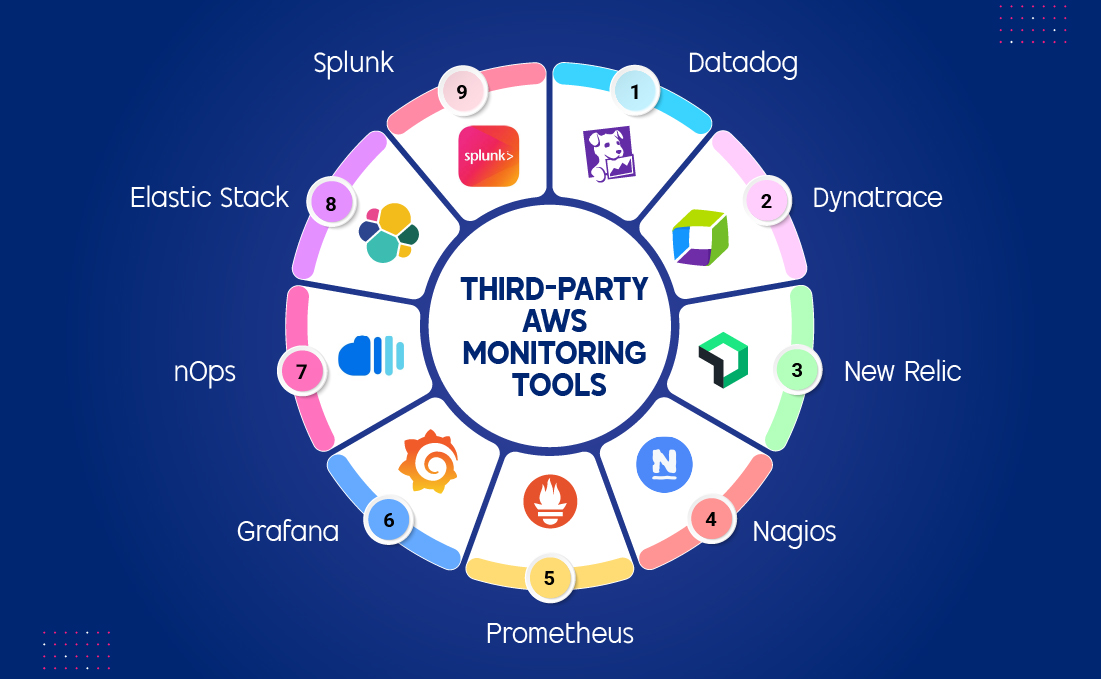
What are the Top 9 Third-Party AWS Monitoring Tools to Simplify Operations?
Third-party AWS cloud monitoring tools offer enhanced features like deeper insights, better visualization, and simplified troubleshooting compared to native AWS tools. They integrate with various AWS services, providing a comprehensive monitoring solution. Some used options are Datadog, Dynatrace, and New Relic. These software tools enhance effectiveness and ensure system reliability by leveraging capabilities and automation features.
1. Datadog: Your Comprehensive Monitoring Solution
Datadog is a third-party monitoring tool that provides rich functionality for managing your resources in the AWS cloud. While native AWS tools may offer similar functionalities, Datadog goes beyond this, offering more significant value because of its better ability to monitor application performance, better visualization of data, and easier means of investigating issues in hybrid and multi-cloud environments.
Key Features:
- Full-Stack Visibility: Monitor every layer of your environment, from servers and databases to containers and APIs.
- Seamless Integration: Integrate smoothly with AWS services like EC2, Lambda, and CloudWatch for end-to-end visibility.
- Real-Time Dashboards: Get real-time, customizable dashboards that make complex data easy to understand.
- Proactive Alerts: Automate alerts and anomaly detection to identify and resolve issues before they impact users.
Benefits:
- Boost team efficiency with a single dashboard for your entire cloud stack.
- Reduce downtime by catching and fixing issues before they escalate.
- Improve user experience with faster, data-backed performance tuning.
- Make smarter decisions with real-time analytics and visual insights.
Use Cases:
- Track and resolve production errors with distributed tracing and APM.
- Monitor Kubernetes clusters and AWS Step Functions in real time.
- Centralize logs from AWS, containers, and third-party SaaS for incident response.
- Security SIEM monitoring for cloud infrastructure and user activity.
- Integrate performance metrics into CI/CD release pipelines to detect issues early.
By utilizing Datadog within your operations management strategies for AWS-based applications, you can enhance efficiency levels, reduce the likelihood of downtime, and ensure availability at all times.
Dynatrace is another third-party monitoring tool that incorporates deep functionalities to help you monitor the AWS environment. It provides a complete solution for managing and analyzing your applications’ performance.
Key Features:
- AI-powered observability: Leverage AI to identify and diagnose performance issues automatically.
- Full-stack monitoring: Observe and measure the efficacy of every tier of your applications.
- Integration with AWS services: This tool seamlessly integrates with many AWS services.
Benefits:
- Save time with AI that automatically identifies and resolves root causes.
- Improve collaboration between DevOps and IT teams with shared insights.
- Enhance reliability by predicting issues before they disrupt performance.
- Accelerate innovation through clear, data-driven visibility.
Use Cases:
- Intelligent observability: Get a better understanding of what your application is doing.
- Automated root cause analysis: Use the tools that help to identify the key drivers of poor performance levels.
- Predictive analytics: Many problems hindering effective teamwork can be foreseen, and solutions should be sought in advance.
Dynatrace can help enhance operational productivity, diminish unavailability time, and guarantee that your applications hosted within AWS are performing at their best.
New Relic is yet another third-party tool for monitoring the AWS environment. It offers additional enhanced functionality to manage your resources, enabling you to have an effective tool for analyzing and improving application functionality.
Key Features:
- Cloud-native Observability: Built for modern applications and the cloud environment.
- Full-stack Monitoring: Track and analyze the performance of your entire application stack.
- Integration with AWS Services: Integrate seamlessly with other AWS services.
Benefits:
- Simplify monitoring with a unified platform for developers and ops teams.
- Quickly spot and fix issues at the code or infrastructure level.
- Enhance application reliability with data-backed decisions.
- Reduce troubleshooting time and maintain a smooth-running AWS environment.
Use Cases:
- Monitoring Kubernetes clusters with Amazon EKS integrations.
- Cloud-native development performance tracking for AWS Lambda.
- Batch workload optimization and automation.
- Multi-region and multi-service health monitoring for AWS.
- Application modernization insights, migration tracking, and resource reallocation.
By incorporating New Relic into your programs, you can ensure efficient operation and minimal downtime for your AWS-based applications.
4. Nagios: Your Reliable Infrastructure Monitoring Solution
Nagios is one of the most widely used open-source event monitoring systems. It provides a comprehensive suite for managing your entire environment, offering a robust and versatile means to monitor your servers, switches, applications, and network services. Nagios has emerged as one of the most preferred AWS observability tools among many.
Key Features:
- Flexible Monitoring: You can supervise multiple aspects of the IT infrastructure components, including servers, networks, applications, and databases.
- Customizable Alerts: Use dashboards to set up specific incidents to be informed of them.
- Service Discovery: Automatically discover and monitor new services.
- Escalation Policies: Implement complex escalation policies for alerts.
- Reporting: Generate detailed reports on your monitoring data.
Benefits:
- Comprehensive visibility over AWS EC2, S3, networks, and more.
- Proactive alerts for outages, threats, and performance degradation.
- Cost optimization by identifying underutilized resources.
- Flexible, scalable architecture supporting large AWS environments.
- Enhanced security via detailed access and error monitoring.
Use Cases:
- Centralized AWS server, database, and bucket monitoring for uptime.
- Detecting unauthorized access attempts to AWS resources.
- Automated incident response via AWS Lambda integrations.
- Real-time alerts for critical metrics (CPU, memory, latency).
- Hybrid monitoring for on-prem, data center, and AWS infrastructure.
5. Prometheus: Your Trusted Solution for Scalable Cloud Monitoring
Prometheus is an open-source monitoring and alerting toolkit developed initially at SoundCloud and now part of the Cloud Native Computing Foundation (CNCF). It collects and stores metrics as time-series data, allowing you to analyze trends over time and detect anomalies before they impact users. This helps you to ensure reliability, scalability, and real-time monitoring of applications and infrastructure.
Key Features:
- Time-Series Data Model: Stores metrics as key-value pairs with timestamps.
- Powerful Query Language (PromQL): Enables dynamic data exploration and alert conditions.
- Pull-Based Data Collection: Prometheus scrapes metrics from endpoints, rather than relying on push-based systems.
- Service Discovery: Automatically detects new services in dynamic environments, such as Kubernetes.
- Integrated Alert Manager: Sends notifications through Slack, PagerDuty, email, and other channels.
Benefits:
- Unified visualization layer across diverse data sources.
- Highly flexible and extensible through plugins and integrations.
- Intuitive UI for quick insights and decision-making.
- Supports real-time monitoring for DevOps, SREs, and data teams.
Use Cases:
- Visualizing Prometheus metrics for infrastructure and application monitoring.
- Business and operational dashboards for real-time analytics.
- Incident management and root-cause analysis during outages.
- Cross-environment observability in hybrid or multi-cloud setups.
6. Grafana: Your Visualization Powerhouse for Smarter Monitoring
Grafana is an open-source analytics and visualization platform that enables teams to visualize time-series data collected from Prometheus, AWS CloudWatch, Elasticsearch, and other sources. It turns raw metrics into interactive dashboards that make it easier to understand application health and performance trends.
Key Features:
- Multi-Source Data Integration: Supports Prometheus, InfluxDB, CloudWatch, Elasticsearch, and other data sources.
- Dynamic Dashboards: Offers customizable charts, graphs, and panels.
- Alerting System: Enables real-time alerts with notifications across multiple platforms.
- Role-Based Access Control (RBAC): Ensures secure collaboration within teams.
- Templating & Variables: Allows dynamic dashboards that update automatically based on data queries.
Benefits:
- Highly flexible and extensible through plugins and integrations.
- Provides an intuitive UI for quick insights and decision-making.
- Supports real-time monitoring for DevOps, SREs, and data teams.
Use Cases:
- Visualizing EC2, RDS, Lambda, and EKS metrics on pre-built dashboards.
- Real-time incident response with unified AWS performance panels.
- Monitoring hybrid environments by consolidating data across cloud and on-prem.
- Custom business KPI dashboards for stakeholders.
- Alert rule configuration and notification routing for AWS workloads.
Note: Prometheus and Grafana form a powerful duo for cloud monitoring. Prometheus handles metrics collection and storage, while Grafana transforms that data into clear, visual insights for seamless performance analysis.
7. nOps: Your Smart Assistant for Cost Control and Cloud Governance
nOps is a cloud management and cost optimization platform built for AWS environments. It helps DevOps teams, FinOps practitioners, and engineering leaders monitor cloud usage, automate governance, and optimize costs in real-time. This helps you to ensure compliance with AWS Well-Architected best practices.
Key Features:
- Automated Cost Optimization: Identifies idle resources, right-sizes workloads, and highlights savings opportunities.
- Change Tracking: Monitors infrastructure changes to prevent misconfigurations and ensure optimal system performance.
- Well-Architected Tool Integration: Continuously evaluates workloads against best practices.
- Automated Tagging & Governance: Ensures resource tagging consistency for accurate reporting.
- Multi-Account Management: Centralizes visibility across all AWS accounts.
Benefits:
- Reduces cloud costs without manual intervention.
- Improves operational visibility with detailed usage analytics.
- Helps maintain compliance with AWS standards.
- Accelerates cloud audits and cost reviews.
Use Cases:
- Continuous Well-Architected Review and automated report generation for AWS.
- Detecting and eliminating unused cloud resources to reduce expenditure.
- Real-time security and compliance monitoring throughout DevSecOps stacks.
- Integrating nOps into migration and re-platforming workflows for optimization.
- Scaling cloud resource scheduling and auto-scaling for platform teams.
8. Elastic Stack: Your Central Hub for Unified Cloud Monitoring
Elastic Stack, commonly known as ELK, is an open-source suite for searching, analyzing, and visualizing large volumes of machine data in real time. It combines Elasticsearch (a search and analytics engine), Logstash (a data processing pipeline), and Kibana (a visualization layer), enabling you to create a complete observability and analytics solution.
Key Features:
- End-to-End Data Pipeline: Collects, stores, and visualizes logs and metrics from anywhere.
- Real-Time Search & Analytics: Elasticsearch provides lightning-fast search and indexing capabilities.
- Scalable Architecture: Handles massive data volumes efficiently.
- Rich Visualization Tools: Kibana enables the creation of dashboards, charts, and drill-down analytics for enhanced data visualization.
- Security & Access Control: Offers encryption, role-based access, and audit logging.
Benefits:
- Complete visibility into logs, metrics, and application performance.
- Highly scalable and extensible, with support for plugins and integrations.
- Enables your team to troubleshoot quickly with centralized logging.
- Cost-effective and open-source alternative to commercial AWS observability tools.
- Scales effortlessly from small setups to enterprise deployments.
Use Cases:
- Centralized logging and application monitoring.
- Security analytics and incident response.
- Infrastructure and performance optimization.
- Business intelligence and trend analysis from raw event data.
Splunk is a leading data analytics platform designed to monitor, search, and analyze large volumes of machine-generated data. It helps you to turn raw data from systems, sensors, and applications into actionable insights to detect issues, maintain uptime, and enhance overall security. In short, Splunk enables you to stay proactive, data-driven, and resilient in your operations.
Key Features:
- Smart Search Language (SPL): Enables advanced queries and pattern recognition.
- AI & Machine Learning: Uses machine learning for anomaly detection and predictive analytics.
- Unified Data Collection: Collects logs, metrics, and traces from any source.
- Powerful Dashboards: Builds rich visualizations and reports that make trends obvious.
- Enterprise-Grade Security: Protects sensitive data with encryption and access controls.
Benefits:
- Enterprise-grade monitoring and analytics for AWS infrastructure.
- Real-time security posture visibility and incident response.
- Flexible, scalable log collection and operational management.
- Built-in machine learning for anomaly detection and threat identification.
- Integrates with AWS and OT environments for end-to-end visibility.
Use Cases:
- Security event monitoring across multiple AWS accounts.
- Operational metrics tracking for EC2, S3, RDS, and Lambda.
- Compliance reporting for HIPAA, PCI-DSS, and GDPR requirements.
- DevOps pipeline performance analytics and troubleshooting.
- Business analytics on cloud data for improved customer and system insights.
How To Choose the Right AWS Monitoring Tool?
Selecting the AWS monitoring tool depends on various aspects, such as user-friendly interface options, integration features, scalability potential, and pricing considerations.
1. Ease of Use
It is essential to ensure that your tool offers an intuitive interface and requires minimal setup. A user-friendly design is crucial. Your tool should have a user-friendly interface and require minimal setup. Native AWS cloud monitoring tools, such as Amazon CloudWatch, smoothly blend with AWS offerings and are easy to use for individuals familiar with the AWS environment. On the other hand, third-party tools may require setup but provide enhanced capabilities and increased adaptability.
2. Integration
Native tools such as AWS CloudWatch and AWS X-Ray are deeply integrated with AWS services, simplifying data aggregation across platforms. However, third-party tools like Datadog or Prometheus offer broader integration across multi-cloud or hybrid environments, making them more versatile in complex setups.
3. Scalability
It is a crucial aspect that should not be overlooked. While CloudWatch scales easily with AWS, third-party tools often offer more flexible scaling options, catering to both small and large enterprises with diverse monitoring needs.
4. Cost
Native tools are often cost-effective at smaller scales, especially within the AWS free tier. As your monitoring needs grow, third-party tools may offer better cost predictability and tailored pricing models, particularly for large enterprises.
AWS-native services, like CloudWatch, offer cost-effective monitoring at small scales, while third-party platforms often provide customizable pricing options for larger setups. Key AWS cost optimization strategies include leveraging auto-scaling to avoid over-provisioning and setting alarms to prevent resource waste.
If you find it challenging to find the right AWS monitoring tools for your business, you can always rely on our AWS consulting services to help you resolve the dilemma.
How Bacancy Can Help You Monitor Smarter and Scale Faster on AWS
As cloud environments become more dynamic and distributed, effective monitoring is no longer just a technical need; it’s a business necessity. The right AWS monitoring tools help you stay ahead by preventing downtime, controlling costs, and keeping performance on track. But choosing and implementing that tool effectively often requires expert guidance.
That’s where our experienced team can help. We provide AWS managed services to help you set up customized monitoring and observability solutions tailored to your business goals. From integrating advanced tools like Datadog, Dynatrace, and nOps to optimizing CloudWatch dashboards and automation workflows, we help you build a monitoring strategy that’s proactive, cost-efficient, and future-ready.
With Bacancy, you don’t just get tool recommendations; you will get a cloud partner who ensures your AWS environment runs smoothly, securely, and at peak performance.
Frequently Asked Questions (FAQs)
This question discusses AWS monitoring solutions, like Amazon CloudWatch and AWS X-Ray, along with tools like Datadog, which provide readers with insights into their choices.
Exploring the differences between built-in tools and options from sources is a popular search trend these days. This allows individuals to assess the advantages and disadvantages regarding scalability, cost-effectiveness, and user-friendliness.
Covering best practices for proactive monitoring, including automated responses and custom alerts, gives valuable insights to users looking for performance optimization strategies.
Many businesses search for ways to reduce cloud expenses, making cost optimization through effective monitoring a relevant and highly searched question.
AWS X-Ray is a powerful tool for understanding the behavior of microservices and distributed applications. By tracing requests as they flow through your application, X-Ray helps you identify performance bottlenecks, errors, and dependencies. This information is crucial for debugging issues, optimizing performance, and ensuring the overall health of your microservices architecture.
For native AWS monitoring tools, AWS Cost Explorer provides detailed cost and usage reports, while CloudWatch monitors resource usage and can trigger alerts when usage affects spending. Among third-party monitoring tools for AWS, Datadog and Splunk help track costs alongside performance metrics, offering insights to optimize resource utilization and control cloud spending effectively.