Quick Summary
Multi tenancy in Kubernetes helps you run multiple teams, customers, or apps on a shared cluster while keeping each one isolated or secure. This blog explains the different Kubernetes multi tenancy models, when to use which one, and the key tools and strategies to consider.
Table of Contents
Introduction
Is your Kubernetes cluster becoming hard to manage as more teams and services come on board? As teams grow and new services are added, workloads start overlapping, access rules get complicated, and isolation can break down, sometimes without you noticing. These are some of the most common Kubernetes challenges teams run into as they scale.
This is exactly why Kubernetes multi tenancy matters. It lets you run multiple teams, applications, or customers on shared cluster infrastructure while keeping each workload isolated, secure, and performant.
In this guide, you will learn the three main Kubernetes multi-tenancy models, how they differ in isolation, cost, and complexity, how to pick the right approach for your environment, and the tools, RBAC strategies, network policies, and monitoring practices your team will need for successful implementation.
What Is Kubernetes Multi Tenancy and Why Does It Matter?
Kubernetes multi tenancy is a setup where multiple tenants, teams, customers, or applications share the same cluster while staying isolated from one another. The core idea is simple: instead of spinning up a separate cluster for every team or workload, you share the infrastructure and enforce boundaries through configuration.
Those boundaries can look very different depending on what your requirement is. Some teams get by with logical separation through namespaces. Others require fully dedicated clusters per tenant. Most production environments land somewhere in between, trading cost against complexity against isolation depth.
The reason multi-tenancy in Kubernetes is getting more attention in 2026 is simpler. Clusters are bigger, teams are larger, and the cost of running dedicated infrastructure per team is harder to predict.
The Three Kubernetes Multi-Tenancy Models Explained
There’s no universally correct approach to Kubernetes multi tenancy. The right model depends on who your tenants are, what you owe them contractually, and how much operational overhead your platform team can absorb. Here’s a breakdown of all three models, covering what they offer, where they fall short, and when to use each one.
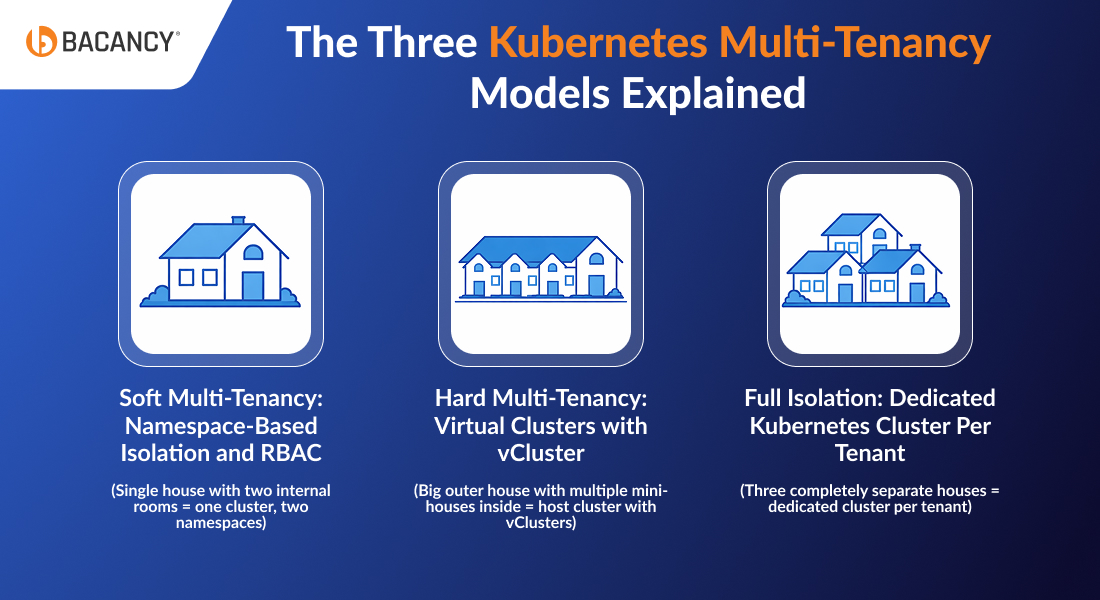
1. Soft Multi-Tenancy: Namespace-Based Isolation and RBAC
Namespace-based isolation is the entry point for most teams exploring multi tenancy in Kubernetes. Each tenant gets one or more namespaces, and isolation is enforced through RBAC policies, NetworkPolicies, and ResourceQuotas applied at the namespace level.
The control plane is shared. The API server is shared. The nodes are shared. What namespace-based tenancy provides is logical separation, not physical isolation.
Best for:
Internal engineering teams that are already trusted. Dev, staging, and QA environments. Feature teams within a single engineering organization. Scenarios where all tenants are employees or contractors, not external customers.
Limitations to understand:
- A misconfigured ClusterRole can grant a tenant access across namespace boundaries.
- CRDs are cluster-scoped; two teams installing conflicting versions of the same CRD (say, different cert-manager releases) break each other’s controllers.
- There’s no API server isolation; a tenant generating excessive API traffic affects everyone on the same control plane.
- The blast radius of a control plane issue or a critical misconfiguration is total: every tenant is affected simultaneously.
2. Hard Multi-Tenancy: Virtual Clusters with vCluster
vCluster gives each tenant a virtual Kubernetes control plane, a dedicated API server, controller manager, and etcd instance, running as pods inside a namespace on a shared host cluster. From inside the virtual cluster, everything looks and behaves like a real, dedicated cluster. The tenant has full API access, their own CRD registry, their own RBAC structure, and no visibility into the host cluster or other tenants.
By default, workloads from all vClusters are scheduled onto the same underlying host nodes. That behavior can be changed with node affinity, taints, and dedicated node pools, but it requires explicit configuration.
Best for:
SaaS platforms serving external customers who need API-level access. Environments where CRD conflicts between teams are a real operational problem. Organizations that need stronger isolation than namespaces provide, but aren’t ready to manage fully dedicated clusters per tenant.
Limitations to understand:
- vCluster adds an operational layer: you’re now managing virtual control planes, monitoring them, and handling upgrades at two levels instead of one.
- Node sharing is the default; customers with regulatory requirements around data residency or compute isolation need dedicated node pools, which changes the cost math.
- At scale, managing 50+ virtual clusters without a fleet management layer (Rancher Fleet, ArgoCD ApplicationSets, or Cluster API) becomes a significant operational burden.
3. Full Isolation: Dedicated Kubernetes Cluster Per Tenant
Each tenant gets a completely separate cluster: its own control plane, nodes, networking stack, and storage. There is no sharing at any layer. A security incident or outage in one tenant’s cluster has zero impact on any other.
Best for:
HIPAA-regulated healthcare workloads that need physical compute isolation to satisfy compliance requirements. PCI-DSS-scoped environments handling cardholder data. GPU-intensive ML training jobs where one tenant’s resource usage would degrade performance for others. Enterprise customers who have contractual requirements for dedicated infrastructure.
Limitations to understand:
- Operational overhead scales linearly with tenant count: every cluster needs its own monitoring, upgrades, and maintenance.
- Cost per tenant is significantly higher than either namespace-based or virtual cluster approaches.
- Scaling to dozens of customers requires serious automation (Cluster API, Crossplane, or a managed Kubernetes fleet tool); without it, cluster provisioning and lifecycle management become unmanageable.
A Quick Comparison of the 3 Kubernetes Multi Tenancy Models
After having discussed the details of the three Kubernetes multi tenancy models, let us now have a quick overview of the differences between the three of them.
| Aspect | Namespace-Based
| Virtual Clusters
| Dedicated Clusters
|
|---|
| Isolation Level
| Logical Only
| Control Plane Isolated
| Full Physical Isolation
|
| Control Plane
| Shared
| Per-tenant virtual
| Separate per-tenant
|
| CRD Support
| Shared
| Per-tenant
| Per-tenant
|
| Node Sharing
| Yes
| Yes
| No
|
| Setup Complexity
| Low
| Medium
| High
|
| Security & Access
| Relies on RBAC, quotas, and network policies
| Better isolation at the API level
| Strongest security and isolation
|
| Cost
| Lowest
| Moderate
| Highest
|
| Best For
| Trusted internal teams
| SaaS platforms and untrusted tenants
| HIPAA, PCI-DSS, and GPU workloads
|
Which Kubernetes Multi Tenancy Model Should You Choose?
The isolation model you choose should follow directly from two inputs: your tenant trust profile and your compliance obligations. Everything else, cost, operational complexity, and tooling, is a consequence of those two decisions.
Decision Criteria by Trust Level and Compliance Requirement
Start with three questions:
- Who are your tenants?
Internal teams in the same engineering org share an implicit trust relationship. External customers do not. If your tenants are internal employees or contractors, namespace-based isolation with well-configured RBAC and NetworkPolicies is a good starting point. If your tenants are external customers with API access to the cluster, namespace isolation is not sufficient; you need vCluster at a minimum.
- What compliance obligations apply?
HIPAA and PCI-DSS both have requirements around data isolation and access control that are difficult to defend with shared nodes. A penetration test or a compliance audit will surface the gap between logically isolated namespaces and physically separated compute. For workloads in regulated verticals, dedicated node pools (configured for vCluster) or fully dedicated clusters are the architecturally right choice, regardless of the cost impact.
- How many tenants do you have, and how fast is that growing?
Namespace isolation manages dozens of tenants without significant operational overhead. vCluster can scale to hundreds of virtual clusters with reasonable automation. Dedicated clusters per tenant work until your ops team’s capacity to manage cluster lifecycles becomes the bottleneck, at which point fleet automation tools become mandatory.
When to Use a Hybrid Kubernetes Multi Tenancy Approach
Many production environments mix the models, and that’s the right call, not a compromise.
A common pattern at scale: namespace-based isolation for internal development teams, vCluster for external SaaS customers or compliance-sensitive internal workloads, and dedicated clusters for the handful of customers in regulated verticals. The models aren’t mutually exclusive. The key is aligning the isolation model to the trust level and compliance exposure of each tenant category, not applying one model uniformly across every workload.
Not sure which multi-tenancy model fits your Kubernetes environment?
Hire DevOps developers from Bacancy with proven Kubernetes expertise to assess your infrastructure and build a tailored Kubernetes multi tenancy strategy that balances performance, security, and cost.
Key Considerations and Strategies for Multi Tenancy in Kubernetes
Choosing the right architecture model is the first decision. What follows is a set of configuration areas that determine whether that architecture actually works in production. These aren’t optional enhancements; they are the areas where Kubernetes multi-tenancy implementations most commonly fall short.
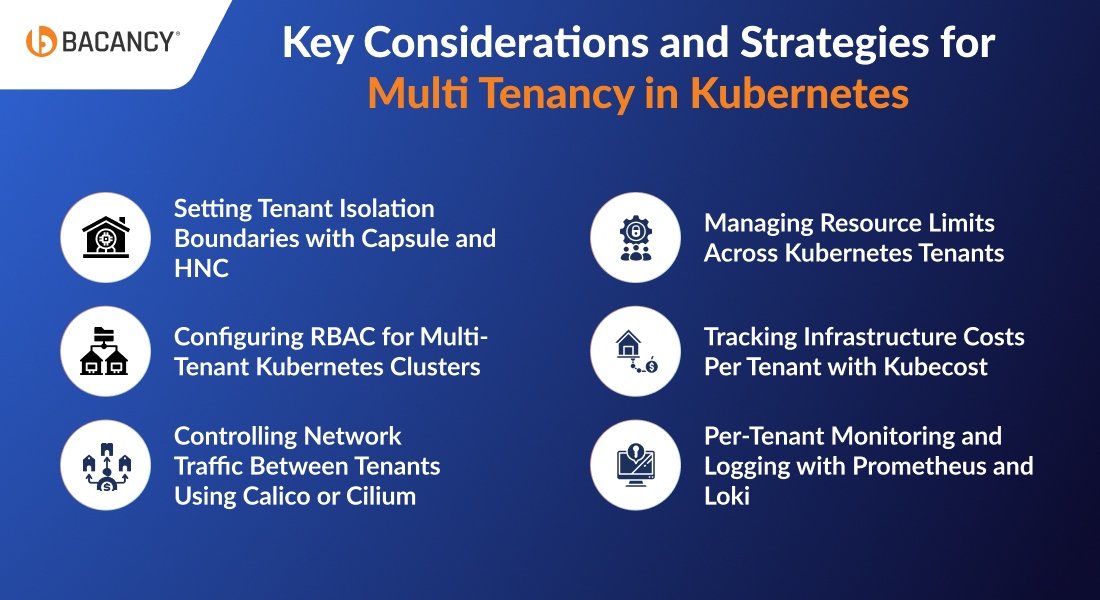
1. Setting Tenant Isolation Boundaries with Capsule and HNC
Namespaces are necessary but not sufficient for real tenant isolation. Without additional tooling, there’s no native object in Kubernetes that groups multiple namespaces under a single policy umbrella, enforces consistent quotas across a tenant’s namespace set, or prevents a tenant from creating resources that affect the cluster-wide scope.
Capsule fills this gap. It introduces a Tenant custom resource that wraps multiple namespaces under shared policies: RBAC rules, NetworkPolicies, resource quotas, and ingress restrictions applied consistently across all namespaces belonging to that tenant. It prevents tenant administrators from creating ClusterRoles or ClusterRoleBindings, restricting them to namespace-scoped permissions only.
Hierarchical Namespace Controller (HNC), developed by the Kubernetes SIG-Multi-Tenancy working group, handles the namespace hierarchy problem. It reduces the manual overhead of maintaining consistent policies across a tenant’s namespace tree as it grows.
Both tools are additive; they work on top of standard Kubernetes primitives and don’t require architectural changes to your existing cluster.
2. Configuring RBAC for Multi-Tenant Kubernetes Clusters
The most common Kubernetes RBAC mistake in multi-tenancy setups is assigning ClusterRoles where namespace-scoped Roles are appropriate. A service account with a ClusterRole that grants get, list, and watch on Secrets has those permissions across the entire cluster, meaning every namespace, not just the one where the service account lives.
The baseline rule: use namespace-scoped Role and RoleBinding objects for tenant workloads. Reserve ClusterRoles for platform operators only. Define a standard tenant role set that maps to actual usage: read-only for developers reviewing logs and pod status, deploy permissions for CI/CD service accounts, and namespace admin for team leads.
Enforce this structurally with an admission webhook. Kyverno can block tenants from creating ClusterRoles or ClusterRoleBindings entirely, and its policies are written in YAML, which most platform engineering teams find significantly easier to maintain than Rego (the policy language used by OPA / Gatekeeper). The practical difference: Kyverno policies get written, reviewed, and deployed. Gatekeeper policies tend to sit in a backlog because no one wants to learn Rego to maintain them.
Controlling Network Traffic Between Tenants Using Calico or Cilium
By default, Kubernetes allows all pod-to-pod communication across the entire cluster, including across namespace boundaries. A compromised pod in one tenant’s namespace can probe services in any other namespace freely. NetworkPolicies fix this, but only if your CNI plugin actually enforces them.
This is a gap that causes serious security issues: Flannel does not enforce NetworkPolicies. Teams running Flannel as their CNI write NetworkPolicies that are syntactically valid, get accepted by the Kubernetes API, and are silently ignored. The isolation they think they have doesn’t exist. Calico, Cilium, and Antrea all enforce NetworkPolicies correctly. Verify your CNI before writing a single policy.
Now, with the right CNI in place, apply a default-deny policy for all ingress and egress within each tenant namespace, then explicitly allow only the traffic paths that are required, internal service-to-service communication, access to shared infrastructure, and approved egress to external endpoints.
Cilium goes further than standard NetworkPolicies. It supports L7-aware network policies (enforcing rules at the HTTP or gRPC layer, not just IP and port), and it ships with Hubble, a built-in network observability layer that makes debugging tenant traffic issues significantly easier than inspecting raw iptables rules.
4. Managing Resource Limits Across Kubernetes Tenants
Without resource limits, a tenant running a batch job or a workload with a memory leak can consume the majority of node capacity and trigger evictions across the cluster. This is the noisy neighbor problem, and it’s the most common operational complaint from teams running multi-tenant Kubernetes setups.
The fix requires enforcement at three levels:
1. ResourceQuotas cap total CPU and memory consumption per namespace (or per tenant namespace set when using Capsule). You can configure them based on actual usage patterns to ensure teams consistently stay within defined limits. However, setting quotas too high can fail to prevent noisy neighbor issues, while setting them too low can restrict workloads from operating effectively.
Read our blog for detailed information about how to configure Kubernetes Resource Quotas.
2. LimitRanges define minimum and maximum resource requests at the individual pod level. They also set defaults for pods that don’t specify resource requests, which eliminates the edge case of an unconstrained pod slipping through.
3. Admission webhooks enforce the requirement that all pods must define both requests and limits before they are accepted by the API server. Kyverno’s require-pod-resources policy handles this in a few lines of YAML. Without this enforcement, developers skip resource specifications when they’re in a hurry, and the gaps accumulate.
Tracking Infrastructure Costs Per Tenant with Kubecost
Shared infrastructure makes cost attribution genuinely difficult. A node doesn’t know which namespace consumed which CPU milliseconds that mapping requires, tooling layered on top of Kubernetes metrics.
Kubecost is the most widely deployed solution for this. It maps resource usage to namespaces, produces per-tenant cost breakdowns, and integrates with AWS Cost Explorer, GCP Billing, and Azure Cost Management for full-stack visibility.
The most important operational note: implement Kubecost before onboarding your first tenant, not after you’ve had a budget conversation with finance. Retroactive cost attribution across a year of shared cluster history is a painful and often inaccurate process.
And beyond attribution, Kubecost’s usage data feeds directly into broader Kubernetes cost optimization decisions, right-sizing nodes, identifying overprovisioned namespaces, and cutting spend without affecting workload performance.
Per-Tenant Monitoring and Logging with Prometheus and Loki
A single Prometheus and Grafana deployment sees the entire cluster. That’s what platform operators need, and it’s precisely what tenants shouldn’t have access to. If you have not reviewed Kubernetes monitoring tools yet, this is a good time, as unscoped dashboards expose cross-tenant metrics, and in a regulated environment, that’s a compliance gap.
For metrics isolation, configure Prometheus with per-namespace scrape configs and use Grafana’s data source permissions to restrict dashboard access to namespace-scoped views per tenant.
For logging, Loki with namespace-based label filtering keeps log streams separated by tenant without running separate Loki instances. If your organization is on Elastic, index-level permissions restrict each tenant to their own log stream.
How Bacancy Helps Teams Implement Kubernetes Multi-Tenancy?
Kubernetes multi-tenancy requires a well-planned approach that aligns access control, networking, resource management, and observability. Without this alignment, teams often face challenges with security gaps, resource conflicts, and limited visibility across tenants.
At Bacancy, our DevOps experts design and implement secure multi-tenant environments across EKS, GKE, and AKS, and ensure each layer works together seamlessly, from access control to monitoring.
Through our Kubernetes consulting services, we help you assess your current setup, identify gaps, and define a clear implementation roadmap tailored to your workloads and scaling needs. With a hands-on approach, we help you:
- Choose the right multi-tenancy model that balances isolation, cost, and operational simplicity.
- Implement structured RBAC policies to ensure clear and controlled access for every tenant.
- Establish network-level isolation to prevent cross-tenant interference while maintaining required connectivity.
- Optimize resource usage with quotas, limits, and autoscaling strategies for predictable performance and cost control.
- Enable per-tenant observability with clear monitoring, logging, and ownership visibility.
- Enforce governance and compliance using policy-driven controls that scale with your environment.
- Streamline tenant onboarding with automation and reusable configurations.
Adopting the right approach to multi-tenancy in Kubernetes helps you enhance isolation, streamline operations, and rapidly onboard tenants without sacrificing control or performance.
Frequently Asked Questions (FAQs)
Fundamentals
Kubernetes multi tenancy lets you run multiple teams, applications, or customers on the same cluster while keeping their workloads isolated and secure.
You should consider it when you need to support multiple teams or customers on shared infrastructure while maintaining proper isolation and control.
Types and Models
In a single-tenant setup, each tenant gets their own dedicated Kubernetes cluster. On the other side, in multi-tenancy, multiple tenants share the same cluster, but their workloads are separated logically through namespaces, quotas, and policies.
In Kubernetes, Soft multi-tenancy uses shared clusters with namespaces, while hard multi-tenancy gives you stronger isolation using virtual clusters.