Quick Summary
In this blog, we will discuss what cloud migration automation is, why migrations fail when done manually, and how it can help eliminate downtime, errors, and inconsistency. It also explains the key steps involved and what teams can expect from a more controlled and repeatable migration process.
Table of Contents
Introduction
Cloud migration doesn’t fail because teams lack tools. It fails because too much of the process is still manual.
You’re dealing with applications, dependencies, configurations, and data movements between environments. And often, this is done while the production environment is still running. At this scale, even the smallest mistake can compound very quickly.
According to DataStackHub’s 2025–2026 analysis, 82% of cloud misconfigurations trace back to human error, not platform failures. At scale, that’s not a people problem. It’s a process problem.
That’s where cloud migration automation comes in. It turns migration from a one time, risky project into a more structured and repeatable process using pipelines, Infrastructure as Code (IaC), and controlled execution.
For CTOs and engineering leaders, the goal isn’t just to move workloads. It’s to move them without breaking systems, timelines, or team bandwidth.
In this guide, we’ll break down what cloud migration automation actually looks like in practice, why it matters for modern IT environments, and how to implement it step by step.
Manual vs Cloud Migration Automation
By now, the problem with manual migration should be clear. But the difference becomes more obvious when you compare how both approaches perform.
| Factor | Manual Cloud Migration
| Cloud Migration Automation
|
|---|
| Execution Speed
| Slow, step-by-step
| 40–60% faster with pipelines
|
| Error Rate
| High (human-dependent)
| Low (scripted execution) |
| Downtime Risk
| High during cutover
| Near-zero with scripted cutover
|
| Scalability
| Limited
| Handles large workloads easily
|
| Repeatability
| None
| Fully repeatable
|
| Operational Overhead
| High
| Reduced significantly
|
Pro Tip: Manual migration works for small, simple workloads. But as complexity grows, automated cloud migration isn’t just faster, it becomes the only way to maintain consistency and control.
Where Manual Migrations Break Down, and How Automation Fixes It
Migrations don’t fail all at once. They usually break down step by step through a series of small, predictable issues.
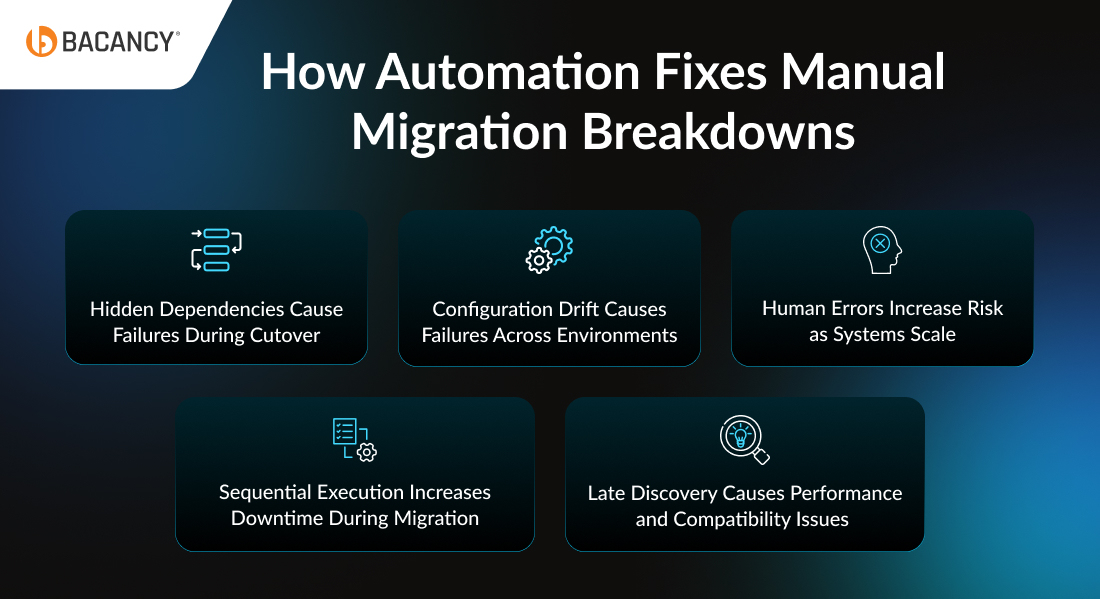
Hidden Dependencies Cause Failures During Cutover
Manual migrations often uncover unexpected connections only during production cutover. Applications might depend on services or integrations that were missed earlier, which can lead to delays and downtime.
With automation, this gets handled upfront. Discovery and dependency mapping tools identify these connections early, so issues are sorted before anything goes live.
Configuration Drift Causes Failures Across Environments
When environments like dev, staging, and prod are set up manually, small differences start to creep in. A missing variable or even a version mismatch can end up breaking production.
With automation through Infrastructure as Code, everything is created from the same templates, which makes any kind of drift easy to spot in version control and helps avoid last minute surprises.
Human Errors Increase Risk as Systems Scale
Manual processes work for a few servers but fail at scale. Mistakes compound as more systems are moved, increasing risk and rework.
The automated process and scripts ensure that these repetitive tasks are handled in a uniform manner. This means that the engineers intervene only when something unexpected happens. This reduces errors for them and increases their available time to focus on critical tasks.
Sequential Execution Increases Downtime During Migration
Manual migrations are sequential and slow. One error can stall the entire process, leading to downtime.
Automated migration pipelines run steps reliably in sequence or parallel, with built in rollback paths, to deliver near zero downtime during cutover.
Late Discovery Causes Performance and Compatibility Issues
In manual migrations, issues often appear only after cutover, forcing reactive fixes.
Automation allows you to easily test and validate everything before cutover in a separate environment. This easily helps teams catch and fix issues early, so the migration runs more smoothly.
Key Components of Cloud Migration Automation
Cloud migration automation is not a single tool. It’s a set of practices applied across the migration lifecycle:
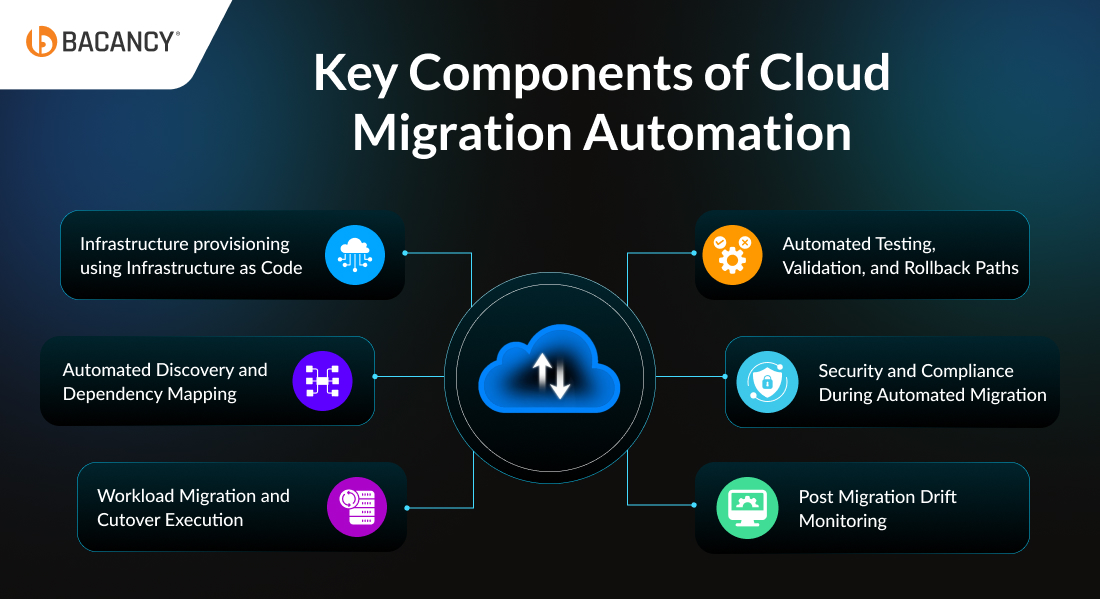
1. Infrastructure provisioning using Infrastructure as Code
Infrastructure as Code (IaC) means setting up your cloud environment using code instead of doing it manually. This covers servers, networks, security settings, roles, and storage.
Before starting the migration, your target environment should already be defined in this way. It keeps dev, staging, and production consistent, so you don’t run into unexpected issues later.
It also helps when things go wrong. Instead of fixing everything manually during a failure, you can quickly rebuild the environment and move on.
2. Automated Discovery and Dependency Mapping
Once the target environment is ready, the next step is to understand what you’re actually moving.
Automated discovery tools scan your current setup and map out applications, services, databases, and how they are connected.
This gives you a clear picture of your system. It helps you decide what should move first and what needs to be checked after each step.
If this step is skipped, teams end up relying on assumptions or old documentation. That’s when hidden dependencies start causing issues during cutover.
3. Workload Migration and Cutover Execution
Once you understand your systems and dependencies, the next step is moving them.
Automation tools handle data transfer, workload replication, and cutover in a controlled way. Instead of manually moving systems and switching traffic, pipelines manage the sequence and timing.
This reduces downtime and ensures each step happens in the right order. Predefined rollback mechanisms are also built in, so if anything fails during cutover, traffic can be safely shifted back without disrupting users.
4. Automated Testing, Validation, and Rollback Paths
Before each cutover, teams usually run a set of checks to confirm things are fine. Basic stuff like connectivity, performance, and whether the application is running the way it should.
You also need a rollback plan. If something goes wrong, you should be able to go back to the last working setup without fixing things in a rush.
Without that safety net, even a small issue can turn into a stressful situation where teams are trying to fix things live. With it, the process feels a lot more controlled. You roll back, fix what’s wrong, and try again.
Once all of this is in place, the migration just becomes easier to handle. Each step supports the next, and you’re not relying on guesswork or last minute fixes anymore.
5. Security and Compliance During Automated Migration
Automation facilitates migration with speed. Security, however, should remain top of mind.
- Encrypt Everything: Make sure your data is always protected, whether it’s moving or stored somewhere. Instead of setting it up again and again, just define it once in your setup, so it applies everywhere.
- Identity and Access Management (IAM): Give only the access that’s actually needed. Don’t use full access or hardcode passwords; that usually creates problems later.
- Secure Your Pipeline: Your pipeline matters just as much as your infrastructure. Keep secrets safe, scan for issues, and run basic checks before anything goes live.
- Build Compliance Into the Process: Don’t leave compliance for later. Add things like GDPR or HIPAA rules from the start so everything stays aligned automatically.
- Keep Monitoring After Migration: Even after migration is done, keep an eye on things. Small changes can happen over time, and it’s better to catch them early before they cause issues.
6. Post Migration Drift Monitoring
Compliance isn’t something you check just once. Cloud setups keep changing all the time, and without keeping an eye on things, your environment slowly drifts from what you originally defined.
It’s usually not on purpose; maybe someone makes a quick console tweak, or a temporary fix is applied in production outside the pipeline. Over time, your live environment doesn’t match your IaC anymore, and you might only notice when an audit or issue pops up.
Tools like AWS Config keep checking your resources against the rules you set and alert you when something drifts. Azure Policy can even block changes that don’t follow the rules. Running Terraform plan regularly also shows differences between what’s declared and what’s actually running.
Drift monitoring is just one part of what happens after migration. For a full breakdown of post migration operations, see our guide on post-migration optimization.
Controlling Cloud Costs After Migration
Once cloud migration automation is complete, cost governance becomes the next priority.
Without structured cost management, cloud spend can grow quickly due to over provisioned resources, unused instances, or poor visibility.
To avoid this:
- Use resource tagging to track cost by team, service, or environment
- Continuously rightsize workloads based on usage
- Monitor cost per workload, not just total spend
- Set budget alerts and automated policies
Automation helps enforce cost controls through tagging, usage-based scaling, and budget policies built into your IaC and pipelines. This ensures cost management is consistent, not manual.
Read more in detail about Cloud Migration Costs
What Cloud Migration Automation Delivers in Production
Cloud migration becomes difficult when too many steps depend on manual effort and last minute decisions. This is where automation brings structure, consistency, and control to the process. Here is how cloud migration automation delivers in production.
Near-Zero Downtime With Scripted Cutover
Scripted cutovers follow the same sequence every time. DNS updates, traffic routing, health checks, and rollback triggers all run in order without manual intervention at each step. That consistency is what makes near-zero downtime possible.
Consistent, Repeatable Environments Across Dev, Staging, and Prod
When environments are created using IaC templates, “it works in staging but not in production” becomes easier to diagnose and fix. The environments are identical by design, and any differences are clearly tracked in version control.
This also makes it easier to scale after migration. Whether it’s a new region or another staging setup, environments can be provisioned reliably without starting from scratch.
Reduced Engineering Overhead During and After Migration
Manual migrations take up a lot of senior engineering time. Every configuration, dependency check, and validation step needs careful attention. Automation changes that. Instead of doing everything manually, engineers shift into a monitoring role.
The pipeline runs the process, and engineers step in only when something needs attention. This frees up time for more important work that actually needs human input.
The 7 Rs: Choosing Your Migration Strategy Before Automating Anything
Before you pick a tool or write a single line of IaC, you need to decide how each workload will be migrated. This is where the 7 Rs framework comes in, a model originally introduced by Gartner as 5 Rs and expanded by AWS into the current seven strategies.
| Strategy
| Description | Automation Potential
| Best For
|
|---|
| Rehost (Lift & Shift)
| Move apps as-is
| Highly automatable
| Quick, large-volume migrations
|
| Relocate
| Move entire virtualization platforms
| High automation
| VMware-heavy orgs
|
| Replatform
| Minor tweaks (self-managed DB → managed service)
| Partial automation
| Teams seeking cloud efficiency
|
| Repurchase | Replace apps with SaaS alternatives
| Data migration automatable
| Commodity apps like CRM
|
| Refactor / Re-architect
| Full redesign for cloud-native
| Partial pipelines help with deployment
| Legacy apps are limiting performance
|
| Retire
| Decommission apps
| None required
| Duplicate/low-usage systems
|
| Retain
| Keep on-prem temporarily
| N/A
| Compliance-heavy or latency-sensitive systems
|
Read more in detail on Cloud Migration Strategy
Cloud Migration Automation Tools: What They Do and Where They Fit
Here are five cloud migration automation tools that help automate key parts of cloud migration and where they fit best.
1. AWS Application Migration Service (MGN)
Moves your servers to AWS with minimal downtime using continuous block level replication. The cutover process is automated, so instead of long migration windows, you can switch over in minutes.
Best for: Teams handling large-scale lift-and-shift migrations to AWS
Pros:
- Quick cutover with minimal downtime
- Handles large migrations without much friction
- Cuts down a lot of manual effort
- Doesn’t disrupt running systems much
Cons:
- AWS-only, so not useful for multi-cloud setups
- Needs AWS know-how to set up properly
- Costs can climb with bigger workloads
2. Azure Migrate
Helps you figure out what to move and then actually move it to Azure. It comes with built-in assessment and dependency mapping, so you’re not going in blind when planning the migration.
Best for: Teams planning full migrations to Azure or working in hybrid setups
Pros:
- Good visibility across the entire migration process
- Works well in hybrid environments
- Dependency mapping is built in
- Free for assessments
Cons:
- Really designed for Azure, not much beyond that
- Can feel like overkill for smaller projects
- Limited outside the Azure ecosystem
Results depend heavily on how clean your existing setup/data is
3. Google Cloud Migrate (Migrate to Virtual Machines)
Moves workloads from on-prem or other clouds into Google Cloud with very little downtime. One useful feature is that you can run and test workloads in Google Cloud before fully committing to the cutover.
Best for: Teams moving workloads into Google Cloud, especially from on-prem or VMware environments
Pros:
- Let’s you test before making the final move
- Keeps downtime low
- Works with multiple source environments
- Solid option for VMware-based setups
Cons:
- Locked into Google Cloud as the destination
- Not as mature as AWS or Azure tooling
- Smaller ecosystem and fewer integrations
- Needs strong network connectivity to work smoothly
4. CloudEndure Migration
An AWS-owned tool that handles large-scale migrations through continuous replication. Your source systems stay live while data is replicated in the background until you’re ready to cut over.
Best for: Teams looking for a simple way to move a large number of servers into AWS
Pros:
- Continuous replication in the background
- Supports a wide range of source systems
- Fairly straightforward to set up
- Free for AWS migrations
Cons:
- Mostly AWS-focused
- Gradually being replaced by AWS MGN
- Lacks more advanced capabilities
- Not a great fit for multi-cloud strategies
A platform-agnostic tool that lets you move workloads across physical, virtual, and cloud environments with minimal downtime. It’s one of the more flexible options if your setup isn’t tied to a single cloud.
Best for: Teams dealing with mixed environments or multi-platform migrations
Pros:
- Works across different platforms and cloud providers
- Keeps downtime low during migration
- Supports both Windows and Linux
- Handles more complex environments well
Cons:
- Licensing can get expensive
- Setup isn’t always simple at scale
- Smaller community compared to AWS/Azure tools
- Interface feels a bit dated
Automated cloud migration requires more than just tools. It needs the right expertise to design and run these pipelines effectively.
CI/CD Integration: Connecting Migration to Your Deployment Pipelines
Cloud migration automation works best when it’s connected to your existing delivery pipeline. If your team already runs CI/CD pipelines for application deployments, your migration automation should be designed to connect to, not bypass, that infrastructure.
In practice, this means:
- IaC changes (Terraform, Pulumi) should go through pull request review and automated validation before being applied to any environment
- Migration pipeline executions should be logged and auditable in the same system as your application deployments
- Security scanning (IaC linting, secrets detection, container scanning) should run as pipeline stages, not as manual pre-flight checks
- Post-migration environments should be managed through the same GitOps or pipeline-based workflows your engineering teams already use
The goal is that after migration, the cloud environment does not become a manually-managed exception to your automation practices. It should slot into your existing delivery workflows from day one.
Why Automation is a Must For Multi-Cloud and Hybrid Migrations
Multi-cloud and hybrid migrations are where the gap between manual and automated approaches becomes most visible. Each environment has different APIs, different defaults, and different failure modes. Managing that manually means your team is constantly context-switching, and the surface area for errors grows with every cloud you add.
Automation addresses this directly:
- Consistent environment definitions: the same IaC templates provision infrastructure across AWS, Azure, GCP, and on-premises, reducing environment-specific surprises
- Early dependency resolution: automated discovery maps cross-cloud dependencies before migration begins, not during cutover
- Pipeline-managed sequencing: workloads move in a defined order that accounts for dependencies across environments
- Built-in compliance: security controls and compliance checks run as pipeline stages, enforced consistently regardless of which cloud is the destination.
When Cloud Migration Automation Is Worth It (And When It Isn't)
Cloud migration automation is not always the right call. It really comes down to how many servers you are moving, how complex the setup is, and whether you will need to do this again.
The Workload Scale That Justifies Automation Investment
Automation is most useful when you are dealing with large workloads, complex setups, and migrations you plan to run more than once. Here is when it is the right fit for you.
- Large workload size: Moving 30 or more servers manually takes too long and increases the chance of errors; automation gets it done faster and more cleanly
- Multiple environments: When you have dev, staging, and production, automation ensures consistency across all environments.
- Complex dependencies: If your app relies on multiple systems and integrations, automation helps make sure nothing gets left behind during the move.
- Repeat migrations planned: If you expect future migrations or expansions, automation saves time by reusing the same pipelines.
When Cloud Migration Automation May Not Be Worth It
In some cases, automation can add unnecessary complexity instead of solving problems.
- Small migrations: If you are moving 10 or fewer servers with a simple setup, doing it manually is usually quicker and easier than building out an automated process.
- Legacy systems with unknown dependencies: Older systems that lack proper documentation are tough to automate because you do not always know what is connected to what until something goes wrong.
- Highly coupled or outdated architectures: These systems usually need someone to go in and sort things out by hand before any automation tool can be applied without causing issues.
- One time migration with no repeat use: If you are only doing this once and have no plans to run it again, the time and effort spent setting up automation simply is not worth it.
How to Build a Cloud Migration Automation Strategy Step by Step
Here is how you can plan and automate cloud migration step by step without unnecessary risks or delays.
Step 1: Run a migration readiness assessment
Before any tooling decisions, conduct a structured assessment covering your current environment inventory, application dependency mapping, data classification, compliance requirements, and your team’s existing automation capability.
The output is a migration wave plan: a sequenced list of workloads with a clear picture of which are automation-ready and which need manual preparation first.
For a more detailed pre-migration checklist, refer to our cloud migration checklist.
Step 2: Define your IaC foundation before moving anything
Write your Terraform or Pulumi templates for the target environment before the first workload moves. This forces upfront decisions about networking topology, security group rules, and access control that would otherwise be made inconsistently during the migration itself.
It also gives you a target environment that can be validated independently, before migration tools start pointing workloads at it.
Step 3: Run parallel environments before production cutover
Run the migrated environment in parallel with the source environment for a defined validation period. Replicate production traffic to both environments and compare outputs. This is where most integration failures surface, in a controlled context, with time to fix them before the official cutover date.
Step 4: Automate post-migration state management, not just the move
The most common mistake in automated migration is treating automation as a one-time activity. Teams automate the migration, then manage the resulting cloud environment manually. Within a few months, the live infrastructure no longer matches the IaC definitions, security controls drift, compliance gaps appear, and the benefits of automation erode under accumulated manual changes.
After migration, IaC must remain the single source of truth. Every infrastructure change goes through version control and the pipeline. Manual changes are either restricted by policy or detected immediately by drift monitoring.
A mid-sized US fintech platform managing payments and user accounts across multiple clouds.
Challenge: The client needed to move workloads from on-prem and AWS to a hybrid Azure-AWS setup. Manual migration attempts in the past caused downtime, hidden dependency issues, and configuration drift across environments.
Bacancy’s Approach:
- Assessment & Architecture: Conducted a full dependency mapping and data flow analysis before choosing tooling. This uncovered previously unknown service integrations and critical compliance checkpoints.
- IaC-First Migration Design: Defined all target environments in Terraform before moving a single workload. Dev, staging, and production were fully aligned from the start.
- Rollback-Ready Cutover: Built automated rollback into every migration wave, ensuring near-zero downtime and safe recovery if anything went wrong.
Outcome:
- 45% faster migration compared to prior attempts
- Zero production downtime during cutover
- Hidden dependencies identified and resolved before go-live
- Post-migration configuration consistency is maintained across both clouds
Key Takeaway: This project was led by Mehul Budasana, Director of Engineering at Bacancy. His focus on automation, Infrastructure as Code (IaC), and structured execution transformed a high-risk multi-cloud migration into a controlled, predictable, and repeatable process, while improving performance and keeping costs in check.
How Bacancy Approaches Cloud Migration Automation
Here is how we approach cloud migration automation to ensure consistency, reduce risk, and deliver predictable outcomes at every stage.
We Assess Before We Act:
- No tool gets selected until we’ve done a full readiness assessment
- That gives us a dependency map, data flow analysis, and a migration wave plan
- You and our team are looking at the same picture, what’s moving, when, and in what order
Infrastructure Is Defined Before Anything Migrates:
- Terraform or Pulumi templates set the baseline for the entire target environment upfront
- Every environment, dev, staging, and production, is built consistently from day one
- Ad hoc provisioning is how configuration drift starts, so we avoid it
Rollbacks Aren’t An Afterthought:
- Every cutover plan has a rollback path written into it before go-live
- If a step fails validation, the pipeline reverts automatically
- No one’s making high-stakes manual calls under pressure at midnight
Migration Ends, But IaC Governance Doesn’t:
- Post-migration, IaC stays the authoritative definition of your cloud environment
- Every infrastructure change goes through version control and the pipeline, no exceptions
- Drift monitoring catches gaps between live infrastructure and the defined baseline before they turn into incidents
If you are planning a cloud migration, execution is where most projects succeed or fail.
Get started with our cloud migration services to move faster, reduce risk, and ensure a controlled transition to the cloud.
Cloud Migration Readiness Checklist for Automation
Finally, follow a structured readiness assessment to make sure automation works smoothly:
- Business case and ROI: Decide what you actually want out of this, maybe lower costs, better speed, or lower cloud migration risk
- Cloud model selection: Choose what works for you: public, private, hybrid, or multi-cloud
- Inventory and dependency mapping: Write down all your apps, services, databases, and how they are connected
- Data classification and compliance: Check what kind of data you have and which rules apply (GDPR, HIPAA, PCI DSS, SOC 2)
- Team capability and tooling: See if your team has the skills and tools needed for IaC, CI/CD, and automation
- Pilot workload selection: Pick one small workload and test your setup before doing everything
- Migration wave sequencing: Decide the order of migration so things don’t break, and downtime is low
Frequently Asked Questions (FAQs)
Planning
Start with workloads that are stable, well-documented, and loosely coupled. Avoid complex or legacy systems in the first phase. The goal is to pick something manageable so your team can test the process and build confidence before scaling.
No, that increases risk. It’s better to begin with a small pilot, validate your approach, and then gradually expand automation across larger workloads.
It depends on your priorities. If you want simplicity and lower operational overhead, single-cloud is easier. If you need flexibility, redundancy, or want to avoid vendor lock-in, multi-cloud is a better fit, but it requires stronger automation and management.
Cost
Yes, there is an initial cost for setting up tools, pipelines, and Infrastructure as Code. However, this is usually offset by faster migrations and lower operational effort over time.
Yes, there is an initial cost for setting up tools, pipelines, and Infrastructure as Code. However, this is usually offset by faster migrations and lower operational effort over time.
Start by evaluating current costs, like downtime, manual effort, and delays. Then compare them with the expected gains in speed, stability, and reduced rework to get a realistic ROI estimate.
Before starting, most teams want a rough idea of cost and ROI.
Here’s a simple estimate:
- Small migration (10–20 servers): $50K – $150K | ROI: 6–12 months
- Mid-sized migration (30–100 servers): $300K – $500K | ROI: 12–18 months
- Large enterprise migration: $1M+ | ROI: 18–24 months
Automation plays a big role in improving ROI by reducing downtime, rework, and manual effort.