

POS System, What Is It?
The Point of Sale or Point of Purchase occurs where a transaction takes place for a product or service, and the merchant calculates the amount owed by the customer. After the entire process of purchasing, the merchant generates the invoice and offers various payment options to the customers (which may be a cash register printout). It allows you to keep track of customers’ purchases, payments, and inventory. At present small businesses have access to more online payment solutions than ever before. When we talk about the payment processing for small businesses, square and clover are the two prominent names.
Marylise Tauzia says, “[Retailers] run the risk of slowing down their operations and missing critical data that could help them grow their business faster. Having key insight about their customers, their inventory level, and ordering more supplies are examples of information a POS provides.”
Key features of the POS system
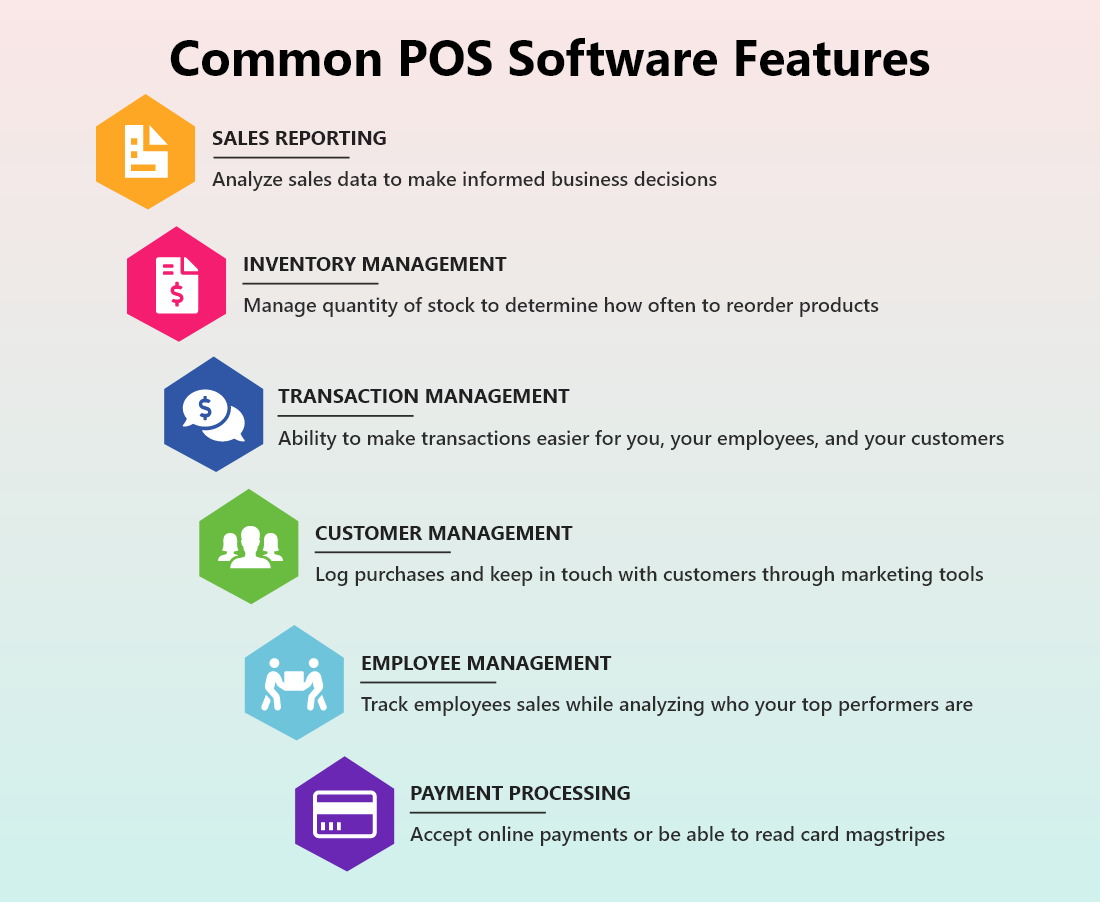
Sales Reporting
Record and analyze sales data to make informed business decisions that allow you to focus on your sales. The POS system creates a sales report based on the total retail amount, profit percentage, and gross margin. The difference lies in how those numbers are displayed and how much detail you get. Additionally, it offers a quick snapshot of your store’s sales performance.
Inventory Management
Manage the quantity of stock to determine how often to reorder products and keep track of all products. It is one of POS systems’ most important features that keeps track of all products when it’s time to order specific products. It also allows you to identify pieces of inventory using unique serial numbers and count products digitally.
Transaction Management
Transaction management makes the entire process easier for you and your customers and provides you with a payment receipt in whatever form you prefer. If you prefer a digital receipt, there should be two options available; a texted or an emailed receipt. If they prefer a paper receipt- your system should be able to print one quickly.
Customer Management
Log purchases and keep in touch with customers using marketing tools. It builds strong relationships with customers and leads to repeat business. Your POS system must have a CRM to track all customer interactions and data. The system can attach a sales transaction to a customer and record/track its purchase history. You can also use email marketing to keep in touch with customers and capture their information such as name, age, birthday, and email address.
Employee Management
Track employee’s sales while evaluating your top performers and who require extra coaching to increase sales. It can set sales targets and break the supply chain of your business/store. It is convenient to add employees to your system and modify schedules based on forecasted activities.
Payment Processing
Accept online payments or be able to read card magstripes. For your business growth, your POS system needs to contain various additional payment methods if you don’t want to lose out on a sale. There are multiple payment processing methods, such as online processing, magstripes, chip cards, contactless payments, etc., for payment.
When you are looking for a point of sale system, I’m sure you will be quite curious about how Clover vs. Square stack up against each other and more importantly which is better square or clover?
So, to make your decision easy, we are going to compare clover pos vs square pos on various criteria such as; Features, Pricing, Hardware, Software, Pricing, Customer Support, Ease of use, Cash advances, etc.
Let’s get started.
Clover vs. Square at a glance
Clover: A POS system designed to make things easy
Clover is a cloud-based Android POS platform with custom hardware designed for several types of retailers launched in April 2012. The company is headquartered in Sunnyvale, CA. Businesses can easily streamline payment processing and inventory management using the Clover POS system. It automatically replaces outdated processes such as label printer, receipt printer, cash register, plus others. The payment processing system in POS supports PIN and chip card payments, credit card swipes, etc. for online payment. The POS system is available for server-based and web-based development versions, including the mobile POS option.
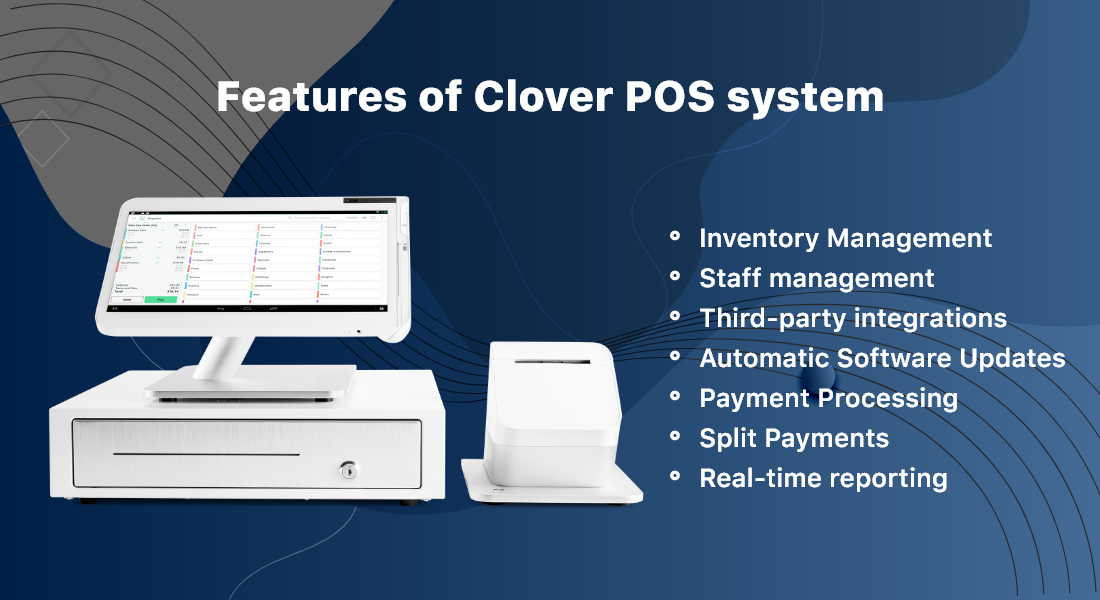
Clover POS system offers features like:
- Automatic software updates
- Menu editing
- Completely customizable
- Add & delete products in real-time.
- Staff management.
- Track revenue and employee sales
- Assign or reassign tables
- Identify the top customers
- Accessible from anywhere
- With the Clover POS system, businesses can visualize key data metrics in real-time and track customers’ orders and data reporting.
Square: Fully Integrated POS Solution
Square is a free POS app that uses a credit card reader to process payments and manage sales. Affordable card processing rates are a great way for small businesses to start selling in minutes without using any applications or monthly fees. To use Square, you need to sign up for a free account, download the app on your smartphone or tablet, and start selling.
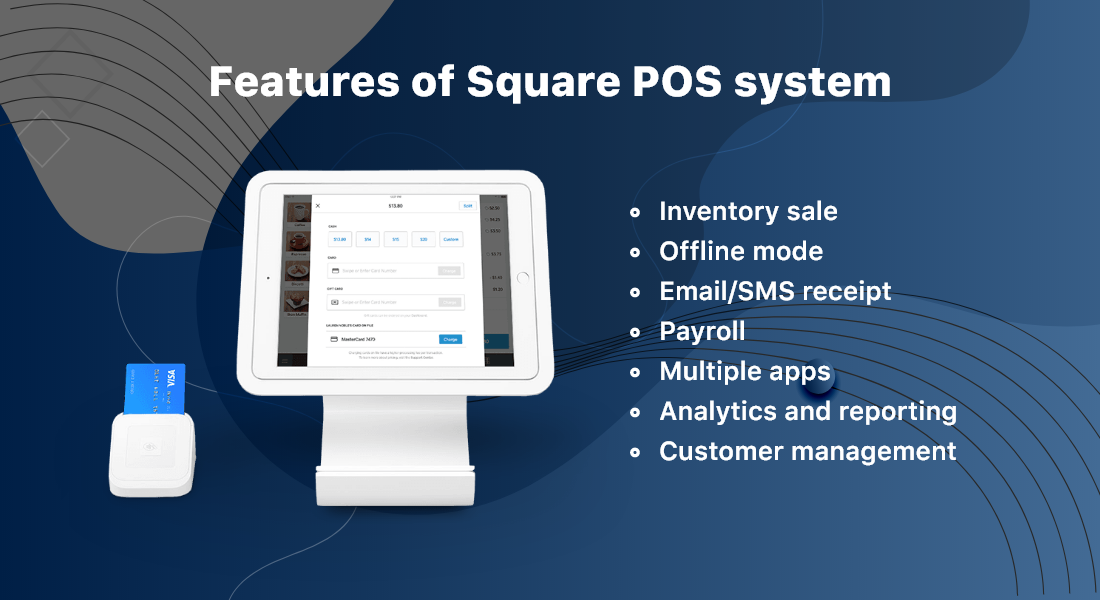
Square POS system offers features like:
- Credit card processing.
- Full and partial refunds
- Adjustable taxes
- Printable sales reports
- Accounting system integration
- Tipping by percentage or a custom amount
- Discount management
- Customizable loyalty programs & rewards
- Other features include inventory management, sales reports, and customer directories to manage your business.
Clover POS vs Square POS: which is better for your business?
All-in-one POS systems allow you to run your business fast and smoothly by offering significant payment processing and inventory management features. It offers various payment options like two printer capabilities and a 14-inch display for customer signatures. It allows you to enable your business and focus on your customers.
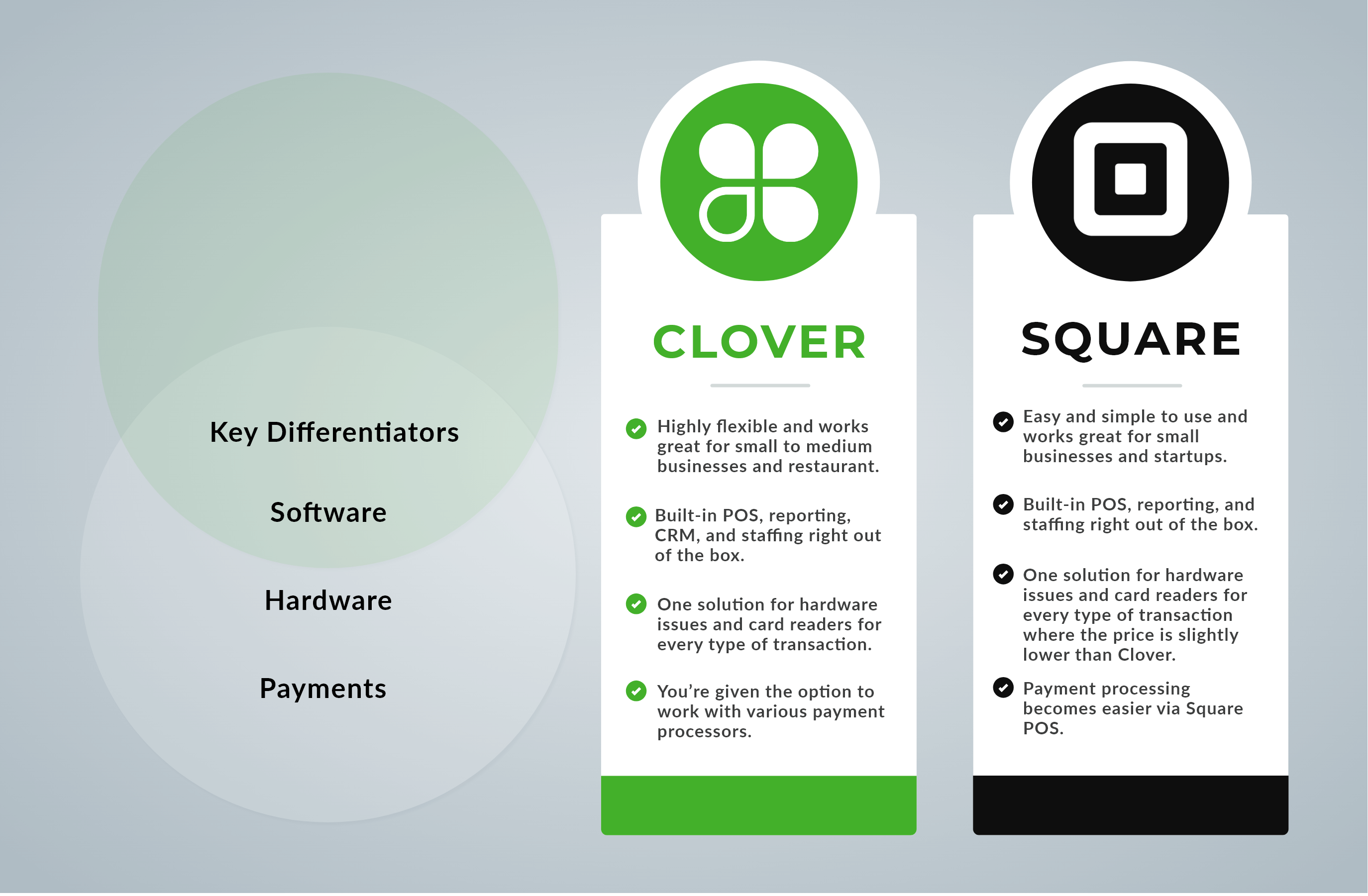
The major difference between Clover and Square is that Clover is designed for businesses with a bit of payment processing volume whereas Square is targeted more for first-time POS users.
Have a quick peek into the differences between the best POS systems to find whether a clover is better than square or not.
Benefits of Using Clover POS to Grow Your Business
Business Management Assistance
With the Clover POS system, you can improve your business management and monitor your inventory list by which you can get a clear idea of what products you need to order. It also allows you to use an effective inventory system and saves time and money to focus on your business.
Dependable Processing Software
Clover POS systems work with the help of WiFI or Ethernet. The processing software also provides an offline mode that can still run even if your internet speed is down, ensuring that you can continue to serve customers and make sales.
Intuitive and User-Friendly
The Clover POS system is available for the Android Operating system, which clearly shows that the user experience will be a bit similar to that of a smartphone. There are a few app-based functionalities, and you may face difficulty understanding how to use the Clover POS system.
Ready To Go
The Clover POS system offers high features, and it is ready out of the box. It is recommended that a merchant services consultant help you set up your system and get the most out of your POS system.
Business Benefits of Square POS
Simple and Powerful
You can use the Square POS system just by downloading the free app on your device. It offers drag and drops functionality to make things easier for you to manage. With Square, one can quickly create and add orders to the list using the ticket management feature.
Fast processing
With Square, you can often get paid the next day. Every transaction is implemented in less time than waiting for printing a receipt.
Intelligent Reports
The Square POS system makes things easier for businesses in making decisions as the software uses analytics tools to generate reports in intelligent decision making.
Clover Vs. Square: Dive Into The Battle
Clover vs Square: Hardware
Clover
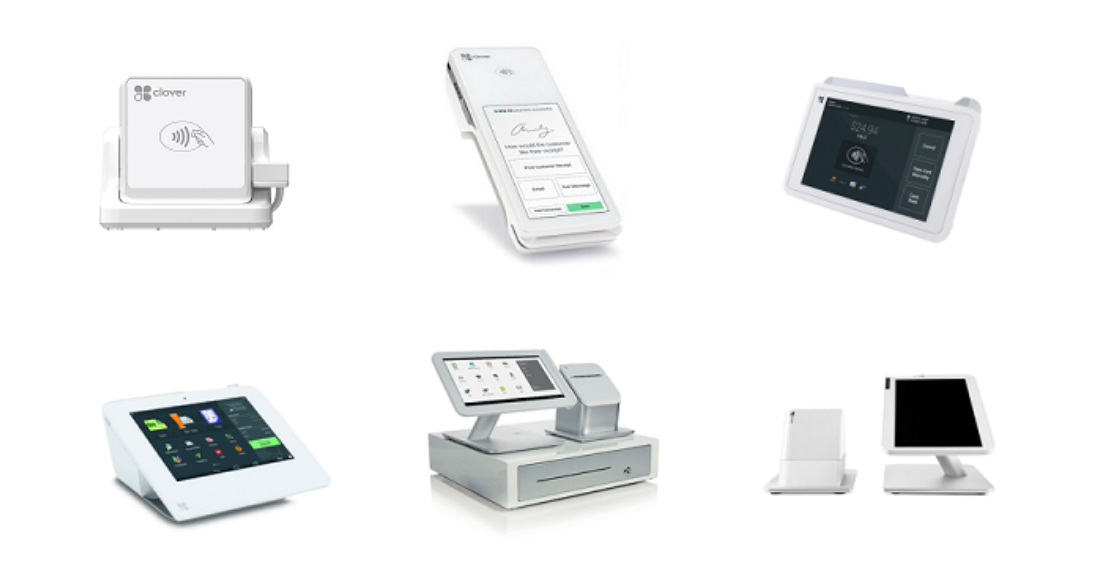
There are four types of POS hardware kits that Clover offers. They are:
Clover Go: It connects to your device (smartphone or tablet) and processes contactless payments, chip cards, and magstripe. Clover Go will only be activated if it’s attached to another device.
Clover Flex: Flex is Clover’s WiFi-connected payment processing option that accepts all the payment options and captures signatures and print receipts.
Clover Mini: Clover Mini is somehow similar to Clover Flex but in a countertop format. Tasks such as scanning barcodes and receipts can be done quickly.
Clover Station: Clover Station is the most secure and fastest POS offering that accepts credit cards with a cash drawer.
All the hardware devices can work together or alone- choose the tools that can serve your business requirements.
Square POS Hardware
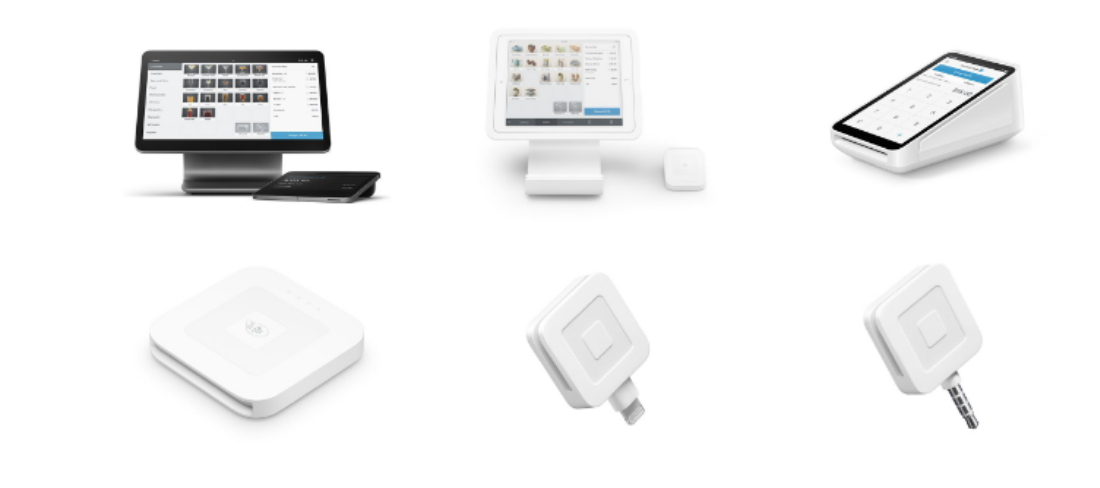
Square POS offers you two options to purchase your iPad as your POS terminal or all-in-one POS terminal for your payment. Have a sneak peek into the Square’s hardware and different types of card payments each can accept:
Square Register: It is an all-in-one countertop payment processing system that allows credit card payments and contactless payments included in the hardware.
Square Terminal: Square terminal offers the most comparable to Clover Flex and accepts all the types of payments connected via Ethernet or WiFi.
Square Stand for Contactless and Chip: Square Stand can be used once you download the Square POS app and use your iPad as your business’s POS system.
Square Card Readers: It collects external hardware that accepts various payments such as a magstripe card reader, chip card, and contactless payment reader.
Clover Vs. Square: Pricing
Let’s take a look at the quick break down of the clover pos pricing to find out how much does clover cost;
Station for full-service Restaurants: $1349
Station Pro for counter service restaurants: $1649
Station for any Business: $1399
Pricing for Clover Mini – $749
Pricing for Clover Go – $69
Pricing for Clover Flex – $499
Square
Square Register: $39/month Or you can buy outright for $799 + 2.6% + 10¢ Per tap, dip, or swipe taken on Square Register.
Square Terminal: $27 per month for 12 months Or $299 + 2.6% + 10¢ Per tap, dip or swipe taken on Square Terminal.
Square Chip Reader: $49 + 2.6% + 10¢ per tap, swipe for Visa, Mastercard, and American Express.
Square Magstripe Reader: You will get you, first magstripe reader, free and afterward $10
Is Square or Clover cheaper?
As you have probably guessed, it’s a tie to which the POS system is cheaper since Clover and Square obtain many different processing companies for price variation.
Here are some rules of thumb:
When Square is Cheaper
If your business is accepting credit cards, then Clover offers an average transaction of over $10.
Food trucks, coffee shops, and other small businesses can benefit from the Square POS system.
When Clover is Cheaper
If your business is accepting credit cards, then Clover offers an average transaction of over $10.
Square vs Clover: Software Plans
Clover:
Payments Plus $4.95/month – No inventory or order management
Compatible devices: Clover Go/Clover Flex/Clover Mini
Register Lite $9.95/month – manage orders, the budget-friendly option for retail environments
Compatible devices: Clover Go/Clover Flex/Clover Mini
Register $39.95/month –manage your day-to-day, perfect for a fast-paced retail environment
Compatible devices: all Clover models
Counter-Service Restaurant $39.95/month – restaurant software
Compatible devices: all Clover models
Table Service Restaurant $69.95/month – restaurant software
Compatible devices: all Clover models (must have additional Clover device to use on Go)
Square:
Square For Restaurants
Free- seating management and limited reporting, including $60/ month, and the premium starts at 299/month.
Square For Retail
No exchanges and limited reporting including $60/month and premium starting at $299/month
Square Appointments
Free for individuals.
2-5 Employees $50/month
6-10 Employees $90/month
Clover Go vs Square Mobile Readers
Square point of sale system is famous for mini credit card readers. These credit card readers basically receive card payments utilizing a smartphone. But, Square POS does not provide a combination reader that comprises NFC/EMV/ magstripe to be utilized with a smartphone. And if you need this, you are required to use their magstripe reader and their NFC/EMV combo reader, which simply means two devices instead of one.
On the other hand, Clover Go offers homogeneous functions with NFC capabilities. With Clover POS, you will have a more convenient all-in-one card reader. This will enable you to take;
- Contactless payments,
- Chip cards,
- Magstripe cards
All with the same device!
Clover Flex vs Square Terminal
Both the devices, Clover Flex and Square Terminal are lightweight and compact. Even so, Clover flex is a bit smaller with a 5” touchscreen than a square terminal having a 5.5” touchscreen.
Flex and Terminal come with in-built printers, which is quite useful when your customers need physical receipts. Additionally, Clover Flex comes with a barcode scanner that is not included in Square’s Terminal.
Clover Mini vs Square Stand
Though Clover Mini and Square stand are referred to as POS systems, they can be considered as more of a POS lite and they are not portable. The Clover Mini comes with a 7” screen whereas the Square Stand comes with a 9.7” tablet.
Square stand is developed for adding the Square point of sale software to a tablet for creating a basic POS system. The physical stand comes with features such as basic inventory management, a magstripe card reader, emailed or printed receipts.
Clover Mini also provides the basic POS function such as EMV chip cards, contactless payment options, basic inventory management, and a built-in reader for magstripe cards. Clover Mini offers a unique alternative to the counter as you can mount it to a wall.
Clover Station vs. Square Register
When we want to talk about the full-fledged point of sale systems, it’s definitely Square Register Vs Clover Stations.
Both of these point of sale systems offer various features such as sales reporting, employees’ time clock and tracking, payment, inventory management, and many more. You can download and install apps from the app market for customizing your point of sale system as with particular required functions. Applications incur extra fees.
One of the major considerations will be processor compatibility and processing costs. You’ll have more chives with Clover station when you are looking for negotiating better pricing for credit card processing as it is offered by more processors. And if you are looking for a simple setup even at higher costs then you can go with Square Register.
Square vs Clover- Cash Advances
With the Square POS, users are able to access the option to take a cash advance under “Square Capital”. ‘Clover Capital” is a similar service offered by Clover pos. You might be wondering “How does this work?”
So, a cash advance is somewhat similar to a business loan. Though, there is not any fixed monthly repayment or interest rate. Rather you are required to pay the borrowed amount with an additional fee.
And these repayments are paid from some of your credit card sales automatically. So, the more your sales will be, the more your repayments will be off your cash advance- understood?
Clover vs. Square: Payment Methods
It’s obvious that you will require your payment service provider to accept the modes of payments preferred by your customers. Both Clover and square hit the mark in that regard fortunately. Let’s take a look at the payment types accepted by both of these POS;
- All the major debit and credit cards (Mastercard, Discover, American Express, Visa, JCB)
- Checks
- Magstripe payments
- EMV payments
- ACH payments
- Virtual terminal
- Gift cards
- NFC payments (Apple Pay, Google Pay etc.)
Clover POS Vs. Square POS: Customer Support
Clover POS offers 24/7 tech support, which can be ideal for a retail business and payment processing company having a lot of traffic on the weekends.
If you are willing to use the Square POS system, you must be an existing customer to use the phone support available Monday to Friday, 7 a.m. to 7 p.m., including documentation and guides online. Similarly, POS systems and payment processing companies offer 24/7 support, whereas Square’s availability is not ideal.
Square POS vs Clover POS: Ease of Use
Clover is an approved POS system, so keeping aside the setup process, you can directly navigate the home screen that includes features such as inventory, employee management, and sales. Using Clover doesn’t require any training or learning experience.
Square is a plug-and-play system that does not require any application or complicated setup. You can simply create a free Square account and download the app and start selling right away.
Is Clover or Square Better for Your Small Business?
When to use Clover?

Clover is an all-in-one POS system and payment processing solution. If you are wondering when is clover better than square? Clover is a better option for business owners who want scalable and customized solutions for their business.
Clover is expensive when compared to Square payment processing and hardware costs. Clover includes employee management features, such as payroll processing and scheduling.
When to Use Square?

Square is a perfect choice for small businesses, whether it’s an in-store or mobile store. It is a good choice for payment processing with an average transaction size of under $20.
The Bottom Line: Which is better Square or Clover for You?
I hope now you have a clear understanding of Clover and Square POS systems, but how would you choose the best out of it for your business?
Both the POS systems have their benefits and features that make it the best choice for business.
It depends upon your business, whether you choose Square or Clover. Both the POS system offers various features and functionality that you are expecting from your POS terminal. Clover and Square offer the most secure all-in-one payment processing system on the market.
How We Can Help: Get Your Custom Clover app with Bacancy
As you can see, Clover and Square POS systems offer similar features.
So, what’s the verdict?
It doesn’t matter whether you’re running:
A restaurant,
Traditional retail store.
A service-based business.
Wrapping Up
I would recommend you to go with Clover as it offers the handy solution that your business requires. If you are looking for custom Clover application development services, Bacancy Technology is the best option for you as it has the Clover Station Hardware Development Kit to meet your industry’s needs. I am eagerly waiting to hear from you about the experience you have either with Clover or Square. So comment down and kick-start the conversation!


