

All things you come across in Flutter are Widgets. Like Components/Controllers in Ionic language, Activities in Android, or React Native Components, everything you create on your app screen is a Widget. So, Buttons, Checkbox, Radio, ListView, Drawer, Tabs, Grid, etc. that interact with the visual aspect of your application are widgets.
From this blog’s title, you would have made out that there are two types of Widgets in Flutter:
Stateless & Stateful Widgets.
First, let us understand them:
Stateless Widgets do not have a specific mutable state and are immutable, meaning when the app is in action, the stateless widgets cannot be redrawn. Hence, such Flutter widgets do not have any internal state, and you can modify their state only when they are re-initialized.
Text, Column, Row, Container, etc. are stateless widgets, and you need to pass some parameters while creating these widgets such as dimensions or decorations. The state of such widgets remains the same throughout the application lifetime.
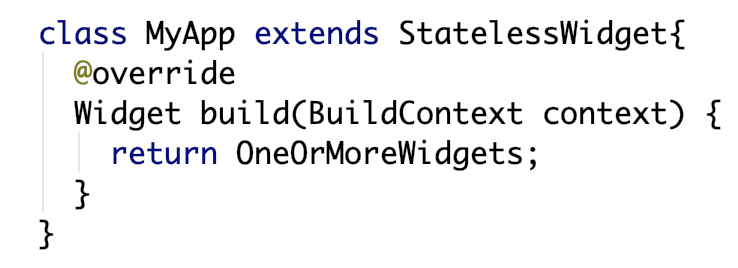
[A bare minimum Stateless Widget]
On the contrary, Stateful Widgets have a mutable state, and you can draw them n number of times within their lifetime. Such widgets are dynamic, and you can modify their state without reinitiation. Learn How To Build First Reusable Widget Using Flutter?
Checkbox, Button, etc. are examples of stateful widgets that generally contain an inner value or data that determines their state. The state of the widget may change as a user selects an item of the checkbox or presses a button.
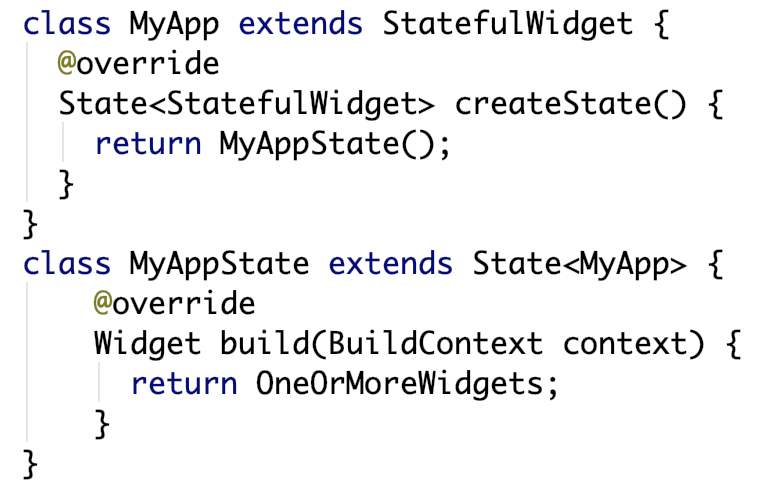
[A bare minimum Stateful Widget]
You may also like to read;Top Flutter Libraries, Tools, Packages and Plugins
Flutter State Management
The state of a stateful widget can vary at different stages during the app lifetime. On every action, you need to define the state of your stateful widget and reinitiate it. You can execute the same by assigning properties to the setState() method.
setState()
For a stateful widget, whenever you call this function, it triggers the build() function of the widget, which in turn redraws the widget. Ideally, you should call the setState() function under the onChanged property of the widget.
Let us see a sample code where we imply state change for a checkbox:
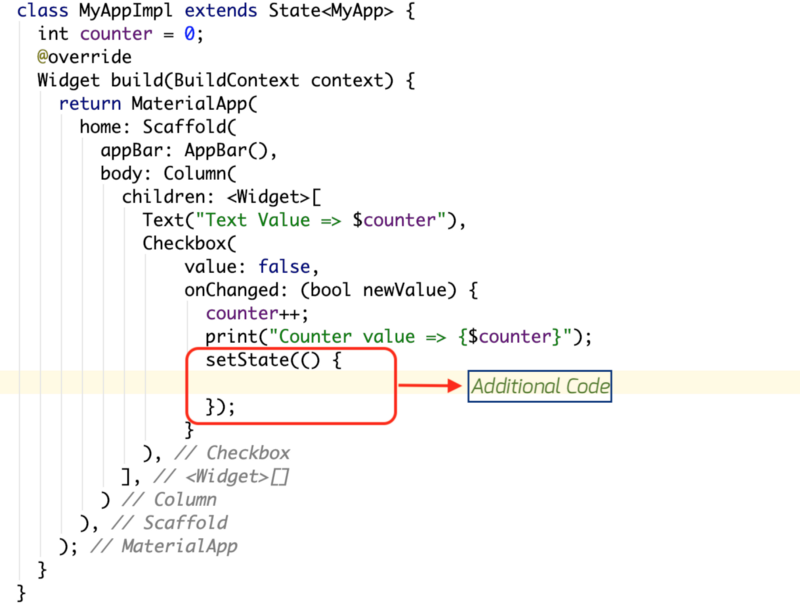
[Redrawing widget using setState()]
However, this method of widget redrawing has some drawbacks. Before we get to the issues, you need to understand the widget hierarchy in your flutter application.
Widget Elementary Tree
The following image will describe the scenario well. Your application will be categorized likewise. Now, for example, you want to change the state of a child widget when a parent widget is affected.
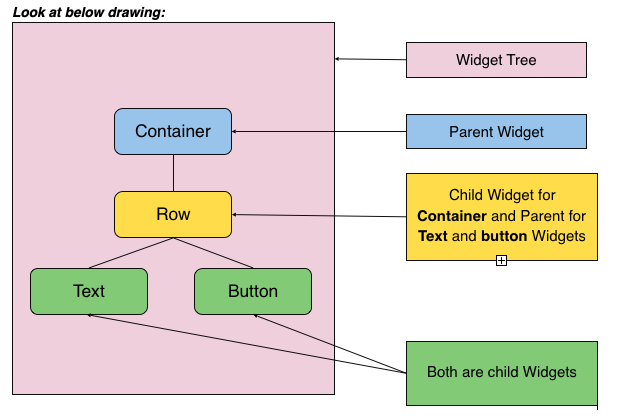
[Source: Blogspot]
In such scenarios, you will face the following two major problems:
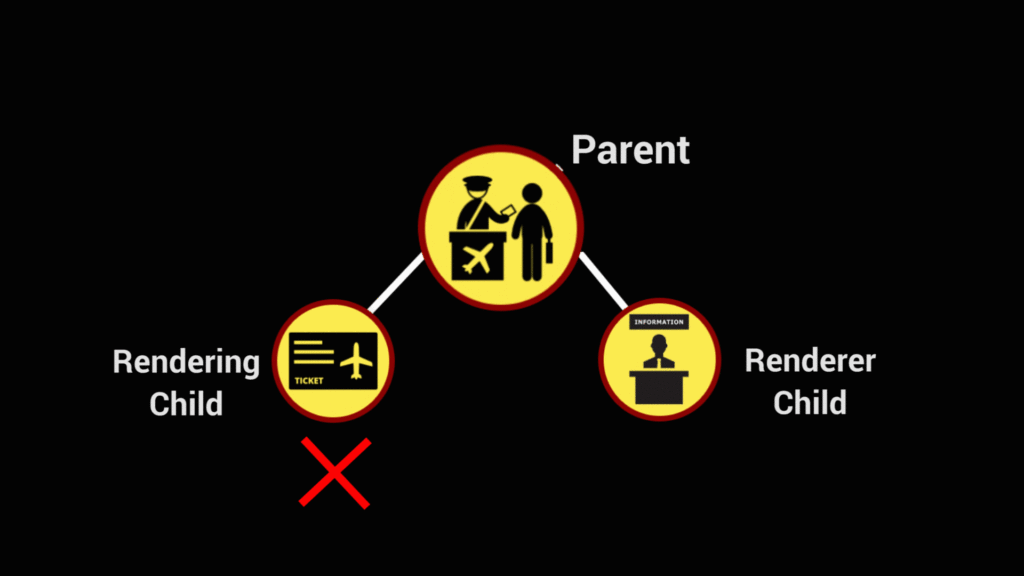
Issue #1 Parent to Child Rendering
Ideally, when you execute a setState() function on a parent widget, it by-default runs all its child widgets, whether or not they are stateful widgets, or whether or not they are stateful widgets need to be redrawn.
This way, all the child widgets are rendered irrespective of a need to state-change. So, you are unable to render a specific child widget, keeping the rest unchanged.
Issue #2 Child to Child Rendering
Imagine you want to change the state of one child widget when some action occurs on another child widget. Both widgets are in the same class and are rendered by one parent widget. In such a case, you will be unable to render a child widget from another.
[Source: Medium]
Now, to overcome these barriers of the setState() method, and to enable MVC architecture for your Flutter application, there are some state management techniques.
MobX, Scoped Model, Redux, and BLoC Architecture can help you solve the issue.
However, Scoped Model and Redux again face primary issues relevant to boilerPlate, Scope, and data rendering.
So, let me share the most reliable Flutter state management technique for the stateful widgets of your Flutter state management.
BLoC Architecture for State Management in Flutter
At their Google I/O conference (2018), Paolo Soares and Cong Hui introduced the BLoC architecture pattern for Business Logic Component and applied it to the business logic between various Dart applications.
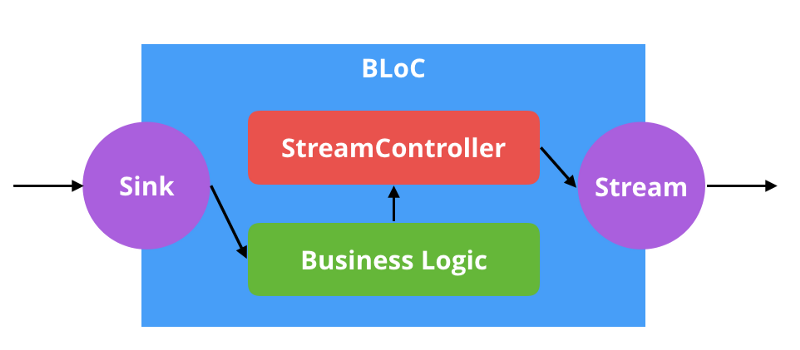
Applying the BLoC architecture, you can keep the business logic of your application separate from the UI view by using Streams. In this manner, it enables an MVVM architecture for your app.
However, BLoC is a logic and not an architectural theory, so you can choose any suitable architecture for your application and can still implement the BLoC logic for Flutter state management best practices.
[Source: https://www.raywenderlich.com]
For understanding the BLoC architecture and flutter state management best practices, you will first have to know some notions.
Streams yield multiple values that are asynchronous events. Streams are similar to the Future that the dart: async package provides.
You can consider Sink as the end from where you feed data in your application.
StreamController acts like the manager of both Stream and Sink. It coordinates your application functioning by handling the business logic under it.
StreamBuilder is yet another manager that observes StreamController and implements the state change in your app.
Now, let us see how the BLoC architecture in Flutter state management works.
[Source: Medium]
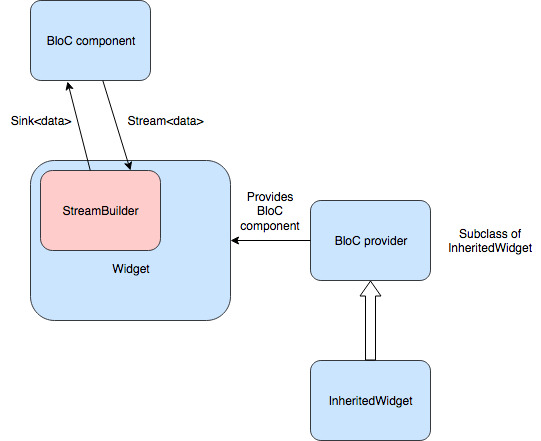
The above diagram depicts a simple flow of execution when a user interacts with your application. When a user clicks a UI component of your application, it sends an event (action) to the BLoC component.
After that, the BLoC component interprets the action and executes the required business logic. It passes the state change of the destination widget that will show the results of his/her action.
Here, to understand the role of InheritedWidget in Flutter state management, you should read ahead.
Inherited Widget
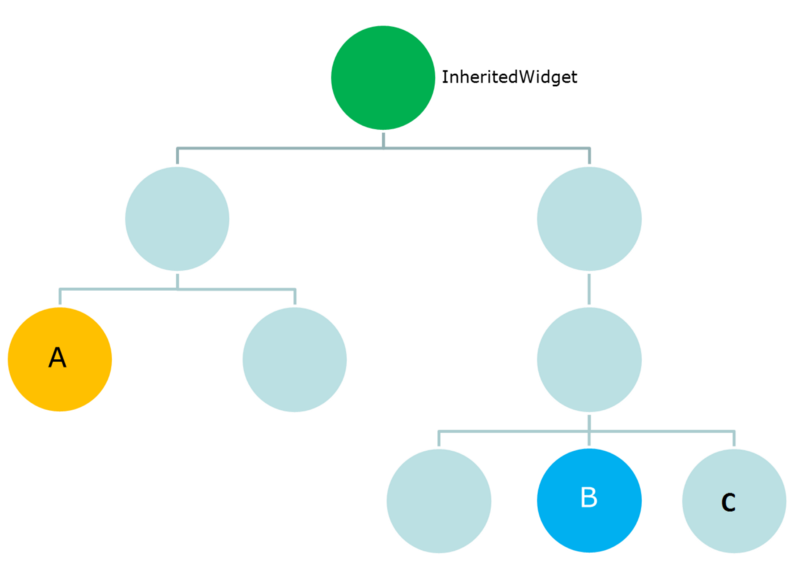
To understand the concept of Inherited Widgets, we will take an example, and for that, you need to consider the following widget-tree structure:
[Source: https://www.didierboelens.com]
Suppose Widget A is a button widget (stateful) in our shopping cart example. Widget B is a text box widget (stateful) that changes state every time a user presses Widget A (button). Widget C
is also a text box widget (stateless), but that does not need to change state on button press.
Here I have presented sample code for the above-illustrated shopping cart example.

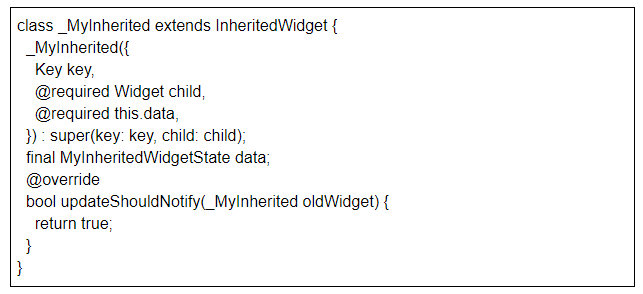
Whenever a user adds an item by clicking on Widget A, the InheritedWidget _MyInherited is recreated.
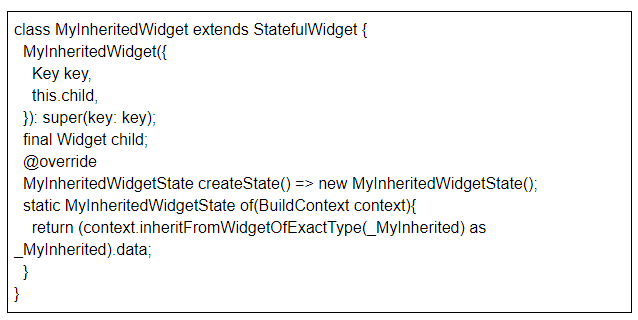
MyInheritedWidget contains a list of Items. The static MyInheritedWidgetState generates the state of the context (BuildContext).
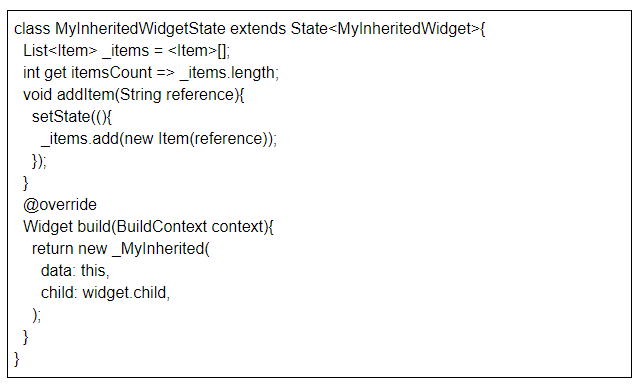
Every time the user adds an item in the cart, the MyInheritedWidgetState rebuilds its state.

This class builds a widget tree whose parent is the MyInheritedWidget class.
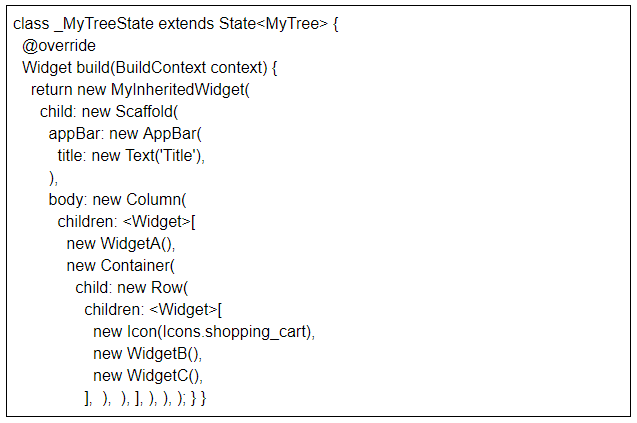
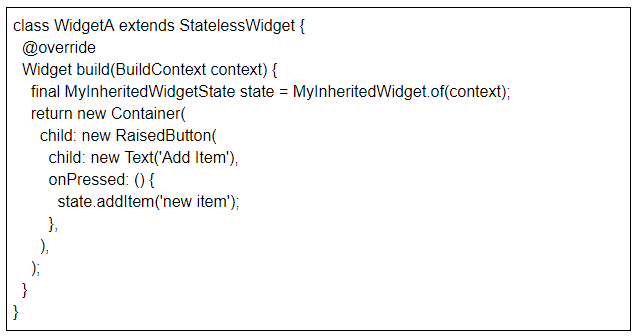
WidgetA is a RaisedButton component that invokes the addItem method of closest MyInheritedWidget on user-press.
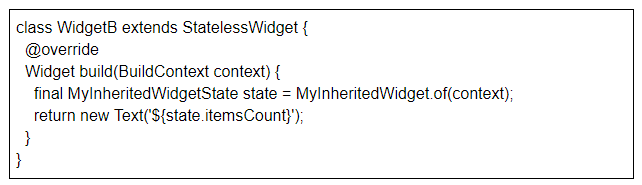
The number of items in the shopping cart will be displayed in WidgetB, a simple text component. It takes the updated value of the cart-item from the closest MyInheritedWidget.
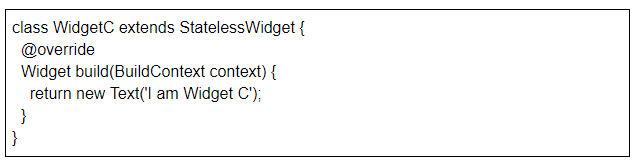
In the above sample code, Widget A and Widget B are rebuilt, and Widget C remains unchanged as there is no need for it to rebuild.
Take Away
Google’s Flutter is an amazing language that has proved its wonders. Whether Stateless or Stateful Widgets, whatever type of app you want to create for your users, you would want the best of all Flutter app development company and Flutter state management best practices. At Bacancy, we have expert Flutter masters that can accomplish almost anything that any other language like Kotlin, Swift, or Java can achieve.
Using the Flutter state management best practices, our proficient Hire Flutter app developers can build next-generation Android and iOS apps. Build high-quality, native, and sophisticated interfaces in no time with Flutter.
