Quick Summary
The best Python libraries for data science can help your data teams move faster, cut errors, and build smarter models. This blog brings together 27 important Python libraries for data science that every data leader should know. If you’re leading data science teams or building analytics platforms, this guide shows you what to use, when to use it, and how to make the most of Python.
Table of Contents
Introduction
What do high-performing data science teams have in common?
A streamlined Python stack that connects the right tools to the right outcomes. Python stands as the most used language in data science and machine learning, backed by a vast ecosystem of libraries that support every part of the data pipeline.
Python has a specialized library for almost every task, from data preparation to model deployment. With over 137,000 libraries available, the challenge lies in selecting the ones that deliver real value.
Not all libraries offer the same reliability or efficiency. In this guide, you will find 27 essential Python libraries for data science in 2026, organized by use case. This list will help your team cut through the noise and focus on tools that drive results.
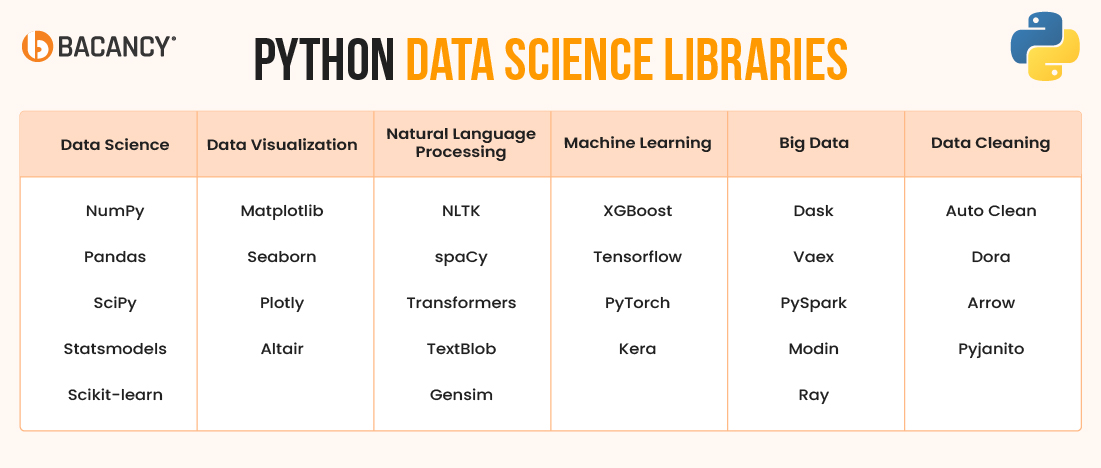
Which are the Must-Have Python Libraries for Data Science Projects?
These core libraries give you the essential tools for handling data, performing analysis, and building a solid data science workflow from the ground up.
1. NumPy
NumPy (Numerical Python) is the core library for high-performance numerical and scientific computing in Python. At its core is the ndarray, a fixed-type, multi-dimensional array that allows fast, memory-efficient operations for vectors, matrices, and tensors.
This Python data science library is written in C for optimal speed and outperforms native Python structures, especially in large-scale calculations. It supports various numerical functions, including linear algebra, Fourier transforms, and random number generation.
NumPy is essential for simulations, numerical analysis, and preprocessing in machine learning workflows. As the computational backbone of libraries like Pandas, SciPy, and Scikit-learn, Python NumPy is widely used across industries from engineering and physics to AI and quantitative finance.
- Best For: High-performance array and matrix operations
- Expert Tip: Use vectorization and broadcasting instead of loops for 10x performance gains
- When to Use: For simulations, linear algebra, or preprocessing tensor data
- When Not to Use: For labeled, relational, or tabular datasets, you can use Pandas instead
2. Pandas
Pandas provides a robust, high-level abstraction for structured data through its DataFrame and Series objects. It is designed for fast, flexible, and intuitive data analysis and manipulation, whether you’re cleaning raw CSVs, joining tables, handling time series, or building complex feature pipelines.
Built on top of NumPy, Pandas is ideal for Exploratory Data Analysis (EDA), business analytics, and preprocessing before machine learning. Its seamless integration with Excel, SQL, and formats like JSON or Parquet makes it a go-to tool for engineers and analysts.
Pandas is the standard library for working with tabular data and serves as a mainstay within Python libraries for data science.
- Best For: Data cleaning, feature engineering, time series manipulation
- Expert Tip: Replace apply() with vectorized functions like .map() or .where() for faster performance
- When to Use: When working with business datasets, time-indexed data, or merging multiple sources
- When Not to Use: For large datasets exceeding RAM, opt for Dask or Polars instead
3. SciPy
SciPy is an advanced Python library for scientific computing built on top of NumPy. It adds tools for math-heavy tasks like optimization, statistics, integration, and signal processing. You can solve equations, analyze data, and run simulations using its ready-to-use modules like scipy.optimize or scipy.stats.
SciPy is used in fields such as physics, finance, and engineering. It is one of the most important Python libraries for data science, where precision and complex math are required.
- Best For: Scientific simulations, numerical optimization, signal or system modeling
- Expert Tip: Use Scipy.optimize.minimize() for parameter tuning and model calibration
- When to Use: For advanced math, physics-based modeling, or when ML needs custom numeric logic
- When Not to Use: While implementing traditional ML pipelines or basic statistical modeling
4. Statsmodels
Statsmodels is a Python library for statistical analysis that helps you test ideas, estimate values, and explain results clearly. It supports models like linear regression, time series like Autoregressive Integrated Moving Average (ARIMA), Seasonal Autoregressive Integrated Moving Average (SARIMA), Generalized Linear Models (GLMs), and survival analysis.
You get detailed outputs, such as p-values and confidence intervals, which are helpful in research, economics, and any field that needs clear, explainable results. As one of the more beginner-friendly Python libraries for data science, Statsmodels is ideal when transparency and interpretability matter most.
- Best For: Regression modeling, hypothesis testing, time series forecasting
- Expert Tip: Use .summary() to generate publication-ready statistical output
- When to Use: When building interpretable models for academic, policy, or research use
- When Not to Use: For high-performance ML or deep learning, Scikit-learn or PyTorch is better
5. Scikit-learn
Scikit-learn is a Python library for machine learning with simple APIs for building models and analyzing data. It is among the top Python libraries for data science because it supports tasks like classification, regression, clustering, and dimensionality reduction using a clean, consistent API.
It also offers helpful tools like cross-validation, pipelines, feature selection, and hyperparameter tuning. Scikit-learn works best on structured (tabular) data and is often the first choice for building fast, explainable, and reliable ML models.
- Best For: Traditional machine learning with structured data
- Expert Tip: Combine Pipeline() with GridSearchCV() to automate tuning and preprocessing
- When to Use: For fast development of ML models in fraud detection, pricing, or recommendation engines
- When Not to Use: For unstructured data like images or text, use PyTorch or TensorFlow instead
Need Help Navigating Python’s 100,000+ Data Science Libraries?
Hire Python developers with proven experience applying the right libraries to solve real-world data science challenges.
What are the Most Popular Python Libraries for Data Visualization?
These Python Data Visualization libraries turn complex information into clear, interactive visuals that reveal patterns, trends, and insights. It also ensures your data and app are easier to interpret and act on.
6. Matplotlib
Matplotlib is a battle-tested Python library for data visualization. Its stateful interface mimics MATLAB, while the object‑oriented API maximizes fine‑grained control of every axis, tick, and annotation. With support for line, bar, scatter, error, and polar plots, Matplotlib powers dashboards, academic papers, and production reporting alike.
- Best For: Highly customized 2‑D charts in research or production reports
- Expert Tip: Switch to the object‑oriented API (fig, ax = plt.subplots()) to future‑proof complex plots
- When to Use: When pixel‑perfect layout, LaTeX‑quality text, or PDF/SVG export are must‑haves
- When Not to Use: For highly interactive or web-based visuals
7. Seaborn
Seaborn is a Python library that makes it easy to create attractive statistical charts like heatmaps and pair plots. It works well with Pandas and is great for quick data exploration in just one line. You can still customize charts using Matplotlib if needed.
- Best For: Fast statistical visual exploratory data analysis with attractive defaults
- Expert Tip: Pass a wide‑form DataFrame and let Seaborn process data automatically for complex facets
- When to Use: Early exploration, correlation insight, or storytelling with distribution plots
- When Not to Use: For real‑time or highly interactive dashboards, you can utilize Plotly instead
8. Plotly
Plotly lets you create interactive charts in Python, including 3D graphs and real-time visuals. It has features like hover info, zoom, and built-in responsive layouts. You can export charts to HTML or use them in web apps and dashboards.
- Best For: Interactive data visualization for web, BI dashboards, and stakeholder demos
- Expert Tip: Utilize plotly.express for rapid prototyping, then switch to graph_objects for fine control
- When to Use: When users need to explore, zoom, or filter data live in the browser
- When Not to Use: For static and print‑quality figures
9. Altair
Altair is a Python library for creating clear, interactive charts using simple, high-level code. You can build complex visuals in just one line with its Vega‑Lite system. It also makes it easy to export charts to JavaScript for use in web apps.
- Best For: Rapid, error‑resistant creation of complex statistical visuals
- Expert Tip: Implement transform operations like aggregate, calculate, and window to preprocess inside the spec and shrink Python code
- When to Use: In a notebook‑driven analysis where clarity of intent and reproducibility matter
- When Not to Use: When pixel‑perfect styling beyond Vega‑Lite’s theme system is required
Which Python Libraries for Natural Language Processing (NLP) are Most Effective?
Python offers powerful, result-driven libraries to handle language data at scale. These Python libraries for NLP help teams analyze, extract, and understand text with speed, accuracy, and reliability.
10. NLTK
The Natural Language Toolkit (NLTK) is a Python library for basic NLP tasks like tokenizing, stemming, and parsing. Thanks to its simple design and helpful tutorials, it’s great for learning and testing language rules. While NLTK is not the fastest, it’s perfect for teaching and small projects.
- Best For: Teaching grammar parsing, tokenization, and part‑of‑speech tagging
- Expert Tip: Pair NLTK splitters with spaCy vectors to blend speed and linguistic depth
- When to Use: When prototyping rule‑based pipelines or studying language structures
- When Not to Use: For enterprise‑scale and real‑time NLP APIs
11. spaCy
spaCy is a fast and efficient NLP library for tasks like segmenting text, entity recognition, and parsing. It supports 60+ languages and works well with PyTorch or TensorFlow. With a clean API and built-in tools, it’s great for production-level NLP projects.
- Best For: High‑throughput entity extraction and text analytics in production
- Expert Tip: Use spaCy’s DocBin to serialize millions of docs for GPU training without memory spikes
- When to Use: In chatbots, contract analysis, or any app demanding millisecond‑level latencies
- When Not to Use: When you need bleeding‑edge LLM task adaptation
The Transformers library by Hugging Face gives access to pre-trained models like BERT and GPT for text, images, and speech. You can load and fine-tune powerful models in just a few lines. It handles complex steps, such as input preparation and hardware setup to speed up deployment.
- Best For: Zero‑shot, few‑shot, or fine‑tuned LLM solutions
- Expert Tip: Use Bitsandbytes + 4‑bit quantization to run billion‑parameter models on a single GPU
- When to Use: For text generation, semantic search, or advanced sentiment tasks
- When Not to Use: When latency budgets fall below 50 ms, and the budget forbids GPU inference, lighter models (spaCy, fastText) may suffice
13. TextBlob
TextBlob is a beginner-friendly tool for basic text tasks like sentiment analysis, part-of-speech tagging, and noun phrase extraction. It’s easy to use and works well for quick demos or simple dashboards. You can get results with just a few lines of code.
- Best For: Quick sentiment scoring and basic text cleaning without heavy dependencies
- Expert Tip: Cache TextBlob results from sidestepping the slower rule‑based pipeline on larger corpora
- When to Use: When stakeholders need a fast demo or lightweight text insights embedded in a Flask app
- When Not to Use: For nuanced domain language or multi‑lingual tasks
14. Gensim
Gensim is a Python library that finds patterns and topics in large text data using models like Latent Dirichlet Allocation (LDA), doc2vec, fastText, and word2vec. It processes data in streams, so you don’t need to load everything into memory. You can also update models over time, which is useful for news or social media analysis.
- Best For: Large‑scale topic modeling and custom word embeddings
- Expert Tip: Use gensim.models.Phrases to build n‑gram pipelines that lift topic coherence scores
- When to Use: For recommendation engines, thematic clustering, or as a feature generator for downstream ML
- When Not to Use: When you need contextual embeddings and upgrade to transformer models
Which Python Libraries for Machine Learning are Worth Your Time?
The following user-tested Python Machine Learning libraries empower real-world AI systems and support accurate, scalable, and production-ready solutions that teams trust.
15. XGBoost
XGBoost is a powerful library for getting high accuracy on structured data using gradient boosting. It handles large datasets efficiently with features like GPU support and out-of-core training. With built-in tools like cross-validation and early stopping can help you speed up model tuning.
- Best For: Kaggle‑winning tabular predictions and risk‑score models
- Expert Tip: Use max_depth, learning_rate, and n_estimators grid search first; fine‑tune colsample_bytree later
- When to Use: In credit scoring, churn prediction, and any leaderboard‑driven competition
- When Not to Use: For image, audio, or text embeddings
16. TensorFlow
TensorFlow is a complete open-source platform with tools like Keras, TensorBoard, TensorPrivacy, and TFX for building and managing models. It uses static graphs to easily deploy anything from a Graphical Processing Unit (GPU) to mobile devices.
This Machine Learning Python library includes features like auto-differentiation and SavedModel, which make it simple to scale across cloud or edge environments.
- Best For: Enterprise‑grade deep learning with strict deployment, monitoring, and MLOps needs
- Expert Tip: Use tf.data with prefetch and cache for input pipelines that keep GPUs saturated
- When to Use: For large‑scale image classification, speech recognition, or edge AI where hardware portability is key
- When Not to Use: When rapid research iteration demands dynamic graphs
17. PyTorch
PyTorch uses eager execution, which allows you to execute and debug model components step by step using standard Python debugging tools. It has built-in tools for calculating gradients and building model layers in a flexible, block-like way.
With add-ons like PyTorch Lightning and TorchServe, it’s easy to move from research to real-world deployment.
- Best For: Cutting‑edge deep learning R&D and custom architecture experimentation
- Expert Tip: Wrap experiments with a torch.compile (PyTorch 2+) for graph capture and automatic speedups
- When to Use: NLP transformers, CV foundations, or any scenario demanding novel layer wiring
- When Not to Use: When a no‑code, autoML platform would satisfy stakeholders faster
18. Keras
Keras makes deep learning easier by turning complex models into simple, readable code. Its functional API and built-in tools, such as early stopping and learning rate control, allow you to build advanced networks quickly. Since TensorFlow 2, Keras has been fully integrated and ready for both beginners and production use.
- Best For: Rapid deep‑learning prototyping and educational demos
- Expert Tip: Mix the Functional and Subclassing APIs to reuse layers and craft multi‑input models
- When to Use: When you need to translate a research paper to code overnight or teach DL fundamentals
- When Not to Use: For ultra‑custom ops or graph surgery, native TensorFlow or PyTorch provides deeper hooks
Overwhelmed by Python Library Choices?
Simplify your tech decisions with Python consulting services that guide you in selecting, integrating, and optimizing libraries for performance, accuracy, and growth.
Top Python Libraries for Big Data Analysis You Can Rely on in 2026
As data volumes grow, traditional tools fall short. These Python libraries for big data are built to handle big data across clusters with speed and efficiency.
19. Dask
Dask breaks large NumPy and Pandas tasks into smaller parts that run in parallel on a laptop, cluster, or Kubernetes cloud. Its DataFrame and Array tools follow the same style as Pandas and NumPy, which makes it easy to use. The smart scheduler moves tasks around to keep things running quickly and smoothly.
- Best For: Scaling Pandas pipelines to multi‑core or multi‑node clusters
- Expert Tip: Persist intermediate Dask collections in memory to avoid recomputation in iterative analytics
- When to Use: When data sizes barely fit in RAM or when batch ETL jobs drag overnight
- When Not to Use: For interactive SQL‑style analytics
20. Vaex
Vaex loads data lazily as memory‑mapped Arrow files, which allows a single machine to process billions of rows per second. Its expression system optimizes on‑the‑fly aggregations without materializing copies, while interactive histograms remain snappy. Also, Vaex is similar to Panda.
- Best For: Data exploration on a workstation without a cluster budget.
- Expert Tip: Store datasets in Apache Arrow or HDF5 to enable zero‑copy slicing and speed boosts
- When to Use: When analysts want Pandas‑like syntax on terabyte‑scale CSVs
- When Not to Use: When you require distributed computing or complex joins
21. PySpark
PySpark connects Python with Apache Spark’s powerful engine, so you can use Python code to work with big data. It supports tools like Spark SQL, DataFrames, and MLlib for machine learning. PySpark is great for handling huge amounts of data, running complex graphs, and processing live data streams across multiple machines.
It is one of the most robust Python libraries for big data. Moreover, PySpark developers can optimize smartly and improve query performance to keep running even if some machines fail.
- Best For: Enterprise big‑data pipelines, log analytics, and lakehouse ETL
- Expert Tip: Replace UDFs with Spark SQL functions or pandas_on_spark to avoid costly JVM‑Python serialization
- When to Use: When data outgrows a single machine and interactive SQL plus ML are required
- When Not to Use: For GPU‑driven ML applications
22. Modin
Modin speeds up your existing Pandas code by using all available CPU cores or a Ray cluster without requiring any code changes. It distributes the workload efficiently, which allows your system to handle larger datasets while keeping memory usage low. You still get the familiar Pandas experience but with significantly better performance.
- Best For: Teams who live in Pandas notebooks but face scaling pain
- Expert Tip: Set MODIN_ENGINE=ray for out‑of‑core cluster scaling; fall back to Dask when Ray isn’t available
- When to Use: Opt for legacy Pandas scripts when there is a need for parallel acceleration without refactoring.
- When Not to Use: When code already relies on Spark SQL or Polars, stick with the existing engine
23. Ray
Ray is a Python library that lets you run tasks in parallel across multiple machines using a simple API. It includes tools for tuning models, serving them, and performing reinforcement learning. Ray also speeds things up by efficiently sharing data between tasks.
- Best For: Distributed hyperparameter tuning and scalable microservices
- Expert Tip: Combine Ray Tune with XGBoost‑Ray for cluster‑wide training using familiar XGBoost syntax
- When to Use: When you need flexible task graphs or want to orchestrate heterogeneous GPU and CPU jobs
- When Not to Use: When you only need simple, batch-based data processing that does not require custom Python logic
Best Python Libraries for Data Cleaning That Prepare Your Data for Accurate Insights
Clean data is a must before you model or visualize anything. These libraries help detect errors, fill gaps, and structure your data for reliable insights.
24. Auto Clean
AutoClean is a Python library that automatically detects and handles missing values, outliers, and categorical variables in pandas DataFrames. It applies imputations and encodings following ML best practices, speeding up dataset preparation for projects like Kaggle competitions.
- Best For: Quick data profiling and cleaning early in analytics projects
- Expert Tip: Adjust pipeline parameters to fit domain-specific needs
- When to Use: At the start of data analysis to identify and fix common issues
- When Not to Use: For complex business logic requiring manual cleansing
25. Dora
Dora automates exploratory data analysis, generating visual summaries, statistical tests, and feature engineering ideas. Its report ranks variable importance and flags multicollinearity, aiding rapid hypothesis building.
- Best For: Data‑science teams seeking automated insight generation
- Expert Tip: Use Dora’s feature suggestions as a starting kit, then iterate manually for domain nuance
- When to Use: During the discovery phase to spark modeling angles
- When Not to Use: In regulated environments where automated feature creation must be justified
26. Arrow
Apache Arrow defines a columnar, in‑memory format that underpins pandas‑2, Parquet, and numerous ML accelerators. It is also known as PyArrow APIs, which allow zero‑copy reads, schema evolution, and vectorized UDFs across C++, Rust, and Java.
- Best For: Cross‑language data pipelines with minimal serialization overhead
- Expert Tip: Convert DataFrames to Arrow tables before writing to Parquet to cut I/O time in half
- When to Use: When shuttling data between Spark, pandas, and GPU frameworks
- When Not to Use: For heavy statistical cleaning and quality rules
27. Pyjanitor
Pyjanitor extends pandas with verbs like clean_names(), remove_columns(), and drop_na() to create readable, pipe‑friendly cleaning pipelines. Inspired by the R janitor package, it encourages reproducible, declarative data‑prep scripts.
- Best For: Human‑readable, notebook‑friendly data hygiene workflows
- Expert Tip: Combine Pyjanitor chains with .pipe() to keep transformations linear and auditable
- When to Use: When teams want pandas power plus SQL‑like clarity
- When Not to Use: On distributed DataFrames, as Pyjanitor primarily operates on single-node Pandas
How to Choose Your Ideal Python Libraries for Data Science?
Whether you create machine learning models, run statistical analyses, or visualize insights, selecting the right Python libraries can shape the success of your data science project. Here’s a structured way to choose the ideal ones:
1. Understand Your Project Requirements
Define the goal of your project. To narrow down the right tools, focus on tasks like data analysis, machine learning, NLP, visualization, or deep learning.
2. Prioritize Well-Established Libraries
Select libraries with active communities and consistent updates. Use Pandas for data manipulation, Scikit-learn for ML, and Matplotlib for basic charts.
3. Evaluate Documentation and Learning Curve
Choose libraries with clear documentation and easy-to-follow examples. Python libraries like Pandas, Seaborn, and Scikit-learn support faster adoption and smoother implementation.
4. Check Compatibility and Integration
Confirm that the library works with essential tools like Jupyter, SQLAlchemy, TensorFlow, or PySpark. You need to ensure it supports your Python version and tech stack.
Pick tools that handle large datasets efficiently. Dask and RAPIDS improve performance, while Prophet and Statsmodels suit time series projects.
6. Align with AI/ML Workflows
Use Scikit-learn, XGBoost, or LightGBM for machine learning and choose TensorFlow, PyTorch, or Hugging Face for implementing deep learning. You can also opt for spaCy or NLTK for NLP.
7. Consider License and Commercial Use
Check for open-source licenses like MIT or Apache 2.0 to allow enterprise use. Avoid tools with restrictive or unclear legal terms.
8. Prototype Before You Commit
Test the library with small datasets. Before full adoption, assess performance, ease of use, and API structure.
Put These Python Libraries to Work with the Right Development Partner
Python continues to lead the way in data science because of its powerful, easy-to-use libraries. Whether you want to clean data with Pandas, build models with Scikit-learn, or work with deep learning tools like TensorFlow or PyTorch, these libraries help solve real-world problems across industries.
However, knowing which tools to pick is only the first step. The real impact comes when the right team applies them to the right problem. That’s where Bacancy comes in.
Our team builds data-driven products that deliver real value. We have worked with fast-growing startups and global enterprises to create scalable, smart, and future-ready solutions. With a strong grip on the Python ecosystem, our Python development company professionals ensure that every library serves a clear purpose and fits your business goals.
Why Bacancy?
- We build custom Python solutions backed by real-world use cases
- Our developers know how to get the most out of Python libraries for data science.
- We have delivered results across fintech, healthcare, e-commerce, and more.
- You get flexible team models and transparent communication.
- Our team focuses on performance, usability, and long-term success.
Ready to move from potential to performance? Get in touch with Bacancy and work with a team that understands your goals, speaks your language, and delivers beyond expectations.
Frequently Asked Questions (FAQs)
You can use Dask, Vaex, or PySpark when your data is too large for Pandas. These libraries handle big data by running tasks in parallel and across multiple machines.
Yes, most libraries in the Python ecosystem are designed to work together. For example, you can prepare data with Pandas, visualize it using Seaborn, and model it with Scikit-learn or XGBoost.
In 2026, top libraries include Pandas, NumPy, Scikit-learn, TensorFlow, PyTorch, Plotly, spaCy, and MLflow. These tools support a wide range of data science needs, from EDA to advanced machine learning and deployment.
Follow GitHub trends, join communities on Reddit, Stack Overflow, or Slack, and subscribe to newsletters like Python Weekly or Towards Data Science. These keep you updated with the latest tools and updates.