Quick Summary
As companies expand, the demand for infrastructure that can adapt and scale effectively increases. Many enterprises are now choosing to migrate on-premise app to AWS for better performance, cost savings, and global availability. This guide provides a step-by-step strategy to help you successfully shift your applications from local servers to Amazon Web Services. It also highlights the role of cloud migration consulting in reducing risk and accelerating deployment.
Table of Contents
Introduction
Traditional on-premise infrastructure limits scalability and often demands high maintenance. In contrast, AWS offers a cloud-native environment where businesses can run, scale, and optimize their applications with ease. If you’re planning to migrate on-premise app to AWS, it’s essential to have a well-structured approach.
This article provides a detailed migration roadmap with practical steps, tools, and insights to make your cloud journey successful. We’ll also discuss how cloud migration consulting can guide your team through the complexities of application migration.
Step-by-Step Process to Migrate On-Premise App to AWS
To ensure a smooth and secure transition, follow this structured 10-step approach designed to help you migrate on-premise applications to AWS with minimal disruption and maximum efficiency.
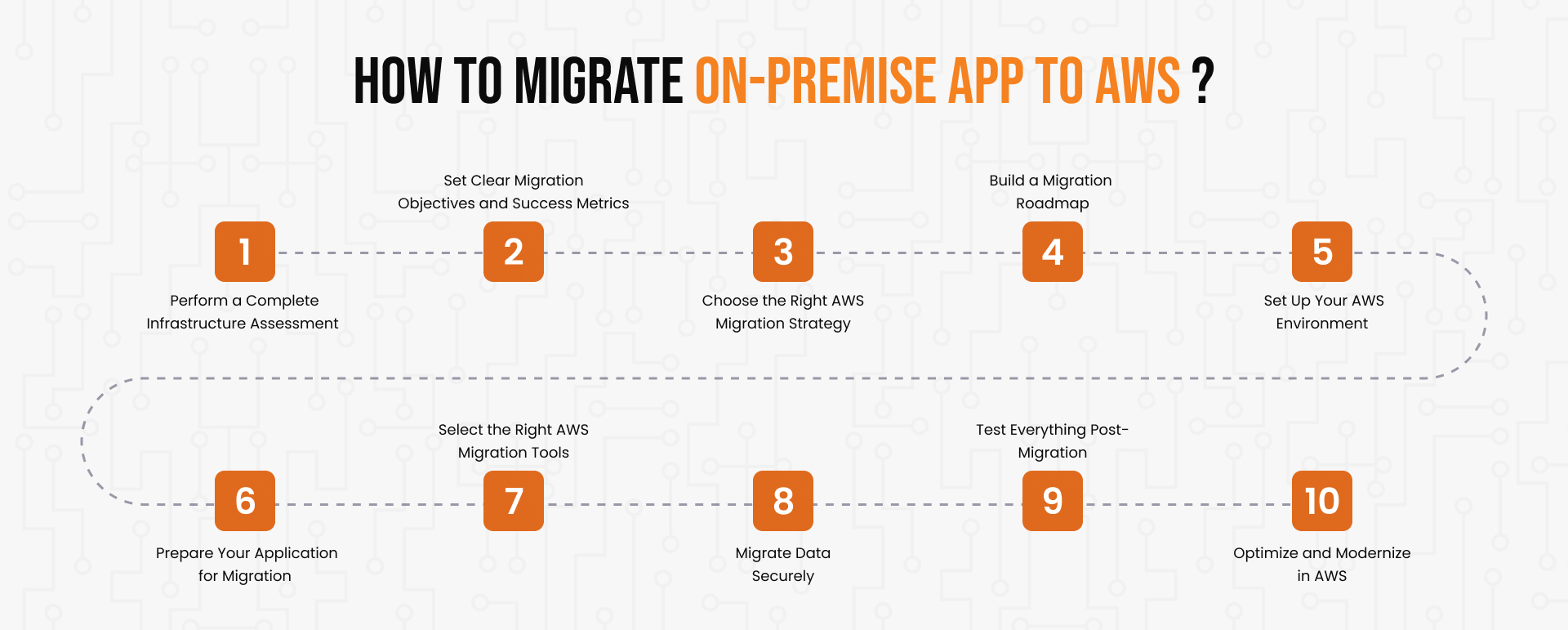
Step 1: Perform a Complete Infrastructure Assessment
Begin by thoroughly evaluating your current infrastructure and system landscape. Identify the current application architecture, operating systems, databases, dependencies, and storage requirements. Map how different components interact and identify legacy systems that might hinder compatibility. Proper assessment forms the foundation of a successful migration. Cloud migration consulting professionals often use discovery tools to accelerate this process and reduce human error.
Interview internal stakeholders to understand usage patterns, business priorities, and performance issues. Use tools like the AWS Migration Evaluator to generate a cost-benefit analysis for AWS infrastructure. This phase will also help eliminate unused resources, optimize licensing, and prepare a clear inventory.
Step 2: Set Clear Migration Objectives and Success Metrics
Identify what you aim to achieve from the migration. Are you targeting improved performance, reduced cost, higher uptime, or better compliance? Define measurable KPIs to track the migration’s success. These may include reduced latency, improved throughput, or enhanced scalability. Align your technical migration goals with business outcomes to maintain stakeholder alignment.
Consider short-term and long-term goals. For instance, while your immediate goal may be to rehost the application, your long-term vision might involve refactoring it into microservices. Establish success criteria for each stage of migration and review them periodically.
Step 3: Choose the Right AWS Migration Strategy
Selecting the appropriate migration strategy depends on your application complexity and business priorities:
- Rehost (Lift-and-Shift): Transfer the application as-is without modifying its code.
- Replatform: Make minimal optimizations during migration. Common for database and middleware changes.
- Refactor: Redesign the app for cloud-native capabilities. Useful for improving agility and performance.
- Repurchase: Replace legacy software with cloud-based alternatives.
- Retire or Retain: Eliminate redundant applications or retain them temporarily.
Each approach serves a purpose, and cloud migration consulting can help evaluate which strategy best fits your application lifecycle when you migrate on-premise app to AWS. Organizations often use a mix of these strategies across their application portfolio.
Step 4: Build a Migration Roadmap
A roadmap ensures smooth execution. Define phases, milestones, timelines, and responsibilities. Identify dependencies, integration points, and risks. Choose between a phased migration and a big-bang cutover. Develop rollback strategies and schedule regular checkpoints. Document change management procedures to ensure minimal disruption during cutover.
Include application categorization (e.g., critical vs. non-critical), risk analysis, and communication planning. Collaborate with DevOps, InfoSec, and business units to ensure buy-in. Use the AWS Well-Architected Framework to assess and refine your migration roadmap.
Step 5: Set Up Your AWS Environment
Prepare your AWS account before migration. Set up the following:
- Virtual Private Cloud (VPC): Establish secure networking.
- Identity and Access Management (IAM): Configure permissions.
- Security Groups and NACLs: Define access control rules.
- Monitoring: Enable CloudWatch and GuardDuty.
- Service Setup: Deploy foundational services like EC2, RDS, S3, and Load Balancer.
This preparation ensures your AWS environment can support the migrated application efficiently and securely.
Establish tagging strategies for cost allocation and resource management. Implement strong backup and disaster recovery plans through AWS Backup and S3 version control, and define logging standards with CloudTrail.
Rely on expert-led application migration services that ensure seamless transitions, minimal downtime, and long-term cloud success at scale.
Step 6: Prepare Your Application for Migration
When you migrate on-premise app to AWS, it’s essential to check your application for cloud readiness. Refactor the code where necessary to support containerization or serverless environments. Update configurations to use environment variables and decouple services. Ensure database compatibility with AWS databases like RDS or Aurora. Incorporate CI/CD automation to accelerate both development and release cycles.
Test application modules independently to isolate potential compatibility issues. Remove hard-coded paths, local storage dependencies, or obsolete libraries. Conduct performance benchmarking under simulated AWS configurations.
Step 7: Select the Right AWS Migration Tools
AWS provides several tools for efficient migration:
- AWS Application Migration Service (MGN): AWS MGN automates lift-and-shift migration for physical, virtual, and cloud servers, ensuring a fast and seamless transition to AWS.
- AWS Server Migration Service (SMS): AWS SMS simplifies migrating workloads from on-premises infrastructure to AWS with minimal effort and downtime.
- AWS Database Migration Service (DMS): AWS DMS transfers databases to AWS quickly and securely with little to no service interruption.
- AWS Migration Hub: AWS Migration Hub provides a centralized dashboard to manage, track, and monitor migration progress across multiple AWS services.
Cloud migration consulting teams can help configure and integrate these tools effectively. Third-party tools like CloudEndure, Carbonite, or RiverMeadow may also be considered based on requirements.
Step 8: Migrate Data Securely
Secure and consistent data migration is crucial. Use encryption during transit and at rest. Validate data consistency before the switch. Use AWS Snowball for large datasets or direct network transfer for smaller ones. Plan data transfer during non-critical hours to reduce disruption, while adhering to local data regulations.
Establish data validation scripts to compare records before and after migration. Use CloudTrail logs to track access and changes. Document data ownership and responsibilities for post-migration monitoring.
Step 9: Test Everything Post-Migration
Once migrated, test your application thoroughly:
- Functionality Testing: Validate business logic and features.
- Performance Testing: Check load handling and latency.
- Security Testing: Ensure access controls and encryption are functioning.
Automate tests where possible to speed up validation. Monitor using CloudWatch, CloudTrail, and X-Ray to identify anomalies early.
Conduct UAT (User Acceptance Testing) with end-users to validate usability. Simulate failover events to test system recovery and high availability. Monitor database performance and conduct stress tests.
Step 10: Optimize and Modernize in AWS
After you migrate on-premise app to AWS, ongoing optimization becomes key to realizing its full potential. Optimize for performance and cost:
Enable autoscaling for dynamic workloads
- Use Reserved Instances for cost savings
- Monitor unused resources and shut them down
- Adopt managed services like Lambda, Fargate, or ECS for modernized deployment
Continuous optimization helps realize full value from your AWS investment. Experienced cloud consultants continually review and enhance your AWS setup to ensure sustainable performance.
Adopt cost reporting tools like AWS Cost Explorer or CloudHealth to manage cloud expenses. Use performance metrics from CloudWatch to identify bottlenecks. Consider implementing infrastructure as code using AWS CloudFormation or Terraform.
Conclusion
Choosing to migrate on-premise app to AWS empowers businesses to grow, streamline operations, and drive innovation. By leveraging a sound approach, the proper tools, and guidance from specialists, the migration can be executed seamlessly and efficiently. A well-defined roadmap, paired with rigorous testing and optimization, ensures application performance and security remain intact. For companies lacking internal cloud expertise, AWS migration consulting plays a crucial role in reducing risk, speeding up timelines, and ensuring compliance.
Keep pace with AWS updates and recommended operational strategies to stay optimized. Consider cloud migration as a continuous path to modernization rather than a single milestone. Partnering with a cloud migration consulting team ensures you stay on track from planning to continuous innovation.