Quick Summary
This blog explains what Lift and Shift migration is, why many businesses choose it, and when it works best. You’ll see its benefits, limitations, real examples, and how Bacancy helps companies rehost applications to the cloud quickly and securely.
Table of Contents
Introduction
Modern businesses are constantly looking for ways to improve how they build, scale, and manage applications. To achieve this, many are turning to cloud migration as a strategic move, using advanced services offered by public cloud platforms like AWS, Azure, and Google Cloud.
Stats reveal that the cloud migration market is expected to grow from $0.30 trillion in 2025 to $1.03 trillion by 2030, with a yearly growth rate of 28.24%. (Source: Mordor Intelligence). This surge reflects a broader push to modernize systems, control costs, and respond more quickly to business needs.
However, several key factors accelerate this shift from on-premise to cloud environments in the first place. That is because:
- Focus shifts from infrastructure to application development
- Cloud offers better flexibility and uptime than on-site systems
- Pay-as-you-go reduces upfront capital costs
- Hybrid models ensure smooth on-prem and cloud integration
- Built-in security and simplified compliance from cloud providers
In many cases, lift and shift becomes the preferred strategy. But is this quick and easy solution truly the best fit for your organization’s long-term needs, or is there more to it? Let’s explore this migration approach further and evaluate it in detail.
What is Lift and Shift?
Lift and Shift cloud migration, also called rehosting, is the process of moving applications and data from on-premises infrastructure to the cloud with little or no modification.
In simple terms, it means to “lift” your existing systems and “shift” them to a cloud platform without changing the core application structure, data flow, or security setup.
Benefits of a Lift and Shift Migration Approach
Lift and shift migration helps businesses move to the cloud quickly while staying focused on core operations. It provides a solid foundation for cloud adoption, from lowering infrastructure costs to improving scalability and uptime. Let’s take a closer look at these advantages.
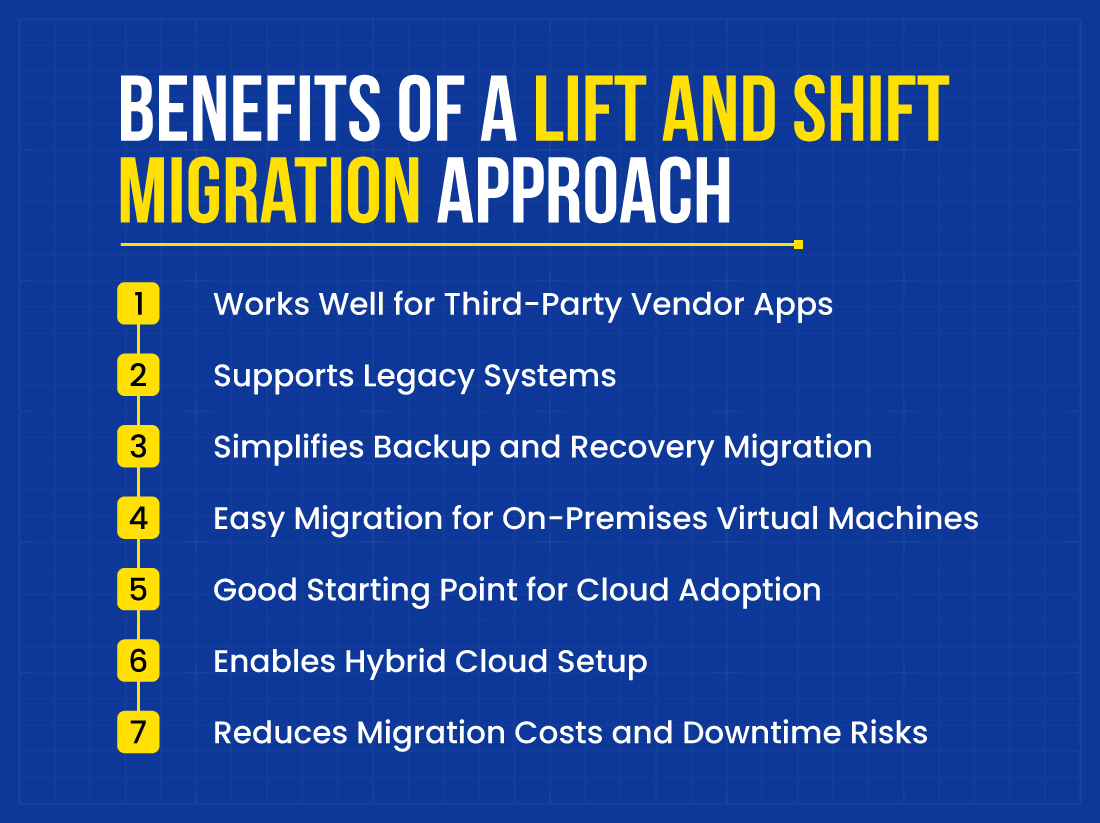
1. Works Well for Third-Party Vendor Apps
Some companies rely on proprietary software from third-party vendors, such as SAS (Statistical Analysis System) or MicroStrategy. Due to vendor-imposed restrictions, this software often cannot be modified or customized.
In such cases, a lift and shift approach is the most suitable choice. This allows organizations to migrate the software to the cloud as-is while maintaining compliance and accelerating cloud adoption.
2. Supports Legacy Systems
Many legacy applications were built before cloud platforms existed. These apps may not support modern cloud features or technologies, and changing them can take a lot of time, money, and effort. Lift-and-shift migration allows you to move these apps to the cloud without any redesign, so they can still run smoothly in a modern environment.
3. Simplifies Backup and Recovery Migration
Backup and disaster recovery systems are often sensitive and highly structured. Lift-and-shift keeps the existing backup workflows intact while relocating them to the cloud. It supports data integrity, faster recovery, and more cost-effective storage without complex reconfiguration.
4. Easy Migration for On-Premises Virtual Machines
Many businesses use virtual machines on-premises to run critical apps. Instead of creating new cloud-native setups, lift-and-shift helps move these existing VMs directly to cloud-based VMs. It saves time, avoids technical issues, and keeps apps running the same way they did before.
5. Good Starting Point for Cloud Adoption
Lift & Shift migration is an excellent way to start building a hybrid cloud environment, where some applications are hosted on-premises and others move to the cloud. You can efficiently manage and optimize both on-premises and cloud systems with proper cloud migration tools, providing a flexible, hybrid IT infrastructure.
6. Enables Hybrid Cloud Setup
Some organizations must keep specific workloads on-premises due to compliance or data sensitivity. Lift-and-shift allows them to move selected apps to the cloud while maintaining others locally, enabling a hybrid model that supports flexibility and gradual cloud adoption.
Read more about Multi Cloud vs Hybrid Cloud.
7. Reduces Migration Costs and Downtime Risks
Lift and shift avoids major changes to the application, helping reduce development costs by approximately 30–50% and testing efforts by 20–40%. It also helps prevent costly downtime, by minimizing migration complexity.
Read more about Cloud Migration Costs in detail.
Limitations of Lift and Shift Cloud Migration
While lift-and-shift offers speed and simplicity, it also comes with certain drawbacks. Understanding these helps in making better long-term cloud migration decisions.
● Reduced Efficiency Over Time
Applications moved without changes may work initially, but can become less efficient over time. They might lead to higher cloud bills, slow performance, or even service interruptions. This happens when the app isn’t well-suited for the cloud setup.
● Lack of Cloud Benefits
Rehosted apps do not use cloud-native features like auto-scaling, load balancing, or serverless functions. This means businesses miss out on better performance and cost savings. The app simply runs in the cloud, without entirely using its capabilities.
● Security Risks
If security settings are not updated for the cloud, the app could face new threats. Features like identity access, encryption, and cloud firewalls may be missing or misconfigured. Without proper cloud governance, data can be exposed, and the risk of security breaches increases.
How to Rehost Your Applications in the Cloud?
Here’s a brief overview of the 5-step process to rehost your applications to the cloud.
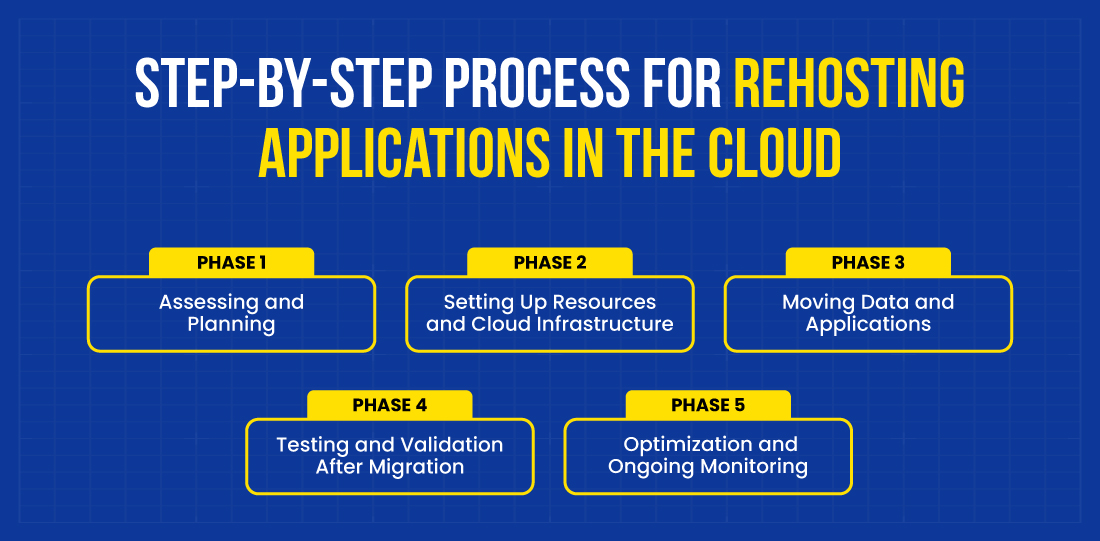
Phase 1: Assessing and Planning
Evaluate your current system to understand its requirements, estimate Cloud Total Cost of Ownership (Cloud TCO), and determine if moving to the cloud is a good fit. Identify challenges, security requirements, and compliance risks. Choose the right cloud model and define a clear migration strategy.
Phase 2: Setting Up Resources and Cloud Infrastructure
Prepare the target cloud environment by provisioning storage, compute, and networking components through effective cloud resource management. Configure security, access controls, and monitoring tools to support a reliable and scalable infrastructure ready for application workloads.
Phase 3: Moving Data and Applications
Securely transfer applications and data from on-premises to the cloud. Use migration tools to automate and streamline the process. Ensure minimal downtime and verify that all assets are moved successfully.
Phase 4: Testing and Validation After Migration
Run thorough tests to validate application functionality, performance, and data integrity. Check system behavior under expected workloads. Confirm everything runs smoothly in the new cloud environment before going live.
Phase 5: Optimization and Ongoing Monitoring
Fine-tune cloud resources to improve performance and reduce unnecessary costs. Set up continuous monitoring to track usage, detect issues early, and maintain system health, even during unexpected cloud outages or traffic surges.
Following these steps, along with cloud migration best practices, ensures a successful cloud migration by optimizing performance and minimizing post-migration risks.
Lift and Shift Migration vs Other Migration Models
Lift-and-shift migration involves moving applications to the cloud without changing their code or architecture. In contrast, other migration strategies involve redesigning or optimizing apps to fit the cloud environment better.
Understanding these differences can help you choose the right approach based on your goals, timeline, and resources.
| Criteria |
Lift and Shift (Rehost) |
Replatform |
Refactor |
Repurchase |
Relocate |
| Approach |
Move apps/data as-is |
Minor cloud optimizations |
Redesign for cloud-native |
Replace the old system with a cloud-based SaaS solution |
Move apps to a different region or zone |
| Scalability |
Limited scalability |
Some scalability improvement |
Fully scalable with cloud-native design |
Scalable depends on the SaaS solution |
Scalable based on the new region’s resources |
| Time to Complete |
Fast |
Moderate |
Long |
Moderate |
Moderate |
| Cost |
Low initial cost, higher cloud |
Moderate |
High initial, long-term |
Moderate, depends on SaaS |
Moderate, depends on SaaS |
| Cloud Optimization |
Minimal cloud benefits; does not leverage cloud features effectively |
Partial optimization uses cloud features like auto-scaling |
Fully optimized for cloud-native features and scalability |
Fully optimized for the cloud with native capabilities |
No cloud benefits |
| Complexity |
Simple |
Moderate |
High |
Low to Moderate |
Low to moderate |
| Vendor Lock-In |
Low |
Moderate |
High |
High |
None |
| Integration |
No integration needed |
Some cloud-native integration |
Full cloud-native integration |
No integration |
No integration |
| Disaster Recovery |
Basic recovery with manual setup |
Better recovery with some cloud tools still requires work |
Best recovery with automated cloud tools |
A SaaS provider handles DR |
Standard, on-premises DR |
How Bacancy Navigates Lift and Shift Cloud Migration Challenges
Lift & Shift is a powerful way to accelerate cloud adoption, but it comes with challenges that require strategic expertise and careful execution. Here’s how Bacancy helps you overcome those hurdles for a secure, cost-efficient, and future-ready migration.
1. High Long-Term Cloud Costs
Poor resource planning and underuse of cloud services often lead to escalating operational costs post-migration. Without clear visibility into consumption, businesses continue to pay for idle or unnecessary resources. These inefficiencies gradually erode the overall return on cloud investment.
Here’s how we take charge of your cloud costs:
- Cost Optimization Tools: Monitor cloud usage and spending patterns to identify areas where costs can be reduced.
- Auto-Scaling: Enable resources to scale up or down automatically based on current workload demands, avoiding overprovisioning.
- Reserved & Spot Instances: Use long-term reserved instances and low-cost spot instances to cut expenses on consistent and flexible workloads.
- Regular Audits: Conduct scheduled audits to detect idle resources, eliminate waste, and ensure efficient cost allocation.
Read more about Cloud Waste and how we help you navigate this roadblock.
2. Lack of Cloud Optimization
Migrating to the cloud without re-architecting applications prevents access to key benefits such as auto-scaling, elasticity, and serverless capabilities. This lack of post-migration optimization leads to inefficient resource use and missed cost savings and performance improvement opportunities.
Here’s how we help you with cloud optimization:
- Post-Migration Refactoring: Re-architect apps to leverage cloud-native features like auto-scaling, serverless computing, and managed databases.
- Replatforming: Integrate apps with cloud-native services such as cloud storage and databases for better performance.
- Cloud-Native Tools: Introduce development tools to maximize cloud performance and reduce costs.
3. Data Migration Complexity
Migrating large volumes of data to the cloud often presents challenges, particularly when dealing with legacy systems. Effective cloud data management is essential to ensure data integrity, reduce downtime, and transform outdated data formats for cloud compatibility throughout the migration process.
Here’s how we can help you with data migration complexity:
- Automated Migration Tools: Use tools like AWS Database Migration Service and Azure Migrate for accurate, fast, and low-downtime transfers.
- Data Validation & Cleanup: Ensure only relevant, high-quality data is migrated by validating and cleaning legacy data.
- Backup & Disaster Recovery: Implement backup and recovery solutions to protect data and ensure safe migration.
Read more in detail about Cloud Data Warehouse.
4. Compatibility Issues with Legacy Apps in the Cloud
Legacy applications built for on-premise environments often fail to align with modern cloud architectures. When moved directly to the cloud, these systems may struggle with performance, integration, or scalability, leading to operational disruptions and inefficiencies.
Here’s how we can help you with legacy app compatibility:
- App Evaluation: We assess your legacy apps to spot compatibility issues and recommend the best cloud migration strategies.
- Refactoring/Replatforming: We help modify or move apps to be cloud-compatible with minimal disruption.
- SaaS Transition: We migrate legacy apps to SaaS, providing better cloud scalability and reduced internal maintenance.
Read more in detail about Legacy application migration to the cloud.
5. Lack of Cloud Expertise
Many organizations lack the in-house skills needed to manage, secure, and optimize cloud environments after migration. This often leads to misconfigurations, increased costs, and slower issue resolution.
Here’s how we can help you with our expertise:
- Cloud Management: We provide cloud management services to handle cloud monitoring, optimization, and issue resolution for businesses without in-house expertise.
- Cloud Computing Consulting: We provide strategic guidance on cloud architecture, migration planning, and future improvements through our cloud computing consulting services.
6. Security and Compliance Risks
Weak configurations can expose sensitive data or violate regulations. Without proper security policies and compliance tracking, cloud setups remain vulnerable.
Here’s how we stay on the front line about security challenges:
- Cloud Security Setup: Implement cloud-native security tools like firewalls, IAM, and encryption to protect your cloud.
- Compliance Assurance: Use automated tracking tools to ensure your cloud meets compliance standards (e.g., GDPR, HIPAA).
- Security Audits: Conduct regular security audits and vulnerability assessments to identify and address potential risks.
Read More About Cloud Migration Threats and Risks.
7 Times When Lift & Shift Is the Best Cloud Migration Strategy
Lift and shift isn’t always the correct answer, but it’s the most practical, low-risk way to move workloads to the cloud in specific business scenarios. Here are six key situations where this strategy delivers real value without rewriting code.
1. Need to Move Quickly
If there’s a tight deadline to get applications into the cloud, Lift and Shift cloud migration is the fastest option, allowing migration with minimal changes.
2. Reducing Infrastructure Costs
If maintaining physical servers is costly, Lift and Shift cloud migration can help you save on hardware, maintenance, and on-premises data center costs by moving to the cloud.
3. Starting a Digital Transformation
For businesses new to the cloud, Lift and Shift migration is a simple first step that moves existing applications to the cloud, allowing time to optimize them later.
4. Keeping Applications Intact
If the existing application is challenging to modify or refactor, Lift and Shift lets you move it to the cloud without altering its structure.
5. Shutting Down Expensive Data Centers
Lift and Shift migration allows businesses to quickly migrate to the cloud without significantly changing their current apps when vacating a costly data center.
6. Switching from CapEx to OpEx
With Lift and Shift, you can move from paying upfront for hardware (CapEx) to a pay-as-you-go model (OpEx), which lowers upfront costs and offers more flexibility.
7. Saving on Hardware
Lift and Shift can migrate applications to a more affordable cloud environment if existing hardware is outdated and expensive, avoiding costly new hardware purchases.
Real-World Use Cases of Lift and Shift Migration
Different industries face unique challenges in moving legacy workloads to the cloud. Here’s how lift and shift migration offers practical, low-disruption solutions across sectors.
1. Financial Services
Migrating core banking systems such as CRM, loan origination, and compliance engines from legacy mainframes to a secure, high-availability cloud environment, without the need for code refactoring.
How Lift and Shift Migration Helps:
- Rehosts legacy financial apps to cloud VMs (e.g., AWS EC2, Azure VMs).
- Maintains application behavior while improving uptime and performance.
- Enables real-time data replication, automated backups, and disaster recovery.
- Meets compliance standards (e.g., PCI DSS) with built-in security controls.
2. Retail Industry
Migrating eCommerce backend platforms to the cloud to handle seasonal traffic spikes efficiently, without overprovisioning on-premises infrastructure.
How Lift and Shift Migration Helps:
- Scales infrastructure instantly with cloud-native auto-scaling and load balancers.
- Supports legacy eCommerce platforms without redevelopment.
- Optimizes cost using Reserved and Spot Instances during peak demand.
- Reduces downtime and improves page load speeds during high-traffic events.
3. Manufacturing
Centralizing legacy Supervisory Control and Data Acquisition (SCADA) and Manufacturing Execution System (MES) applications in the cloud to enable remote plant monitoring and real-time access for globally distributed teams.
How Lift and Shift Migration Helps:
- Moves industrial systems to cloud VMs without disrupting control logic.
- Enables centralized access to operational dashboards and logs.
- Ensures minimal downtime and latency with regionally distributed instances.
- Reduces hardware dependency and enables future system modernization.
4. Education Sector
Scaling on-premise Learning Management Systems (LMS) to handle a sudden increase in remote learners across multiple locations.
How Lift and Shift Migration Helps:
- Rehosts LMS platforms in the cloud with zero refactoring.
- Uses cloud auto-scaling and global delivery networks for consistent access.
- Simplifies IT management with built-in monitoring and backup.
- Supports growing student bases while reducing infrastructure costs.
Lift and Shift With Bacancy: A Winning Approach
At Bacancy, Lift and Shift is more than just moving workloads; it’s about accurately replicating your existing setup without changing your application code. Our cloud migration services focus on mapping dependencies, ensuring operating system (OS) and middleware compatibility, and replacing on-premises components with cloud-native alternatives. These include Amazon Elastic Compute Cloud (EC2), Amazon Relational Database Service (RDS), Microsoft Azure Virtual Machines (VMs), and Google Compute Engine (GCE).
To maintain consistent performance and security, we align network configurations, access controls, and storage structures with your current setup.
As part of the migration, we also implement automated backups, disaster recovery mechanisms, and cost optimization strategies. The result is a cloud environment that mirrors your existing infrastructure, enhanced with improved scalability, stronger reliability, and greater operational efficiency.
Frequently Asked Questions (FAQs)
1. Assess workloads and cloud compatibility.
2. Select a cloud provider.
3. Plan migration priorities and timelines.
4. Prepare cloud resources.
5. Migrate using tools.
6. Test and verify.
7. Go live and monitor.
Depending on the app’s complexity, it typically takes a few weeks to a few months.
● Cloud Resources: Charges for computing, storage, and networking.
● Data Transfer: Moving data to the cloud.
● Setup: Cloud configuration costs.
● Licensing: Fees for cloud licenses.
● Testing: App validation expenses.
● Training: Training and support costs.
● Ongoing: Regular cloud charges.
Lift-and-shift migration in Azure means moving your apps, data, and workloads to Azure without changing how they work. You can also use tools like Azure Migrate to transfer them to Azure Virtual Machines and store them quickly and easily.
Lift-and-shift in AWS means moving workloads from on-premises to AWS with little or no changes. It’s a common way for businesses to start using the cloud and can later transition to a cloud-native setup.
It means moving your apps, data, and workloads to Google Cloud as they are, without changes. Using tools like Migrate for Compute Engine, you can rehost them on Google Cloud VMs quickly and easily.
Lift and shift cloud migration is moving an app from one place to another without changing it. For example, you could move a website running on your office server to a cloud server without changing its functionality.
● Lift and shift cloud migration means moving an application to the cloud without changing anything.
● Modernization means updating or improving an application to fully take advantage of cloud features, such as making it more efficient or scalable.