This blog is a step-by-step guide on integrating AWS Security Hub and AWS Config for easier compliance management. We’ll explain how to set up your environment, configure AWS Config rules, and link them with AWS Security Hub. We’ll also highlight the key benefits and features of AWS Security Hub and AWS Config, showing how they can help automate compliance.
Table of Contents
Introduction
Maintaining compliance and a good security posture in a cloud environment relies upon achieving and managing it through automation with tools such as AWS Security Hub and AWS Config. AWS Config monitors and records resource configuration continuously, while AWS Security Hub aggregates and prioritizes security findings for multiple AWS services. This blog focuses on integrating AWS Security Hub and AWS Config to yield automated compliance management. We will focus on how AWS Config works at the rules level on resources while providing configurations to the AWS Security Hub that aggregates and analyzes security-related data giving a holistic picture of the state of security within the particular environment.
What is AWS Security Hub?
AWS Security Hub is an integrated service for security management that allows one to gain an overview of their AWS security posture. It aggregates and classifies all enabled AWS services security findings, including GuardDuty, AWS Config, and AWS Inspector, to track compliance and identify security risks in an AWS environment. AWS Security Hub will now aid you in automating how your environment will be evaluated against the best practices and security standards so that you can ensure continuity in maintaining security and compliance.
Key Features of AWS Security Hub:
Centralized Security View: This feature gathers security information from various AWS services and third-party tools into one dashboard for easy viewing.
Compliance Checks: Regularly check your AWS resources to ensure they meet industry standards like CIS AWS Foundations and PCI DSS.
Automated Security Findings: Automatically detects security issues and organizes them based on how serious and impactful they are.
Integration with AWS Config: Works with AWS Config to monitor compliance with regard to configuration and will alarm deviations automatically.
Cross-Account Visibility: Provides security findings monitoring and management on multiple AWS accounts from one location.
Custom Actions and Automated Remediation: Set custom workflows to remediate security findings automatically.
Benefits of AWS Security Hub:
Unified Security Monitoring: The process whereby security data from different services converge in one central place, enabling you to manage everything neatly.
Improved Compliance: An automated process of checking compliance to ensure constant attendance toward best practices and standards set by regulation.
Proactive Security: It detects threats and vulnerabilities in advance and allows owners to overcome them quickly, even before they turn into major disasters.
Customizable Remediation: The new feature has allowed them to automatically decide the workflows for responding to security incidents.
Scalability: Able to scale quickly with your AWS environment allows organizations of all sizes to remain secure and compliant.
What is AWS Config?
AWS Config is a service that provides an evaluation, auditing, and compliance report of your AWS resources’ configurations. It continuously monitors and records your resource configurations and allows for assessment at any time. These capabilities enable compliance with internal policies and regulatory standards. With AWS Config, you can discover existing resources and export a complete inventory of your resources with all detailed AWS configurations. By configuring AWS Config, you can target specific resources or types of resources, and you can set up the resource triggers that are used to detect changes. Also, you can use it to set up rules that automatically check that the changes to your resources are consistent with your desired configurations.
Key Features of AWS Config:
Configuration Monitoring: It continuously monitors and records the configurations for your AWS resources and any change in time.
Compliance Management: Specifies rules to monitor compliance with best practices, internal policies, or industry standards.
Resource Relationships: It visualizes resource relationships in real-time, making it easier to understand how different parts of your infrastructure interconnect.
Configuration Snapshots: Historical snapshots of configuration and the ability to review resource changes can be monitored.
Integration with AWS Security Hub: It integrates with AWS Security Hub to get enhanced security and compliance monitoring by providing resource configuration data.
Custom Rules: Using AWS Lambda, you can create custom compliance rules to evaluate resources according to your requirements.
Benefits of AWS Config:
Automated Compliance: Continuously evaluates configurations against compliance rules, helping you maintain alignment with security standards and internal policies.
Change Visibility: Provides a clear history of configuration changes, helping you identify misconfigurations or unauthorized changes.
Audit Support: Simplifies the auditing process by offering a detailed log of changes and configuration snapshots for your AWS resources.
Real-Time Alerts: Sends notifications when resources drift from their compliant state, allowing for immediate action.
Scalability: Easily scales across multiple accounts and regions, providing a comprehensive view of your entire AWS environment’s configuration compliance.
Step-by-Step Guide: Checking EC2 and S3 Compliance with AWS Security Hub and AWS Config
Let’s learn about integrating AWS Security Hub and AWS Config to check if your EC2 instances and S3 buckets follow the rules.
1. Set Up AWS Config
Step 1.1: Open AWS Config
Go to the AWS Management Console.
Search for “AWS Config” in the search bar and select it.
Step 1.2: Configure AWS Config
Click Get Started if you haven’t already set up AWS Config.
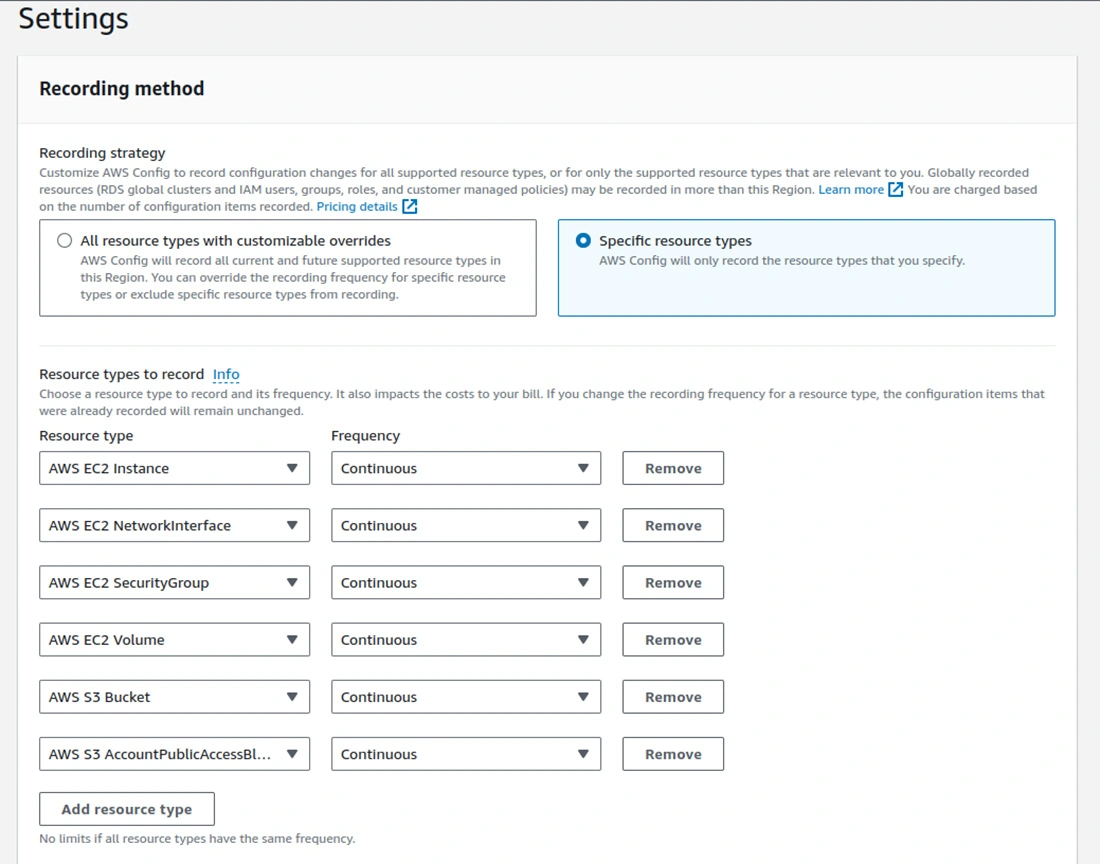
Choose the following Recorded Resource Types to monitor: • AWS EC2 Instance
• AWS EC2 NetworkInterface
• AWS EC2 SecurityGroup
• AWS EC2 Volume
• AWS S3 Bucket
• AWS S3 AccountPublicAccessBlock
Select or create an S3 bucket for storing configuration history.
(Optional) Set up SNS notifications to receive alerts on configuration changes or rule violations. (See Section 5 for detailed SNS setup steps)
Step 1.3: Create AWS Config Rules for EC2 and S3
Go to Rules in the left-hand menu and click Add Rule.
Add the following AWS Config rules:
For EC2 Instances, select rules like:
ec2-instance-no-public-ip – checks whether EC2 instances have public IP addresses.
ec2-instance-detailed-monitoring-enabled – ensures that detailed monitoring is turned on to all the EC2 instances
ec2-security-group-attached-to-eni – checks whether security groups are attached to Elastic Network Interfaces
ec2-instance-profile-attached – checks that EC2 instances have an instance profile attached to them.
ec2-volume-inuse-check – ensures all EBS volumes are attached to an instance.
restricted-ssh – checks for unrestricted SSH access.
ec2-managedinstance-association-compliance-status-check – verifies whether EC2 managed instances are in compliance.
ec2-ebs-encryption-by-default – ensures EBS encryption is enabled by default.
encrypted-volumes – checks whether EBS volumes are encrypted.
ec2-stopped-instance – verifies if there are any stopped instances.
For S3 Buckets, select rules like:
s3-bucket-level-public-access-prohibited – checks whether EC2 instances have public IP addresses.
s3-bucket-server-side-encryption-enabled – checks if server-side encryption is on or off for S3-bucket
s3-bucket-public-read-prohibited – confirms that S3-buckets are not publicly readable.
s3-bucket-public-write-prohibited – ensures the S3-bucket cannot be written into from the public.
s3-bucket-logging-enabled – this test confirms that server access logging is enabled on the S3-buckets.
s3-bucket-versioning-enabled – it ensures versioning has been enabled for S3-bucket
s3-bucket-replication-enabled – it ensures that replication is enabled for the S3-bucket when it applies.
2. Turn On the AWS Security Hub
Step 2.1: Access the AWS Security Hub
Open the AWS Management Console and search for AWS Security Hub.
Click Enable Security Hub if not already enabled.
Step 2.2: Configure Security Standards
Go to Security Standards within Security Hub.
Enable standards like AWS Foundational Security Best Practices and CIS AWS Foundations Benchmark, which includes checks for EC2 and S3 compliance (e.g., ensuring public access is restricted for both services).
Security Hub will start assessing your environment based on these standards.
3. Integrating AWS Config and AWS Security Hub
Step 3.1: Enable AWS Config Findings in the Security Hub
Go to Settings in AWS Security Hub.
In the Integrations section, ensure that AWS Config is activated.
This will allow AWS Config to send non-compliance data (from the rules you created earlier) to AWS Security Hub.
Step 3.2: View Compliance Findings for EC2 and S3
Go to the Findings tab in AWS Security Hub.
Filter by AWS Config to see the compliance results for EC2 instances and S3 buckets.
For each finding, check details about the non-compliant resources (e.g., which EC2 instances have public IPs or which S3 buckets lack encryption).
Integrate easily without any worries, leverage our AWS Integration Services, and let us handle the complexities.
4. Monitor and Manage EC2 and S3 Compliance
Step 4.1: View the Compliance Dashboard in AWS Config
You can use the compliance status to log into your AWS Config dashboard for your EC2 instances and S3 buckets.
The dashboard will thus indicate compliance versus noncompliance based on your designed criteria.
Step 4.2: Investigate non-compliant resources
In AWS Config, go to the Rules and select the rule you want to analyze.
For each rule, you will find non-compliant resources.
5. Automated Alerts and Remediation
Step 5.1: Set Up Alerts Using AWS SNS
To receive email notifications for AWS Config changes, you can configure an SNS topic. 1. First of all, create an SNS Topic:
Open the Amazon SNS console.
Click Create topic and select Standard type.
Provide a name (e.g., SNSConfigTopic), then click Create topic.
2. Create an Email Subscription:
In the SNS console, select your new topic and click Create Subscription.
Choose Email as the Protocol, and enter the desired email address in the Endpoint field.
Confirm the subscription through the confirmation email sent to your inbox.
3. Link AWS Config to the SNS Topic:
In the AWS Config console, go to Settings.
Under Settings, add the SNS topic ARN created earlier under the SNS topic to receive notifications.
Step 5.2: Automate EC2 Remediation
We have implemented a remediation process to start EC2 instances when they are stopped automatically. Here’s how you set it up: 1. Create a Custom IAM Role for AWS Config Remediation:
Trust Relationship Policy:
AmazonEC2FullAccess: To allow the role to start and manage EC2 instances. (We will give EC2 full access for demo purposes)
AmazonSSMAutomationRole: For automation actions.
AWSConfigRulesExecutionRole: To execute config rule actions.
2. To set up AWS Config-managed remediation, follow these steps:
In the AWS Config console, navigate to the Remediations section.
Select the rule for ec2-stopped-instance.
Choose the remediation action AWS-StartEC2Instance.
Set the AutomationAssumeRole to the custom IAM role created earlier with the correct trust policy and permissions.
Save the remediation action.
3. Test Remediation:
Stop an EC2 instance manually to trigger non-compliance.
AWS Config should automatically start the stopped instance based on the rule and remediation action.
Conclusion
Therefore, integrating AWS Security Hub and AWS Config gives total visibility about the security posture, making decisions more effective and efficient regarding security management. You can always hire expert AWS developers to simplify compliance monitoring with actionable insights, automated alerts, and remediation-all critical to maintaining a secure AWS environment.
Kishan Prajapati
AWS Certified DevOps Engineer at Bacancy
DevOps enthusiast delivering efficient, cloud-driven, and automated infrastructure solutions.