
AngularJS 2 is an open source web and mobile application development framework. Nowadays it is widely used for desktop application development as it is a module base framework. Let me get you through the detailed guideline so you can have understanding that how to use its module or component in your application to import it.
AngularJS 2 Application File Structure
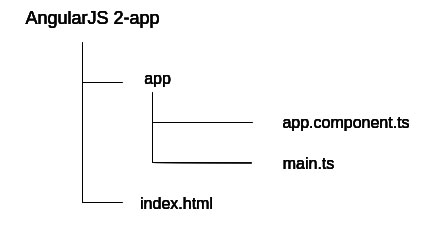
It has one HTML file (index.html) and Two Type Script files in app directory (app.component.ts, main.ts).
Create an application project folder
Create a folder/directory for our AngularJS 2 application (Run following command in terminal window).
mkdir MyAngularApp
cd MyAngularApp
Install the node.js
Installing node js (Run following command in terminal window)
npm install node.js
The above command will create a folder name “node_modules” with node.js folder containing files like lib, package.json many more.
Install the npm packages and typing files
Install all the packages included in package.json file, run following command in terminal window. (for windows on command line)
npm install
In order to get npm install and run, I have globally installed some of the devDependencies (Run following commands in terminal window)
npm install -g typescript  (g for globally installing globally)
npm install typings (this is used to convert .ts file to js file)
This is how you can create the development environment for your AngularJS 2 application.
Now let’s start by developing (creating) Hello World application.
Open an application project folder in the Code.VisualStudio.com (Can use notepad++, Subline instead)
Every AngularJS 2 application consists of one or many components. These components are building blocks of AngularJS 2 application. Every component controls a portion of the application using the template.
Make sure, every AngularJS 2 application has one root component, commonly referred as AppComponent.
AppComponent is a component class. There are two purposes of the component class.
- Control appearance of view
- Control behavior of view
Component class control behavior and appearance of view through a template. Component class can have component decorator.
There are two purposes of component decorator
- It tells the AngularJS framework what template to use
- It tells the AngularJS framework how the component will be created.
Are you looking for proficient Angular developers for your project?
Bacancy is here for you! Contact us now and hire angularjs developer to build, optimize, and deploy your application.
Create app.component.ts
So now let’s create AppComponent for our AngularJS 2 application in app.component.ts file
/* Importing Component decorator function from anularjs library module */

import {Component} from 'angular2/core'


/* Creating  AppComponent Class decorator */
@Component ({
	selector: 'my-app',
	template: 'AngularJS 2 Hello World'
})

/* Creating AppComponent class */
/* Exporting AppComponent Class */
export class AppComponent{}
Our Component decorator has two elements (fields) selector and a template.
We have assigned AppComponent names to selector field. We can use that AppComponent name in HTML. Whenever we use that AppComponent name (learning-turn) in HTML, AngularJS creates a AppComponent instance and displayed it in HTML.
AppComponent slector is CSS selector not HTML tag
We have assigned an AppComponent template to template field. It tells the AngularJS how to render the AppComponent view. Template fields can have HTML and other components
We have exported AppComponent so, we can import it somewhere else in our application.
Our AppComponent is now to ready in order to use it in our application.
Create main.ts file
Now create main.ts file in app directory
Following is the purpose of main.ts file
- main.ts is entry point (like main function) of our AngularJS 2 application.
- In main.ts we tells the Angular how to load our AngularJS 2 application.
- In main.ts we tells the Angular in which platform we want to run our AngularJS 2 application (We are going to run our application in browser).
- In main.ts we specify external dependencies of our AngularJS 2 application.
Here is our main.ts file
/* importing bootstrap component from angular library */

import {bootstrap} from 'angular2/platform/browser';

/* Importing AppComponent created in app.component.ts file */
import {AppComponent} from './app.component';

/* Bootstrapping AppComponent */
bootstrap(AppComponent);
create index.html
Now create an index.html file in your root directory of the project
index.html will load our application in the browser. In index.html we load required scripts (libraries), define system configuration and define an application component selector.
Here is our index.html
<html>

  <head>
    <title>AngularJS 2 Getting Started. Hello world Application</title>
    <meta name="viewport" content="width=device-width, initial-scale=1">
    <link rel="stylesheet" href="styles.css">

    <!-- 1. Load libraries -->
    <!-- IE required polyfills, in this exact order -->
    <script src="node_modules/es6-shim/es6-shim.min.js"></script>
    <script src="node_modules/systemjs/dist/system-polyfills.js"></script>
    <script src="node_modules/angular2/es6/dev/src/testing/shims_for_IE.js"></script>

    <script src="node_modules/angular2/bundles/angular2-polyfills.js"></script>
    <script src="node_modules/systemjs/dist/system.src.js"></script>
    <script src="node_modules/rxjs/bundles/Rx.js"></script>
    <script src="node_modules/angular2/bundles/angular2.dev.js"></script>

    <!-- 2. Configure SystemJS -->
    <script>
      System.config({
        packages: {
          app: {
            format: 'register',
            defaultExtension: 'js'
          }
        }
      });
      System.import('app/main')
            .then(null, console.error.bind(console));
    </script>
  </head>

  <!-- 3. Display the application -->
  <body>
    <my-app>Loading...</my-app>
  </body>
</html>
When AngularJS framework calls bootstrap function in app/main.ts file, AngularJS prepare AppComponent, find AppComponent selector (my-app), locate AppComponent selector assigned CSS selector (my-app) in index.html and load application between that it.
Compile and Run
Now open your terminal window and run following command (right click on the app folder, click ‘Open in Command Prompt’
npm start
You can see the output in the default browser.
