Quick Summary
Based on Bacancy’s expertise in AI development, the total cost to build an AI app can typically range from $30,000 for basic applications to $500,000 for more advanced solutions. Enterprise apps with complex models or larger workloads may require a higher investment.
Please note that the final cost depends on critical factors, including the complexity of the AI model, the level of design and user experience you expect, the platforms you plan to support, and the architecture required to ensure speed, security, and scalability.
For more clarity, we have outlined the complete AI app development cost, broken down every stage of the process, and included practical insights to help you plan your budget with confidence.
Table of Contents
Introduction
AI is not just the future; it is already redefining the way businesses operate. From apps that recommend what customers should buy to tools that predict market trends, Artificial Intelligence can give your company a powerful competitive edge.
Today, building an AI app goes beyond implementing smart algorithms. It involves designing effortless user experiences, personalized interactions, and adaptive features that keep users engaged.
This leads to important questions such as:
- How can I develop an AI app that delivers personalized recommendations or predictive insights that genuinely matter to users?
- How can I incorporate voice, image, or multi-modal AI features into an app that is intuitive and easy to use?
- What does it take to create an AI-driven app that adapts and improves over time without breaking performance or usability?
But one ultimate question remains at the top of every CEO’s or product leader’s mind:
“How much will it cost to develop an AI app that delivers real, measurable business value?”
According to MIT’s NANDA initiative in The GenAI Divide: State of AI in Business 2025, 95 percent of generative AI pilot projects deliver little to no measurable business impact (source).
It means that companies invest millions in AI experiments, but most of these efforts fail to scale or simply do not produce meaningful results.
At Bacancy, we have supported multiple businesses in turning complex AI ideas into practical, cost-effective applications. With years of hands-on experience, we have covered for you an inside-out view of AI app development costs, giving you clarity on:
- Major cost drivers, from data pipelines and model training to deployment, maintenance, and everything in between.
- How to budget realistically for each phase, taking into account today’s technology stack, market rates, and team composition.
- Proven strategies to optimize spending and mitigate hidden risks, ensuring your investment delivers measurable business impact.
By the end, you’ll have a clear understanding of how to manage costs and make strategic decisions throughout your AI app development journey, ensuring your investment turns into a high-performing, business-driving application.
How Much Does AI App Development Cost?
| App Type
| Approx Cost
|
|---|
| Basic AI App
| $30,000 – $75,000
|
| Mid-Level AI App
| $75,000 - $150,000 |
| Enterprise AI Solutions | $150,000 to over $500,000 |
AI App Development Cost Estimate: A Phase-Wise Complete Breakdown
We’ve broken down every stage of AI app development with clear timelines, realistic costs, and AI-focused deliverables so that you can budget confidently without surprises.
Stage 1: Planning Costs
Before writing a single line of code, you need a clear plan. This stage defines what AI features to build, which data to use, and how your app will solve user problems. The cost here covers all the groundwork that prevents wasted effort later, ensuring your budget goes toward high-value decisions.
| Phase | Estimated Cost (USD)
| Core Deliverables
| Timeline |
|---|
| Planning & Discovery
| $5,000–$10,000
| AI project roadmap, user persona analysis, data source audit, model feasibility report, technology stack recommendation, AI model selection guidance, scalability planning
| 1–2 weeks
|
Stage 2: Design Cost
Design is about making your app simple and smart to use. This cost covers creating AI interactions, such as chatbots or recommendations, mapping user journeys, and designing screens to ensure everything works smoothly for your users from day one.
| Phase | Estimated Cost (USD)
| Core Deliverables
| Timeline
|
|---|
| UX/UI Design for AI App
| $5,000–$15,000
| UX/UI for AI interactions, wireframes, predictive flow prototypes, clickable design mockups, AI feature placement, user journey mapping, accessibility, and engagement planning
| 2–4 weeks
|
Stage 3: Development Cost
Development is where your AI app becomes functional. The costs here reflect building reliable AI models, connecting them with back-end logic, and creating a smooth front-end experience. Proper investment ensures the app performs well and avoids expensive post-launch fixes.
| Component
| Estimated Cost (USD)
| Core Deliverables
| Timeline |
|---|
| AI Model Development & Training
| $20,000–$50,000+
| Creating, training, and tuning the AI models.
| 3–8 weeks
|
| Backend Development
| $10,000–$50,000+ | Server-side logic, APIs, database management, and infrastructure setup.
| 4–10 weeks
|
| MVP/Core Development
| $15,000–$35,000+ | Building the minimum viable product, including front-end development.
| 4–8 weeks
|
Stage 4: Quality Assurance (QA) & Testing
Testing is an investment in reliability. It helps ensure your AI predictions are accurate, the app performs smoothly, and security stays solid. Skipping or underfunding QA can lead to costly errors later, making this stage essential for a successful launch.
| Phase
| Estimated Cost (USD)
| Core Deliverables
| Timeline |
|---|
| QA & Testing
| $5,000–$15,000
| Functional testing, model accuracy validation, performance and load testing, security checks, edge-case testing, bug fixes, and AI output reliability verification
| 2–4 weeks
|
Stage 5: Deployment and Launch Costs
Deployment covers hosting, monitoring, and performance tuning to ensure your AI app is stable, accessible, and performs smoothly from day one. Investing properly at this stage minimizes downtime and prevents costly emergency fixes after launch.
| Phase
| Estimated Cost (USD)
| Core Deliverables
| Timeline
|
|---|
| Deployment & Launch
| $5,000–$20,000
| Cloud deployment, app store setup, live AI model hosting, real-time monitoring, performance tuning, launch support, analytics tracking setup
| 1–2 weeks
|
Stage 6: Maintenance Costs
Ongoing maintenance costs ensure your AI stays accurate, features stay relevant, and infrastructure remains secure. Budgeting for maintenance prevents expensive retraining or emergency fixes, protecting your long-term ROI.
| Phase | Estimated Cost (USD)
| Core Deliverables
| Timeline
|
|---|
| Ongoing Maintenance
| 15–25% of initial dev cost per year
| AI model retraining, feature updates, bug fixes, cloud cost management, performance tuning, user feedback implementation, security updates
| Continuous |
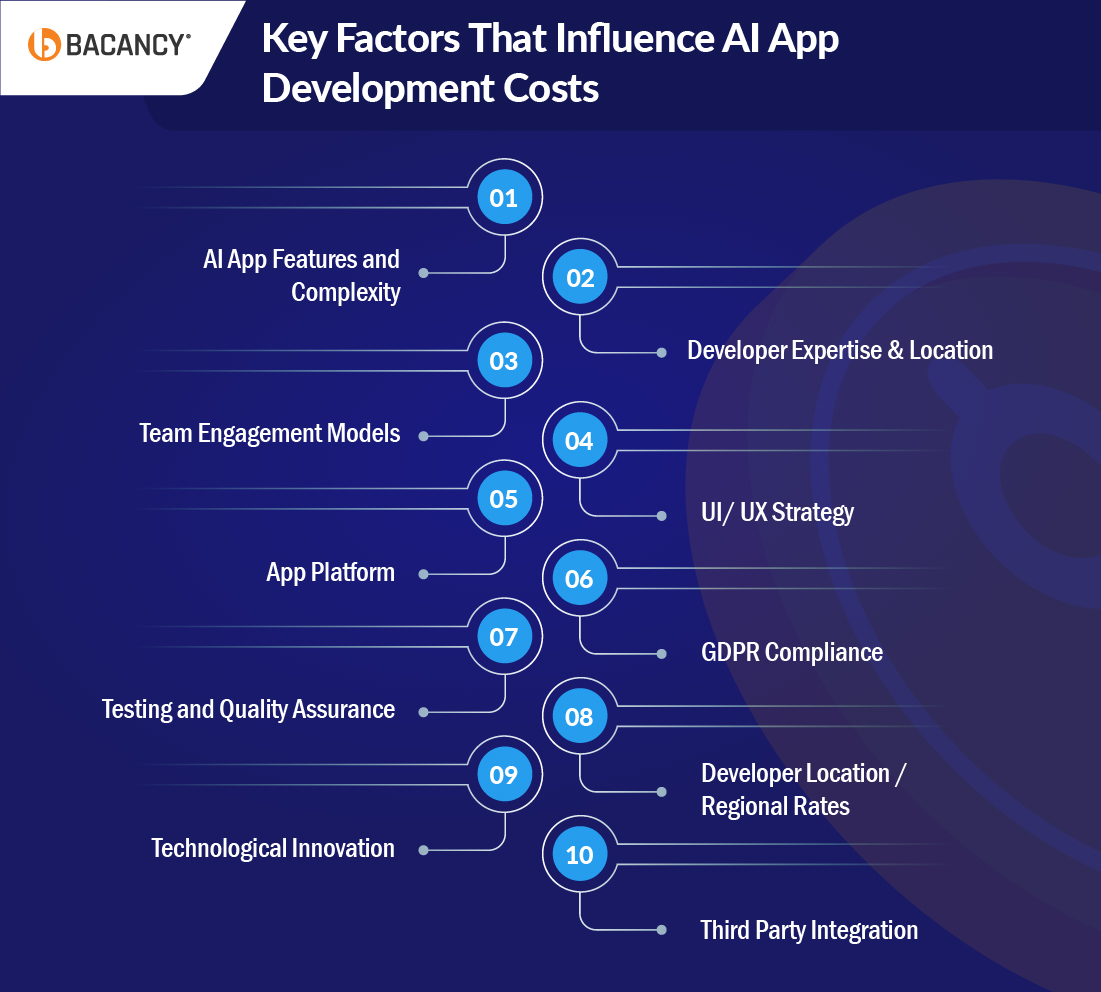
11 Key Factors That Influence AI App Development Costs
Several factors determine the cost of building an AI app. From the AI model’s complexity to the features you include and the technology stack you choose, each decision affects your budget. Let’s explore the key factors that impact AI app development costs.
1. AI App Features and Complexity
The cost of an AI app depends on the features you choose. A simple chatbot for customer support is quick and cost-effective. More advanced features, such as a recommendation engine for ecommerce, a predictive analytics tool for finance, or a healthcare diagnostic app, require multiple AI models, larger datasets, and more infrastructure.
These features naturally increase your investment but deliver higher business impact and smarter user experiences. It is also essential to plan for hidden costs, such as data collection, labeling, and ongoing model retraining, which can impact your overall budget.
| App Type
| Approx. Cost (USD)
| Development Timeline
|
|---|
| Basic AI features (chatbots, recommendation engines)
| $15,000 – $35,000
| 1–3 months
|
| Intermediate AI (image recognition, natural language processing, analytics dashboards)
| $100,000 – $200,000
| 3–6 months
|
| Advanced AI (autonomous systems, predictive analytics, multi-model AI integration, generative AI)
| $250,000 – $500,000+
| 6–12+ months
|
2. Developer Expertise & Location
The expertise and composition of your AI development team directly affect your project timeline and overall cost. Simple AI apps can be built with a small team, while complex solutions require specialized roles, such as AI developers, ML engineers, data engineers, backend developers, frontend developers, designers, QA engineers, and product managers.
Choosing the right team mix upfront ensures your investment goes toward value-driven work and avoids delays or costly mistakes.
| Role | Hourly Rate (USD)
| Bacancy’s Hourly Rate (USD)
| Key Contribution
|
|---|
| AI Developer / Data Scientist
| $50 – $200+/hr (specialists → senior)
| $22
| Build, train, and tune AI models; handle data processing and feature engineering
|
| Data Engineer
| $40 – $120/hr
| $22
| Create data pipelines, clean and label data, and experiment with algorithms
|
| Sr. Web & Backend Developer
| $40 to $100/hr
| $20-70
| Create server-side logic, APIs, database management, and integration with AI models
|
| Frontend Developer / UI Engineer
| $35–$90/hr
| $20-70
| Build interactive interfaces and connect users to AI features
|
| DevOps / MLOps Engineer
| $50 to $ 120/hr
| $22-70
| Set up cloud infrastructure, model deployment pipelines, scaling, and monitoring
|
| UI/UX Designer
| $30 to $80/hr
| $20-60
| Design AI interactions, user flows, and ensure usability and engagement
|
| QA Engineer
| $25 to $50/hr
| $20-50
| Test AI outputs, validate performance, check edge cases, and ensure reliability
|
| Business Analyst / Product Manager
| $30 to $70/hr
| $35-70
| Define requirements, prioritize features, and bridge communication between business and technical teams.
|
How Bacancy’s AI Developers Transformed Hour Grocers Into an Intelligent Grocery App
Hour Grocers, a UK-based online grocery platform, wanted a smarter app to improve product discovery, personalize recommendations, and ensure accurate real-time order tracking. Bacancy’s AI developers built a solution that combined intelligent automation, AI-driven personalization, and scalable architecture.
Challenges & AI-Driven Solutions
- Challenge 1: Fragmented product data and basic search
Solution: Our AI engineers implemented an AI-powered search engine that understands user intent and behavioral patterns, delivering faster and more accurate results.
- Challenge 2: Lack of personalized recommendations
Solution: Built a recommendation engine using customer purchase history and browsing behavior to suggest relevant products automatically.
- Challenge 3: Inaccurate real-time order tracking
Solution: Developed an intelligent integration between Magento, GetSwift, and Zapier to provide reliable real-time updates for customers.
- Challenge 4: Limited scalability for future AI features
Solution: Migrated to a centralized Magento architecture, enabling future AI enhancements such as dynamic pricing and inventory optimization.
Core Features Delivered by Bacancy’s AI Developers
- AI-powered product search
- Personalized product recommendations
- Real-time order tracking with intelligent automation
- Scalable central database for future AI growth
- Enhanced UX for seamless grocery shopping
With Bacancy’s AI expertise, Hour Grocers transformed into an intelligent, user-friendly platform, improving customer experience, operational efficiency, and scalability for future AI enhancements. Hire AI developers from Bacancy who can help you build intelligent applications tailored to your business needs.
View more of our case studies to see how we’ve transformed ideas into real solutions.
3. Team Engagement Models
How you engage your team also influences cost. You can hire in-house full-time staff, bring on freelancers for specific skills, or work with a dedicated agency. Each approach has different cost implications and levels of control over your project.
| Engagement Model
| Description
| Approx. Cost (USD)
|
|---|
| Full-time In-house Team
| Employees work exclusively on your AI project. Best for long-term, high-control projects.
| $8,000–$25,000 per developer/month
|
| Freelancers / Staff Augmentation
| Hire specialists for short-term tasks or specific features. Flexible and cost-effective.
| $30–$150/hr depending on role and region
|
| Dedicated Agency / Outsourcing
| External company handles end-to-end AI development. Quick ramp-up with complete expertise.
| $5,000–$50,000+/month or per project, depending on scope
|
| Bacancy Outsourced Developers
| Dedicated team of experienced AI developers managing your project from strategy to deployment. Faster delivery, higher quality, and predictable cost for scalable, business-driving AI apps.
| $50,000 - $200,000
|
4. UI/ UX Strategy
An excellent AI app is about how smoothly users can interact with it. Basic screens and simple navigation are sufficient for lightweight apps, but advanced AI applications, such as real-time dashboards or personalized recommendations, require deeper research and careful design.
AI-specific flows, such as chatbots or predictive suggestions, require additional UX work to guide users effectively. Investing in good UI/UX early improves adoption, engagement, and reduces rework, making your development budget more efficient.
| UI/UX Complexity
| Approx. Cost (USD)
| Development Timeline
|
|---|
| Basic (static screens, simple navigation)
| $5,000 – $10,000
| 1–2 weeks
|
| Intermediate (interactive dashboards, responsive elements)
| $10,000 – $20,000
| 2–4 weeks
|
| Advanced (custom animations, AI-driven personalization)
| $20,000 – $50,000+ (may go higher based on number of screens and complexity)
| 4–6 weeks
|
Note: Hourly design rates typically range from $30 to $100+, depending on the designer’s experience and location. AI‑specific UX flows and prototypes can significantly increase costs.
The platform you choose, whether native iOS/Android, cross‑platform, or web, plays a major role in both cost and performance. Native builds deliver the most optimized performance, especially for complex AI tasks, but require separate codebases.
Cross-platform solutions save time and money by sharing a single codebase, although they may limit access to advanced, platform-specific features. Web-based apps are the most flexible and cost‑effective to start, while enterprise platforms often require custom integrations and more infrastructure.
| Platform
| Approx. Cost (USD)
| Development Timeline
|
|---|
| Native iOS or Android
| $50,000 – $200,000+
| 4–8 months
|
| Cross‑Platform (React Native / Flutter)
| $20,000 – $150,000+
| 3–6 months
|
| Web-based AI app
| $10,000 – $25,000+
| 2–4 months
|
| Enterprise / Custom Platform
| $120,000 – $300,000+ (highly dependent on integrations & scale)
| 6–12+ months
|
6. GDPR Compliance
If your AI app handles sensitive user data, particularly in the European Union, GDPR compliance is crucial. Costs cover secure data storage, consent management, and audit tracking.
Failing to comply can result in substantial fines and erode user trust. Depending on your app’s complexity and data type, compliance can take anywhere from 1 to 6 weeks.
| GDPR Compliance Level
| Approx. Cost (USD)
| Timeline |
|---|
| Basic compliance (user consent forms, secure data storage)
| $3,000 – $7,000
| 1–2 weeks
|
| Advanced compliance (full audit-ready privacy measures)
| $7,000 – $15,000
| 3–6 weeks
|
7. Testing and Quality Assurance
AI apps can behave unpredictably, particularly when handling complex data or engaging in real-time interactions. QA is an investment in trust and reliability. Costs cover validating AI models, checking performance, testing security, and identifying edge cases.
The more sophisticated your app, the more thorough the testing and the higher the cost.
| Testing Type
| Approx. Cost (USD)
| Timeline
|
|---|
| Basic functional testing
| $3,000 – $6,000
| 1–2 weeks
|
| Standard (Data encryption, DPO, audit trails)
| $7,000 – $15,000
| 2–4 weeks
|
| Advanced QA (performance, security, AI validation)
| $15,000 – $40,000+
| 4–6 weeks
|
8. Developer Location / Regional Rates
Where your AI developers are based and how experienced they are make a significant difference to your budget. Senior AI / ML engineers with deep expertise cost more, especially in North America or Western Europe. In contrast, skilled developers in regions such as Eastern Europe or Asia can offer substantial value without compromising on quality.
| Region
| Hourly Rate
|
|---|
| North America (US / Canada)
| $70 – $150+
|
| Western Europe
| $60 – $120/hr
|
| Eastern Europe
| $30 – $70/hr
|
| Asia (India / SE Asia)
| $20 – $60/hr
|
| Australia
| ~$60 – $130/hr
|
9. Technological Innovation
Adding innovative AI features can make your app smarter, but it also increases development costs. Off-the-shelf modules are cheaper, while custom algorithms, multi-modal AI, or advanced NLP solutions require research, testing, and specialized expertise. Here’s a look at what different technology choices might cost you:
| Technology
| Use Cases
| Approx. Cost (USD)
|
|---|
| AI & Machine Learning
| Recommendations, chatbots
| $5,000 – $20,000 (based on pre-trained vs fine-tuned models)
|
| Generative AI / LLM
| Text generation, content personalizationText generation, content personalization
| $20,000 – $150,000+ (custom LLMs + inference costs)
|
| Multi‑Modal AI / Vision / Audio
| Image + text + voice features
| $30,000 – $200,000+ (depending on model complexity and data)
|
| AR/VR
| Interactive experiences
| $15,000 – $60,000+
|
| Blockchain
| Transactions, smart contracts
| $20,000 – $100,000+ (depends on integration + logic)
|
10. Third Party Integration
Many AI apps rely on integrations with CRMs, payment gateways, cloud services, or IoT devices, and each integration adds to your development cost and complexity. Whether you’re connecting just a few APIs or building custom connectors, these tasks require skilled work and careful testing. Here’s a look at what third‑party integrations might cost you:
| Integration Complexity
| Approx. Cost (USD)
|
|---|
| Basic (1–3 prebuilt APIs)
| $3,000 – $7,000
|
| Moderate (4–6 common APIs)
| $7,000 – $15,000
|
| Extensive (7+ APIs or custom connectors)
| $15,000 – $30,000+
|
| Enterprise / Legacy System Integration
| $30,000 – $70,000+ (for middleware, data migration, custom logic)
|
11. Post Launch Support and Updates
Launching your AI app is just the beginning. To keep it running smoothly and delivering real value, you need regular updates, model retraining, and adjustments for new devices or software. Investing in post-launch support now helps avoid costly problems later and ensures your app continues to perform at its best.
Here’s a look at what it might cost:
| Support Level
| Scope
| Approx. Cost (USD/month)
|
|---|
| Basic
| Bug fixes, minor updates
| $1,000 – $3,000
|
| Moderate updates & optimization
| Model retraining, algorithm tuning, and small feature updates
| $3,000 – $7,000 (or more, depending on retraining frequency)
|
| Full AI model retraining & feature expansion
| Continuous retraining, feature expansion, cloud scaling, and monitoring
| $7,000 – $15,000+ (depends on usage, number of models, and infrastructure)
|
Hidden Expenses You Might Overlook in AI App Development
Even when a project seems on track, AI app development can go over budget. Many costs are hidden and only appear as the project progresses. Understanding these silent drivers helps you avoid surprises and plan more accurately.
1. Approval Delays That Quietly Drain Your Budget
Even when your development team is ready, waiting for approvals or access can slow the project significantly. Coordinating between departments and waiting for final sign-offs increases labor hours and pushes timelines. These delays may not feel costly day-to-day, but over weeks, they quietly raise the overall project spend.
2. When Teams Resist Change, Costs Rise
Introducing AI often changes existing workflows. Team members may initially hesitate or resist adopting new processes. Supporting them, answering questions, and providing guidance requires extra time and resources. This effort ensures adoption but also adds to the hidden costs that are rarely accounted for.
3. Extra Training and SOP Updates You Did Not Plan For
AI features often require users to learn new processes and procedures. Updating standard operating procedures, creating training materials, and instructing staff on how to interact with AI tools requires additional time. Even minor updates can accumulate and become a significant hidden expense in your project.
4. Legal and Security Reviews That Add Hidden Hours
Compliance checks are crucial, particularly in industries such as finance, healthcare, or government. Legal, risk, and security reviews frequently identify gaps that require attention. Addressing these issues can require weeks of additional work, resulting in increased costs and timelines.
5. When Your AI Works in Tests but Fails in Real Life
AI models often perform well in controlled testing environments but struggle in real-world scenarios. Adjusting models to match actual workflows requires extra development, testing, and fine-tuning. These adjustments are necessary for accuracy but add unexpected costs.
6. Slow Decisions That Inflate Project Costs
Waiting for decisions from management or stakeholders can stall progress. Each pause adds labor hours and extends the project timeline. These small delays may seem minor, but they quietly inflate overall costs when combined.
7. Workflow Resistance That Costs More Than You Think
Even small hesitation from staff in adopting AI-powered workflows leads to repeated adjustments and support requests. Guiding users through these changes requires additional effort, increasing hidden costs that often go unnoticed.
What Pricing Model Should Your AI App Use to Crush It in 2026?
Choosing the right pricing model can significantly impact how your AI app evolves. Some models attract users quickly, others generate steady revenue, and a few are effective only if your app solves a very specific problem.
Here’s a simple breakdown of the top pricing models so you can pick the one that fits your product and scales smoothly in 2026.
1. Subscription‑Based Model
A subscription model is when users pay a recurring fee, monthly or yearly, to keep using your AI app’s premium features. Think of it like telling your customers, “Stay subscribed and you will always get full access to the latest features without interruptions.” This model works best when your app delivers ongoing value rather than a one-time benefit.
When To Choose This Model?
- Users rely on the app repeatedly, at least weekly, and see ongoing value from updates.
- Predictable recurring revenue is needed to fund continuous model improvements and infrastructure.
- The product can be tiered so customers naturally upgrade over time.
- Customers prefer predictable monthly or annual budgeting over variable bills.
- Frequent feature releases or quality improvements justify continued payment.
Real World Example
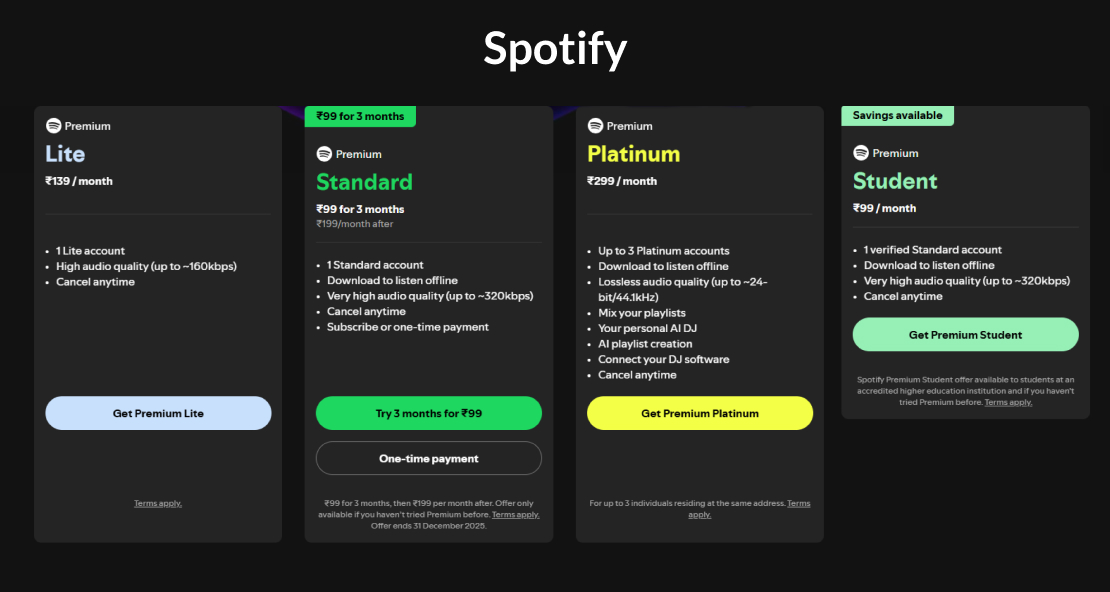
One of the best examples of a subscription-based model is Spotify Premium. Users pay a monthly fee for ad-free music, offline downloads, and AI-powered personalized playlists. Spotify continually updates playlists, recommends new songs, and enhances AI suggestions based on users’ listening habits. This keeps users subscribed month after month while providing Spotify with predictable revenue to enhance features, improve personalization, and expand its music library.
2. Freemium Model
The freemium model lets people use a basic version of your AI app for free while offering advanced features in a paid tier. The goal is to attract a large audience and then convert part of that audience into paying customers.
Users get to try your app without any commitment, and once they see value, many naturally upgrade to unlock more powerful features. This model works best when your free tier is strong enough to hook users but still leaves room for valuable premium options.
When To Choose This Model?
- Your app requires broad adoption before monetization becomes meaningful.
- The free version is compelling enough to hook users.
- There are natural upgrade points to encourage paying for premium features.
- First-time users might be hesitant to pay upfront.
- You’re focused on long-term retention rather than immediate revenue.
Real World Example
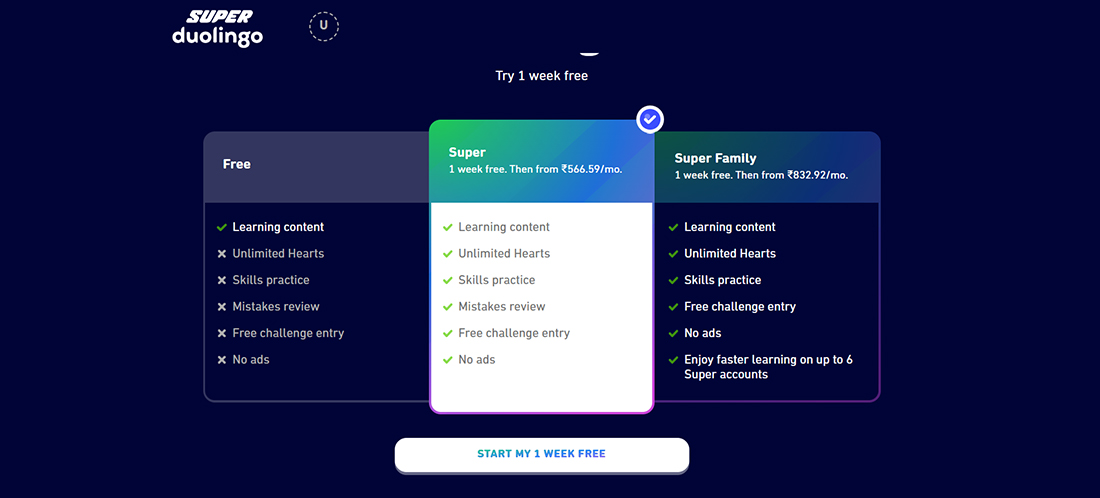
Duolingo, a popular language-learning app, offers a free version where users can learn languages with lessons and quizzes. The paid version removes ads, adds unlimited hearts, and provides advanced AI-driven conversation practice. Many users start with the free version and upgrade once they want faster progress or additional features, making freemium a strong growth engine for Duolingo.
3. Pay‑Per‑Use / Transactional Model
The pay-per-use model charges users only for what they actually consume, such as the number of API calls, image generations, or minutes of model inference. Instead of paying a flat fee, customers are billed based on their usage, making this model fair and flexible. It is especially useful when different users have very different usage patterns.
This approach is ideal for AI apps that behave like services and plug into other workflows or tools.
When To Choose This Model?
- Your customers have varied or unpredictable usage levels.
- The cost of running your AI models can fluctuate in response to demand.
- Users prefer paying only for what they use, rather than fixed plans.
- Your product is integrated into larger systems or processes.
- You want a flexible model that scales with your customers’ needs.
Real World Example
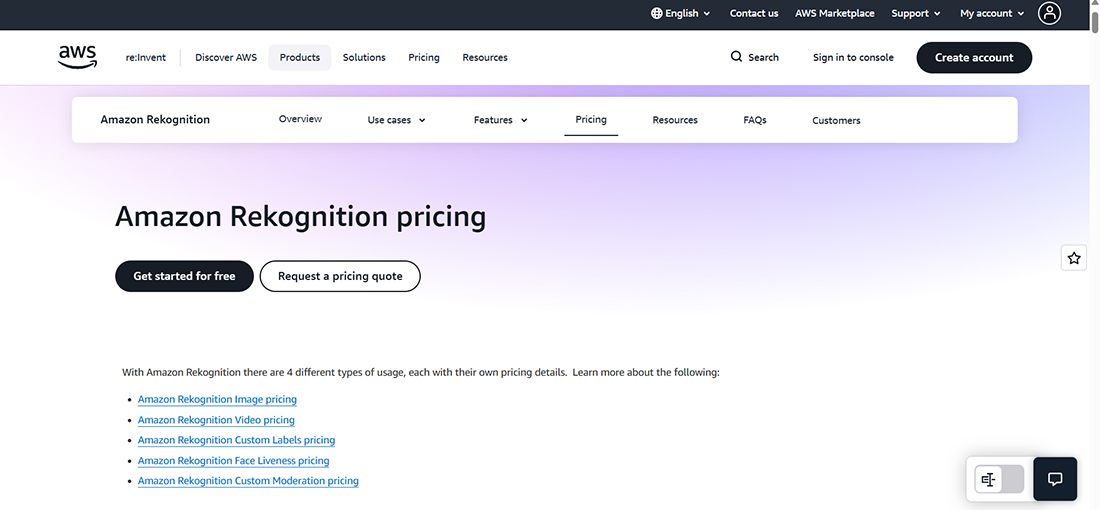
Amazon Rekognition, a cloud-based AI service from AWS, charges businesses based on the number of images or videos they process. Companies only pay for the exact amount of analysis they perform, making it cost-effective for both small and large users. This usage-based structure suits AI services that handle resource-heavy tasks like vision processing or deep learning inference.
4. Licensing Model
The licensing model allows businesses to pay for the right to use your AI technology within their own systems. Instead of charging per user or per action, you license the entire solution for a set fee or contract. This model often includes support, customization, and enterprise-level deployment.
When To Choose This Model?
- Your AI App solves domain-specific or enterprise problems.
- Clients require customization, integration, or guarantees of compliance.
- You prefer fewer, higher-value contracts over many small accounts.
- Customers need private deployment, data control, or advanced security.
- Long-term, predictable revenue is more valuable than rapid adoption.
Real World Example
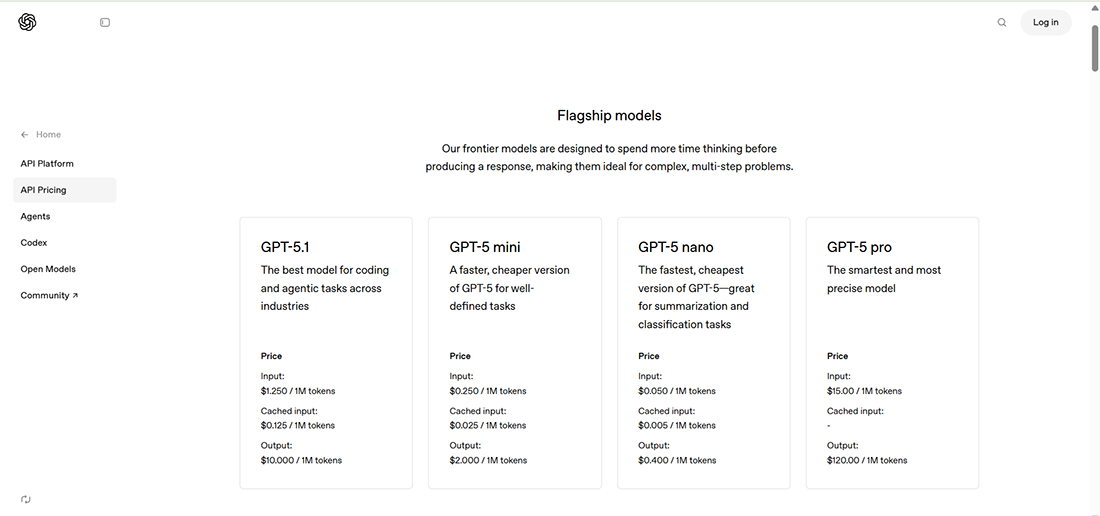
OpenAI licenses its GPT models to businesses that want to integrate advanced AI into their products without building their own models from scratch. Companies like Stripe, Duolingo, and Khan Academy pay for API access so they can use the intelligence of GPT inside their apps.
This lets them add powerful AI features quickly while OpenAI earns predictable revenue from ongoing usage. It is a strong example of how licensing turns proprietary technology into a repeatable, scalable business model.
5. Advertising Model
The advertising model allows you to offer your AI app for free while still generating revenue. Instead of charging users, you earn revenue when companies place their ads within your app. In simple words, the more people use your app, the more brands are willing to pay to show their ads to your audience.
If your app gets strong daily traffic or people spend time exploring content, watching videos, trying filters, or scrolling through feeds, advertisers see value in being part of that experience. This turns user engagement into a steady income stream without asking users to pay anything.
When To Choose This Model?
- Your app has the potential to reach a large, engaged audience.
- Ads do not interfere with the core experience.
- You want a low-friction user acquisition strategy.
- Your engagement metrics are strong enough to attract advertisers.
Real World Example
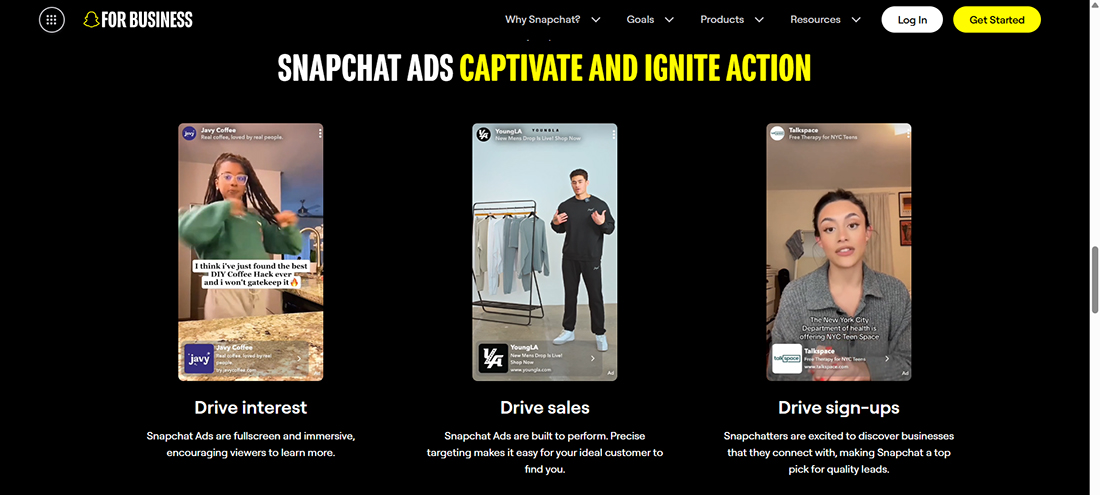
Snapchat is a social app where people share quick photos, videos, and fun AR filters. Since users open it multiple times a day and interact with lenses and stories, it is a perfect match for the advertising model.
Brands pay to place their ads within these filters and story slots, and users continue to enjoy the app for free. This steady engagement turns ads into a strong and natural revenue stream for Snapchat.
Is There a Cost-Effective Way to Test Your AI App Before Fully Investing?
Before you pour a big budget into development, here are the top tips to test your AI app in a cost-effective way. These steps help you validate your idea early, avoid unnecessary spending, and build with confidence.
- Build a Mini Prototype First:
Start with a small version of your app that includes only the core features your users truly need. This helps you validate whether the idea works in the real world without spending money on full development too early.
- Use Ready-Made AI APIs: Instead of building every AI feature from scratch, plug in existing APIs for tasks like NLP, image recognition, or recommendations. This lets you test functionality faster and at a much lower cost.
- Work in Short Sprints: Break the development process into small, focused cycles. Testing each piece on real devices helps you catch problems early and adjust quickly before unnecessary expenses pile up.
- Outsource Data Labeling if Needed: If your app requires tagged data, consider hiring specialists to handle this step. It’s often more efficient and affordable than training an in-house team to do repetitive labeling work.
- Reuse Existing Components: Use prebuilt modules for login, UI elements, or even basic AI pipelines. Reusing proven components saves time, avoids rework, and keeps development moving smoothly.
- Choose Scalable Frameworks and Cloud Services: Select tools and infrastructure that can grow with your app as usage increases. This prevents future rebuilds that can become expensive and time-consuming.
- Experiment with Third-Party AI SDKs: Try out SDKs that offer ready-to-use AI features. It’s a quick way to see what’s possible without committing to building your own solution from the ground up.
- Optimize AI Models for Performance: Make sure your models are efficient and run smoothly on mobile and web platforms. Better performance reduces compute costs and gives users a faster, more reliable experience.
- Foster a Lean, Cost-Aware Team Culture: Encourage your team to focus on the features that matter most. Avoiding unnecessary complexity helps save money, reduce delays, and keep the project aligned with your goals.
- Test Before Full-Scale Launch: Run real-world tests to confirm your app delivers real value before investing in full development. This lowers financial risk and ensures you’re building something users genuinely want.
Let Bacancy Help You Plan Your AI App Development Costs Right From Day One
AI app development costs in 2026 can vary significantly because every idea, feature, and dataset is unique. Some apps only need a basic model, while others require deep learning, large datasets, or complex workflows.
As a trusted provider of AI development services, Bacancy offers far more than technical implementation. We do much more than build AI features. We walk with you through the entire journey, from your first idea to a fully working product that delivers real value.
Here is how the cost planning process stays focused, efficient, and aligned with your goals:
- Validate the AI use case early to avoid unnecessary development spend.
- Select the right AI model, data pipeline, and tech stack for long-term scalability.
- Prioritize essential features to launch the MVP faster without overbuilding.
- Estimate timelines and development costs based on project goals and data complexity.
- Build with security, compliance, and maintainability in mind from the very beginning.
At Bacancy, you do not receive a random estimate. You receive a clear and personalized cost plan that fits your business, your vision, your data, and the outcomes you want to achieve.
Frequently Asked Questions (FAQs)
AI app development requires:
- Specialized expertise (ML engineers, data scientists)
- Data collection, cleaning, and labeling
- GPU/compute resources for training
- Setting up pipelines for inference and monitoring
- Continuous improvements and fine-tuning
This additional complexity raises both initial and ongoing costs.
Yes, most AI providers use pay-as-you-go pricing, billing you based on usage metrics such as:
- Number of API calls
- Tokens processed
- Compute resources (when training or fine-tuning models)
Using APIs can be more cost-effective than building custom models if your app does not require unique training.
Yes, each AI technology has different development and training requirements:
- Chatbots/NLP apps: Lower cost if using pre-trained models; higher if training from scratch.
- Machine Learning prediction apps: Requires datasets and algorithms; moderate cost.
- Computer vision apps: Higher cost due to image/video processing and GPU demand.
- Generative AI apps: Higher cost because they require large models and more compute power.
The more data-intensive the AI is, the more expensive it becomes.
You can use pre-trained models if:
- You need faster development
- Your budget is limited
- Accuracy requirements are not industry-specific
Build custom models if:
- Your app requires unique behavior
- You have large proprietary datasets
- You want complete control over accuracy and performance
Custom models cost more but offer long-term scalability.