Last Updated on December 10, 2025
Last Updated on December 10, 2025
Quick Summary
Table of Contents
Ever wonder why some teams add features effortlessly while others just juggle tasks, even when they work just as hard? The difference lies in flow and the AI tools that support it.
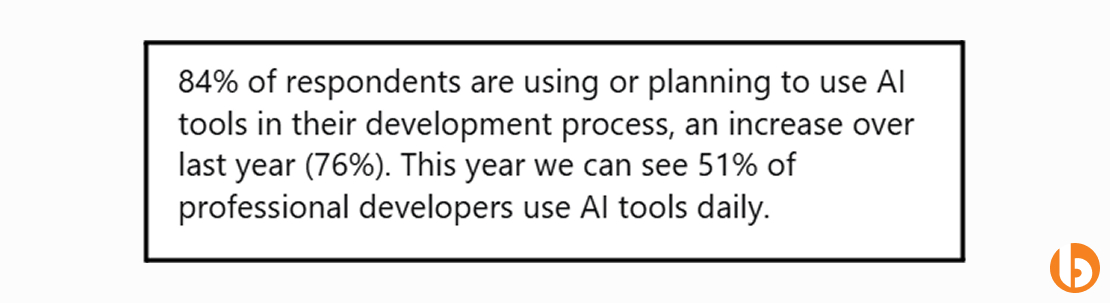
The trend is not just our observation, but Stack Overflow reports that 84% of developers already use or plan to use AI coding tools in their projects.
Vibe‑coding tools provide a simple win because they let you command AI, understand exactly what you need, and remove repetitive tasks while enabling you to focus on the big picture. They make collaboration smooth, speed up development, and help teams stay in the zone.
In this guide, we break down the top 16 vibe‑coding tools that transform how your developers work, help you build faster, smarter, and with less friction.
As AI becomes the backbone of modern software development, these 16 vibe coding tools stand out for helping teams move faster, write cleaner code, and stay in the zone without losing control over quality or strategy.
1. Github Copilot
2. Cursor
3. Cody
4. Tabnine
5. JetBRAINS
6. Amazon CodeWhisperer
7. Lovable
8. Bolt.new
9. Base44
10. Continue.dev
11. Zed
12. Windsurf
13. Raycast AI
14. Gemini CLI
15. Replit AI
16. Aider
GitHub Copilot is an AI-powered coding assistant that integrates seamlessly into IDEs, such as VS Code, JetBrains, and Neovim. It provides smart, context-aware suggestions, helps automate repetitive coding tasks, and accelerates pull request cycles, all while maintaining code quality.
Over 20 million developers already use Copilot, including most Fortune 100 companies, which makes it one of the most adopted AI tools in modern development workflows.
Copilot tackles repetitive coding, boilerplate generation, and time spent searching for syntax or logic examples. It frees developers to focus on solving real problems rather than rewriting similar code.
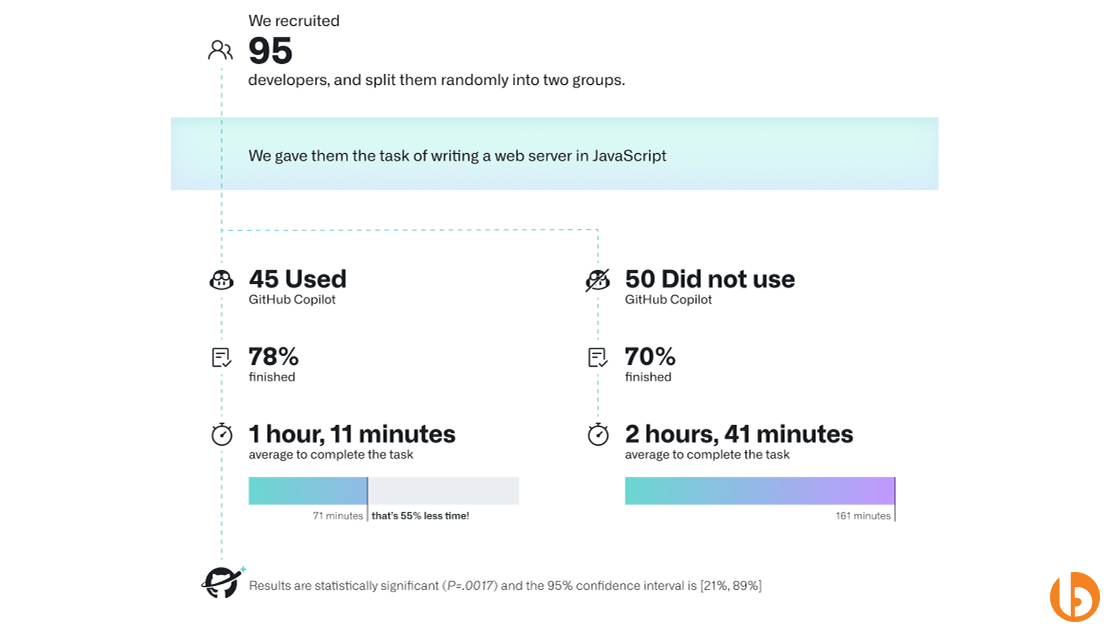
Teams that use Copilot can complete their task 55% faster. It boosts developer focus, improves PR velocity, and supports faster onboarding for new engineers through smart suggestions based on project context.
(Source)
Best suited for enterprise teams, product teams, and fast-scaling startups working on complex, multi-developer projects with heavy code review cycles.
Its deep integration with GitHub’s ecosystem and OpenAI’s Codex model means Copilot doesn’t just autocomplete code; it understands intent and project context, offering truly predictive support.
Frequent developers often say, “Copilot feels like a pair programmer who never gets tired.” It’s widely praised for improving flow and confidence during long coding sessions.
4.8/5 – Copilot stands out as the most dependable AI assistant for teams seeking speed, precision, and consistent code quality at scale.
Cursor is an AI-powered coding assistant designed to enhance developer memory and refactoring speed. It remembers your history context, keeps project continuity intact, and works like a smart collaborator that understands the why behind your code.
55% experts are positive about Cursor and reduce refactor time by leveraging its persistent project memory and contextual chat history.
It addresses one of the biggest pain points in team coding: losing context across long-term projects. So, your developer does not need to dig through old commits or documentation to recall decisions.
It keeps your team aligned by remembering discussions, maintaining context, and suggesting cleaner refactors. Cursor developers can also ensure that your codebase evolves without losing structure or logic.
It is suitable for mid-sized development teams that are focused on long-term projects or knowledge-intensive initiatives.
Its team memory sync and context persistence capabilities turn it into a long-term project companion, not just a simple code generator.
It is on the list of the top vibe coding tools because it has become a trend in a short span of time. Moreover, developers describe Cursor as “that teammate who never forgets anything.”
4.5/5 – A quiet powerhouse for teams that value continuity, clean code, and long-term maintainability.
Cody by Sourcegraph is an AI coding assistant built to help developers understand, explore, and navigate massive codebases faster. It helps your developers to function code across multiple repositories, like an interactive guide to your entire system.
You can simply ask Cody any questions, and they will provide a clear and content-aware answer instantly. For instance: how does this function connect to that API?” or “why was this logic written this way?”
Sourcegraph reports that teams using Cody experience a 40% faster onboarding for new developers.
Cody drastically reduces that time by explaining logic, dependencies, and file relationships instantly.
It fosters collaboration and transparency; developers can query the codebase in natural language, ask “why” something was written a certain way, and get instant answers.
Best for growing startups or enterprises with complex architectures and high team rotation.
Its deep integration with Sourcegraph enables cross-repository code understanding, a capability that most AI coding tools struggle to handle effectively.
Developers love its code explainability feature, saying it feels like a mix of documentation, mentor, and search engine.
4.6/5 – Ideal for teams onboarding new developers or managing large, multi-repository systems.
Tabnine is one of the earliest AI coding assistants and tools for Vibe coding that focuses on code privacy and language diversity. It supports over 25 programming languages and ensures that your code never leaves your local environment.
It supports over 1 million developers globally. Tabnine powers AI completions across startups, enterprises, and universities alike.
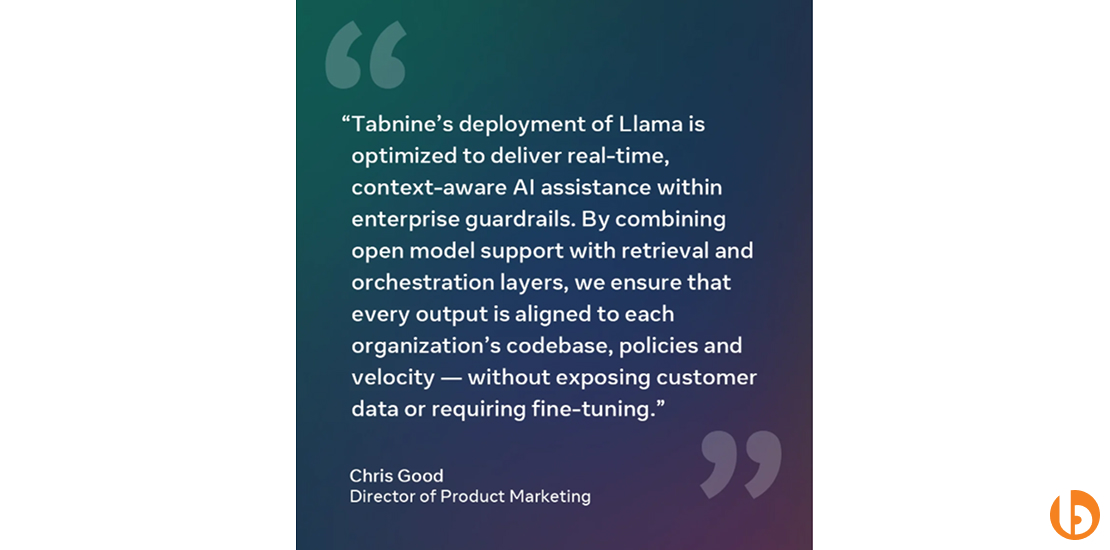
For companies with strict data policies, it ensures complete code privacy while still delivering fast, context-aware suggestions.
Tabnine adapts to each team’s coding style, providing secure completions that stay consistent across languages and frameworks.
Best suited for enterprises and security-sensitive organizations that work across multiple tech stacks.
It runs entirely on-device or self-hosted, making it one of the few AI assistants that prioritize compliance as much as performance.
Developers appreciate its lightweight setup and have peace of mind knowing their code isn’t sent to third-party servers.
(Source)
4.4/5 -The best fit for security-first teams that want reliable AI assistance without compromising data integrity.
JetBrains AI Assistant is built into JetBrains IDEs, such as IntelliJ IDEA and PyCharm. It maximizes in-depth project structure understanding to offer smart suggestions, documentation generation, and test creation.
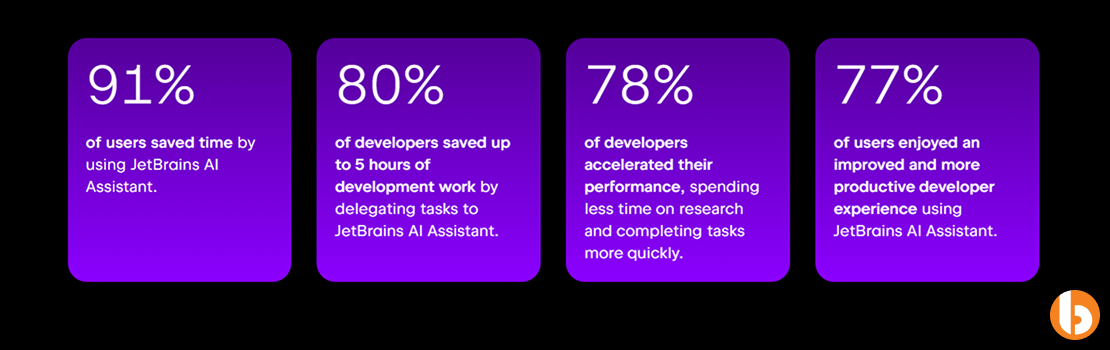
80% of developers saved up to 5 hours of development work by delegating tasks to JetBrains AI Assistant.
(Source)
It helps developers navigate massive enterprise codebases, auto-generate documentation, and maintain consistent patterns across projects.
By integrating AI natively, it ensures developers stay productive without relying on third-party plugins or external models.
Perfect for large-scale enterprise teams working in JetBrains’ IDE ecosystem.
It’s natively integrated, not bolted on, allowing for a deeper understanding of projects, better context, and seamless team workflows.
Several developers claimed that they have been using JetBrains for many years, and it remains a powerful and unmatched AI tool for them.
4.7/5 – A must-have for enterprises already embedded in JetBrains’ ecosystem.
Amazon CodeWhisperer is AWS’s answer to AI-powered coding, a smart assistant that understands your cloud stack and compliance requirements.
AWS developers using CodeWhisperer experience up to 57% faster coding completion on cloud-native tasks.
It simplifies cloud development by offering AI suggestions that understand AWS services, APIs, and compliance frameworks.
It enables developers to write secure, compliant code across AWS Lambda, EC2, and serverless architectures with minimal friction.
Best for teams building cloud-native applications or managing AWS-heavy infrastructures.
Its native AWS integration allows direct awareness of IAM policies, encryption standards, and architecture best practices.
Developers call it “Copilot for the cloud”, noting how it bridges the gap between AI code generation and AWS-specific compliance.
4.6/5 – The go-to companion for teams that live and breathe AWS or handle cloud-first deployments.
Hire Vibe Coding developer from Bacancy to choose, integrate, and optimize the best tool.
Lovable is built to help teams quickly create interactive prototypes. It allows you to visually design workflows and see them come to life in real time, making early testing and validation a breeze.
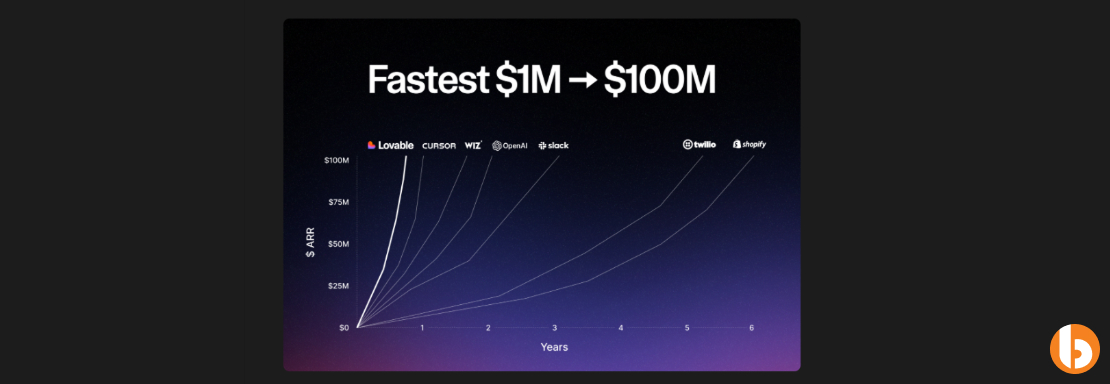
More than 100 billion projects are created using Lovable and have passed $100m in ARR in just 8 months.
Traditional prototyping can be slow and resource-intensive. Lovable speeds up the process, helping teams test ideas and UX flows before committing to full-scale development.
It enables designers and developers to collaborate seamlessly, turning concepts into usable interfaces almost instantly.
Ideal for startups or product teams focused on rapid iteration and user testing.
Lovable emphasizes visual workflow creation, bridging design and development efficiently.
Developers and product managers love it for making prototypes feel like real apps in under one hour.
Bacancy’s Take:
4.4/5 – Perfect for teams looking to accelerate early-stage product development and prototype testing.
Bolt.new transforms plain language prompts into production-ready React and Next.js components. It acts as your front-end developer who understands your instructions instantly.
Bolt.new stated they have five million users and are still adding more than a million users each month.
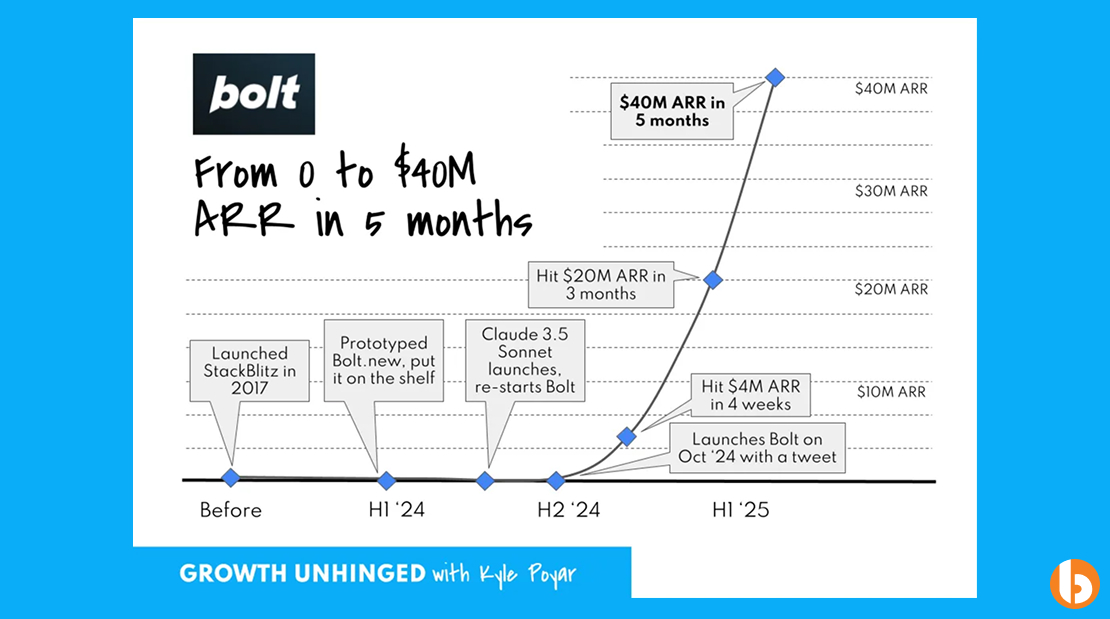
(Source)
It removes repetitive front-end coding tasks, especially when converting design mockups into functional components.
Bolt.new developers can focus on logic and architecture while Bolt.new handles the monotonous component generation.
Best suited for frontend teams or startups that want to build React or Next.js applications rapidly.
Its natural language interface allows developers to translate human instructions into clean code efficiently.
Bolt.new has become a second ChatGPT moment for its users.
4.5/5 – A must-have for teams wanting to speed up front-end development without sacrificing quality.
Base44 is an AI-powered platform that converts natural language prompts into fully functional front-end and back-end applications, including database setup, hosting, and authentication.
Early adopters report building functional apps in under 30 minutes, a process that traditionally takes days.
Starting a new project from scratch is slow and error-prone. Base44 automates app scaffolding, reducing development time and mistakes.
It standardizes app creation, allowing multiple team members to generate consistent codebases quickly, improving collaboration and iteration speed.
Base44 developers, startup founders, and product teams looking to prototype or launch MVPs without manual boilerplate coding rapidly.
Unlike other prototyping tools, Base44 covers both front-end and back-end, including deployment-ready code, all from natural language instructions.
Users praise Base44 as a game-changer for fast MVP creation, especially for small teams and solo developers.

4.8/5 – Perfect for teams and solo developers aiming to accelerate full-stack development with AI assistance.
Continue.dev is built to extend your existing codebase automatically. It generates boilerplate, fills in repetitive patterns, and helps maintain code consistency across large projects.
Continue executing in real-time and allow the AI agent to handle the refactoring while you keep coding
Scaling applications often involves repetitive code extensions. Continue.dev automates this, reducing errors and increasing efficiency.
It allows developers to focus on new features while the AI handles routine code extensions, ensuring consistent patterns across the project.
Large development teams, SaaS products, or projects with rapidly growing codebases.
Its ability to understand existing code patterns and extend them intelligently makes it stand out among code automation tools.
Among several other top tools for vibe coding, developers call it like having a coding assistant that thinks ahead.
4.5/5 – Best suited for teams looking to maintain consistency and accelerate development on large, evolving codebases.
Zed is a high-performance, minimalist code editor built to help developers stay deeply focused. It is designed to remove every friction point that interrupts your flow.
There’s no heavy UI, no slow plugins, just speed, simplicity, and collaboration. It’s written in Rust, which gives it exceptional responsiveness even for large projects.
Zed.dev has officially been released as open-source to boost performance and improve accessibility.
Zed tackles one of the most common issues that developers struggle with: focus while coding. Pop-ups, lag, and plugin delays can disrupt productivity.
Zed comes with real-time multiplayer editing and built-in voice chat, allowing developers to code together, review changes, and resolve issues instantly.
Ideal for small to mid-sized teams, open-source contributors, and developers who value focus, speed, and simplicity in their workflow.
Zed’s biggest strength is its Rust-based, low-latency performance and seamless remote collaboration, which is something most editors still struggle with.
Several developers move to Zed because of its great IDE and documentation that work to the fullest.
4.6/5 – Great for developers who want speed, clarity, and team collaboration without distractions.
Windsurf (previously known as Codeium AI) is an AI-driven Integrated Development Environment (IDE) built to personalize your entire coding workflow. It intelligently learns from how you code, your shortcuts, navigation patterns, refactoring style, and even the way you switch between tasks to create a development space that feels uniquely yours.
Windsurf users can increase task completion speed due to its adaptive environment and automated routine handling.
Windsurf learns your unique workflow patterns and removes repetitive steps, so you can focus on coding instead of managing tools or switching contexts.
For teams, Windsurf synchronizes workflow templates, shortcuts, and coding preferences across members. That means faster onboarding, consistent setups, and less time wasted on adjusting environments for every project.
Ideal for engineering teams, tech leads, and individual developers juggling multiple projects or wanting a smarter, more adaptive workspace.
Its adaptive intelligence model sets it apart. Windsurf actively learns, predicts, and optimizes, turning your IDE into a personalized productivity partner that grows smarter the more you use it.
Developers feel Windsurf is worth it because of its transparent pricing, UI/UX features, and responsiveness.
4.5/5 – A great choice for developers and teams that want their workspace to learn, adapt, and keep them focused.
Raycast AI is a productivity tool that lets your developers control their entire workflow using natural language. Instead of clicking through multiple menus or typing complex commands, you can just tell Raycast what you want, and it does it for you.
For instance, typing or saying, “Open my last PR,” “Check today’s Jira tickets,” or “Run the last build command,” and Raycast executes it instantly. It’s like having a personal developer assistant that sits in your command bar.
Raycast supports thousands of daily active users, with a large ecosystem of third-party extensions written in React, TypeScript, and Node.js.
Developers juggle too many tools like GitHub, VS Code, Jira, and more. Raycast unifies them into one accessible interface, cutting down your time wasted switching contexts.
Raycast boosts team efficiency by standardizing workflows. Everyone can run the same tasks or automations without scripting knowledge, simply through conversational commands.
Perfect for engineers, tech leads, and product managers who want to streamline their daily tasks and reduce manual toggling between apps.
Unlike most AI productivity tools, Raycast integrates natively with macOS and major developer tools, which indicates instant performance without browser overhead.
Users love to implement Raycast in their daily projects and get fruitful results.
4.6/5 – A must-have for developers who want to automate repetitive tasks and command their workflows naturally.
Gemini CLI is an AI-powered command-line companion from Google designed to make terminal workflows faster, smarter, and intuitive. It brings natural language understanding directly to your command line, so you can type instructions like “set up a Python virtual environment” or “optimize this Dockerfile,” and Gemini executes or suggests commands accordingly.
Early testers claim a 30-40% reduction in time spent recalling complex terminal commands.
Command-line tools can be powerful but intimidating. Gemini CLI lowers that barrier by translating natural language into executable commands, reducing errors and boosting confidence for all skill levels.
It standardizes workflows and ensures that every team member can run scripts and commands correctly, even without deep shell knowledge.
Ideal for developers, DevOps engineers, and data scientists who rely heavily on terminal workflows and want a smarter command experience.
It integrates seamlessly with Google Cloud and local environments, giving both novice and advanced users AI assistance that feels native.
Developers appreciate how Gemini is fast and integrates with most of Google’s tools.

4.7/5 – Perfect for developers seeking AI help within the command line to enhance productivity and precision.
Replit AI is a collaborative coding platform that lets multiple developers work on the same codebase simultaneously while utilizing AI for suggestions, debugging, and learning. It is like a multiplayer mode for software development, where the AI acts as a co-pilot that can help everyone in real time.
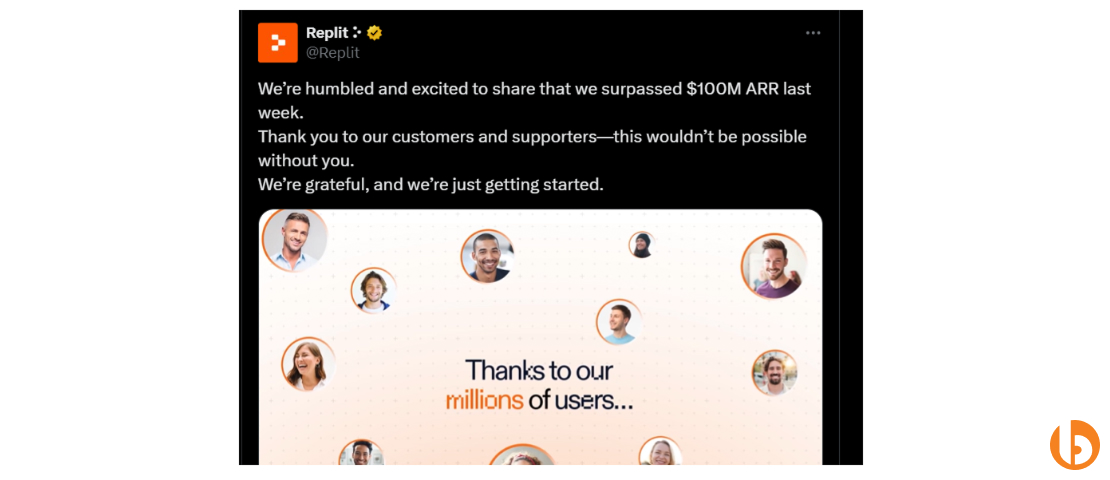
Replit has crossed 100+ million users in 2025, and its subscriber base has been growing 45% monthly since the release of its AI agent.
Traditional IDEs isolate developers, which can slow down feedback and collaboration. Replit AI solves this by combining live editing with AI support, eliminating the need for long pull request cycles and constant context switching.
Teams stay aligned through real-time collaboration, shared context, and instant AI support. Replit developers can build, debug, and iterate together without losing track of changes or waiting for lengthy review cycles.
Ideal for remote teams, startups, and hackathon environments where multiple developers need to collaborate on a project in real time without waiting for approvals or context explanations.
Replit AI merges cloud-based collaboration with AI-powered coding assistance, so teams get both synchronous multiplayer coding and intelligent support in one platform, something that less tools offer.
A user says that it helps to build a to-do application within seconds, with no code writing, and the tool asks you cross-questions, just like a human developer would, when given a requirement.
4.7/5 – Perfect for teams that want to code together, iterate faster, and use AI as a real-time collaborator.
Aider is a chat-based AI coding assistant that lives inside your IDE or terminal, designed to help your developers debug, refactor, and understand code simply by asking questions in natural language. It turns your coding environment into an interactive conversation with a knowledgeable assistant.
Instead of manually hunting through logs or Stack Overflow, you can ask Aider things like, “Why is this function returning null?” or “Suggest a cleaner way to write this loop,” and get actionable solutions instantly.
Aider AI is connected to multiple LLMs, including OpenAI, GithubCopilot, DeepSeek, and Vertex AI.
Debugging can be time-consuming and mentally draining. Aider simplifies troubleshooting by analyzing code context and offering immediate, practical fixes, helping developers maintain momentum.
It speeds up code reviews, encourages clean refactoring, and helps junior developers learn by example. Multiple developers can benefit from AI guidance simultaneously, creating a shared knowledge base within the project.
Best suited for teams working on complex projects, where maintaining clean code and rapid bug resolution is critical.
Aider’s chat-based, in-context interaction allows you to ask “why,” “how,” and “what if” questions directly inside your workflow. This approach bridges the gap between learning, debugging, and coding productivity.
Free Aider is useful for use, and developers feel Aider is powerful, clean, and light coding for their project.
4.5/5 – Essential for teams that value clarity, speed, and learning while coding, providing AI guidance where it matters most.
Vibe coding development gives your team the edge to move faster, stay focused, and deliver better results. With the right setup, every project feels smoother and every goal feels closer. At Bacancy, we help CTOs put vibe coding into action so their teams can collaborate better and build smarter.
As a prominent Vibe coding company, we help you create an intelligent workflow powered by AI-driven and smart automation. Our Vibe code experts are proficient in combining innovation and execution, ensuring your business delivers promising outcomes, achieves consistency, and reduces errors in overall projects.
Vibe coding tools are an AI-powered platform that helps your developers write, debug, and optimize code faster through automation and natural language processing. These tools understand your intent, suggest solutions, and simplify collaboration among the team, which helps developers code more smoothly and increases efficiency.
GitHub Copilot and Cody are great tools for Vibe coding for team collaboration. It helps you integrate across repositories, understand shared context, and suggest real-time options that align with your team’s workflows. Moreover, it also helps developers to stay consistent across large projects.
Vibe Coding is helpful for startups in various ways. For instance, the tools can help you speed up development without the need for large teams. It also enables developers and non-technical individuals to write code, automate repetitive tasks, and boost productivity under tight deadlines.
Additionally, if you are a startup owner, Vibe Coding evaluates solutions that accelerate your product launches, reduce costs, and enhance collaboration across multiple teams.
Absolutely. Vibe coding tools like Cursor, Copilot, and Replit Ghostwriter support major programming languages, including JavaScript, Python, TypeScript, Go, and Java. Some even adapt their responses based on your project’s tech stack.
You will find two types of vibe coding tools: free and paid/premium versions. The paid plans start from $10/month and offer restricted functionality. Few vibe coding tools offer freemium models for individual use and paid tiers for teams. Several also provide enterprise plans with custom pricing and advanced features.
While determining the best Vibe coding tool, you need to focus on the ease of integration, programming language support, AI accuracy, data security, and collaboration features. The top tools for Vibe coding are those that seamlessly integrate your project within the existing workflow, while enhancing team productivity with minimal disruption.
Bacancy helps CTOs and startups choose, integrate, and customize the right vibe coding tools for their projects. Our experts build AI-powered workflows that enhance developer focus, automate repetitive tasks, and drive measurable improvements in speed and quality.
Tools for vibe coding help CTOs to gain visibility, boost productivity, stay consistent, and speed up the overall development process. The top vibe coding tool makes it easier to onboard new developers, maintain code quality, and ensure projects stay aligned with business goals.
No, vibe coding tools don’t replace developers; in fact, they enhance them. These tools act as intelligent assistants that handle repetitive coding tasks while developers focus on creativity, logic, and architecture. The goal is to amplify human skills, not substitute them.

Tech Geek at Bacancy
Story-driven writer blending research, passion, and full-stack web clarity.
MORE POSTS BY THE AUTHOR
Your Success Is Guaranteed !
We accelerate the release of digital product and guaranteed their success
We Use Slack, Jira & GitHub for Accurate Deployment and Effective Communication.