Bacancy Bacancy
      • About Company
      • Resources

      About Company

      About Us Leadership Team Customer Reviews Awards & Recognition
      Infrastructure Our Locations Partnership

      Resources

      Press Room Blog Insights
      We are great place to work certified™

      Building and Sustaining High-Trust, High-Performance Culture

      Get Quote
    • Engagement Models

      Hiring Software Developers becomes easier with just a few clicks.

      Software Development Outsourcing

      End-to-end delivery of custom solutions aligned to your roadmap.

      Staff Augmentation

      Scale your in-house team with pre-vetted specialists on demand.

      Dedicated Teams

      Get dedicated engineers who work exclusively on your project.

      • Enterprise Services
      • IT Services
      • Data Analytics
      • Cloud Services
      • AI & ML
      • Platforms

      Enterprise Services

      Digital Transformation Business Process Automation Digital Product Engineering Enterprise App Development Custom Software Development

      IT Services

      Legacy App Modernization DevOps & SRE Full Stack Development AI Testing & QA Automation

      Data Analytics

      Data Visualization & Reporting Data Engineering & Pipelines Data Science & Predictive Analytics Business Intelligence

      Cloud Services

      Cloud Strategy & Consulting Cloud Migration & Modernization Multi Cloud Management

      AI & ML

      AI Development Agentic AI Generative AI Computer Vision Machine Learning & MLOps

      Platforms

      Salesforce SAP ServiceNow Microsoft Dynamics Snowflake
      High-quality, Cost-effective IT Outsourcing

      Schedule a free discovery session to explore your needs and find tailored solutions with no obligation.

      explore all services
    • Industries
      Healthcare Fintech Real Estate
      Logistics Education Retail & Ecommerce
      Let's Grow Together! Get Quote
      • Front End
      • Backend
      • Mobile
      • Databases
      • DevOps & Infra
      • AI & Data Stack
      • Vibe Coding

      Front End

      React.js Next.js Angular Vue.js TypeScript
      Your Very Own UI/UX Architects

      Experience smooth navigation and user-friendly designs with our front-end expertise.

      Hire Frontend Developer

      Backend

      Node.js Python Java Spring Boot Laravel .NET C# Golang FastAPI
      Server Solutions To Change Power Dynamics

      Transform your data into digital experiences with optimized coding standards.

      Hire Backend Developer

      Mobile

      iOS Android Flutter React Native
      Innovating Mobile-Friendly App Solutions

      Create dynamic mobile apps that make your brand stand out from the crowd.

      Hire Mobile App Developer

      Databases

      PostgreSQL MongoDB MySQL Redis Supabase
      Dedicated Talent With Skilled Approach

      Bring your digital visions to life with a hired resource at your convenience.

      Hire Dedicated Developer

      DevOps & Infra

      AWS Azure Google Cloud Docker Kubernetes Terraform
      Redefining Scalable Digital Infrastructures

      Make your data accessible worldwide at will, and leave the stress behind.

      Get Quote

      AI & Data Stack

      OpenAI LangChain LlamaIndex Apache Spark Airflow Tableau PowerBI Databricks
      Guiding Decisions With Data-Driven Insights

      Transition from your gut calls to actionable insights with our rich Data Science expertise.

      Get Quote

      Vibe Coding

      Base44 Claude Code Cursor Lovable Github Copilot
      Your AI-Native Development Team

      Skip the boilerplate. Our vibe coding experts use AI-first tools to go from prompt to product, fast.

      Hire Vibe Coding Developer
  • Case Studies
  • Contact Us
Find a Developer book a 30 min call
      • About Us
      • Leadership Team
      • Customer Reviews
      • Awards & Recognition
      • Infrastructure
      • Our Locations
      • Partnership
      • Press Room
      • Blog
      • Insights
      • Digital Transformation
      • Business Process Automation
      • Digital Product Engineering
      • Enterprise App Development
      • Custom Software Development
      • Legacy App Modernization
      • DevOps & SRE
      • Full Stack Development
      • AI Testing & QA Automation
      • Data Visualization & Reporting
      • Data Engineering & Pipelines
      • Data Science & Predictive Analytics
      • Business Intelligence
      • Cloud Strategy & Consulting
      • Cloud Migration & Modernization
      • Multi Cloud Management
      • AI Development
      • Agentic AI
      • Generative AI
      • Computer Vision
      • Machine Learning & MLOps
      • Salesforce
      • SAP
      • ServiceNow
      • Microsoft Dynamics
      • Snowflake
    • Healthcare
    • Fintech
    • Real Estate
    • Logistics
    • Education
    • Retail & Ecommerce
      • React.js
      • Next.js
      • Angular
      • Vue.js
      • TypeScript
      • Hire Frontend Developer
      • Node.js
      • Python
      • Java
      • Spring Boot
      • Laravel
      • .NET
      • C#
      • Golang
      • FastAPI
      • Hire Backend Developer
      • iOS
      • Android
      • Flutter
      • React Native
      • Hire Mobile App Developer
      • PostgreSQL
      • MongoDB
      • MySQL
      • Redis
      • Supabase
      • Hire Dedicated Developer
      • AWS
      • Azure
      • Google Cloud
      • Docker
      • Kubernetes
      • Terraform
      • Get Quote
      • OpenAI
      • LangChain
      • LlamaIndex
      • Apache Spark
      • Airflow
      • Tableau
      • PowerBI
      • Databricks
      • Get Quote
      • Base44
      • Claude Code
      • Cursor
      • Lovable
      • Github Copilot
      • Hire Vibe Coding Developer
  • Case Studies
  • Contact Us
  • Find a Developer
  • book a 30 min call
Start With , “Hello World” Application

Get Started with Angular 2

Aishwary Rawat
Aishwary Rawat Director of Engineering
Last Updated on March 5, 2025 | Written By: Aishwary Rawat

AngularJS 2 is an open source web and mobile application development framework. Nowadays it is widely used for desktop application development as it is a module base framework. Let me get you through the detailed guideline so you can have understanding that how to use its module or component in your application to import it.

AngularJS 2 Application File Structure
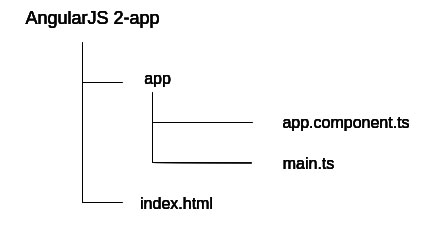
AngularJS 2 Application File Structure

It has one HTML file (index.html) and Two Type Script files in app directory (app.component.ts, main.ts).

Create an application project folder

Create a folder/directory for our AngularJS 2 application (Run following command in terminal window).

mkdir MyAngularApp
cd MyAngularApp
  

Install the node.js

Installing node js (Run following command in terminal window)

npm install node.js

The above command will create a folder name “node_modules” with node.js folder containing files like lib, package.json many more.

Install the npm packages and typing files

Install all the packages included in package.json file, run following command in terminal window. (for windows on command line)

npm install

In order to get npm install and run, I have globally installed some of the devDependencies (Run following commands in terminal window)


npm install -g typescript  (g for globally installing globally)
npm install typings (this is used to convert .ts file to js file)

This is how you can create the development environment for your AngularJS 2 application.

Now let’s start by developing (creating) Hello World application.

Open an application project folder in the Code.VisualStudio.com (Can use notepad++, Subline instead)

Every AngularJS 2 application consists of one or many components. These components are building blocks of AngularJS 2 application. Every component controls a portion of the application using the template.

Make sure, every AngularJS 2 application has one root component, commonly referred as AppComponent.

AppComponent is a component class. There are two purposes of the component class.

  • Control appearance of view
  • Control behavior of view

Component class control behavior and appearance of view through a template. Component class can have component decorator.

There are two purposes of component decorator

  • It tells the AngularJS framework what template to use
  • It tells the AngularJS framework how the component will be created.

Are you looking for proficient Angular developers for your project?
Bacancy is here for you! Contact us now and hire angularjs developer to build, optimize, and deploy your application.

Create app.component.ts

So now let’s create AppComponent for our AngularJS 2 application in app.component.ts file


/* Importing Component decorator function from anularjs library module */
 
import {Component} from 'angular2/core'


/* Creating  AppComponent Class decorator */
@Component ({
	selector: 'my-app',
	template: 'AngularJS 2 Hello World'
})
 
/* Creating AppComponent class */
/* Exporting AppComponent Class */
export class AppComponent{}

Our Component decorator has two elements (fields) selector and a template.

We have assigned AppComponent names to selector field. We can use that AppComponent name in HTML. Whenever we use that AppComponent name (learning-turn) in HTML, AngularJS creates a AppComponent instance and displayed it in HTML.

AppComponent slector is CSS selector not HTML tag

We have assigned an AppComponent template to template field. It tells the AngularJS how to render the AppComponent view. Template fields can have HTML and other components

We have exported AppComponent so, we can import it somewhere else in our application.

Our AppComponent is now to ready in order to use it in our application.

Create main.ts file

Now create main.ts file in app directory

Following is the purpose of main.ts file

  • main.ts is entry point (like main function) of our AngularJS 2 application.
  • In main.ts we tells the Angular how to load our AngularJS 2 application.
  • In main.ts we tells the Angular in which platform we want to run our AngularJS 2 application (We are going to run our application in browser).
  • In main.ts we specify external dependencies of our AngularJS 2 application.

Here is our main.ts file

/* importing bootstrap component from angular library */
 
import {bootstrap} from 'angular2/platform/browser';
 
/* Importing AppComponent created in app.component.ts file */
import {AppComponent} from './app.component';
 
/* Bootstrapping AppComponent */
bootstrap(AppComponent);


create index.html

Now create an index.html file in your root directory of the project

index.html will load our application in the browser. In index.html we load required scripts (libraries), define system configuration and define an application component selector.

Here is our index.html

<html>

  <head>
    <title>AngularJS 2 Getting Started. Hello world Application</title>
    <meta name="viewport" content="width=device-width, initial-scale=1">    
    <link rel="stylesheet" href="styles.css">
 
    <!-- 1. Load libraries -->
    <!-- IE required polyfills, in this exact order -->
    <script src="node_modules/es6-shim/es6-shim.min.js"></script>
    <script src="node_modules/systemjs/dist/system-polyfills.js"></script>
    <script src="node_modules/angular2/es6/dev/src/testing/shims_for_IE.js"></script>   
 
    <script src="node_modules/angular2/bundles/angular2-polyfills.js"></script>
    <script src="node_modules/systemjs/dist/system.src.js"></script>
    <script src="node_modules/rxjs/bundles/Rx.js"></script>
    <script src="node_modules/angular2/bundles/angular2.dev.js"></script>
 
    <!-- 2. Configure SystemJS -->
    <script>
      System.config({
        packages: {        
          app: {
            format: 'register',
            defaultExtension: 'js'
          }
        }
      });
      System.import('app/main')
            .then(null, console.error.bind(console));
    </script>
  </head>
 
  <!-- 3. Display the application -->
  <body>
    <my-app>Loading...</my-app>
  </body>
</html>


When AngularJS framework calls bootstrap function in app/main.ts file, AngularJS prepare AppComponent, find AppComponent selector (my-app), locate AppComponent selector assigned CSS selector (my-app) in index.html and load application between that it.

Compile and Run

Now open your terminal window and run following command (right click on the app folder, click ‘Open in Command Prompt’

npm start 

You can see the output in the default browser.


Expand Your Digital Horizons With Us.

Start a new project or take an existing one to the next level. Get in touch to start small, scale-up, and go Agile.


Or
E-mail us : solutions@bacancy.com

Your Success Is Guaranteed !

Related Articles

Dipal Bhavsar

November 21, 2025

AngularJS

Angular 21: Latest Features, Updates & Advancements

By : Dipal Bhavsar

Read More
Dipal Bhavsar

November 3, 2025

AngularJS

7 Easiest Ways to Use AI in Angular

By : Dipal Bhavsar

Read More
Dipal Bhavsar

May 29, 2025

AngularJS

Angular 20: Your Guide to the Latest Features and Improvements

By : Dipal Bhavsar

Angular 20 just launched, and it’s packed with exciting updates that make your app development faster, easier, and more modern....

Read More

Offices and Development Centers

Bacancy Ahmedabad Ahmedabad

15-16, Times Corporate Park, Thaltej, Ahmedabad, 380059

Bacancy Gandhinagar Gandhinagar

422-A, 4th Floor, Pragya Tower Road 11, Block 15, Zone 1, SEZ-PA Gandhinagar, 382355

Bacancy Hyderabad Hyderabad

Awfis, Level 1, N Heights, Plot No 38, Phase 2, Hitech City Hyderabad, 500081

Bacancy Mumbai Mumbai

18th Floor, Cyberone, opp. CIDCO Exhibition Centre, Sector 30, Vashi, Navi Mumbai, 400703

Bacancy Pune Pune

2nd FloorMarisoft-1, Marigold IT Park, Pune - 411014

Bacancy Bengaluru Bengaluru

Raheja Towers, 26/27, Mahatma Gandhi Rd, East Wing, Craig Park Layout, Ashok Nagar, Bengaluru, 560001

Global Presence

Bacancy New Jersey New Jersey

33 South Wood Ave, Suite 600, Iselin NJ 08830

Bacancy California California

535 Mission St 14th floor, San Francisco, CA 94105

Bacancy Massachusetts Massachusetts

501 Boylston St, Boston, MA 02116

Bacancy Florida Florida

4995 NW, 72nd Avenue, Suite 307, Miami, FL, 33166

Bacancy London London

90 York Wy, London N1 9AG, United Kingdom

Bacancy Ontario Ontario

71 Dawes Road, Brampton, On L6X 5N9, Toronto

Bacancy Australia Australia

351A Hampstead Rd, Northfield SA 5085

Bacancy UAE UAE

One Central 8th and 9th Floor - Trade Centre - Trade Centre 2 - Dubai - United Arab Emirates

Bacancy Sweden Sweden

Junkergatan 4, 126 53 Hagersten

Get in Touch

Great Place to Work

Get in Touch

cal-icon

Looking for expert advice?

Schedule a Expert Call


  • Brochure
  • Quality Assurance
  • Resources
  • Tutorials
  • Customer Reviews
  • Privacy Policy
  • FAQs
  • Press Room
  • Contact Us
  • Sitemap
  • Employee

bacancy google review 4.6
bacancy google review
bacancy clutch review 4.8
bacancy clutch review
bacancy goodfirms review 4.8
bacancy goodfirms review
iso
  • Bacancy Behance
  • Bacancy Pinterest

Copyright © 2026 BACANCY SERVICES PRIVATE LIMITED All rights reserved.