Quick Summary
Optimizing .NET application performance is crucial for developers to deliver fast, responsive, and scalable software experiences. You can significantly enhance application efficiency by identifying code-level bottlenecks, using async programming, revamping memory usage, and implementing effective caching strategies. This blog covers tips on how to optimize .NET application performance, improve user satisfaction, reduce infrastructure costs, and support long-term scalability.
Table of Contents
Introduction
Speed is the backbone of every successful .NET application. Whether you are handling thousands of enterprise users or powering a lean internal tool, performance directly impacts user satisfaction, developer productivity, and your bottom line.
According to a report, the average cost of a single hour of downtime exceeds $300,000 for over 90% of mid-size and large enterprises.
This guide will walk you through the tips to optimize .NET application performance. It will help you detect, troubleshoot, and fix problems so your app runs faster, scales better, and delivers real value.
Why Does .NET Application Performance Matter?
High-performing .NET applications reduce load times, increase responsiveness, and scale efficiently under heavy traffic. With so much competition, there is no space for a lag of even a few milliseconds, which can result in lost users and revenue. Optimizing performance leads to:
- Better user experience and retention
- Lower infrastructure and hosting costs
- Faster deployment cycles
- Easier debugging and monitoring
- Improved SEO for web-based .NET apps
Investing time in performance pays off in long-term scalability, reliability, and business growth.
What are the Most Common Performance Bottlenecks in .NET?
Even the most well-structured .NET applications can hit performance roadblocks if critical areas go unchecked. Identifying these bottlenecks early is key to delivering responsive, high-performing software.
1. Inefficient Database Queries
If your app takes too long to get data from the database, users will feel the delay. This often happens when the app requests too much data or calls repeatedly for the same information. As a result, these small issues can add up and slow things down.
Cleaning up the database, adding only what it needs, and reusing results where possible can cut load times and reduce costs. You can use tools like SQL Profiler or built-in .NET logs to help identify these slowdowns and guide fixes.
2. Memory Leaks and Garbage Collection
Every app uses memory to store information temporarily. But if your app forgets to eliminate the memory it no longer needs, it piles up over time, making your system slow or even crash. This process is known as a memory leak.
.NET includes a system called garbage collection to clean up unused memory, but it can only do so much. If the memory is not released properly, your app can slow down. Moreover, ensure regular maintenance by using tools like dotMemory or Visual Studio to identify the memory issues before they affect the entire application.
3. Blocking and Synchronous Code
When parts of your app run in a fixed sequence and wait for each step to finish before moving on, it’s called synchronous code. While that sounds logical, it often causes delays, especially when waiting on external resources like servers or APIs. Instead, writing code that can handle multiple tasks at once (asynchronous code) helps your app stay fast and responsive.
This is especially important for customer-facing apps, where delays can lead to frustration. Think of it as taking multiple customer orders at once instead of waiting to finish one before starting the next.
4. Poor Caching Strategy
Caching is like keeping a shortcut or saved version of information your app needs often. Without caching, your app fetches the same data repeatedly, which slows things down and adds server costs.
For instance, showing a user’s dashboard without caching could mean loading the same data again and again. A smart caching setup stores commonly used data temporarily, so the app doesn’t have to work as hard. Using tools like Redis or in-memory cache systems can drastically speed up performance and keep users happy with fast load times.
Modern apps can perform multiple tasks at the same time using a system called threading. But if threading is not handled properly, it can cause confusion inside the app, like workers tripping over each other instead of working as a team.
This can lead to errors, slow performance, or even app crashes. On the flip side, using too few threads means the app doesn’t take full advantage of your server’s capabilities. A balanced setup ensures tasks run smoothly side-by-side, making your application faster and more reliable under pressure.
How to Measure and Analyze .NET Performance Effectively?
Accurate measurement helps identify bottlenecks and provides the insight needed to optimize .NET application performance.
Before you try to improve anything, you need to know what matters most. KPIs help you track your .NET app’s health and speed. Some important ones include response time, memory use, error rate, and server load.
These numbers show how your app performs under real use. By watching these signs regularly, you can spot slowdowns early and fix them before they hurt users or business goals. Always choose KPIs that match your business goals. For instance, if you run an eCommerce store, load speed during checkout should be a top priority.
.NET comes with useful tools that help check how your app runs. These tools show you where time and memory are spent. Moreover, using Visual Studio Diagnostic Tools and Performance Counters can help you monitor the performance of your .NET application.
They will also help you track memory use, CPU load, and delays in your app. With these tools during development or testing, you can find problems early. The tools give quick insight into performance and help you fix trouble spots without deep coding knowledge.
3. Profile and Benchmark Your Code
Profiling means checking how your code behaves while it runs. It shows which parts take too long or use too many resources. Benchmarking helps you compare different versions of your code to see which runs faster.
These steps help your team improve slow features and avoid wasted effort. Tools like dotTrace or BenchmarkDotNet provide clear reports that highlight problem areas. Even small changes can bring significant gains in speed and memory use. For business owners, this means faster apps, happier users, and lower cloud hosting bills.
4. Integrate APM for Real-Time Monitoring
Application Performance Monitoring (APM) helps you watch your .NET app live, while real users are using it. APM tools like New Relic, Datadog, or Azure Monitor show slow requests, errors, and system load in one dashboard.
These tools help your team act fast when something breaks or slows down. You don’t need to wait for customer complaints. With APM, your app stays smooth and performs well under pressure.
This protects your brand reputation and helps avoid sudden losses during traffic peaks or product launches.
5. Run Load and Stress Tests
Load tests show how your app handles many users at once. Stress tests push your app beyond its limits to see when it breaks. These tests prepare your system for real-world traffic. By running them, you find weak spots before customers do.
For instance, if your site crashes during a sale, it can damage your credibility and trust. To avoid that, you can use tools like Apache, JMeter, or K6 to let your team test performance safely. This helps your business avoid downtime, keep users happy, and better plan for future growth.
Worried about performance bottlenecks under heavy traffic?
Hire .NET developer to run thorough load and stress tests that keep your app stable, scalable, and error-free.
Which Code-Level Practices Improve .NET Performance?
Many performance issues trace back to how the code is structured. By adopting smarter development techniques, you can prevent bottlenecks before they appear.
1. Minimize Object Allocations
Every time your app creates a new object, it uses memory. Too many objects slow down performance and make garbage collection work harder. This causes your app to pause and respond slowly.
Developers should reuse objects when possible and avoid creating temporary ones. Think of it like a business using reusable packaging to reduce waste. Cleaner code with fewer objects runs faster and uses less memory, resulting in a smoother user experience and lower infrastructure costs.
2. Use Value Types and Span
.NET lets your developers choose between two types: reference types and value types. Value types use less memory and avoid delays caused by garbage collection. Using Span<T> helps manage slices of data without creating new objects.
This is very useful when working with strings, arrays, or files. By choosing the right data types, developers reduce overhead and improve app speed. For your business, this means the app stays responsive even when traffic increases.
3. Refactor Heavy LINQ Queries
LINQ is a tool that helps with database and data queries in .NET. However, writing complex LINQ queries can slow down performance. These queries sometimes pull more data than needed or take time to run. Developers should rewrite long or nested LINQ queries into simpler ones.
They should also avoid doing too many operations inside a single query. Cleaning up these parts of the code helps reduce delay and lower server load. This ensures that your app remains quick and responsive for users.
4. Optimize String Handling
Strings are used often in any application. But if not managed well, they can use a lot of memory. For instance, joining or changing strings inside loops causes extra work for the app. Developers should use StringBuilder or format strings carefully to avoid extra memory use. They can also store common strings for reuse.
These changes may seem small, but they have a big impact on speed and stability. Faster string handling leads to smoother performance, especially when your app handles large amounts of data.
What are the Best Caching Techniques for .NET?
Caching is one of the most effective ways to boost speed. However, to get real value and optimize .NET application performance, you need to use the right strategy at the right time.
1. In-Memory vs Distributed Caching
In-memory caching stores data temporarily in the server’s memory. It works fast, but only for small apps or when there is one server. Distributed caching stores data across multiple servers and helps handle more users or traffic.
Tools like Redis or NCache make this possible. Nevertheless, In-memory is cheaper and simpler, while distributed is better for growing apps. Picking the right one keeps your app fast and responsive, even when many users are online at once.
| Feature | In-Memory Cache
| Distributed Cache |
|---|
| Location | Local server memory | External/shared cluster |
| Speed Faster | Faster | Slower |
| Scalability | Low | High |
| Use Case | Single server apps | Mutli-server and cloud apps |
2. Cache What Matters
Not all data needs to be cached. It’s important to cache only the data that takes time to load or does not change often. For instance, user settings, product lists, or dashboard stats are good candidates.
Caching everything wastes memory and can cause outdated results. Work with your tech team to decide what data slows down your app and focus on caching that. Smart caching reduces pressure on your database, cuts loading times, and helps your app stay fast and cost-effective.
3. Set Smart Expiration Policies
Cached data cannot stay forever in your .NET applications. Hence, setting an expiration policy helps to ensure that your app does not show old or incorrect information. For instance, cache product prices for 5 minutes or daily reports for 1 hour.
You can also refresh the cache only when data changes. These rules keep your data fresh and performance steady. Without expiration, users may see old data. With it, your app balances speed and accuracy. It’s like keeping food fresh in a fridge instead of letting it sit on a shelf for days.
How to Improve .NET Performance During Build and Deployment?
A slow or bloated build leads to delays, higher costs, and poor user experience. Tuning your build and deployment process helps you understand real performance gains.
1. Enable Tiered Compilation
Tiered compilation helps your app start fast and run even faster over time. It first uses quick code to launch the app, then swaps in better, faster code while it runs. This gives users a faster experience from the beginning, without waiting for full optimization.
It’s like a car starting in a simple mode, then shifting into high performance as you drive. This feature is available in .NET and needs to be turned on by your developers. It improves speed without changing how your app works.
2. Use ReadyToRun and PublishTrimmed
When your app is built and deployed, it includes many files. Some are useful, but others are extra and slow things down. ReadyToRun compiles parts of your app in advance, so it loads faster on the user’s device.
PublishTrimmed removes unused parts of the code before it gets released. These two steps reduce the app’s size and speed up startup time. Your tech team can enable these features easily.
For your business, this means quicker updates, better app performance, and less waiting for your users.
GC (Garbage Collection) helps clean up unused memory in your app. .NET has different GC modes, and choosing the right one depends on your app type. For instance, a real-time app with many users needs a low-latency mode, while a background processing app may prefer high-throughput mode.
The wrong setting can lead to delays or wasted resources. Your development team can adjust the GC mode to match how the app runs. This helps keep your app stable, fast, and ready for growth.
Once your .NET application goes live, the real test begins. Monitoring it in production helps you catch issues early and keep performance on track.
APM tools like New Relic, Datadog, or Azure Monitor help you watch your app while it runs live. They show where things are slow or broken and help you fix issues quickly. These tools give your team full visibility into how the app performs, what users are doing, and which parts need attention. APM tools reduce the time it takes to find and fix bugs.
For business owners, this means fewer outages, happier users, and faster recovery when something goes wrong.
2. Monitor Key Indicators
To keep your app healthy, your team should track important signs like response time, error rate, memory use, and server load. These indicators show how well your app performs and where it struggles. Watching these numbers daily helps prevent major problems. It also helps the team plan for scaling or updates.
For instance, consider indicators as a car dashboard. If a light goes on, you know something needs attention before it becomes serious. Moreover, dynamic monitoring helps your app run smoothly and protects your business credibility.
3. Enable Real-time Alerts
Real-time alerts tell your team the moment something goes wrong. If your app gets too slow, crashes, or starts showing errors, an alert can be sent to email, chat, or monitoring dashboards. This allows your team to respond quickly before customers notice or complain.
It’s like a fire alarm that warns you early, so damage is limited. Setting alerts for key events helps reduce downtime and keeps your service reliable. Fast action means better customer trust and fewer disruptions to business operations.
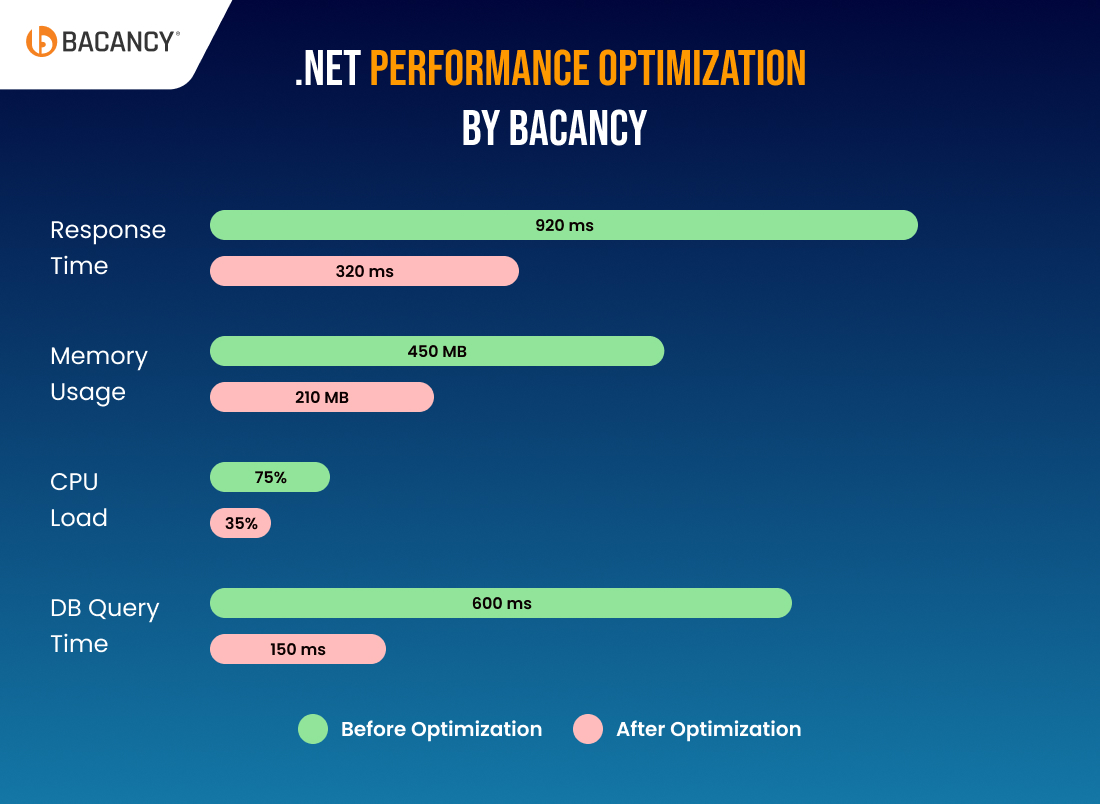
A growing enterprise came to us with a slow .NET application. Users faced long wait times, high memory usage, and delayed data processing, which made the platform hard to use and less reliable during peak hours.
We ran a complete performance audit. Our team cleaned up the code, reduced object allocations, fine-tuned database queries, and applied the right GC mode. We also enabled tiered compilation and used smarter deployment settings.
Here is the result:
- Response Time: 920ms to 320ms
- Memory Usage: 450MB to 210MB
- CPU Load: 75% to 35%
- DB Query Time: 600ms to 150ms
These changes helped the client serve more users with fewer resources. Their system now runs faster, handles more traffic, and supports better decision-making.
Build Faster, Smarter, and Scalable .NET Apps With Bacancy
Optimizing performance is not just a one-time fix. It’s a long-term advantage that leads to better user experience, stronger reliability, and lower infrastructure costs. The right strategy to optimize .NET application performance helps your applications perform well under pressure and scale without compromise.
Partnering with a proven .NET development company like Bacancy gives you access to deep technical expertise, performance-focused architecture, and full-cycle optimization support. From code audits to production monitoring, we ensure your .NET application runs at its best, every step of the way.
Our team utilizes modern tools to resolve issues at the code, infrastructure, and deployment levels. We also fine-tune caching, database access, and async operations to ensure your .NET application is lean, responsive, and ready to scale.
Frequently Asked Questions (FAQs)
Start with efficient data access patterns, use asynchronous programming, implement proper caching, trim unused libraries, enable tiered compilation, and monitor resource usage continuously. Avoid blocking calls and large object allocations where possible.
Test during every major release, infrastructure change, or traffic spike. Adopt continuous performance testing using CI/CD tools, so your app stays fast as it scales. Monitoring tools like New Relic, Datadog, or Azure Monitor help in real-time insights.
Yes. Each .NET version brings runtime improvements. .NET 10 offers better Just-In-Time (JIT) compilation, memory handling, and container performance. Upgrading your app to the latest .NET version often results in noticeable performance gains.