In this guide, you will explore React MCP (Model Context Protocol), how it is rapidly becoming a standard way to build AI native web apps with a unified, agent-suitable interface that allows applications to fetch context and take actions dynamically. Also, you will discover how React MCP works across web apps, its real-world use cases, implementation process, and when to use it in production.
Table of Contents
Introduction
Most of the teams are building web apps using React MCP in 2026, and they are not constrained due to a lack of AI capability, but because of the integration complexity they encounter. Product leaders want quick integration of smart AI across products, engineering teams want to proceed faster, and this introduces maximum friction on the board.
The time when React teams actually start building such features, they witness a wall distinguish every model needs a different SDK, and every internal system needs custom API wiring. Context seems scattered across databases, tools, and services, and UI logic becomes tightly coupled with prompts and backend flows.
The Model Context Protocol was built to solve such issues. According to Anthropic’s reports, MCP has surpassed 97 million installs as of late March 2026. The protocol now boasts over 10,000 active, public, and open-source MCP servers, making it the dominant standard for connecting AI agents to external tools, databases, and data sources.
For React developers, this shift makes React MCP the most stable foundation for building intelligent web apps that connect directly with AI tools, data, and agents through a single open standard.
What is React MCP and Why Does it Matter for Web Apps?
React MCP is an architectural pattern that combines React web apps with AI models, tools, and data. It also standardizes an interface for building smart and agent-driven systems. From its core architecture, which is often referred to as React.js MCP Server, it exposes several applications’ capabilities in a way that intelligent AI agents can understand and use. Instead of designing dozens of API endpoints, a React MCP server exposes three key primitives:
Tools that allow actions that the system can perform, such as order creation, report fetching, and all.
Resources where structured data is present, such as users, documents, and analytics
Prompts that work on reusable templates for guided AI interactions.
The reason why React.js MCP server matters in 2026 is due to rising integration complexities across web apps, while AI integration. React MCP solves it by introducing a standard integration layer, reusable capabilities, model-agnostic architecture, and agent-driven workflows. The React MCP server helps them easily define capabilities, and the React MCP agent decides how to use them, so your React app interfaces stay dynamic for intelligent workflows.
Need a Production Ready React MCP Solution?
Hire an experienced team of MCP Developers from Bacancy to design and deliver a secure, production-ready system from day one.
How React MCP Powers Intelligent Web Apps?
React MCP powers intelligent web apps by introducing a capability layer between UI and systems. To understand better, look at how traditional React web apps are built around a predictable flow.
User action → API call → Data response → UI update
This work model is used to perform based on deterministic product flow. But when you try building an intelligent web app, this architecture starts to break down. Because AI systems don’t require data, they need structured access to capabilities they can reason about. They need to:
Understand intent from natural language
Discover available actions dynamically
Access context across multiple systems
Execute multi-step workflows
In a React MCP-powered app, the flow looks different:
User provides input (text, action, or event)
A MCP React agent interprets intent
The agent discovers available tools via the React MCP server
It selects and executes the right tool with structured arguments
The server returns a typed response
React renders the result dynamically
This replaces rigid UI logic with agent-driven orchestration into multi-step flows:
Fetch data
Transform it
Trigger actions across systems (Slack, Jira, internal APIs)
The biggest advantage of using the React.js MCP server for app development is its extensibility. You can easily add a new tool and expose it via MCP. The MCP React agent can make it for immediate use, no need for frontend rewrites and all. This separation is what allows intelligent web apps to scale without increasing complexity.
How Is React MCP Different from REST APIs and Server Actions?
The most common confusion teams face while building an intelligent web application with React MCP is to consider them as a replacement for REST APIs. This is definitely not. Two different protocols solve different problems and work together in production.
The Protocol Layer Difference: MCP vs REST
REST is known as a contract between two systems. You define the endpoints, schema, and behaviour. MCP is a contract between the system and AI clients that supports the protocol. AI does not know endpoints; it discovers tools, resources, and prompts at runtime, then chooses what to call based on user intent.
Technically. The REST handles user-facing data later in your app, and React MCP handles the AI-facing surface. A smart web app uses both REST to the existing app fast and predictable, while React MCP adds the AI surface that makes it intelligent.
When Should You Use Next.js Server Actions vs React MCP
Next.js Server Actions remains one of the strong fits for structured, UI driven interactions inside React web apps. They are ideal when the action is triggered by any known UI element, input shapes are fixed, workflow is simple and deterministic. In such scenarios, server actions are fast, predictable, and efficient.
Whereas, React MCP server becomes a better choice as soon as your app moves toward intelligence and flexibility. It is designed for scenarios where actions are triggered through natural language, inputs are flexible, not fully known, and capabilities need to be restored across multiple. Here, the MCP React Agent coordinates with multi-step workflows.
How Does the React.js MCP Server Architecture Work for Intelligent Web Apps?
React MCP server architecture defines what an intelligent web app can actually do, and how easily it can evolve. A clean architecture lets you add new tools, resources, and AI clients without even considering the frontend. In 2026, scalable React MCP systems follow a clear pattern built around the separation of concerns.
In a production setup, the React MCP server runs separately from the React application. Your React frontend acts as a client, and the React.js MCP server exposes capabilities such as tools, resources, and prompts. The backend proxy sits between them in production. It allows the same React MCP server to be reused across multiple AI clients as:
Your in-app assistant
External tools like Claude Desktop or Cursor
Internal automation agents
Client Server Transport: SSE vs Streamable HTTP
The communication between the React App and the React MCP server happens through the transport layer. In 2026, streamable HTTP is the recommended standard because it supports bidirectional streaming, automatic reconnection, and session management. It is more reliable than traditional Server-Sent Events (SSE), especially in production environments.
Tools, Resources, and Prompt Primitives
Every React.js MCP server exposes three core primitives, and every intelligent web app depends on them.
Tools (Action Layer)
Callable functions executed by the AI with structured arguments.
Resources (Context Layer)
Structured, readable data accessed via URIs.
Prompts (Interaction Layer)
Reusable templates with parameters.
Together, these three primitives form the capability layer of your application.
Where the React Frontend Sits in the Full MCP Stack
A production-grade React MCP architecture includes four layers for intelligent web apps.
1: React UI (Frontend): Handles user interaction and rendering 2: Client SDK (e.g., use-mcp, CopilotKit): Connects the frontend to the MCP ecosystem 3: Backend Proxy (Security Layer): Manages authentication, rate limiting, and request validation 4: React MCP Server (Capability Layer): Exposes tools, resources, and prompts
Hire React.js developers from Bacancy who specialize in MCP-powered web applications, secure backend orchestration, and scalable intelligent web application development.
What Core Capabilities Does React MCP Unlock for Web Apps?
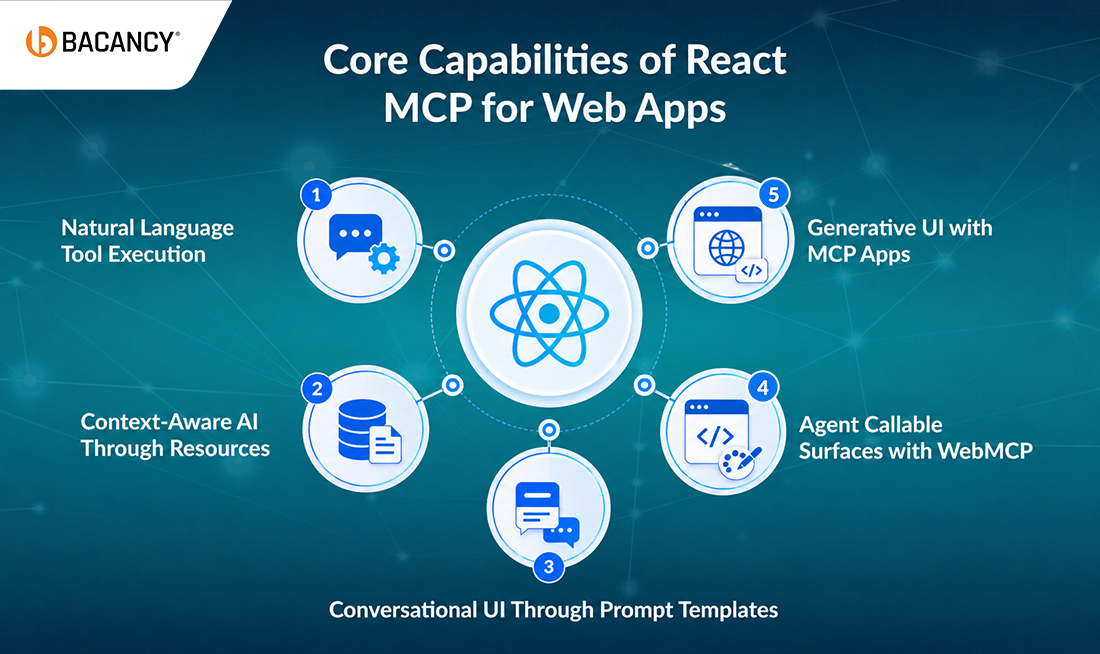
React MCP transforms a traditional React app into an intelligent, agent-driven system. It exposes capabilities through the React MCP server and an MCP React agent that decides how to use them. Learn about the five core capabilities that define intelligent web apps in 2026:
Natural Language Tool Execution
React MCP allows users to trigger actions employing natural language instead of UI controls. A MCP React Agent interprets the requests and maps them into the correct tool while exposing the React.js MCP server and executing it in a structured way. It eliminates the friction and reduces multi-step workflows into a single interaction across web apps.
Context-Aware AI Through Resources
Intelligent web apps need an appropriate context, and React MCP provides it all through resources. Resources expose structured data, such as:
User profiles
Documents
Database records
Activity history
The React MCP server makes all these resources discoverable, and the MCP React agent can fetch them on demand, enabling personalized responses, making informed decisions, and operating across multiple systems.
Conversational UI Through Prompt Templates
React MCP introduces prompt templates as a reusable interaction pattern in apps. Instead of embedding prompts directly into components, they can be defined at the React MCP server level. These prompts ensure consistency, reduce duplication, and allow updates without frontend changes.
Generative UI with MCP Apps
With MCP Apps, your backend can return interactive UI components, not just the data. This means the React MCP server can generate dynamic dashboards, forms, action panels, and embedded workflows.
Agent Callable Surfaces with WebMCP
With WebMCP, React applications can expose their capabilities as a tool. It turns an application into a React.js MCP server in the browser, allowing external AI clients to interact with it. This makes your app part of a broader agent ecosystem, not just a standalone interface.
How To Build Your First MCP React Agent? A Step-by-Step Guide
Developing the first MCP React Agent is simpler than teams expect. The friction usually enters when wrong primitives are chosen, not from the protocol itself. Let’s proceed with the cleanest path from a blank Next.js project to a working agent that can easily read context and call real tools.
Step 1: Spin Up the React App and Install the MCP Client
Start with a Next.js 14+ project on the App Router. Install a React MCP client like @copilotkit/react-core or the lower-level @modelcontextprotocol/sdk, depending on how much abstraction you want. CopilotKit gets you a working chat UI in under 30 minutes; the raw SDK gives you full control at the protocol layer.
You don’t always need to build a server from scratch. With over 10,000 public MCP servers in the registry, chances are someone already exposes the system you need (Linear, Slack, Postgres, Stripe, GitHub). Configure the endpoint:
The agent only knows what you expose. Each tool needs a precise name, a description the LLM will read, and a strict input schema (Zod or JSON Schema). Vague descriptions are how MCP React agents pick the wrong tool. Be specific to create_jira_issue beats create_ticket to prevent most misrouting before it happens.
Step 4: Wire the Agent into the React UI
Drop the chat surface into your layout, then bind your React app’s state to the agent so it gains live context:
<CopilotKit runtimeUrl="/api/copilotkit">
  <CopilotPopup instructions="You are a project assistant..." />
  {children}
</CopilotKit>
Use useCopilotReadable to share component state with the agent. Now, when a user types “show me overdue tasks for the launch project,” the agent already knows what’s loaded on screen.
Step 5: Test with MCP Inspector and Ship
Before going live, ensure you run Anthropic’s MCP Inspector against your server, validating every tool, schema, and auth flow. Then deploy the React MCP server behind an authenticated proxy.
What Are Common React MCP Issues and How Do You Fix Them?
The majority of React MCP problems are not related to bugs; they are because of setup mistakes that can show up later in production.
1. Transport Confusion (SSE vs HTTP)
Problem: Old apps use SSE, which struggles with reconnection and sessions.
Fix: Switch to Streamable HTTP (new standard). If connections drop under load → check your transport first.
2.React 19 Dependency Conflicts
Problem: Many MCP libraries don’t fully support React 19 yet.
Fix:
Use – – legacy-peer-deps
Lock versions in package.json
3. Agent Uses the Wrong Tool
Problem: The AI picks the wrong tool.
Cause: Poor tool descriptions.
Fix: Write clearer descriptions:
“Use this when- specify it clearly
“Do NOT use this for…”
Add input examples
4. Too Much Context (Slow + Confused AI)<
Problem: Too many tools = slower responses + more errors
Fix:
Only load tools the user actually needs
Don’t expose everything at once
5. Authentication Breaks in Production
Problem: Works locally, fails remotely
Cause: Missing proper auth
Fix:
Use OAuth 2.1 + PKCE
Handle tokens on backend (NOT frontend)
Which React MCP Library Should You Choose in 2026?
The React MCP ecosystem has grown so quickly. The majority of teams now choose from a small set of reliable options, and the right one depends on how much control vs speed you want for your app.
Note: There is no best library; only the right level of abstraction matters. The higher abstraction works toward faster development, and the lower abstraction denotes more control. Make your selection based on what you value more: speed or flexibility.
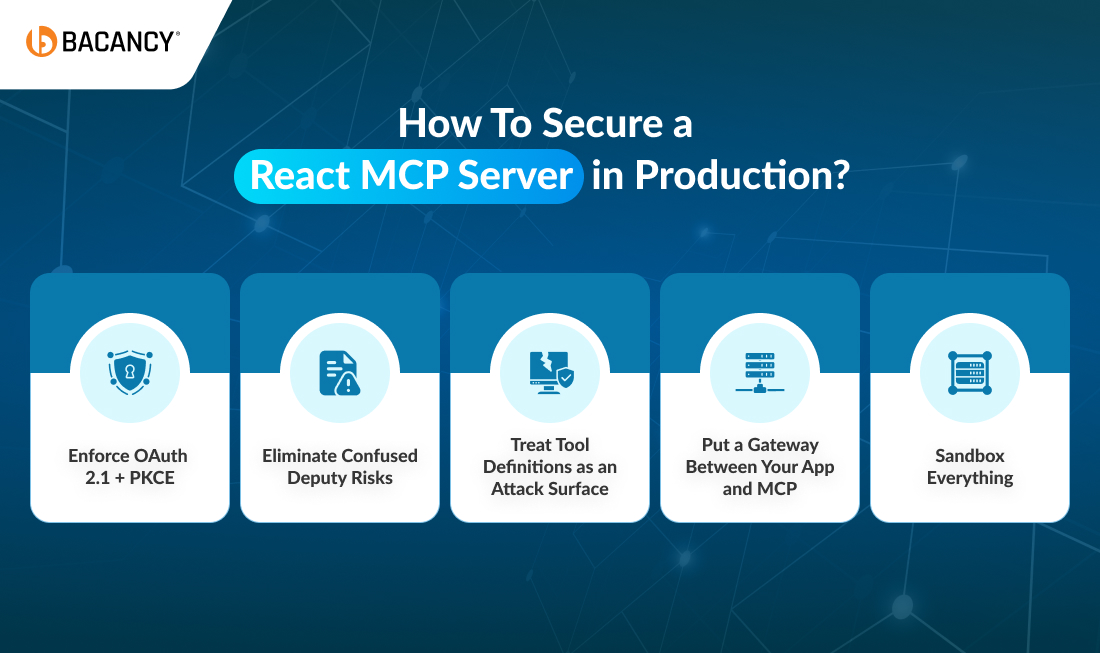
How To Secure a React MCP Server in Production?
Security is where most React MCP web apps fail, not because of the protocol, but because teams treat it like a feature instead of infrastructure. If you are running a React MCP server, you are not shipping a UI layer; you are exposing a system that can read data, execute tools, and take actions across your stack.
1. Enforce OAuth 2.1 + PKCE
Each remote React.js MCP server needs to use modern auth. The lag happens when the team passes API keys or tokens directly from the React frontend, and anything in the browser can be extracted.
What’s the solution?
Run authentication through a backend proxy.
Store tokens server-side only
Use OAuth 2.1 with PKCE for all flows.
2. Eliminate Confused Deputy Risks
When your MCP React agent connects to external systems such as Jira, Salesforce, and Slack introducing delegated authority. Attackers reuse client IDs or hijack consent flows to act on behalf of users.
What’s the solution?
Maintain a per-user registry of approved client IDs
Validate the client before every OAuth exchange
3. Treat Tool Definitions as an Attack Surface
In a React MCP system, tool descriptions are not just metadata, but model inputs, which makes them exploitable. The attack patterns incorporate malicious or compromised tool descriptions, hidden instructions, and LLM-executed unintended actions.
What’s the solution?
Pin every MCP server version.
Disable auto-updates in production.
Scan configs before deployment.
4. Put a Gateway Between Your App and MCP
Direct connections are a mistake. In production, every React MCP server should sit behind a gateway such as MCP Manager and Kong AI Gateway. And this layer handles the rate limiting, request validation, audit logging, and per tool access control.
5. Sandbox Everything
Your MCP server executes tools. That means it can read files, call APIs, and run system-level operations. If restricted, it can turn into liability.
What’s the solution?
Run in containers or isolated environments.
Restrict filesystem and network access.
Disable unnecessary system permissions.
What Are Real-World Use Cases of Intelligent Web Apps Built with React MCP?
The biggest misconception that is linked with React MCP is that it is ideal just for chatbots. Rather, the best teams can employ it as a capability layer, a single interface that connects React apps to real systems and lets users act across them seamlessly.
Use Case 1: In-App AI Assistants That Take Action Inside SaaS Dashboards
This use case defines the React MCP server pattern in 2026; instead of embedding a chatbot, the team incorporates it as a system operator inside the product.
How it works:
The user gives intent in plain English
The MCP React agent selects the right tools
The React app renders results in real time
Also, in finance dashboards, it does not just show reports; it runs validations, flags anomalies, and simulates financial scenarios.
Use Case 2: Internal Developer Tools That Claude Desktop and Cursor Can Call Into
Sometimes teams forget that an MCP server is bidirectional, and the same React JS MCP server power you in app copilot is also callable from Claude Desktop, Cursor, ChatGPT, and Cline. That means the dashboard your team is building for customers can also become a developer tool, and it is reusable across AI environments. It makes your internal tools AI accessible and your product APIs a conversational interface.
Use Case 3: Customer Support Agents Resolving Tickets via Tool Calls in Fintech and E-commerce
Traditional chatbots reduce tickets. MCP agents resolve them. The difference is simple:
Instead of just waiting for the query to solve, these agents process refunds, update tickets, and verify user data. Every action is tied to the real system, and every step is logged and auditable.
Use Case 4: Multi-Step Approval Workflows With Human-in-the-Loop for Enterprise
Most enterprise workflows don’t follow single actions; they need multi-step decisions incorporated with risk. It includes invoice approvals, contract changes, and access provisioning. React MCP handles this through two underused primitives by sampling deeper reasoning mid-task and elicitation while pausing for human input. In that case, the React frontend becomes Approval UI, Diff viewer, and decision checkpoint safe enough for enterprise use. It doesn’t eliminate humans, but rather calls them at the right moment for assistance.
Use Case 5: Agent-Ready Storefronts via WebMCP for Retail
React Apps are no longer used by humans; AI agents are now browsing and buying products too, using ChatGPT, Perplexity AI, and Microsoft Copilot to search, compare, and complete the purchase. And it happens with MCP-based storefront APIs. Modern storefronts now expose simple, structured actions:
Search products
Add to cart
Check order status
WebMCP (Callable Frontends) is built by Google and Microsoft, which lets a React App expose actions directly. AI Agents don’t scrap UI anymore; they use it like an API.
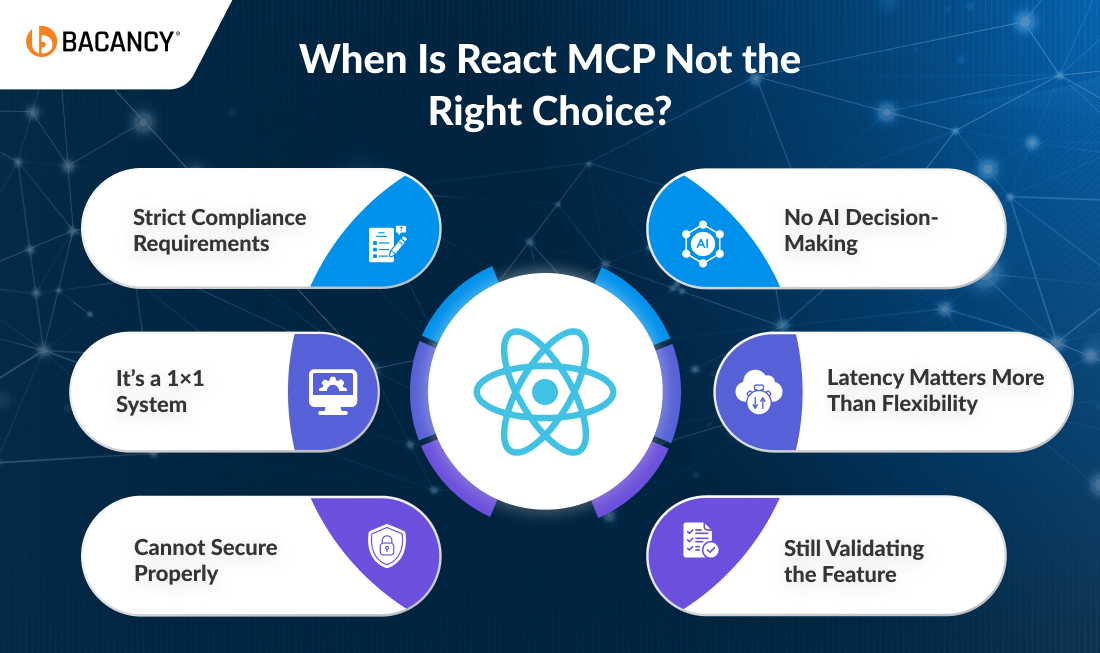
When Is React MCP Not the Right Choice?
React MCP is capable, but not every web application needs its added protocol layers and orchestration complexity. If an LLM is not selecting between tools, MCP may be overengineering the solution
1. When There’s No AI Decision-Making
React MCP exists for one simple reason: to let LLM choose which tool to call. But if your UI does this, such as Button → API call → Done. Then it eliminates the need for MCP. MCP is not a replacement for REST; it’s a layer for AI-driven actions.
2. When Latency Matters More Than Flexibility
MCP adds overhead to JSON-RPC, network hops, and sometimes an LLM round-trip. For real-time systems, that’s a problem. Avoid MCP for:
Search-as-you-type
Live dashboards
Financial data streams
Games
Your better approach can go with direct client to backend calls. If milliseconds matter, MCP is the wrong tool.
3. When You’re Still Validating the Feature
If your AI feature is still experimental. Adding MCP means:
More complexity
More moving parts
Dependency on an evolving spec
And the MCP spec is still changing through 2026. A better way could be to start with a simple prompt, validate demand first, and add MCP later if required.
4. When You Have Strict Compliance Requirements
Some teams are running into gaps between MCP’s OAuth 2.1 model and Enterprise SSO / IdP systems. For sensitive environments like HIPAA, PCI-DSS, and Strict data residency, MCP may not align completely. You can use the existing identity system and can build controlled integrations.
5. When It’s a 1×1 System
MCP solves problems such as many models and many tools. But if you have a single model and one backend, you don’t have that problem, your better approach can be using native tools that need no protocol if there is nothing to standardize.
6. When You Can’t Secure It Properly
React MCP introduces several risks while executing tools, external integrations, and token handling. If your team fails to guarantee audit logs, rate limiting, and a backend proxy, MCP can become a liability.
How Bacancy Builds Production-Ready Intelligent Web Apps with React MCP?
Many companies can claim they do MCP, but only a few can take it beyond integration, where the real complexity needs to be settled down. And that’s where the project usually falls off due to security gaps, architectural shortcomings, and scalability issues. Bacancy functions beyond that stage.
1. Deep React + AI Expertise
MCP is not an experiment for us. It’s the core of what we ship. Our team actively develops React MCP web apps, MCP React agent workflows, WebMCP integrations, and interactive UI using @mcp-ui/client so that the delivery looks exactly what’s expected.
2. Built-In Security
The common mistake in React MCP web apps lies in storing a token in the browser. But in our execution, only default architecture backends hold all tokens, browsers only use short-lived session cookies, and full audit logging from the first tool call.
3. One MCP Server, Designed for Multiple Audiences
We don’t build MCP systems for a single use case. Every React.js MCP server we design is built to serve React application users, internal teams using tools like Cursor or Claude, and external AI agents like ChatGPT or Perplexity AI.
4. Full-Stack MCP Ownership
React MCP is not just frontend work. A real deployment spans React client, Backend proxy, MCP server layer, OAuth 2.1, transport (streamable HTTP), and observability and audit logging. Our experts handle all layers under one team, with no vendor coordination and no gaps.
5. Faster Delivery with Proven Accelerators
Most teams spend weeks solving the same problems, but we don’t. We don’t proceed from scratch. Rather, we start from the problem itself, such as hardening backend proxy templates, prebuilt OAuth integration, strict mode safe React architecture patterns, and tool permission frameworks.
6. Always Up-to-Date with the MCP Spec
MCP evolution is quite fast. Our engineers actively track changes from organizations like the Linux Foundation ecosystem to stay ahead of new transport models, server discovery standards, and enterprise authentication updates. We don’t build on any outdated assumptions.
Conclusion
You can’t think of React MCP as a future bet for web apps; it is already an infrastructure. The protocol has crossed the hype and has become a dependency measure. It is quietly becoming a part of how modern web applications connect intelligence to action. The teams pulling ahead in 2026 aren’t the ones running the most ambitious AI experiments. They’re the ones doing something far more practical by treating React MCP as the core of development, not a feature. It doesn’t reward complexity but enables first integration to get right, skipping OAuth misconfigurations, transport instability, and production time surprises. If you are looking to move faster with a team that has already solved such problems, partner with an expert React JS Development company to build a robust, production-ready, intelligent web application for you.
Frequently Asked Questions (FAQs)
Yes. React MCP works on model agnostic means that you can connect multiple AI models to the same MCP server for your web application. It enables you to route tasks based on the best model for the job without changing the React app or backend logic.
React MCP can increase latency because of orchestration and model involvement, but it often reduces overall cost and complexity by replacing large prompts, minimizing repeated API integration, and allowing smarter yet context-aware execution.
No. You don’t need a full rebuild. React MCP can be added incrementally. Start with one workflow, add an MCP server alongside your existing APIs, and integrate the agent into a single feature. This gradual approach reduces risk and speeds up adoption.
Yes, and there are many examples that use chat UIs, and React MCP works perfectly in dashboards, forms, background workflows, and event-driven systems.
Bacancy’s way of testing React MCP systems typically involves validating tool schemas, invoking MCP inspector tools, logging every tool invocation, and running a controlled prompt to test edge cases.
Vivek Patel
Full Stack Developer at Bacancy
Engineering director and React expert leading innovation through code and collaboration.