This blog explains how Laravel Reverb enables real-time functionality in Laravel applications. You will learn how its architecture works, what real-time features you can build, and how to install and implement Reverb step by step. We also share practical use cases and insights to help you decide whether your Laravel app is ready for real-time capabilities.
Table of Contents
Introduction
Let’s cut to the chase, real-time features are no longer about “nice-to-have”, they have become a driver of engagement and retention. Research suggests that real-time interactions can increase daily active usage, improve personalized content delivery, and enhance user satisfaction.
But adding real-time capabilities has historically meant costly third-party services, complex setups, and fragmented tooling until Laravel Reverb arrives. Built as Laravel’s own WebSocket server, Reverb eliminates the external dependencies while enabling highly efficient and two-way communication between clients and servers.
Now, real‑time broadcast features like live notifications, collaborative interfaces, and instant messaging are easier and more affordable to build. Let’s dive into how Laravel Reverb transforms real-time interactions, helping you deliver instant updates, enhance user engagement, and simplify development from start to finish.
What Is Laravel Reverb and Why Is It Ideal for Real-Time Apps?
Laravel Reverb is an official first-party WebSocket server for Laravel, introduced in Laravel 11. Unlike third-party solutions such as Pusher or Soketi, the core team designs and maintains Reverb. It has deep integration with Laravel’s broadcasting system, queues, and event architecture, so it works seamlessly out of the box.
In simple terms, Laravel Reverb allows Laravel applications to:
Push updates instantly to users
Deliver live notifications and alerts
Build chat systems and collaborative tools
Power real-time dashboards and analytics
How Laravel Reverb Powers Real-Time Applications?
Understanding the architecture behind Laravel Reverb real-time applications helps your team make better implementation decisions. There are 3 distinct layers, each with a clear responsibility.
The Backend Layer: Laravel Events with ShouldBroadcast
This is where you define what data gets pushed to connected clients, and when. Any Laravel event class can implement the ShouldBroadcast interface. Once it does, dispatching that event causes the payload to be serialized and sent to the WebSocket server.
class ReportGenerated implements ShouldBroadcast {
    public function broadcastOn(): Channel {
        return new PrivateChannel('user.' . $this->userId);
    }
}
Your existing Laravel event system, queues, and business logic all remain unchanged. Reverb is an additional transport layer and not a replacement for your application architecture.
The Transport Layer: Reverb WebSocket Server
Reverb is the persistent pipe between your Laravel application and the browser. Unlike HTTP, which closes after each request, WebSocket connections remain open, allowing the server to push data to the client at any time without polling.
Reverb handles connection management, channel subscriptions, authentication handshakes for private channels, and message routing. It runs as a standalone process alongside your Laravel application.
The Frontend Layer: Laravel Echo
Laravel Echo is the JavaScript client library that connects to Reverb and listens for broadcast events. It abstracts WebSocket protocol details and provides a clean, declarative API for frontend developers, and it works with Vue, React, Angular, or vanilla JavaScript.
Public, Private, and Presence Channels: Choosing the Right Channel
One of the most important architectural decisions in a real-time Laravel application is which channel type to use for each feature.
In simple terms, Laravel Reverb allows Laravel applications to:
Public Channels: No authentication required. Ideal for live feeds, global announcements, open dashboards, and leaderboards. Anyone connected can listen.
Private Channels: Requires backend authorization. Use for user-scoped notifications, order updates, personal data, and anything that should only reach a specific authenticated user.
Presence Channels: An extension of private channels that also tracks who is currently subscribed. Use for showing who’s online, typing indicators, collaborative editing awareness, and any feature that requires shared user state.
Selecting the correct channel type has direct security and user experience implications. Private and presence channels require a channel authorization endpoint in your Laravel application, which Reverb validates on every subscription request.
Build high-performance real-time Laravel applications with expert guidance.
Hire Laravel developer from Bacancy to implement scalable WebSocket architectures powered by Laravel Reverb.
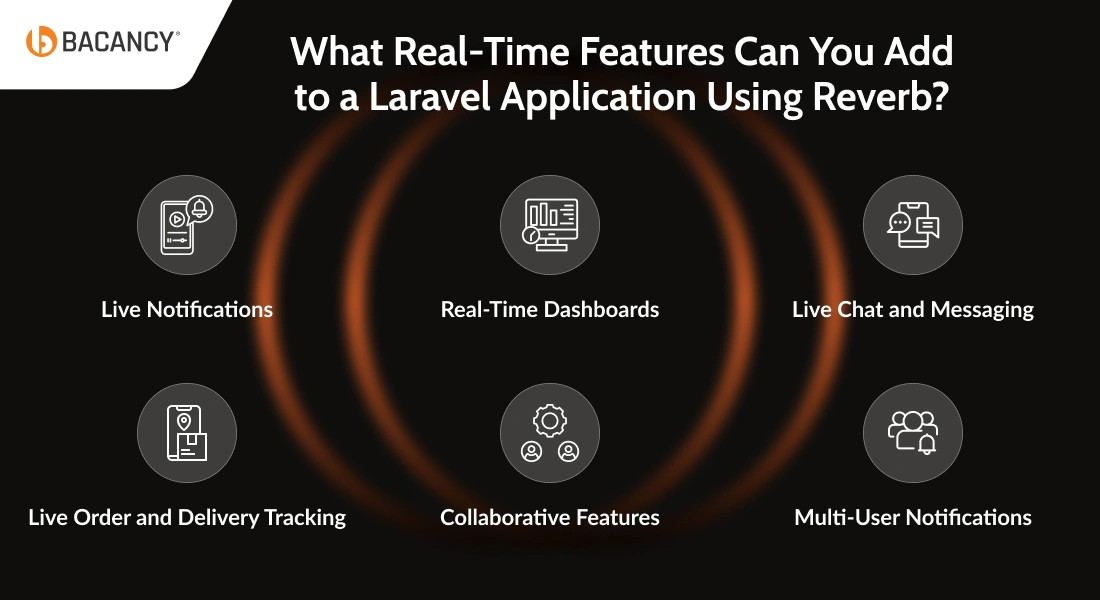
What Real-Time Features Can You Add to a Laravel Application Using Reverb?
While evaluating the benefits of real-time functionality in Laravel apps, Reverb makes 6 feature categories possible. Each of these features directly enhances the user experience in meaningful ways.
1. Live Notifications
Push notifications to specific users the moment a relevant event occurs: a report is ready, a payment is confirmed, a task is assigned. No polling, email delay, and page refresh. You can decrease support tickets caused by users who didn’t know that something had happened.
2. Real-Time Dashboards
Replace manual refreshes with live-updating metrics: order volumes, revenue, active users, inventory levels, or server health. Broadcast aggregated data on a schedule or triggered by events. Your operation and analytics teams can act on current information rather than stale snapshots.
3. Live Chat and Messaging
Support inboxes, internal team communication, and customer-facing chat can all be built on Reverb’s presence and private channel model with real-time message delivery and typing indicators, replacing expensive third-party chat widgets while keeping full data control.
4. Live Order and Delivery Tracking
E-commerce, logistics, and food delivery applications can push status updates directly to a customer’s screen as they happen. You can reduce customer anxiety and inbound support volume around order status queries.
5. Collaborative Features
Show when multiple team members are viewing or editing the same record simultaneously. It prevents conflicts before they happen with real-time presence awareness across CRM, project management, and document tools.
6. Multi-User Notifications
Broadcast to segments or groups of users simultaneously, for example, notifying all agents in a support queue when a high-priority ticket arrives. It enables coordinated team workflows without requiring a separate notification infrastructure.
How to Install Laravel Reverb in an Existing Application: Step by Step
Adding real-time capabilities to an existing Laravel application with Reverb is a structured and step-by-step process.
Step 1: Enable Broadcasting
Run the official Laravel broadcasting installer. This command installs Reverb, configures the broadcasting service provider, and scaffolds the necessary environment variables in a single step:
php artisan install:broadcasting --reverb
Step 2: Verify Environment Credentials
Confirm the Reverb-specific variables were added to your .env file. These credentials authenticate your Laravel application with the Reverb server:
For production, update REVERB_HOST to your server domain and switch REVERB_SCHEME to https with proper SSL termination at your web server or load balancer.
Step 3: Create a Broadcastable Event
Implement the ShouldBroadcast interface on any Laravel event class to make it broadcastable: use Illuminate\Contracts\Broadcasting\ShouldBroadcast;
class OrderStatusUpdated implements ShouldBroadcast {
    public function __construct(public Order $order) {}

    public function broadcastOn(): array {
        return [new PrivateChannel('orders.' . $this->order->user_id)];
    }
}
Step 4: Define Channel Authorization
For private and presence channels, add authorization logic in routes/channels.php:
In production, manage this process with Supervisor to ensure automatic restarts on failure.
Step 7: Test Your Real-Time Pipeline
Dispatch your broadcastable event from Tinker or a test route:
OrderStatusUpdated::dispatch($order);
Open your browser’s Network tab, filter by WS connections, and confirm the event payload arrives in real time.
Step 8: Monitor with Laravel Pulse
Reverb integrates with Laravel Pulse out of the box, allowing you to monitor active WebSocket connections, peak concurrent users, and server-side performance metrics from your existing Pulse dashboard.
Bacancy’s 4 Practical Laravel Reverb Real-Time Use Cases
In several projects, our Laravel engineers at Bacancy implemented real-time functionality because it is necessary when a product grows beyond basic request-response interactions.
Instead of relying on heavy polling or third-party real-time services, we often execute event-driven workflows using Laravel broadcasting architectures like Laravel Reverb. Below are 4 practical scenarios that reflect the type of real-time features our team commonly builds.
1. Instant Report Availability in SaaS Platforms
One of our platforms was a SaaS platform that allowed users to export large reports that were processed in the background. The challenge was simpler because users did not know when the report was ready.
The original solution used API polling every few seconds. As usage increased, this created thousands of unnecessary requests. Our engineers replaced this approach with a real-time notification workflow.
How it works in production:
User requests a report from the dashboard
A queue job processes the report in the background
Once completed, the system fires a ReportGenerated event
The event broadcasts to the user’s private channel
The frontend instantly shows that your report is ready to download.
This small change significantly improved user experience while reducing unnecessary server traffic.
2. Built-In Support Chat for SaaS Products
Based on our experience, several products want to support directly inside the applications instead of redirecting users to external chat tools.
Bacancy’s team built a lightweight messaging system between users and support agents. The first version fetched new messages through API polling, which caused delays during conversations.
We moved the system to an event-based real-time architecture.
What our team implemented:
Private channels for secure message delivery
Real-time message broadcasting when a new chat message is sent
Presence channels to show which agents are currently online
To improve the interaction experience, we also implemented typing indicators using client events. For example, when an agent starts typing, the user interface displays:
“The support agent is typing…”
This small feature made the interaction feel much more natural and responsive.
3. Real-Time Sales and Operations Dashboard
Admin dashboards are one of the most common areas where real-time updates provide real value. Operations teams running Laravel e-commerce campaigns need dashboards that reflect live order activity, not data that is already 30 seconds stale. We replaced manual refresh cycles with event-driven broadcasting tied directly to order and payment events.
Our Laravel developers introduced real-time event broadcasting tied to key system events. Whenever an important action occurs, the dashboard updates instantly.
Examples of broadcast events:
OrderCreated → Updates order count
PaymentCaptured → Updates revenue metrics
InventoryUpdated → Updates stock availability
Instead of pushing large datasets, we broadcast only small updates such as metric changes.
Why this approach works well:
Dashboards stay accurate during high traffic
Network payload remains small
Teams gain better operational visibility
4. Real-Time Collaboration Awareness in CRM Systems
In collaborative business tools, it is common for multiple users to access the same record at the same time. While working on a CRM system for a sales team, we noticed frequent situations where two representatives edited the same contact simultaneously.
Rather than implementing complex record locking, our team introduced real-time presence awareness.
When a user opens a CRM record, the system joins a presence channel associated with that specific record. Other users viewing the same record appear instantly in the interface. This visibility helps teams coordinate their actions before making changes.
For instance, the system may display messages such as:
“2 team members are currently viewing this record.”
Is Your Laravel App Ready to Go Real-Time? A Self-Assessment Checklist
Make sure Laravel broadcasting is set up with Pusher, Redis, or Socket.io.
Confirm your app supports WebSockets for two-way communication.
Ensure queued jobs run efficiently without slowing down the app.
Check that your database can handle frequent read and write operations.
Make sure your frontend can consume real-time events smoothly.
Testing the app for performance and scalability under heavy loads.
Secure real-time channels with proper authentication and rate-limiting.
How Bacancy Helps Businesses Build Real-Time Laravel Applications?
Businesses that adopt real-time applications with Laravel Reverb gain the ability to respond instantly to user actions, enhance operational efficiency, and create more engaging digital experiences. These web applications help your teams make faster decisions, stay on top of daily operations, and see exactly what your users need in real time.
As a Laravel development company, Bacancy helps businesses design and implement real-time applications that handle instant notifications, live updates, and high-frequency events efficiently. Our team works closely with clients to create solutions that balance speed, reliability, and scalability, ensuring every feature enhances user engagement.
With Bacancy’s expertise, your business gains applications that are robust, maintainable, and ready for the future. Real-time Laravel apps become predictable, efficient, and responsive, allowing organizations to focus on growth and innovation without worrying about technical bottlenecks or system limitations.
Frequently Asked Questions (FAQs)
Understanding Laravel Reverb
Laravel Reverb acts as Laravel’s WebSocket server that allows applications to push data instantly to connected users. It enables real-time features such as notifications, chats, and live dashboards without requiring page refreshes.
Traditional HTTP requests require the client to repeatedly ask the server for updates. Laravel Reverb maintains a persistent WebSocket connection, allowing the server to send updates instantly when events occur.
Laravel Reverb was introduced to provide Laravel developers with a native, scalable solution for real-time communication that doesn’t rely on external WebSocket services.
Step 1: A Laravel event occurs in the backend (for example, a new order or notification).
Step 2: The event implements the ShouldBroadcast interface.
Step 3: Laravel broadcasts the event to the Reverb WebSocket server.
Step 4: The server sends the update to subscribed clients.
Step 5: The frontend receives the event through Laravel Echo.
Step 6: The user interface updates instantly without refreshing the page.
Technical Architecture
Laravel Reverb uses WebSocket protocols to keep an open connection between the server and clients, allowing data to flow instantly whenever an event is triggered.
Laravel Reverb deployments often use Redis, queue workers, and load balancers to process events efficiently and manage concurrent connections.
Laravel Reverb can scale horizontally across multiple servers with distributed infrastructure and load balancing to manage thousands of concurrent WebSocket connections.
Laravel Reverb can be a better option for many Laravel projects because it is a first-party WebSocket server built by the Laravel core team. Unlike Pusher, Reverb runs on your own infrastructure, which reduces long-term costs and provides greater control over scaling and performance.
Real-World Applications
Industries, such as fintech, healthcare, e-commerce, and collaboration platforms, use real-time applications to provide live updates, instant messaging, and activity monitoring.
Businesses can build features such as live notifications, chat systems, collaborative editing tools, real-time analytics dashboards, and order tracking systems.
Real-time functionality allows teams to access instant updates, monitor processes continuously, and respond quickly to changes or issues.
Performance & Security
Performance can be improved through efficient event broadcasting, Redis caching, queue processing, and infrastructure scaling strategies
Laravel Reverb uses authentication and authorization mechanisms to control access to private and presence channels, ensuring that only authorized users receive specific events.
Real-time applications require expertise in WebSockets, scalable architecture, and event-driven systems. Working with an experienced Laravel development company like Bacancy ensures your application is built with performance, scalability, and security in mind.
Nikunj Padhiyar
Director of Engineering at Bacancy
Senior Software Engineer building robust, high-performing PHP web applications.