The blog shows how Laravel testing ensures app reliability using unit, feature, and browser tests. With tools like PHPUnit and Laravel’s built-in test helpers, Laravel tests catch bugs early, boost collaboration, and support scalable, maintainable code.
Table of Contents
Introduction
Bugs always show up when you least expect them. A small change can break something important. Hence, Laravel makes it easier by giving you built-in tools to test your code early and often.
From unit tests to browser-level checks, Laravel helps you confirm that every part of your application works as expected, which results in you staying ahead of all.
In this blog, we will cover what Laravel testing is, why it matters, the different types of tests you can use, and how to avoid common pitfalls. Whether you are starting fresh or improving your current setup, this guide will help you test smarter and build better with Laravel test automation practices.
What is Laravel Testing?
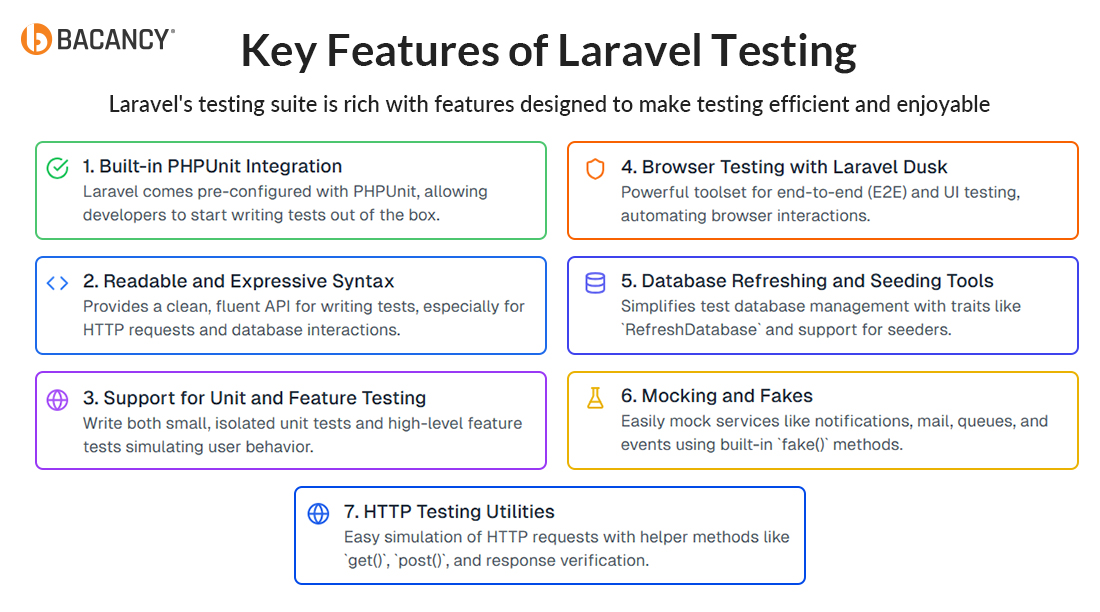
Laravel testing is the process of writing and running automated tests in a Laravel application to ensure that individual components, such as functions, routes, APIs, and features, work correctly, bug-free, and as per your expectations.
Laravel uses PHPUnit as its testing framework. It provides built-in tools and helper methods to make writing tests easy and expressive. It adapts a test-driven development approach and offers expressive syntax that can create meaningful tests.
3 Types of Laravel Tests for Bug-free Applications
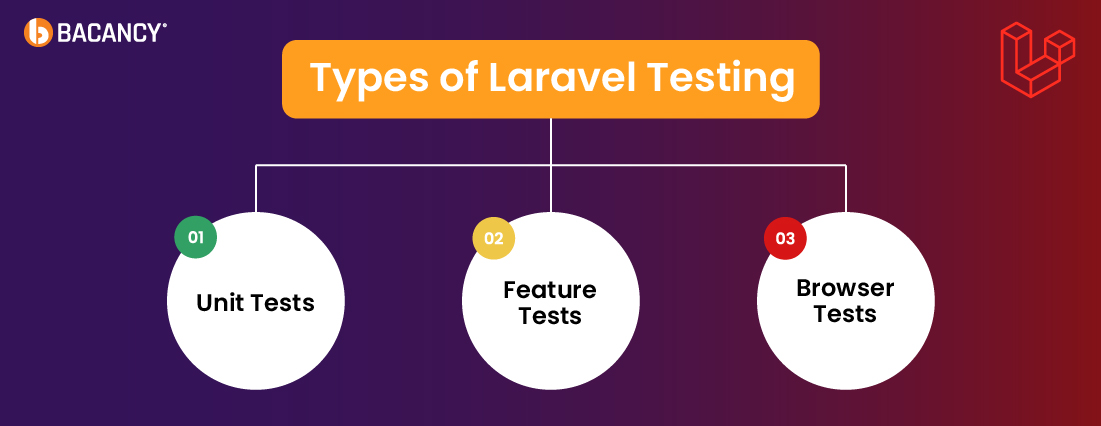
Laravel provides powerful testing tools to ensure every part of your application performs as expected. Below are the 3 essential types of tests used in Laravel projects:
1. Unit Tests
Unit tests focus on individual functions or classes. These tests verify small, isolated pieces of logic without relying on the database, filesystem, or external services. Laravel makes it easy to write these tests using PHPUnit, allowing fast validation of internal logic.
2. Feature Tests
Feature tests check how different parts of the application work together. These tests simulate real user actions, such as submitting a form or accessing a route. It uses Laravel’s built-in HTTP testing tools and often interacts with the database to validate complete flows.
3. Browser Tests
Browser tests (also known as end-to-end or Dusk tests) replicate full user journeys in a real browser. These tests help verify UI behavior, JavaScript interactions, and layout consistency. Laravel Dusk allows developers to script interactions, such as clicks, form entries, and page transitions in a controlled environment.
Benefits of a Strong Testing Culture in Laravel Projects
A strong testing culture in Laravel projects does more than catch bugs; it reshapes how your team builds, deploys, and scales software. The following are the benefits of Laravel tests:
Faster Development Cycles with Fewer Bugs
Automated unit and feature tests reduce the time spent on manual QA. Developers get instant feedback, fix issues earlier, and ship code faster, without fear of regressions.
Better Collaboration Between Development Teams
Clear test coverage acts like documentation. QA knows what’s tested, developers know what needs fixing, and product teams gain confidence in delivery timelines, which leads to fewer handoffs and better team alignment.
Easier Refactoring and Scaling
When your codebase has solid tests in place, you can confidently refactor legacy code or introduce new features. Laravel’s test helpers and assertions make maintaining code quality less stressful, even as the project grows.
Dynamic Continuous Deployment
A reliable test suite becomes your safety net in CI/CD pipelines. With every commit and merge, you know exactly what passed and failed, so you can push to production more frequently without compromising stability.
Better Code Quality and Developer Accountability
Tests encourage modular, predictable code. Laravel’s testing tools promote the use of service containers, mockable dependencies, and SOLID principles, leading to more maintainable, testable code from the beginning.
How Laravel Testing Delivers ROI Across Development and Deployment?
Laravel testing offers technical reliability. It brings long-term business value that often goes unnoticed. Here’s how it adds real return on investment:
Lower Cost to Fix Issues
Bugs caught during development cost less to resolve than those found after launch. Automated tests help detect problems early. This reduces expenses related to emergency fixes, client dissatisfaction, and lost revenue.
Faster Project Progress Over Time
Writing tests may take extra time at first, but they lead to faster cycles as the application evolves. Developers work more efficiently and face fewer surprises when updating features or cleaning up code.
Less Burnout and Fewer Disputes
A solid test suite keeps developers focused on feature delivery rather than constant bug resolution. QA teams avoid repetitive manual checks. Product owners face fewer delays. This creates a more stable and cooperative work environment.
Easier Transition for New Developers
A well-tested codebase gives new team members a clear view of how the system works. Tests serve as a guide. New developers contribute sooner and ask fewer questions about legacy logic or risky changes.
More Confidence for Stakeholders
A strong test coverage gives you a sense of control over release quality. It helps speed up decision cycles and reduces hesitation around product updates or launches.
Want to reduce bug-related costs and speed up releases in your Laravel applications?
Hire Laravel developer who builds clean, test-driven code that lowers maintenance costs and accelerates delivery.
How Do You Set Up and Run Tests in Laravel?
Laravel makes testing a core part of the development process with built-in tools and a simple structure. Here’s how to get started and run tests effectively in any Laravel project:
Step 1: Check the Testing Environment
Laravel includes PHPUnit by default. Make sure your phpunit.xml file is configured correctly and your .env.testing file is set up for a test-specific database.
DB_CONNECTION=sqlite
DB_DATABASE=:memory:
Step 2: Create a Test Class
Use Artisan to generate a new test file:
php artisan make:test UserTest
You can add –unit if it’s a unit test:
php artisan make:test UserTest --unit
Step 3: Write Your First Test
Inside your test class, add methods that reflect expected outcomes:
public function test_user_can_be_created()
{
    $response = $this->post('/register', [
        'name' => 'John',
        'email' => 'john@example.com',
        'password' => 'secret',
    ]);

    $response->assertStatus(302); // redirect after registration
    $this->assertDatabaseHas('users', ['email' => 'john@example.com']);
}
Step 4: Use Factories and Seeders
Utilize Laravel model factories to create test data:
$user = User::factory()->create();
This keeps your test setup clean and consistent.
Step 5: Run the Tests
You can run all tests with:
php artisan test
Or you use PHPUnit directly:
vendor/bin/phpunit
You can target a specific test:
php artisan test --filter=UserTest
Step 6: Interpret the Results
Laravel provides readable output with status codes, errors, and assertions. Green = pass, Red = failure. Use this feedback to adjust your logic or fix bugs early.
If you are new to Laravel tests, no worries! Here’s the experience shared by an expert on Laravel testing, which will help you learn and understand easily.
When and What Should You Automate in Laravel Testing?
Not every test needs automation. Knowing what to automate and what to handle manually helps teams work smarter, reduce costs, and keep quality high. Here are key areas to consider:
Automate Repetitive and High-Value Tests
Automate tests that run often and cover core logic. This includes unit tests for services, validation, calculations, and feature tests for login, checkout, or data entry flows. These tests offer fast feedback and reduce errors before release.
Keep the Exploratory and UI Testing Manual
Manual testing works best for edge cases, design checks, and scenarios where user behavior varies. Teams should manually test new UI elements or unexpected inputs to find usability issues that automation might miss.
Match Automation Scope to Product Stability
Automation saves time and prevents regressions for stable products with mature features. Start with minimal tests in fast-changing areas and add more after flows become consistent. Avoid full coverage in code that shifts often.
Adjust Strategy Based on Team Size and Budget
Smaller teams with limited time can focus on high-risk areas. Prioritize unit and feature tests over browser tests, which take longer to maintain. Larger teams or enterprise setups can invest in broader coverage, including end-to-end and performance tests.
Common Testing Challenges That Cost You Time and Money
Even with the best practices, Laravel testing can go off track. These common issues often slow teams down, create frustration, and eat up resources:
1. Missing Test Coverage for Critical Logic
Many teams write tests for obvious features but overlook business-critical logic. This leads to gaps that surface only in production.
2. Unclear Test Naming and Structure
Poorly named or unorganized tests make it hard for teams to understand what’s being tested or debug when things fail.
3. Over-Mocking Dependencies
Excessive mocking in unit tests can give a false sense of stability and miss real-world integration issues.
4. Flaky Tests on CI/CD Pipelines
Tests that pass locally but fail in the Continuous Integration and Continuous Delivery(CI/CD) environment waste time and reduce trust in the pipeline.
5. Lack of Parallel Test Execution
Running tests sequentially slows down feedback loops, especially in large Laravel projects with hundreds of tests.
6. Heavy Reliance on Factories Without Validation
Factories are helpful, but without proper Laravel validation rules, they can silently generate bad data that passes tests but breaks real usage.
Laravel Testing Checklist: What to Ensure Before Running Tests
Before running your test suite, walk through this checklist to ensure your Laravel application is stable, efficient, and production-ready:
Environment Setup
✅ Use .env.testing for isolation
✅ Configure an in-memory SQLite database
✅ Ensure migrations run before tests
✅ Use RefreshDatabase or DatabaseTransactions traits
Test Coverage
✅ Write unit tests for isolated logic
✅ Create feature tests for user flows
✅ Include edge cases and error handling
✅ Test permissions and role-based access
Data Management
✅ Use model factories with realistic data
✅ Avoid hardcoded values in tests
✅ Add only necessary data
✅ Clean up data after each test run
Structure and Clarity
✅ Keep tests organized in proper directories
✅ Name tests descriptively (test_user_can_login)
✅ Use the Arrange-Act-Assert (AAA) pattern
✅ Write one test per behavior
Mocking and External Services
✅ Mock external API calls and third-party services
✅ Use Laravel’s Http::fake() when necessary
✅ Ensure no real services are triggered during test runs
Automation and Speed
✅ Add tests to your CI/CD pipeline
✅ Use Laravel’s –parallel testing to save time
✅ Set up pre-commit hooks to run tests locally
✅ Monitor test coverage and maintain metrics
How Bacancy Ensures Test-Driven Success in Laravel Projects
In Laravel projects, quality comes from writing reliable code backed by solid tests. Bacancy uses a test-driven development approach when delivering Laravel development services to focus on clarity, structure, and long-term stability. Developers write tests first, then build the logic to meet those conditions. This results in fewer issues and cleaner code.
The team applies unit, feature, and browser tests based on each project’s scope. Laravel’s built-in testing tools help verify logic, simulate real-world scenarios, and support dependable releases.
Laravel testing remains part of every development phase. This approach improves code quality, supports scalability, and helps future updates proceed without disruption.
Frequently Asked Questions (FAQs)
Use PHPUnit, Laravel’s default testing framework, for unit and feature tests. For browser tests, tools like Laravel Dusk, Pest, and Mockery enhance flexibility and ease of use.
Laravel testing helps ensure that your application’s logic, features, and user flows work as expected. It allows developers to catch bugs early, maintain code quality, and deploy efficiently.
Yes, you can significantly reduce test execution time by running tests simultaneously across multiple processes. Install Brianium/Paratest and then use php artisan test –parallel.
For a reliable Laravel test setup, follow these best practices:
Use a separate .env.testing environment
Set an in-memory SQLite database
Apply RefreshDatabase or DatabaseTransactions
Use factories to generate test data
Structure tests into Unit, Feature, and Browser folders
Keep tests small and independent
Avoid overusing mocks
Reuse code with setup methods or helpers
Integrate tests with your CI/CD pipeline
Dipal Bhavsar
Tech Geek at Bacancy
Story-driven writer blending research, passion, and full-stack web clarity.