What is Angular CLI, and what are its main features?
Angular CLI is a command-line tool that helps developers create, build, test, and manage Angular applications easily from the terminal.
That means if you want to perform tasks like creating an application, adding a module, component, or service, or even building and compiling the code, Angular CLI becomes an essential tool.
Angular CLI becomes your go-to utility. It saves time, eliminates repetitive setup work, and follows best practices automatically.
What is the difference between Angular and Angular CLI?
If you’re just getting started with Angular development, it’s common to get a bit confused between Angular and Angular CLI. At first glance, they might sound like the same thing, but they serve different purposes.
Angular is the actual framework. It’s what you use to build dynamic, single-page web applications. It provides everything from component-based architecture to routing, dependency injection, forms, HTTP integration, and more. You write your application logic using Angular.
On the other hand, Angular CLI (short for Command Line Interface) is the tool that helps you work with Angular more efficiently. Instead of manually setting up configuration files or writing boilerplate code, you can just run a command
I.e if we want to add new component to the project, we can add it by below cli command:(from terminal)
> ng generate component my-component
The system will automatically detect the meaning of ‘ng’ from system variables and execute cthe ommand with all arguments, and angular cli has already handler to take care of each and every individual parameter
Still confused?
Let’s understand it witha few real world examples of “Construction of Building”:
Angular is like the blueprint, concrete, steel, and structure of the building; it’s the framework. It defines how the building is planned, how the rooms are laid out, how electricity flows, how people move around, and where everything fits.
Angular CLI, on the other hand, is like the automated tools, cranes, laser levels, and pre-mixed concrete trucks. It’s not part of the building itself, but it helps you build faster, more accurately, and with fewer errors.
Now, just assume if we need to both above tasks without CLI, then its impact on resource/timings and productivity, that’s the power of Angular CLI, write less and achieve more
Is it possible to install multiple versions of Angular CLI on a single system?
Yes, and it’s often necessary.
Here are some real-life situations where this helps:
- You’re migrating a project to a newer version of Angular
- You’re managing multiple Angular apps built with different versions
- You’re maintaining a legacy app while starting a new one
While you can’t install multiple CLI versions globally, you can install one globally and have different versions locally per project (inside node_modules).
This setup lets each project use the version it was built with avoiding compatibility issues.
If both local and global versions of Angular CLI are installed with different versions, how does the system determine which one to use?
Let’s look at two scenarios:
Example 1: To create new Angular App
We need to create new project / application inside D:\angular_blog and we type command ng new myapp after navigating terminal to taht directory
The system will try to find node_module exists inside same directory or not, if yes then it will fetch angular cli detail from node_modules itself
If there is no node_modules inside same directory, the system variables / paths will be fetched and scanned and globally installed node_modules will be searched, and if it found then the cli version used inside global node_modules will be used
Example 2: We need to add new component into existing app where cli is already there
Command: > ng generate component my-component
The system will try to find node_module exists inside same directory or not.
As here node_modules already exists so the cli details will be extracted from node_modules and command executed accodingly, no further action of searching of Global Angular Cli will be performed
What If CLI Isn’t Installed Globally or Locally?
If Angular cli at local/ global level(node_modules) not found,that means angular Cli is not installed yet in system and hence it will throw error like:
‘ng’ is not recognized as an internal or external command,
operable program or batch file.
To fix it we have to install Angular Cli at global level first.
npm install -g @angular/cli
Is it mandatory to install or have a global Angular CLI?
No it’s not mandatory. You can use Angular CLI locally inside each project and run commands with npx.
For example:
npx ng serve

npx ng generate component header
This is useful when you want to avoid global installs or when projects require different CLI versions.
However, for convenience, many developers do install CLI globally, especially to run commands like ng new without typing npx.
Local Angular Cli is Enough?
Yes, in many cases, using a local Angular CLI is completely sufficient especially when you’re working inside a project that already has it installed via package.json.
However, there’s one key difference:
You can’t just type ng directly in the terminal unless it’s globally available. Instead, you’ll need to prefix your commands with npx.
For example:
npx ng serve

npx ng generate component header
So what is npx?
It’s a command-line utility that comes with npm (Node Package Manager). It lets you run CLI tools like Angular CLI without installing them globally. When you run a command with npx, it looks inside your project’s node_modules and executes the package directly from there.
This is really useful in situations where:
- You’re working on multiple projects with different CLI versions.
- You want to avoid polluting your global environment.
- You’re working in a team and want consistent behavior without relying on everyone having the same global setup.
In short, you’re not installing anything globally you’re just leveraging what’s already installed locally in your project folder.
Why do we need to install Angular CLI globally? What purpose does it serve compared to local installation?
Here are a few solid reasons:
- It lets you run Angular commands from anywhere (ng new, ng serve, etc.)
- It’s faster than typing npx each time
- Ideal when all your projects use the same CLI version
- Acts as a fallback if the local CLI isn’t present
That said, the global CLI will only be used if there’s no local version inside the project so local always takes priority.
How can we install Angular CLI globally? What command is used?
To install Angular CLI on your system so it’s available from any folder or terminal window, just run this command:
npm install -g @angular/cli
Here the ‘-g’ tells it to install the tool globally (not just in one folder),
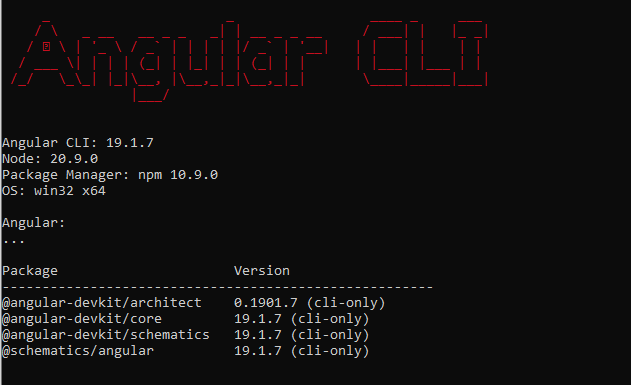
Once installed, try this to check it’s working:
From Terminal execute the command
ng version

ng v
If it has response like below then it means the CLI at globally installed successfully
How can we update Angular CLI to latest globally?
If you want to upgrade the Angular CLI to its latest version globally meaning it’s available from any terminal window regardless of which project you’re in you can use the following command:
npm install -g @angular/cli@latest
The -g flag ensures the package is installed globally.
The @latest tag ensures you’re getting the most recent stable version.
Here the ‘@latest’ tells it to install the latest angular version (not just in one folder),
Once installed, try this to check it’s working:
From Terminal execute the command
ng version

ng v
If there is an error while doing global update mostly of version conflicts or permission issues, you need to uninstall cli globally and re run the above command
To uninstall Angular CLI globally:
> npm uninstall -g @angular/cli
After that, rerun the install command:
> npm install -g @angular/cli@latest
This clean uninstall-and-reinstall method often resolves unexpected errors during updates.

Need Help With Angular Development?
Work with our skilled Angular developers to accelerate your project and boost its performance.
Hire Angular Developers