As of the current Angular framework release, a unified, out-of-the-box date and time picker component is not natively available. While Angular Material provides robust, separate implementations for date and time selection, developers often seek a singular, integrated control. This solution aims to bridge that gap by offering a practical approach to combine these functionalities –
1. Integration with MatDatepicker
Angular Material Timepicker
Check this link (material version 20.1.3)
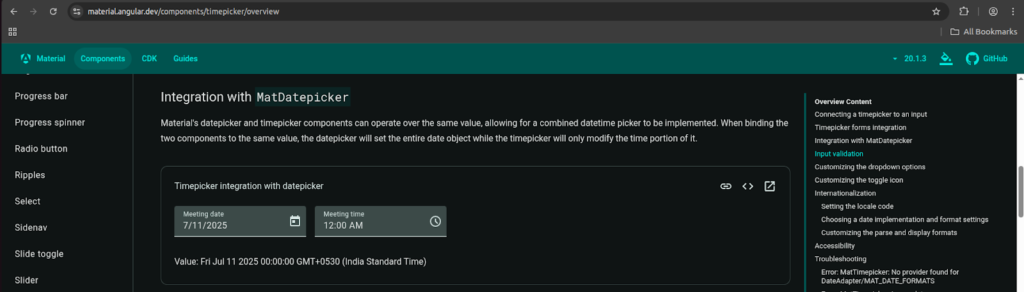
HTML:-
<mat-form-field>
  <mat-label>Meeting date</mat-label>
  <input matInput [matDatepicker]="datepicker" [(ngModel)]="value">
  <mat-datepicker #datepicker/>
  <mat-datepicker-toggle [for]="datepicker" matSuffix/>
</mat-form-field>

<mat-form-field>
  <mat-label>Meeting time</mat-label>
  <input matInput
    [matTimepicker]="timepicker"
    [(ngModel)]="value"
    [ngModelOptions]="{updateOn: 'blur'}">
  <mat-timepicker #timepicker/>
  <mat-timepicker-toggle [for]="timepicker" matSuffix/>
</mat-form-field>

<p>Value: {{value}}</p>

Ts
import {ChangeDetectionStrategy, Component} from '@angular/core';
import {FormsModule} from '@angular/forms';
import {MatTimepickerModule} from '@angular/material/timepicker';
import {MatInputModule} from '@angular/material/input';
import {MatFormFieldModule} from '@angular/material/form-field';
import {provideNativeDateAdapter} from '@angular/material/core';
import {MatDatepickerModule} from '@angular/material/datepicker';

/** @title Timepicker integration with datepicker */
@Component({
  selector: 'timepicker-datepicker-integration-example',
  templateUrl: 'timepicker-datepicker-integration-example.html',
  styleUrl: './timepicker-datepicker-integration-example.css',
  providers: [provideNativeDateAdapter()],
  imports: [
    MatFormFieldModule,
    MatInputModule,
    MatTimepickerModule,
    MatDatepickerModule,
    FormsModule,
  ],
  changeDetection: ChangeDetectionStrategy.OnPush,
})
export class TimepickerDatepickerIntegrationExample {
  value: Date;
}
For other solutions, we need to install a third-party library because there is no support from Angular. We can try these popular library.
1.npm i @ngxmc/datetime-picker
2. npm i @ng-matero/datepicker
4. npm i ng2-date-picker
5. npm i ngx-material-timepicker
6. npm i @angular-material-components/datetime-picker
7.using html type=”datetime-local”
<mat-form-field>
    <input matInput type="datetime-local" placeholder="start date">
  </mat-form-field>
Demo – stackblitz-starters-vejckz

Need Help With Angular Development?
Work with our skilled Angular developers to accelerate your project and boost its performance.
Hire Angular Developers