Approach – 1
import 'package:flutter/material.dart';

void main() {
 runApp(const MyApp());
}

class MyApp extends StatelessWidget {
 const MyApp({super.key});

 @override
 Widget build(BuildContext context) {
   return MaterialApp(
     theme: ThemeData(
       colorScheme: ColorScheme.fromSeed(
         seedColor: Colors.deepPurple,
       ),
       useMaterial3: true,
     ),
     home: const NestedListView(),
   );
 }
}

class NestedListView extends StatelessWidget {
 const NestedListView({super.key});

 @override
 Widget build(BuildContext context) {
   return Scaffold(
     body: SafeArea(
       child: ListView.builder(
         itemCount: 10,
         itemBuilder: (context, index) {
           return Column(
             crossAxisAlignment: CrossAxisAlignment.start,
             children: [
               Padding(
                 padding: const EdgeInsets.all(8.0),
                 child: Text(
                   'Category $index',
                   style: TextStyle(fontSize: 20, fontWeight: FontWeight.bold),
                 ),
               ),
               SizedBox(
                 height: 100,
                 child: ListView.builder(
                   scrollDirection: Axis.horizontal,
                   physics: ClampingScrollPhysics(),
                   itemCount: 15,
                   itemBuilder: (context, innerIndex) {
                     return Container(
                       width: 100,
                       margin: EdgeInsets.all(8),
                       color: Colors.blueAccent,
                       child: Center(
                         child: Text(
                           'Item $innerIndex',
                           style: TextStyle(color: Colors.white),
                         ),
                       ),
                     );
                   },
                 ),
               ),
             ],
           );
         },
       ),
     ),
   );
 }
}
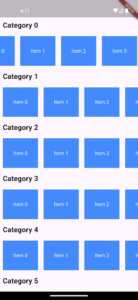
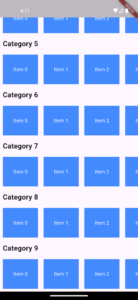
Outer ListView:
The outer ListView.builder creates a vertically scrollable list.
Each item in this list contains a category title and an inner ListView.
Inner ListView:
The inner ListView.builder is configured to scroll horizontally (scrollDirection: Axis.horizontal).
physics: ClampingScrollPhysics() ensures smooth scrolling behavior.
A fixed height (SizedBox(height: 100)) is set to constrain the inner ListView’s size, preventing layout issues.
Scroll Conflict Resolution:
By default, nested scrollable widgets cause conflicts. Setting physics: NeverScrollableScrollPhysics() on the inner ListView (if vertical) or using ClampingScrollPhysics() (for horizontal) ensures the outer ListView handles primary scrolling.
shrinkWrap: true ensures the inner ListView takes only the space it needs.
Performance:
Using ListView.builder for both outer and inner lists ensures lazy loading, improving performance for large datasets.
Approach – 2
import 'package:flutter/material.dart';

void main() {
 runApp(const MyApp());
}

class MyApp extends StatelessWidget {
 const MyApp({super.key});

 @override
 Widget build(BuildContext context) {
   return MaterialApp(
     theme: ThemeData(
       colorScheme: ColorScheme.fromSeed(
         seedColor: Colors.deepPurple,
       ),
       useMaterial3: true,
     ),
     home: const NestedListView(),
   );
 }
}

class NestedListView extends StatelessWidget {
 const NestedListView({super.key});

 @override
 Widget build(BuildContext context) {
   return Scaffold(
     body: SafeArea(
       child: CustomScrollView(
         slivers: [
           SliverList(
             delegate: SliverChildBuilderDelegate(
               (context, index) {
                 return Column(
                   crossAxisAlignment: CrossAxisAlignment.start,
                   children: [
                     Padding(
                       padding: const EdgeInsets.all(8.0),
                       child: Text(
                         'Category $index',
                         style: TextStyle(fontSize: 20, fontWeight: FontWeight.bold),
                       ),
                     ),
                     SizedBox(
                       height: 100,
                       child: ListView.builder(
                         scrollDirection: Axis.horizontal,
                         physics: ClampingScrollPhysics(),
                         itemCount: 15,
                         itemBuilder: (context, innerIndex) {
                           return Container(
                             width: 100,
                             margin: EdgeInsets.all(8),
                             color: Colors.redAccent,
                             child: Center(
                               child: Text(
                                 'Item $innerIndex',
                                 style: TextStyle(color: Colors.white),
                               ),
                             ),
                           );
                         },
                       ),
                     ),
                   ],
                 );
               },
               childCount: 10,
             ),
           ),
         ],
       ),
     ),
   );
 }
}
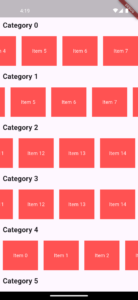
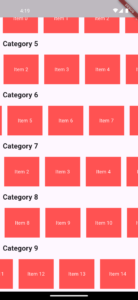
Fixed Height for Inner ListView:
Always constrain the inner ListView’s height (if vertical) or width (if horizontal) using a SizedBox or Container to avoid layout errors.
Scroll Physics:
Use NeverScrollableScrollPhysics() for inner ListView if you want the outer ListView to handle all scrolling.
Use ClampingScrollPhysics() for smoother scrolling in horizontal lists.
Performance Optimization:
Use ListView.builder instead of ListView to lazily load items.
Avoid deeply nested widgets; consider CustomScrollView for complex layouts.
Debugging Scroll Issues:
If scrolling doesn’t work as expected, check for conflicting physics or missing size constraints.
Use Flutter’s DevTools to inspect the widget tree and layout

Need Help With Flutter Development?
Work with our skilled Flutter developers to accelerate your project and boost its performance.
Hire Flutter Developers