You’re encountering this error because you’re trying to call an instance method using static access, which Dart doesn’t allow. The error message: Instance member ‘signInWithGoogle’ can’t be accessed using static access means you’re calling signInWithGoogle() like this:
final FBApi api = await FBApi.signInWithGoogle();
But signInWithGoogle() is not marked as static, so it needs to be called on an instance of FBApi.
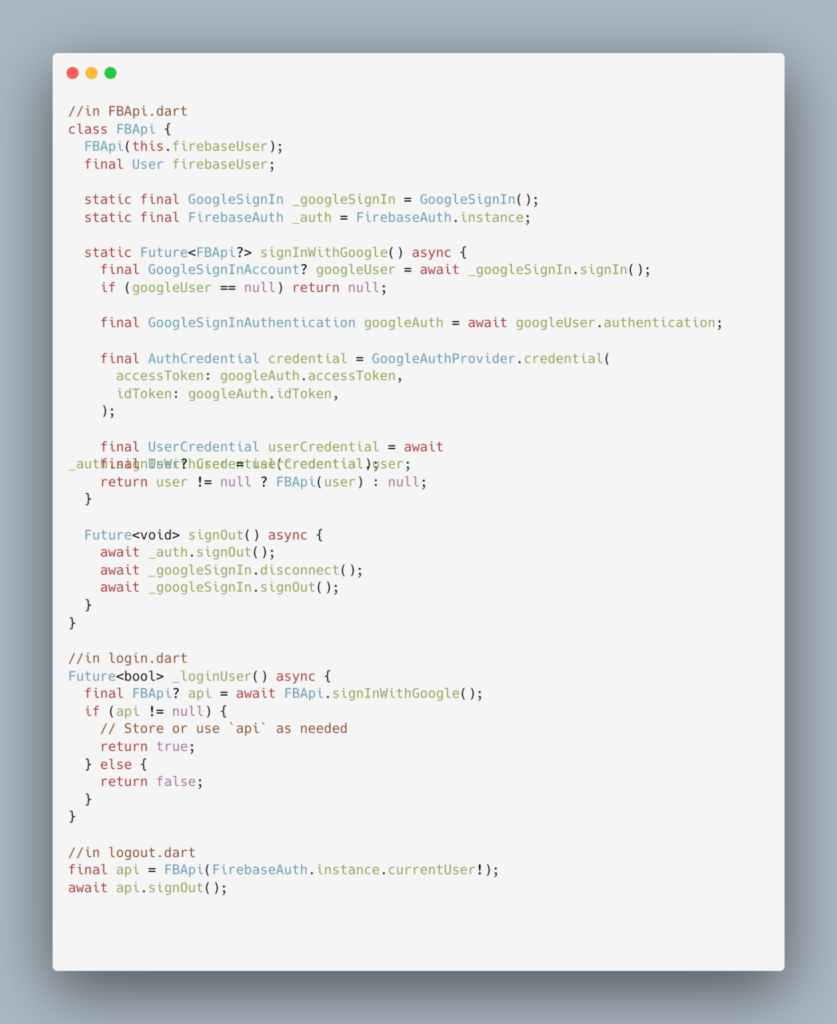
Solution 1: Make signInWithGoogle() a static method
If signInWithGoogle() doesn’t rely on any instance-specific state (e.g., this.firebaseUser), the cleanest fix is to mark it as static.
Once it’s static, you can call it using the class name (FBApi.signInWithGoogle()), which resolves the error.
After this change
- Your sign-in method works as a one-time factory that returns an instance of FBApi after successful authentication.
- You can store that instance and call non-static methods (like signOut()) on it later if needed.
What you were doing :
await FBApi.signOut(); // Error: signOut is not static

await FBApi.signInWithGoogle(); // Error: signInWithGoogle is not static
Summary:
Use static when you want to call a method without creating an object first.
Only make a method static if it doesn’t depend on instance variables.
For signing in/out logic, making them static usually makes sense unless you’re maintaining internal session state.

Need Help With Flutter Development?
Work with our skilled Flutter developers to accelerate your project and boost its performance.
Hire Flutter Developers