
Bacancy Bacancy
      • About Company
      • Resources

      About Company

      About Us Leadership Team Customer Reviews Awards & Recognition
      Infrastructure Our Locations Partnership

      Resources

      Press Room Blog Insights
      We are great place to work certified™

      Building and Sustaining High-Trust, High-Performance Culture

      Get Quote
    • Engagement Models

      Hiring Software Developers becomes easier with just a few clicks.

      Software Development Outsourcing

      End-to-end delivery of custom solutions aligned to your roadmap.

      Staff Augmentation

      Scale your in-house team with pre-vetted specialists on demand.

      Dedicated Teams

      Get dedicated engineers who work exclusively on your project.

      • Enterprise Services
      • IT Services
      • Data Analytics
      • Cloud Services
      • AI & ML
      • Platforms

      Enterprise Services

      Digital Transformation Business Process Automation Digital Product Engineering Enterprise App Development Custom Software Development

      IT Services

      Legacy App Modernization DevOps & SRE Full Stack Development AI Testing & QA Automation

      Data Analytics

      Data Visualization & Reporting Data Engineering & Pipelines Data Science & Predictive Analytics Business Intelligence

      Cloud Services

      Cloud Strategy & Consulting Cloud Migration & Modernization Multi Cloud Management

      AI & ML

      AI Development Agentic AI Generative AI Computer Vision Machine Learning & MLOps

      Platforms

      Salesforce SAP ServiceNow Microsoft Dynamics Snowflake
      High-quality, Cost-effective IT Outsourcing

      Schedule a free discovery session to explore your needs and find tailored solutions with no obligation.

      explore all services
    • Industries
      Healthcare Fintech Real Estate
      Logistics Education Retail & Ecommerce
      Let's Grow Together! Get Quote
      • Front End
      • Backend
      • Mobile
      • Databases
      • DevOps & Infra
      • AI & Data Stack
      • Vibe Coding

      Front End

      React.js Next.js Angular Vue.js TypeScript
      Your Very Own UI/UX Architects

      Experience smooth navigation and user-friendly designs with our front-end expertise.

      Hire Frontend Developer

      Backend

      Node.js Python Java Spring Boot Laravel .NET C# Golang FastAPI
      Server Solutions To Change Power Dynamics

      Transform your data into digital experiences with optimized coding standards.

      Hire Backend Developer

      Mobile

      iOS Android Flutter React Native
      Innovating Mobile-Friendly App Solutions

      Create dynamic mobile apps that make your brand stand out from the crowd.

      Hire Mobile App Developer

      Databases

      PostgreSQL MongoDB MySQL Redis Supabase
      Dedicated Talent With Skilled Approach

      Bring your digital visions to life with a hired resource at your convenience.

      Hire Dedicated Developer

      DevOps & Infra

      AWS Azure Google Cloud Docker Kubernetes Terraform
      Redefining Scalable Digital Infrastructures

      Make your data accessible worldwide at will, and leave the stress behind.

      Get Quote

      AI & Data Stack

      OpenAI LangChain LlamaIndex Apache Spark Airflow Tableau PowerBI Databricks
      Guiding Decisions With Data-Driven Insights

      Transition from your gut calls to actionable insights with our rich Data Science expertise.

      Get Quote

      Vibe Coding

      Base44 Claude Code Cursor Lovable Github Copilot
      Your AI-Native Development Team

      Skip the boilerplate. Our vibe coding experts use AI-first tools to go from prompt to product, fast.

      Hire Vibe Coding Developer
  • Case Studies
  • Contact Us
Find a Developer book a 30 min call
      • About Us
      • Leadership Team
      • Customer Reviews
      • Awards & Recognition
      • Infrastructure
      • Our Locations
      • Partnership
      • Press Room
      • Blog
      • Insights
      • Digital Transformation
      • Business Process Automation
      • Digital Product Engineering
      • Enterprise App Development
      • Custom Software Development
      • Legacy App Modernization
      • DevOps & SRE
      • Full Stack Development
      • AI Testing & QA Automation
      • Data Visualization & Reporting
      • Data Engineering & Pipelines
      • Data Science & Predictive Analytics
      • Business Intelligence
      • Cloud Strategy & Consulting
      • Cloud Migration & Modernization
      • Multi Cloud Management
      • AI Development
      • Agentic AI
      • Generative AI
      • Computer Vision
      • Machine Learning & MLOps
      • Salesforce
      • SAP
      • ServiceNow
      • Microsoft Dynamics
      • Snowflake
    • Healthcare
    • Fintech
    • Real Estate
    • Logistics
    • Education
    • Retail & Ecommerce
      • React.js
      • Next.js
      • Angular
      • Vue.js
      • TypeScript
      • Hire Frontend Developer
      • Node.js
      • Python
      • Java
      • Spring Boot
      • Laravel
      • .NET
      • C#
      • Golang
      • FastAPI
      • Hire Backend Developer
      • iOS
      • Android
      • Flutter
      • React Native
      • Hire Mobile App Developer
      • PostgreSQL
      • MongoDB
      • MySQL
      • Redis
      • Supabase
      • Hire Dedicated Developer
      • AWS
      • Azure
      • Google Cloud
      • Docker
      • Kubernetes
      • Terraform
      • Get Quote
      • OpenAI
      • LangChain
      • LlamaIndex
      • Apache Spark
      • Airflow
      • Tableau
      • PowerBI
      • Databricks
      • Get Quote
      • Base44
      • Claude Code
      • Cursor
      • Lovable
      • Github Copilot
      • Hire Vibe Coding Developer
  • Case Studies
  • Contact Us
  • Find a Developer
  • book a 30 min call

How to Deploy Rails App With Capistrano?

How to Deploy Rails App With Capistrano?
Last Updated on March 5, 2025 | Written By: Tanay Sharma

Being a software developer it’s a part of routine job to perform on assigned tasks, do the required changes, build new features and make it live to production. All of these stuff such as taking pull from branch, migrating, bundling and seeding is a tedious process. Almost every other developer is in need of a tool to ease things up.

If you are looking for automating deployment, then one tool is already there called Capistrano. I am writing this technical blog to help you understand that how to deploy a Rails application to AWS using Capistrano.

For better understanding, consider that you are using the Passenger + Nginx + PostgreSQL. Passenger is the application server, Nginx is the reverse proxy, and PostgreSQL is the database server.

So, before you proceed for deployment it is must to have an existing application and one server. i.e. We will be using AWS Ec2 instance. For more details on how to create EC2 Instance please visit, https://www.bacancytechnology.com/blog/aws-ec2-how-to-create-ec2-instance-from-scratch”

After, creating instance you have to setup environment that is able to run Rails app for the listed below steps :

Step 1: Setup the Server

- sudo apt-get update
- sudo apt-get install build-essential libssl-dev libyaml-dev libreadline-dev openssl curl git-core zlib1g-dev bison libxml2-dev libxslt1-dev libcurl4-openssl-dev nodejs libsqlite3-dev sqlite3

Note: Based on Database used on your rails app you have to install that in this server, for example, Postgres or Mysql

Install RVM & Ruby

curl -sSL https://get.rvm.io | bash -s -- --path /home/ubuntu/.rvm	 	 	
export rvm_path=/home/ubuntu/.rvm	 	 	
rvm install 2.4.2

Install Git and add SSH

Step 2: Let’s start by configuring each module one by one

Configuring Passenger & Capistrano

Please add below gems in your Gem file

group :development do
 gem 'capistrano', require: false
 gem 'capistrano-rvm', require: false
 gem 'capistrano-rails', require: false
 gem 'capistrano-bundler', require: false
 gem 'capistrano-passenger', require: false
end

Note: For more details on GEM please visit : https://github.com/capistrano/capistrano

Step 3: Install bundle and generate Capistrano config files

-After adding Gem into Gemfile run ‘bundle install’

– Now after successful installation for all gem it’s time to configure Capistrano,

- cap install cap install STAGES=production

Above command will generate a list of file for configuring Capistrano such as config/deploy.rb and config/deploy/production.rb
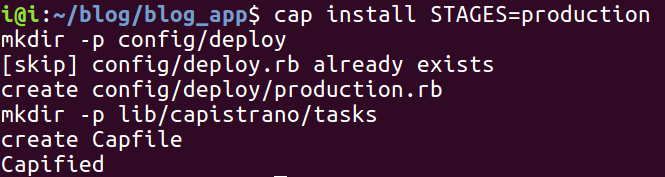
Install bundle and generate Capistrano config files
Step 4: Configure Capistrano Files

For the first file, we have to configure Capfile to paste below lines into your Capfile. Search Capfile in your rails App root directory.

# Load DSL and set up stages
			require "capistrano/setup"
			require "Capistrano/deploy"

			require "capistrano/scm/git"
			install_plugin Capistrano::SCM::Git

			require 'capistrano/setup'
			require 'Capistrano/deploy'

			require 'Capistrano/rails'
			require 'Capistrano/bundler'
			require 'Capistrano/rvm'
			require 'Capistrano/passenger'
			require "whenever/Capistrano"

		Dir.glob("lib/capistrano/tasks/*.rake").each { |r| import r }

Note : this file is already added in your cap file you just have to uncomment it or replace all with the above code.

Step 5: Configure deploy.rb

# config valid only for the current version of Capistrano

lock "3.10.2"

		server '54.88.139.244', port: 22, roles: [:web, :app, :db], primary: true

		set :repo_url, '< repo url >'
		set :application, < app_name >'
		set :user, 'ubuntu' #server user

		set :rvm_bin_path, "$HOME/bin"
		set :rvm_ruby_version, 'ruby_version@gemset_name'

		# Don't change these unless you know what you're doing
		set: pty, true
		set :use_sudo, false
		set :rails_env, "production"
		set :stage, :production
		set :deploy_via, :remote_cache
		set :deploy_to, "/home/#{fetch(:user)}/apps/#{fetch(:application)}"

		set :ssh_options, { forward_agent: true, user: fetch(:user), keys: %w(~/.ssh/id_rsa) }

		set :branch, :< branch name >

		namespace: deploy do

		desc 'Initial Deploy'
		task: initial do
		on roles(:app) do
		before 'deploy: restart'
		invoke 'deploy'
		end
		end

		set :linked_files, %w{config/database.yml}

		after :finishing, :compile_assets
		after :finishing, :cleanup
		after :finishing, :restart
		end

– In deploy.rb change following things

Set your ip
Set your repository
Set application name
Set user
Set rvm path as per your installation
Set deploy_to path
Set linked_file (It’s secret files that is confidential for your application. We need to create symbolic on a server for that files)

Step 6: Create a Symbolic link

– You have to create a symbolic link for storing Credential like database.yml and .env

– For that Create directory in this structure app_name/shared/config/database.yml
e.g. sudo vi /home/ubuntu/apps/blog__app/shared/config/database.yml

Step 7: Install and configure passenger-Nginx

sudo apt-key adv --keyserver keyserver.ubuntu.com --recv-keys 561F9B9CAC40B2F7

– Edit below file

sudo vi /etc/apt/sources.list.d/passenger.list

– Add below line in that file

deb https://oss-binaries.phusionpassenger,com/apt/passenger xenial main

– Save that file and exit

And run below command in terminal

- sudo chown root: /etc/apt/sources.list.d/passenger.list
- sudo chown ubuntu: /etc/apt/sources.list.d/passenger.list
- sudo chmod 600 /etc/apt/sources.list.d/passenger.list

- sudo apt-get update

- sudo apt-get install nginx-extras passenger

After installation done open Nginx configuration file and uncomment below the line.

# Uncomment it if you installed passenger or passenger-enterprise include /etc/nginx/passenger.conf;

By running below command

- sudo vi /etc/nginx/nginx.conf
user www-data;
worker_processes auto;
pid /run/nginx.pid;

events {
worker_connections 768;
# multi_accept on;
}

http {
# Basic Settings

sendfile on;
tcp_nopush on;
tcp_nodelay on;
keepalive_timeout 65;
types_hash_max_size 2048;

include /etc/nginx/mime.types;
default_type application/octet-stream;

access_log /var/log/nginx/access.log;
error_log /var/log/nginx/error.log;

# Gzip Settings

gzip on;
gzip_disable "msie6";

# Uncomment it if you installed passenger or passenger-enterprise
include /etc/nginx/passenger.conf;

# Virtual Host Configs

include /etc/nginx/conf.d/*.conf;
include /etc/nginx/sites-enabled/*;
}
- sudo vi /etc/nginx/passenger.conf

Check passenger.conf that passenger ruby is there, if your file contains below two line your good to go

passenger_root /usr/lib/ruby/vendor_ruby/phusion_passenger/locations.ini;
passenger_ruby /usr/bin/passenger_free_ruby;

Step 8: Create or edit nginx site-enable/site-available, as described below,

- sudo vi /etc/nginx/sites-enabled/default
server {
      listen 80 default_server;
      server_name < IP >;
      #server_name < hostname >;
      passenger_enabled on;
      passenger_app_env production;
      passenger_app_group_name production;
      root /home/ubuntu/apps/app_name/current/public;
    }

Note: Please change the root path according to your application location.

At Last just run command :

cap production deploy

and restart Nginx server using below command

sudo service nginx restart

Expand Your Digital Horizons With Us.

Start a new project or take an existing one to the next level. Get in touch to start small, scale-up, and go Agile.


Or
E-mail us : solutions@bacancy.com

Your Success Is Guaranteed !

Related Articles

Viral Parekh

April 14, 2026

Ruby on Rails

Integrating LLMs with Ruby on Rails: How Tech Leaders Can Build AI-Powered Systems

By : Viral Parekh

This blog provides a practical guide to integrating LLMs with Ruby on Rails for developing AI applications. It covers the...

Read More
Ritwik Verma

January 29, 2025

Ruby on Rails

Rails Upgrade Guide – A Comprehensive Analysis to Upgrade Your Rails Apps in 2026

By : Ritwik Verma

Upgrading Ruby on Rails ensures your applications remain secure, perform well, and leverage modern features. This Rails Upgrade Guide explains...

Read More
Ritwik Verma

October 3, 2024

Ruby on Rails

What’s New In Ruby on Rails 8.0 – New Features And Updates?

By : Ritwik Verma

In today’s competitive market, the software development arena is all about the survival of the fittest. Accepting this fact, the...

Read More

Offices and Development Centers

Bacancy Ahmedabad Ahmedabad

15-16, Times Corporate Park, Thaltej, Ahmedabad, 380059

Bacancy Gandhinagar Gandhinagar

422-A, 4th Floor, Pragya Tower Road 11, Block 15, Zone 1, SEZ-PA Gandhinagar, 382355

Bacancy Hyderabad Hyderabad

Awfis, Level 1, N Heights, Plot No 38, Phase 2, Hitech City Hyderabad, 500081

Bacancy Mumbai Mumbai

18th Floor, Cyberone, opp. CIDCO Exhibition Centre, Sector 30, Vashi, Navi Mumbai, 400703

Bacancy Pune Pune

2nd FloorMarisoft-1, Marigold IT Park, Pune - 411014

Bacancy Bengaluru Bengaluru

Raheja Towers, 26/27, Mahatma Gandhi Rd, East Wing, Craig Park Layout, Ashok Nagar, Bengaluru, 560001

Global Presence

Bacancy New Jersey New Jersey

33 South Wood Ave, Suite 600, Iselin NJ 08830

Bacancy California California

535 Mission St 14th floor, San Francisco, CA 94105

Bacancy Massachusetts Massachusetts

501 Boylston St, Boston, MA 02116

Bacancy Florida Florida

4995 NW, 72nd Avenue, Suite 307, Miami, FL, 33166

Bacancy London London

90 York Wy, London N1 9AG, United Kingdom

Bacancy Ontario Ontario

71 Dawes Road, Brampton, On L6X 5N9, Toronto

Bacancy Australia Australia

351A Hampstead Rd, Northfield SA 5085

Bacancy UAE UAE

One Central 8th and 9th Floor - Trade Centre - Trade Centre 2 - Dubai - United Arab Emirates

Bacancy Sweden Sweden

Junkergatan 4, 126 53 Hagersten

Get in Touch

Great Place to Work

Get in Touch

cal-icon

Looking for expert advice?

Schedule a Expert Call


  • Brochure
  • Quality Assurance
  • Resources
  • Tutorials
  • Customer Reviews
  • Privacy Policy
  • FAQs
  • Press Room
  • Contact Us
  • Sitemap
  • Employee

bacancy google review 4.6
bacancy google review
bacancy clutch review 4.8
bacancy clutch review
bacancy goodfirms review 4.8
bacancy goodfirms review
iso
  • Bacancy Behance
  • Bacancy Pinterest

Copyright © 2026 BACANCY SERVICES PRIVATE LIMITED All rights reserved.