[Vue warn]: Component name “Temp” should always be multi-word.
Why the Warning?
Vue 3 introduced a rule in its linter and framework guidelines that component names should always be multi-word (e.g., MyComponent, UserProfile, CustomButton, etc.).
This rule exists to:
- Avoid conflicts with built-in HTML elements (e.g., Table, Button, etc.).
- Make components more descriptive and clear.
How to Fix It
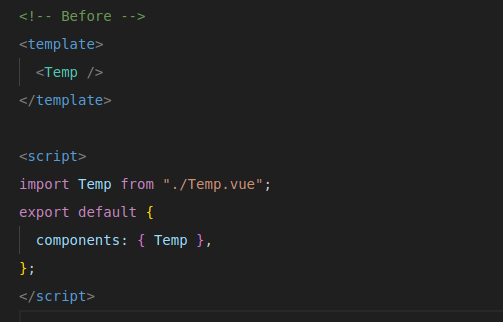
Rename your component from something like Temp.vue to a multi-word name:
Example:
Temp.vue –> MyTemp.vue
Then, update the usage wherever it’s used:

Want to Suppress the Warning (Not Recommended)?
You can disable this lint rule, but it’s not advised in production projects.
If using ESLint:
Edit .eslintrc.js or .eslintrc.json:

Or for Volar in Vue 3 + TypeScript projects:
Edit tsconfig.json or jsconfig.json:

Use descriptive, multi-word names like:
- UserCard.vue
- AdminPanel.vue
- DashboardHeader.vue
This keeps the code clean, prevents naming collisions, and adheres to Vue’s official style guide.

Need Help With Vue Development?
Work with our skilled Vue developers to accelerate your project and boost its performance.
Hire Vuejs Developers