 Bacancy Global







November 4, 2026
Hidden Costs of Healthcare AI Agents You Must Know
Explore the 7 hidden costs of healthcare AI agents, including EHR integration, compliance, security, and maintenance, plus TCO and ROI.
Read More
This guide breaks down EHR implementation costs for healthcare providers who plan a rollout. It shows what the cost of implementing EHR includes, how it splits by phase and organization size, and which factors move your budget. You will also learn about hidden EHR implementation costs, cloud vs on-premise options, and how to build a realistic 3-5 year EHR budget.
"How much does an EHR implementation cost?", it is a general question until you start listing everything the implementation involves.
The software may have a defined subscription or licensing price, but the story is not the same with implementation costs. The data migration, system integrations, configuration, training, testing, infrastructure, and go-live support can each add to the final bill.
Hospitals hold the largest share of the US EHR market, at 52.48% in 2025, according to Grand View Research. They also run the most complex builds. For them, those variables can make a huge difference between a relatively contained implementation and a multimillion-dollar project.
That is why a useful EHR implementation cost estimate needs to look beyond the provider quote and account for the actual work required to put the system into clinical use.
Here's how those costs break down by component, implementation phase, and organization size.
EHR implementation cost is the total spend to select, configure, migrate to, integrate, and launch an EHR. It also includes training, the revenue lost during the learning curve, and the cost of running the system afterward.
A small to mid-size practice often spends roughly $15,000 to $250,000 in one-time costs, plus a monthly subscription and support. The table shows where that money goes.
| Cost Component | Typical Cost Range | What it Covers |
|---|---|---|
| Licensing or Subscription | Software access per provider or per user | $150 to $700 per provider per month |
| Implementation and Configuration | Workflows, templates, order sets, user roles | $5000 to $50000 |
| Data Migration | Patient records, meds, allergies, scanned files, and billing history | $2000 to $25000 |
| Integration and Interoperability | Labs, imaging, pharmacy, billing, portal, and HIE links | $5000 to $25000+ per interface |
| Training and change management | Classes, super-users, floor support, documentation | $2000 to $25000, plus staff time |
| Hardware and infrastructure | Workstations, devices, network, servers if on-premises | $3000 to $50000 (cloud); more for on-premises |
| Testing and go-live | Test runs, cutover, and at-the-elbow support | $5,000 to $30,000 |
| Support | Help desk, fixes, and updates | Often bundled in cloud fees; 15% to 22% of license cost per year for on-premises |
These are planning ranges rather than fixed industry prices. Actual EHR implementation costs can fall outside these ranges depending on the organization, providers, deployment model, number of users and locations, legacy systems, integration requirements, and customization scope.
The following are the 7 components included to calculate the cost of implementing EHR:
This is the most visible part of the EHR cost, but it is not necessarily the largest implementation expense. Pricing can depend on the number of providers or users, selected modules, locations, deployment model, and contract structure.
This covers the work required to configure the EHR around clinical and administrative workflows. It can include templates, user roles, permissions, order sets, dashboards, forms, and other system settings.
Moving existing patient and operational data into the new EHR requires more than transferring files. Data extraction, cleansing, mapping, conversion, validation, and reconciliation can all add to the implementation cost.
An EHR rarely operates alone. Interfaces with laboratories, pharmacies, billing systems, imaging platforms, health information exchanges, medical devices, and other applications can become a significant implementation cost.
Training costs depend on the number of users, their roles, the complexity of the workflows, and the level of support required before and after go-live. Larger implementations may also require dedicated super-user and change-management programs.
Cloud EHRs can reduce the need for on-premises infrastructure, but organizations may still need workstations, scanners, networking equipment, mobile devices, security controls, or other technology to support clinical workflows.
Before launch, the system needs functional, integration, workflow, security, and user-acceptance testing. Go-live support and post-launch stabilization then add another layer of implementation cost, particularly for larger or more complex deployments.
Account for Every Major EHR Implementation Cost With Us
Our EHR development services help you scope software, configuration, migration, integrations, training, infrastructure, testing, and support for your implementation.
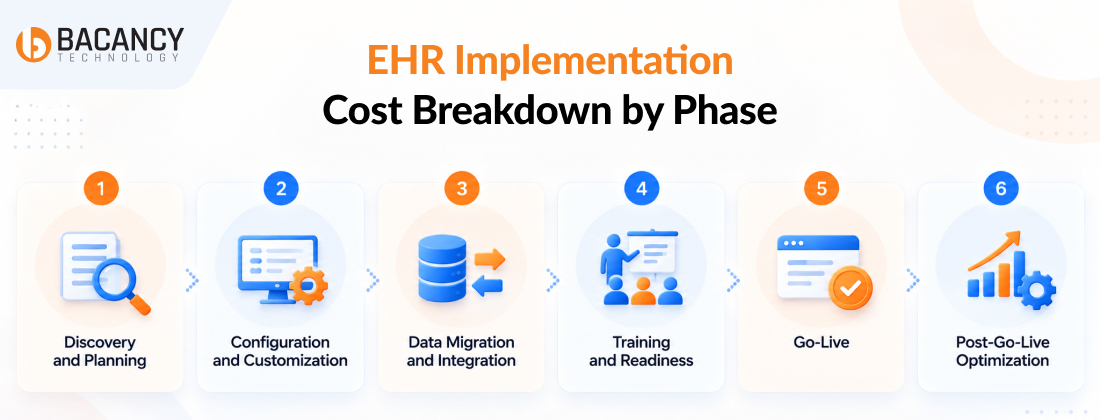
EHR implementation costs build up across several stages, from planning the rollout to supporting staff after go-live. The largest expenses usually come from configuring the system, migrating patient data, and connecting the EHR with other systems.
Let's understand what happens in each phase of EHR implementation services, which lets healthcare providers estimate the budget more accurately and identify costs that are easily overlooked.
Typical budget share: 5-10%
Typical duration: 2-6 weeks
Before implementation begins, the provider needs to define clinical workflows, user requirements, data needs, integrations, security requirements, and the scope of the rollout. This phase also includes implementation planning and identifying how the new EHR will fit into existing operations.
A rushed planning phase can create additional costs later when teams identify missing requirements or request changes that were not included in the original scope.
Typical budget share: 20-30%
Typical duration: 2-6 months
This is where the EHR is configured for the provider's day-to-day operations. It may include setting up clinical workflows, user roles, templates, order sets, documentation screens, billing workflows, reports, and other system settings.
Costs can increase when the organization needs extensive customization instead of using the EHR's standard capabilities. Each additional workflow or custom feature can require more development, testing, and validation.
Typical budget share: 20-30%
Typical duration: 2-5 months
Existing patient records and other operational data need to be prepared and transferred to the new EHR. This can involve data extraction, cleansing, mapping, validation, testing, and migration.
The EHR may also need to connect with laboratory systems, pharmacy platforms, imaging systems, billing applications, patient portals, health information exchanges, and other clinical systems. Older or poorly documented systems can make this phase more expensive than initially estimated.
Typical budget share: 10-15%
Typical duration: 4-8 weeks
Healthcare providers need to prepare physicians, nurses, administrative staff, and other users before the new EHR goes live. Costs can include role-based training, training environments, super-user programs, training materials, and support for staff who need additional sessions.
There can also be an indirect cost: staff may spend working hours in training instead of providing care or handling administrative tasks, requiring temporary coverage or overtime.
Typical budget share: 10-15%
Typical duration: 1-4 weeks
Go-live is when the new EHR becomes part of daily operations. The implementation team may need to provide on-site or remote support, resolve technical issues, adjust workflows, troubleshoot integrations, and help staff handle unfamiliar processes.
For larger hospitals and multi-location providers, additional support may be required across departments or facilities, increasing the cost of the go-live period.
Typical budget share: 10-20%
Typical duration: 1-6 months
The first few months after go-live often reveal issues that were difficult to identify during testing. Staff may need workflow adjustments, additional configuration, report changes, integration fixes, or usability improvements.
Budgeting for this phase gives providers room to address these issues without treating every post-launch change as an unexpected expense. It also allows the organization to use feedback from clinicians and administrative teams to improve how the EHR works in practice.
EHR implementation costs increase with the number of users, locations, integrations, and legacy records involved. A small practice may need a few basic integrations, while a hospital or health system may require complex data migration and interoperability across multiple facilities.
Small practices typically have fewer users, one location, and limited integrations. Multi-provider practices add more users, workflows, and connected systems, which increases implementation effort.
Specialty clinics often need customized clinical workflows and specialty-specific integrations. These requirements can make implementation more expensive than a general medical practice of a similar size.
Hospitals and health systems have larger user bases, more departments, higher data volumes, and significantly more integrations. Multi-location deployments also require additional coordination, testing, training, and rollout support.
| Organization | Assumptions | Estimated Cost | Timeline | Main Cost Driver |
|---|---|---|---|---|
| Small Practice | 5-20 users, 1 location, 2-5 integrations | 15K-75K | 3 to 6 months | Configurations |
| Multi-provider Practice | 20-75 users, 1-3 locations, 5-10 integrations | 50K-150K | 6 to 12 months | Integrations |
| Specialty Clinic | 20-100 users, 1-3 locations, 5-15 integrations | 75K-250K | 6 to 12 months | Speciality Workflows |
| Hospital | 100-1,000+ users, 1 location, 15-40+ integrations | 500K-5M+ | 12 to 24 months | Migration and Integration |
What makes an EHR implementation more expensive? The biggest factors are the number of users and locations, the condition of your existing data, the systems you need to connect, and how much the EHR needs to be customized.
Even your security requirements, internal IT resources, and implementation timeline can affect the final EHR implementation budget.
The more providers, users, and locations you have, which indicates more workflow to configure, accounts to set up, devices to support, and teams to train. It means a multi-location health system costs more to implement than a single-site practice.
Rule of thumb: Budget increases as users, departments, and locations increase.
The amount and condition of your existing patient data directly impact your migration costs. A clean and standardized record is easier to move than fragmented or duplicated data stored across older systems.
Rule of thumb: Budget 5% to 15% of the migration cost for cleansing and validation.
Connecting the EHR with laboratories, pharmacies, billing systems, imaging platforms, patient portals, and health information networks adds development and testing work. Moreover, requirements like the Trusted Exchange Framework and Common Agreement (TEFCA) and FHIR API participation can affect your integration scope.
Rule of thumb: Cost you $2,000 to $25,000+ per interface, and count every interface before you sign.
Standard EHR configurations generally cost less than extensive customization. Specialty clinics may need custom templates, order sets, clinical workflows, reports, or specialty-specific integrations.
Rule of thumb: The more the EHR needs to be changed to match existing workflows, the higher the implementation cost.
Healthcare organizations may need additional controls for access management, audit trails, encryption, data protection, and regulatory requirements. The cost depends on the organization's security requirements and the systems involved.
Rule of thumb: More stringent security and compliance requirements require additional configuration, testing, documentation, and validation.
Training costs increase with the number of users and the variety of clinical and administrative roles. A major workflow change may require additional training, support, and time for staff to adapt.
Rule of thumb: More users and greater workflow changes require a larger training and change-management budget.
Organizations with limited internal IT resources may need more support from the EHR provider or implementation partner. A compressed timeline increases costs when additional implementation, testing, or support resources are needed.
Rule of thumb: When IT capacity is low or the schedule is tight, set contingency at the high end of the 10% to 25% range.
The initial EHR quote may not include every cost your organization faces during implementation. Productivity loss, staff time, data preparation, and post-launch changes can add 10 to 25% or more to the initial implementation budget.
Healthcare organizations can experience a 5-20% temporary drop in productivity during the first few weeks after go-live. Estimate the potential revenue impact with:
Lost revenue = Weekly visits × Revenue per visit × Weeks affected × % reduction
For instance, 1,000 visits/week × $150 × 4 weeks × 10% reduction = $60,000 in potential revenue impact.
Internal teams may spend 50-200+ hours per department on workflow mapping, testing, training, and implementation meetings. For a 10-person team averaging $50/hour, 100 hours of implementation work represents $5,000 in internal labor.
Data preparation can account for roughly 5-15% of the migration budget, depending on data quality and volume. For instance, a $100,000 migration project could require another $5000-$15000 for cleansing, mapping, and validation.
Post-launch changes can add 5-15% to the original implementation budget. For a $500,000 EHR implementation, that could mean another $25000-$75000 for additional workflows, reports, integrations, and configuration changes.
The choice between cloud and on-premise EHR deployment changes more than the initial implementation bill. It determines who pays for infrastructure, who manages upgrades, how security responsibilities are divided, and how easily the system can accommodate new users or locations.
A cloud EHR is typically hosted by the provider and accessed through the internet. An on-premise EHR runs on infrastructure managed by the healthcare organization, which means the provider takes on more responsibility for servers, storage, networking, backups, and system maintenance.
| Cost Factor | Cloud EHR | On-Premise EHR |
|---|---|---|
| Upfront cost | Lower and includes implementation, migration, configuration, and setup | Higher and includes software, networking, servers, implementation, and storage. |
| Ongoing cost | Subscription, upgrades, support, and additional users or modules | Hardware maintenance, upgrades, licenses, software support, and IT staff |
| Security | Security controls are generally included, with additional costs for advanced security, monitoring, or compliance features | Higher security costs for infrastructure protection, monitoring, backups, access controls, and compliance. |
| Hardware | Expert-managed core hosting infrastructure | Provider purchases, manages, and replaces infrastructure |
| Scalability | Add users, storage, or locations with less infrastructure planning | Requires additional capacity, hardware, and IT planning |
| IT Resources | Lower infrastructure management requirement | Higher internal IT requirement |
| Upgrades | Generally managed by the company | Organization manages or coordinates upgrades |
Cloud EHR: Generally a better fit for small and mid-sized practices, growing provider groups, and health systems that want lower upfront infrastructure investment and easier expansion.
On-premise EHR: Can make sense for organizations with substantial internal IT capabilities, existing infrastructure, and specific requirements for infrastructure control or system management.
The cost of implementing EHR continues after certain years. It depends on your deployment model and contract; if the provider pays for software subscription, technical support, upgrades, additional modules, security, infrastructure, and compliance activities.
For planning purposes, organizations can model ongoing maintenance and support as a percentage of the initial implementation cost, then replace the estimate with actual provider quotes during budgeting. A common software-maintenance planning benchmark is around 15-25% of the initial software cost annually, although an EHR contract may structure these costs differently.
For example, assume a provider spends $500,000 on the initial EHR implementation and budgets 20% of that amount, or $100,000 per year, for ongoing costs.
| Cost | Year 1 | Year 3 | Year 5 |
|---|---|---|---|
| Initial implementation | $500K | $600K | - |
| Ongoing cost | $100K | $300K | $200K |
| Cumulative TCO | $600K | $800K | $1M |
Hence, the calculation will be like -
3-year TCO = 500K + (100K× 3) = $800K
5-year TCO = 500K+ (100K × 5) = $1M
An off-the-shelf EHR requires less upfront development because of its core platform, clinical workflows, security features, and administrative functions that already exist. A custom EHR needs a much larger initial investment, but it offers providers greater control over integration, data models, workflows, and future changes.
The commercial question is not simply "Which costs less to build?" It is "At what point does the recurring cost of the existing EHR exceed the cost of building and maintaining our own system?"
A simple break-even calculation is:
Break-even period = Custom EHR build cost ÷ Annual savings from moving away from the existing EHR
For example, assume:
$1.25M ÷ $150K = 8.3 years
The custom approach would therefore take roughly 8.3 years to recover the initial development investment, before considering financing, migration, internal IT, security audits, infrastructure, and major future upgrades.
EHR implementation budget = Software + Configuration + Data migration + Integrations + Training + Testing + Go-live + Internal resources + Contingency
A practical starting point is:
The larger the implementation is, the more opportunities you have for unexpected integration work, workflow changes, data issues, and timeline extensions.
Before finalizing the budget, ask the company or implementation partner to identify what is included, excluded, and what triggers additional charges. It is often more useful than comparing the headline implementation price alone.
You can control the implementation cost of EHR by reducing avoidable rework and expensive decisions before they become difficult to change.
Review the quality and volume of existing records before signing off on the migration scope. Identify duplicate, incomplete, outdated, or unusable data early.
Why it saves money: Cleaning 500,000 records before migration can be significantly easier than discovering data problems during testing or after go-live.
List every system that could connect to the EHR, then separate must-have integrations from lower-priority connections. You need to prioritize systems that affect patient care, clinical workflows, billing, or regulatory requirements.
Why it saves money: Deferring low-priority integrations can reduce initial development and testing work without blocking the core EHR rollout.
Document required custom workflows, templates, reports, and specialty features during discovery. Establish a cutoff after which new requests go through formal change control.
Why it saves money: Late customization can trigger additional development, testing, training, and go-live work.
Not every existing workflow needs to be recreated in the new EHR. Especially where the platform already supports a safe and effective process, adapting the workflow can cost less than building a custom one.
Why it saves money: Fewer custom workflows mean less configuration, testing, maintenance, and future upgrade work.
Train users according to their responsibilities instead of giving every employee the same training program. However, physicians, nurses, billing teams, administrators, and IT staff typically need different workflows.
Why it saves money: Targeted training reduces unnecessary training hours while focusing support on the tasks each role performs.
Create a formal process for new requirements. Each request should document the reason, estimated cost, timeline impact, and clinical or operational value before approval.
Why it saves money: It prevents small requests from accumulating into significant scope and budget increases.
Do not compare EHR proposals based only on the implementation price. Ask specifically about:
EHR implementation costs can range from thousands of dollars to millions for larger hospitals and health systems. The final implementation cost of EHR depends on your users, data migrations, locations, customizations, integrations, security, training, and post-go-live support.
For the next step, you need to define your users and location, assess your legacy data, list required integrations, and identify customization needs. You must add a 10-25% contingency based on project complexity and compare providers using a 3-5 year total cost of ownership rather than the initial quote only.
If your organization needs capabilities beyond a standard EHR, an experienced EHR developer can help build custom workflows, integrations, and healthcare applications around your requirements. Bacancy Technology provides healthcare software development services to help organizations integrate existing EHRs or build secure, scalable healthcare platforms tailored to their workflows.
It is both. One-time costs include setup, integration, migration, training, and go-live. Subscription or license fees, support, upgrades, and training for new hires repeat every year. On-premise systems often add annual maintenance of roughly 15 to 22% of the license cost.
For a small practice, it needs 3 to 6 months; a multi-site group takes 6 to 12 months. Hospitals and health systems run 12 to 24 months or longer. Data migration, training readiness, and integrations set the pace more than software setup does.
Usually yes, at the start. A ready-made EHR has lower upfront cost and a faster launch. A custom EHR often runs well into 6 or 7 figures and takes longer to build. Custom can pay off when your workflows are unusual, your specialty is niche, or off-the-shelf tools cannot meet your integration needs.
Upfront, yes. Cloud EHRs skip servers and most hardware, and they charge a monthly fee instead of a large license payment. On-premise costs more at the start but has no subscription. Over 5 or more years, the gap often narrows.
Yes, many organizations roll out by location, department, or module. For instance, you can start with clinical charting and add billing or the patient portal later. Phasing eases cash flow and limits risk. The trade-off is a longer project, more interfaces to manage, and possible overlap with older systems.
Yes. Specialties like oncology, cardiology, orthopedics, and behavioral health need custom templates, device and imaging connections, and specialty reports. That adds configuration and integration work. A primary care practice with standard workflows usually costs less to set up than a specialty group with complex needs.
Often, yes. An upgrade usually costs less than a full replacement because your data stays in place. You still pay for testing, interface fixes, and staff training on changes. Replacement makes more sense when the company ends support, the system cannot meet current interoperability rules, or workflows no longer fit.
Usually, switching adds data migration from a legacy system, a period of running two systems, and full retraining. Old records often need cleanup and read-only access after cutover. These items push costs above those of a first-time EHR rollout. Ask for migration scope and archive access in writing before you sign.
Explore the 7 hidden costs of healthcare AI agents, including EHR integration, compliance, security, and maintenance, plus TCO and ROI.
Read More

Understand ONC Certified EHR and EMR requirements, certification status checks, 2026 changes, and how they affect healthcare providers and CTOs.
Read More
This guide covers 12 EMR security best practices that help healthcare organizations reduce the risk of data breaches, ransomware, and unauthorized access to patient records. It also explains key regulatory obligations and gives CIOs a practical 30-60-90 day plan for closing security gaps and improving incident readiness.
Read More
AI-First Engineers
Our engineers use AI agents and tools to build faster, then spend their time where it matters: reviewing code, closing technical gaps, catching security and performance risks, and testing every release. You work with AI engineers, AI product engineers and tech architects who own the quality of everything that delivers.

Embedded in Your Business
Our engineers work within your systems, data and security requirements, with overlapping hours for teams in the US, UK and Australia. Hire an individual Forward Deployed Engineer (FDE) or a dedicated FDE pod led by a named lead. We stay accountable for measurable outcomes until your solution runs reliably in production.

Built for Regulated AI
We build AI agents and agentic workflows primarily for healthcare and finance, integrating with EHRs, payer portals, banking systems and loan platforms. Our expertise spans data engineering, data warehousing and analytics, with human oversight, audit trails and HIPAA- and PCI DSS-aware controls. We also deliver solutions across other industries, backed by 1,050+ engineers and ISO/IEC 27001:2022 certification.