 Bacancy Global





October 7, 2026
Healthcare Data Warehouse Architecture Guide 2026
Explore healthcare data warehouse architecture, types, components, implementation, build vs buy options, and costs for healthcare organizations.
Read More
Not sure if EHR CRM integration is right for your organization or how to get started? This guide explains the key ways to connect your EHR and CRM, what to ask your EHR provider before you begin, and how to keep patient data HIPAA-compliant. It also covers the expected cost and timeline, along with the key metrics that can help you measure the results.
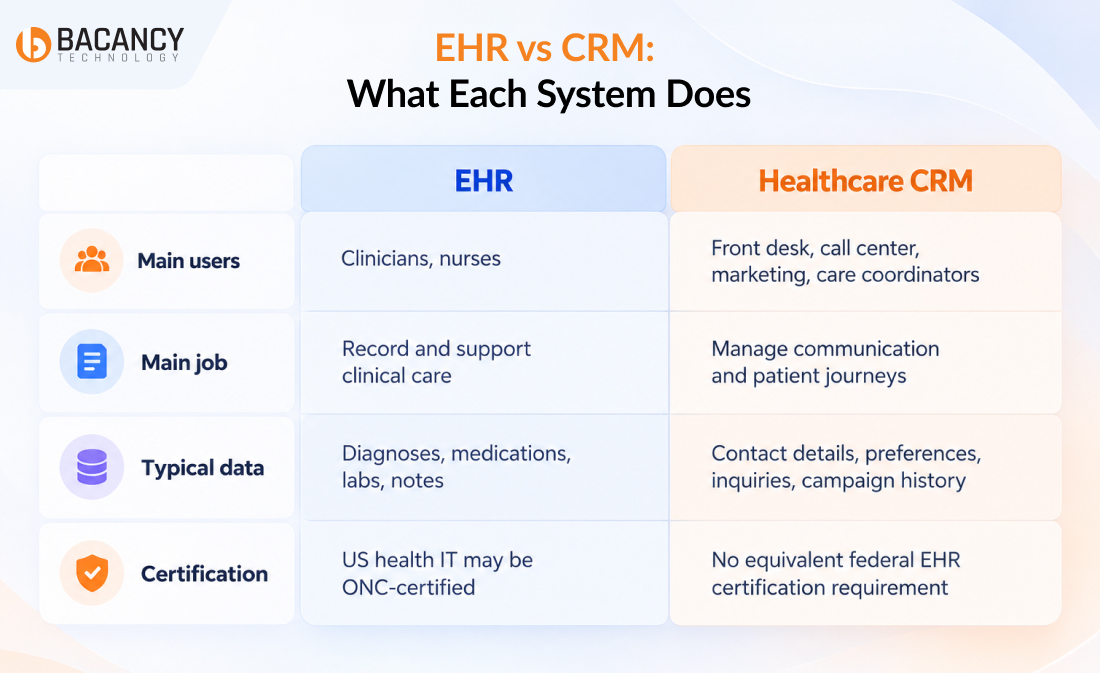
EHR and CRM systems often hold different parts of the same patient journey. The EHR stores clinical and appointment information, while the CRM helps staff manage inquiries, referrals, reminders, and follow-ups.
When these systems are not connected, staff may have to enter the same patient information more than once or check both systems for updates. This can take extra time and can lead to missed reminders, outdated information, or duplicate records.
EHR CRM integration connects the two systems so the right information can move between them. This guide gives you a complete view of the process, from choosing the right integration method and checking your EHR vendor to understanding HIPAA requirements, costs, timelines, and ROI. By the end, you should have the information you need to decide how to move forward.
EHR CRM integration is when a clinic’s patient records system is connected to its patient communication system. Any update made in one is carried over to the other. Appointment reminders and referral follow-ups go out on schedule, and patient information stays protected under rules like HIPAA.
EHR CRM integration is becoming more important in 2026 for three main reasons: data sharing, security, and missed appointments.
HHS has proposed changes to the HIPAA Security Rule that include requirements such as multi-factor authentication and encryption. The proposal is not final yet, and the latest federal agenda has pushed final action to July 2027. The current Security Rule still needs to be applied completely
Missed attendance may also have consequences for patients and healthcare practices. According to MGMA’s 2025 report, practices experiencing low non-attendance tended to utilize digital reminders and convenient ways of cancellation or rescheduling of their appointments.
Upon connecting the EHR to the CRM system, you can send reminders to patients and follow up with them if they miss or cancel the appointment.
Three major methods exist for CRM EHR integration. The right approach depends on the number of systems, the amount of data being exchanged, and how that data needs to be processed
Here, the CRM connects straight to the EHR through its API. You can use FHIR, a common way for healthcare systems to share data, or an API provided by the EHR vendor.
This can work well if you have one EHR, one CRM, and only a few things to connect through EHR CRM integration.
The main thing to keep in mind is that you depend on the EHR vendor. For example, the EHR vendor may change its API later. If that happens, you may have to make changes to your integration too.
Oracle Health is one example. It has moved from its older DSTU 2 FHIR APIs to FHIR R4, so apps using the older version need to be updated.
In this case, yet another layer of software exists between the EHR and CRM that transfers information between these systems. It is named middleware or an integration engine.
Rhapsody, Mirth, Redox, and Azure Health Data Services can be used for transferring and managing health care data. Middleware is also capable of translating data formats, retransmitting failed messages, and logging the transferred data.
It may come in handy when you have more than one EHR, CRM, or healthcare facility to connect through CRM EHR integration. If later on you decide to connect some other system, you just need to connect it rather than rebuilding the whole integration process.
The downside is that you now have another system to manage and pay for.
In this architecture, both the CRM and EHR feed into the same data store centrally. Any other system can then access the data in the centralized data store for reporting, analysis, or machine learning.
This can work well in a situation where the healthcare organization needs the patient data in several areas.
However, the problem with this architecture is that it is quite complex to implement. It requires the healthcare organization to secure an additional copy of patient data.
If it is not updated in time, the data will not be appropriate for scheduling purposes on the same day.
Think of your immediate requirements first when planning EHR CRM integration.
There’s no need to develop some complicated structure from scratch. Just choose the one that suits your present requirements and can scale further.
You will also have to determine whether the flow of data in CRM EHR integration would go in one direction or both directions.
The one-way flow would consist of sending the data from the EHR to the CRM.
For instance, the EHR may send the contact and scheduling information to the CRM, which would enable the latter to send reminders or generate marketing lists. In the process of this action, the patient’s data won’t be altered in the EHR.
With two-way synchronization, the updates may be sent in both directions.
For instance, the CRM may return a new phone number, schedule update, or a referral update to the EHR.
This option requires more preparation than the one mentioned above. In particular, you will have to determine whose data will have priority in the event the data in the systems differs.
For instance, what should be done if the patient’s phone numbers in both systems are different?
It is often easier for many teams to start with one-way synchronization and then proceed to adding two-way communication for certain actions later on.
HL7 v2 is the older messaging standard, and most hospital systems still use it for events such as admissions and appointment updates. It works, but every connection usually needs custom mapping.
FHIR is the newer standard. It uses modern web APIs, so CRMs connect to it faster and with less custom code. In the US, certified health IT is subject to ONC requirements for standardized APIs based on FHIR, so FHIR is widely supported across major EHR platforms.
Use FHIR for new API-based projects when the EHR supports the resources and workflows you need. Use HL7 v2 when the EHR relies on it for event-based messaging or when FHIR does not cover the required workflow.
The CRM EHR integration process may vary based on the EHR that is used. Prior to initiating any integration process, you should consider the following points to ensure a smoother process later. These include the process of access by the vendor and the type of testing that is allowed prior to the actual implementation.
EHR-by-EHR Comparison Table
| EHR | API | How you connect | Main thing to check |
|---|---|---|---|
| Epic | FHIR, SMART on FHIR, HL7 v2 | Register the app and get the customer to activate it | Customer activation |
| athenahealth | REST, FHIR | Build and test through its Developer Portal | Production access |
| Oracle Health | FHIR R4 | Register through Oracle Health's developer program | API fees and setup |
| Other EHRs | FHIR, REST, HL7 v2 | Connect directly or use middleware | Write access |
Epic provides Epic on FHIR as a free resource for developers. However, your healthcare customer still needs to activate the app before it can be used with their Epic system. Listing the app in the Epic Showroom is optional.
In the case of athenahealth, the developer portal will be used to develop the application and perform testing on it. When the app is finished being tested, it can be placed in the production environment.
Both test and production are different environments, so the development team should prepare for both.
Oracle Health has its current APIs built using FHIR R4. The older DSTU2 APIs have been phased out. There may also be costs associated with some APIs, and therefore you need to establish the cost beforehand.
When you need to work with small or less popular EHRs, you should first contact the vendor and ask them about available API access. Some FHIR APIs only let you read patient data, not update it.
Before you estimate the project, get clear answers to these questions:
Obtain these details in writing before beginning the process of integration. This way, you have clarity on what the work entails, when it will be completed, and what it costs, instead of realizing API limitations later into the development process.
When you have established the means by which your system will integrate with the EHR system, you will then have to ensure that the patient data is directed to the correct destination. That’s where data mapping and patient matching come into play.
Connecting the systems through EHR CRM integration is only part of the job. You also need to make sure the patient data is matched correctly and goes into the right CRM fields. Here’s how you can do it:
Before you connect the two systems through CRM EHR integration, first decide where each piece of EHR data should go in the CRM. Make a simple list for this. Note where each piece of data comes from, where it should go in the CRM, and whether you need to change anything before moving it.
For example, a patient’s phone number from the EHR should go into the correct phone field in the CRM. Use the same format for details such as phone numbers and dates.
Pay close attention to status fields too. An appointment marked as arrived should not show as cancelled in the CRM. Make sure each EHR status matches the right CRM status so patients get the right reminders and follow-ups.
Use the patient’s medical record number (MRN) or enterprise ID to match the same patient in both systems. Keep in mind that an MRN can be different at different facilities. If you have more than one location, an enterprise ID can make it easier to match the same patient across all of them.
A new website inquiry may not have an MRN yet. Keep it as a prospect until you can match it to an existing patient.
Start with the patient matches you are sure about. If you are not sure two records belong to the same person, have someone check them before you match them. Do not use only the patient’s name and date of birth to match records. Two family members can have the same name, birthday, or even phone number.
A wrong match can put one patient’s information in another patient’s record, so always check uncertain matches before linking them.
Once the data is mapped and matched correctly, the next step is to make sure it stays safe. This is where HIPAA requirements come in.
When you connect an EHR with a CRM through EHR CRM integration, patient data moves between the two systems. So, you need to make sure the data is only shared with the right people and kept safe. Here are some basic things to check.
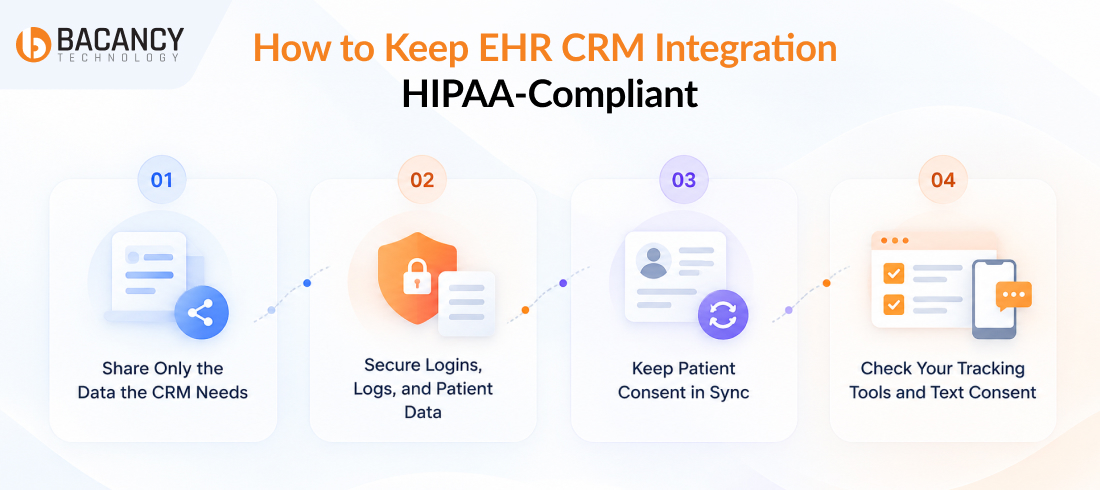
First, decide what data the CRM actually needs. Do not send extra patient information just because it is available in the EHR.
Sign a business associate agreement with the CRM vendor and any middleware provider that handles patient data. Also, filter the data before it reaches the CRM.
The less patient data you move, the less data you need to protect.
Keep patient data safe while it is being sent and stored. Use encryption and ask users to sign in with multi-factor authentication.
Only give people access to the data they need for their work. For example, a marketing user does not need the same access as a care coordinator.
Keep a record of who viewed or changed patient data. These logs can help you find and investigate problems.
Make sure consent changes reach both systems during CRM EHR integration.
If a patient opts out of texts in the CRM, that choice should also be respected by the EHR and any other system sending messages. If consent is removed in the EHR, the CRM should stop sending messages too.
Keep treatment reminders and marketing messages separate because they may need different types of consent.
Before you go live, check the EHR, CRM, and integration to make sure they all follow the same consent rules.
Many CRMs connect to website forms, ad platforms, and analytics tools. OCR has warned that tracking pixels on healthcare websites can share patient information with third parties. Remove any tool that sees patient data without a BAA.
Text reminders and marketing texts also fall under the Telephone Consumer Protection Act (TCPA), not just HIPAA. Marketing texts may require prior express written consent under the TCPA. Store the consent type, date, and applicable communication preference in the CRM.
Need help reviewing your EHR CRM integration for HIPAA requirements?
Explore our HIPAA compliance services to strengthen data protection, access controls, and security practices.
Once your EHR and CRM are connected, staff stop copying patient data between systems. Here are five common ways providers use the connection.
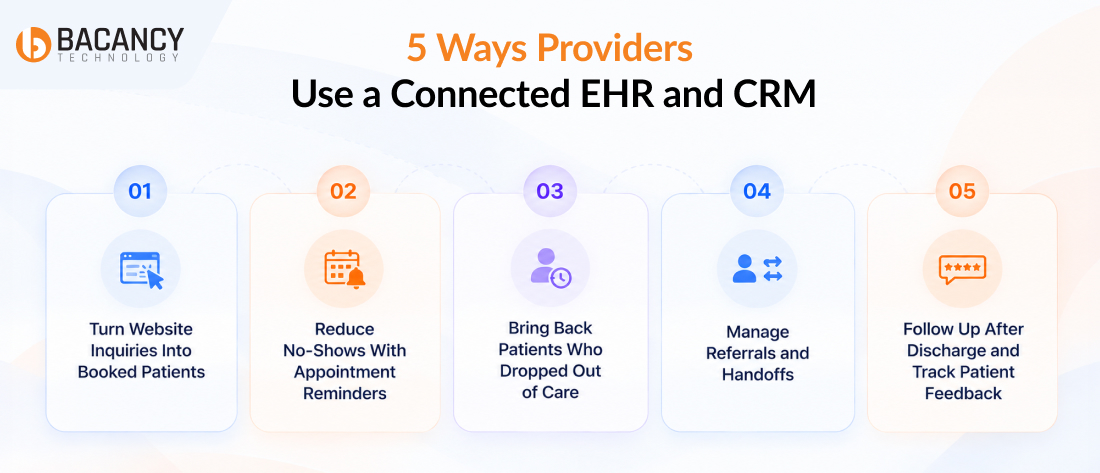
When someone fills out a website form, the CRM can create a new lead. If it can also see available appointment slots from the EHR, staff can offer the patient an available time instead of checking the schedule separately.
This makes CRM EHR integration useful for moving from a new inquiry to a booked appointment.
The CRM pulls appointment data from the EHR and sends reminders a few days before the visit and again the day before. Each reminder should let the patient confirm, cancel, or reschedule.
When a patient cancels, the open slot can be offered to someone on the waitlist.
The EHR knows which patients are due for a visit or screening. The CRM uses that list to contact them.
For example, a clinic can build a list of patients who missed their follow-up and reach out by text or call. Once a patient books, the outreach stops automatically.
The CRM tracks each referral until the patient completes the visit. If the patient hasn’t booked within a set time, staff get an alert. After the visit, the referring doctor is notified. Staff can see every open referral in one list instead of chasing them by phone.
When a patient is discharged, the CRM creates a follow-up call task for staff. After the call, it can send a short survey. If the patient reports a problem, the CRM routes it to the right person.
At Bacancy Technology, we have years of experience delivering Healthcare IT services and solutions for healthcare organizations.
Based on our experience, an EHR CRM integration can cost $40,000 to $350,000+, depending on the integration approach, number of EHRs, workflows, data-sharing requirements, and vendor or API fees.
| Scope | Typical cost |
|---|---|
| Simple one-way sync, one EHR, one or two workflows | $40,000 to $90,000 |
| Two-way sync, one EHR, several workflows | $90,000 to $150,000 |
| Multiple EHRs, write-back, middleware, many workflows | $150,000 to $350,000+ |
Ongoing support, monitoring, and vendor fees usually add 15% to 20% of the build cost each year.
These are planning estimates, not fixed prices. Your actual cost will depend on your EHRs, workflows, security requirements, and vendor setup, so define the scope before setting your budget.
An EHR CRM integration usually takes several months because some steps depend on the EHR vendor.
Overall, plan for about four to seven months for a typical EHR CRM integration. Start the vendor access process in the first week so it does not hold up the rest of the project.
A healthcare CRM platform such as Salesforce Health Cloud or Microsoft Dynamics 365 works well when your workflows are fairly standard: reminders, referrals, and outreach. The vendor maintains the core tools and some EHR connectors.
Keep in mind that license fees are per user per month, and EHR integration is often the largest part of the implementation cost. For Salesforce, connectors usually run through MuleSoft, which costs extra.
A custom build makes more sense when you work with several EHRs, have workflows that are specific to your organization, or need the CRM to work inside the EHR.
You can also use both for CRM and EHR integration. For example, the CRM can handle patient and outreach work while a custom integration layer manages the connection with your EHRs.
If you do not have enough developers in-house, you can also hire EHR developers to help build and maintain the integration.
Not sure which CRM approach fits your EHR setup?
Opt for our custom CRM development to plan, build, and maintain the right integration for your workflows.
A few common mistakes in CRM EHR integration can lead to delays, wrong patient data, or extra work after launch. Here are six to watch for.
Do not move every EHR field into the CRM. Start with the data your workflows actually need. This keeps the integration easier to manage and reduces the amount of patient data you need to protect.
API access and vendor approvals can take time. Start this process early so development does not stop while your team waits for access.
A name and date of birth may not be enough to identify the right patient. Use the MRN or another reliable patient ID to reduce incorrect matches.
A failed message can leave different information in the EHR and CRM. Set up alerts so your team knows when something fails and can fix it.
Patients can change how they want to be contacted. Make sure those changes reach the CRM and any other system that uses the patient’s communication preferences.
You need a starting point to know whether the integration helped. Track a few numbers before launch, such as no-show rates, referral completion, or the time it takes to respond to new patient inquiries.
Before you connect the EHR and CRM, decide how you will measure the results of EHR CRM integration. This gives you a clear way to see what changed after launch.
Look at the last 6 to 12 months of data before the integration goes live. Track a few numbers that matter to your workflows:
If these numbers change during the year, note why. Seasonal changes can affect the results too.
You do not need dozens of KPIs. Start with these four:
Compare these numbers with your baseline to see whether the integration is making a difference.
A simple way to calculate payback is:
Payback period = Total integration cost ÷ Monthly net benefit
Monthly net benefit is the extra revenue from recovered visits and new bookings, plus staff time saved, minus monthly running costs.
For example, suppose an integration costs $250,000 to build and has a net benefit of $25,000 per month.
$250,000 ÷ $25,000 = 10 months
So, in this example, the initial cost would be recovered in about 10 months.
The numbers will be different for every organization. Use your own visit volume, revenue, costs, and results when checking the payback period for CRM EHR integration.
A good EHR CRM integration starts with a few clear decisions: which connection method fits your systems, whether you need one-way or two-way sync, and what data the CRM actually needs. Get API access from your EHR vendor early, match patients carefully, and build HIPAA safeguards in before launch. Record your baseline numbers too, so you can show the payback after go-live.
If you need help scoping your EHR CRM integration, we can assess your systems, define the right integration approach, and estimate the cost and timeline. As an experienced EHR integration services provider, we can help you plan the integration around your data, workflows, and compliance needs.
It can be, but integration alone doesn’t make it compliant. You need encrypted data transfer, role-based access, audit logs, and a signed BAA with every vendor that touches patient data. Compliance depends on how you build and manage it.
Most projects take 4 to 7 months. Planning takes 2 to 3 weeks, getting EHR vendor access takes 3 to 8 weeks, and building and testing take most of the rest. Vendor approval usually decides the final date.
FHIR is usually a strong choice for new API-based projects, while HL7 v2 remains widely used for event-based healthcare messaging. Many integrations use both. Choose based on the EHR’s supported standards, required workflows, and data you need to exchange.
No. A CRM manages patient relationships like outreach, appointments, and follow-ups. An EHR holds clinical records such as diagnoses, prescriptions, and lab results, and it must meet certification rules that a CRM doesn’t. They work best when connected, not swapped.
Most projects cost $40,000 to $350,000+. A simple one-way sync sits at the low end. Two-way sync, several EHRs, or middleware push it higher. Plan another 15% to 20% each year for support and vendor fees.
Explore healthcare data warehouse architecture, types, components, implementation, build vs buy options, and costs for healthcare organizations.
Read More

Discover the 16 mental health app features that drive maximum engagement in 2026, from clinical screening tools to AI journaling and ethical design.
Read More

Compare top LLM in healthcare for 2026 using HealthBench benchmarks, HIPAA/BAA deployment options, FDA guidance, and real-world implementation insights.
Read More
AI-First Engineers
Our engineers use AI agents and tools to build faster, then spend their time where it matters: reviewing code, closing technical gaps, catching security and performance risks, and testing every release. You work with AI engineers, AI product engineers and tech architects who own the quality of everything that delivers.

Embedded in Your Business
Our engineers work within your systems, data and security requirements, with overlapping hours for teams in the US, UK and Australia. Hire an individual Forward Deployed Engineer (FDE) or a dedicated FDE pod led by a named lead. We stay accountable for measurable outcomes until your solution runs reliably in production.

Built for Regulated AI
We build AI agents and agentic workflows primarily for healthcare and finance, integrating with EHRs, payer portals, banking systems and loan platforms. Our expertise spans data engineering, data warehousing and analytics, with human oversight, audit trails and HIPAA- and PCI DSS-aware controls. We also deliver solutions across other industries, backed by 1,050+ engineers and ISO/IEC 27001:2022 certification.