Last Updated on March 3, 2026
Last Updated on March 3, 2026
Quick Summary
In this blog, we break down the fundamentals of REST architecture, explain its six core principles, and share 15 REST API best practices that can guide you in designing structured and easy-to-manage APIs.
Table of Contents
You might think that REST APIs lack a strict rulebook or fixed standards for interface design. However, at Bacancy, we have identified and practiced 15 best practices for REST API design.
A RESTful system is defined by architectural constraints, such as a uniform interface, statelessness, cacheability, client–server architecture, layered systems, and optional code-on-demand. However, these constraints do not limit designers, because REST is a design architectural style, and not a standard or framework.
Since the origin of the REST approach, introduced by Roy Fielding in 2000, and through years of software development experience, we have adapted and refined these REST API design best practices that work in 2026 too. We hope they prove useful in your projects as well.
A REST API stands out for Representational State Transfer Application Programming Interface. It is a web service that allows your applications to communicate with each other over the internet using standard HTTP methods, such as PUT, GET, POST, and DELETE.
It follows REST principles, which ensure that interactions are scalable, stateless, and organized around resources, such as products, users, or orders. Moreover, REST API exchanges data in JSON format and makes it lightweight, easy to use, and compatible across mobile, web, and cloud applications.
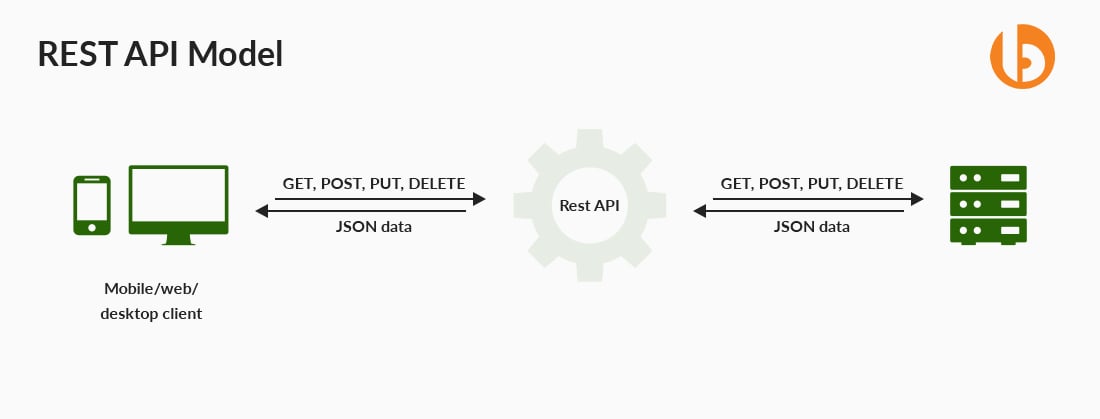
Here’s a simple REST API example:
GET /users → Retrieve a list of users
GET /users/101 → Retrieve details of a specific user
POST /users → Create a new user
PUT /users/101 → Update an existing user
DELETE /users/101 → Remove a user
In this example, “users” is the resource, and HTTP methods define the action performed on that resource.

A well-grounded API will be uncomplicated to work with. Its resources and other related operations should be quickly committed to memory by developers who deal with it consistently. Thus, an ideal API should be trouble-free to read and write so that designers and developers are comfortable working with it.
Integration with an API having a good design will be quite straightforward when writing inaccurate code becomes less likely to occur. It has knowledgeable feedback and does not enforce any severe guidelines on the API end customer.
With conciseness, we mean that a comprehensive API will enable developers to create full-fledged applications in opposition to your exposed data. Usually, completeness takes place over time, and maximum API designers gradually build on top of the existing APIs. Thus, this is an ideal trait of the best API design that every organization or an engineer having an API should be dedicated to.

Reach out to our intelligent minds to get the architecture correct.
Read the complete guide on Web Application Architecture.The following six architectural constraints were originally defined by Roy Fielding in his doctoral dissertation. These constraints form the foundation of REST and define how a system must be designed to align with RESTful API standards.

By REST, you use the same concept to decouple the client from implementing the REST service. Compare interface with a contract signed between client-server where you must use certain standards. The reason being, globally accepted APIs should enforce global concepts, like standards, to make them understandable.
Having gained inspiration from HTTP, Roy fielding considers this constraint. By this architectural constraint, we mean to make all the client-server engagements stateless. This way, the server will not reserve anything regarding the latest HTTP request made by the client. Hence, it will consider every request as a new and unique one. Moreover, it must not rely on any prior information exchanged between the two. This further means no session, no history.
The client is held accountable for handling the application’s state. A client application requires a stateful application for the end-user, wherein the logs in once and carries out various authorized operations. Every request from the client must involve all the essential information for servicing the request and authorization details and authentication.
Here, we mean that the server application and the client application should evolve individually without the need to depend on each other. To be more precise, it should stick to the separation of concerns. By separation of concerns, the code on the client end can be modified/altered anytime without creating any impact on the conditions of the server. Additionally, the code on the server end can be altered without altering the conditions of the client.
By maintaining the separation of concerns, we can enhance the flexibility and Scalability of the particular interface across various platforms. A client must be aware of resource URIs only. Unless and until the interface between clients and servers is kept unaltered, they can be developed and replaced separately.
Generally, components are unable to view beyond the immediate layer. REST enables you to make use of a layered architecture system. Here, you can deploy the APIs on server A, save data on server B, and verify requests on server C. These servers may offer a security layer, a load-balancing layer, a caching layer, and several other functionalities. Additionally, any of these layers must not influence the responses or requests.
Today, caching holds vital importance wherever applicable. With caching comes an enhanced performance for the client, leading to an improved scope for scalability for a server with a reduced load.
When it comes to REST, every response can be termed as cacheable and non-cacheable. You can use the cached response as the request-response instead of checking with the server. This helps in eliminating the interaction required between the client and the server up to some extent.
This one is generally an optional constraint. Usually, you will be required to send a static representation of resources in a JSON REST API or XML form. However, whenever you need to, you can easily return executable code for supporting a vital part of your application.
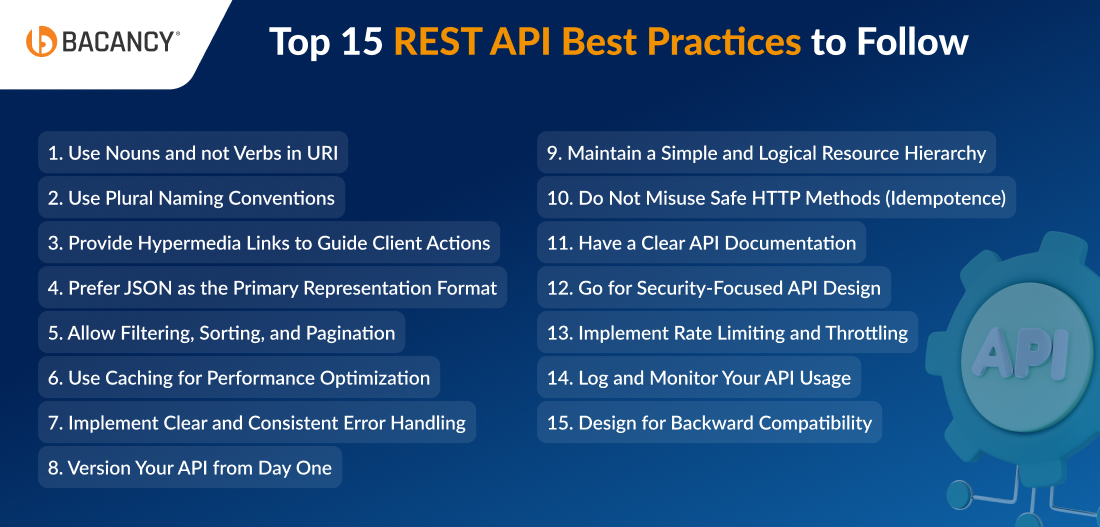
Here are the 15 best practices for REST API design that we implement at Bacancy for our in-house work and client projects. They have worked well for us, and we hope they help you too.
REST APIs must be developed for resources that can be services, entities, etc. Hence, they should always consist of nouns and not verbs. This means that we must refrain from using verbs in REST endpoint paths. Instead, we must implement nouns that represent a certain entity.
Why? Because the HTTP request method that we use already consists of a verb. Having verbs in the REST API endpoint path does nothing and, thus, is unnecessary as it does not fetch any new information.
The selected verbs can vary from a developer’s notion. For example, some prefer ‘get’, while some prefer ‘retrieve’. Hence, it is better to allow the HTTP GET verb to state what an endpoint does.
The action must be specified by the HTTP request method made by us. Generally, some basic methods involve
The verbs map to Create, Read, Update, and Delete(CRUD) operations. Hence, to get news articles, you have to create GET /articles/. POST /articles/ to add a new article, PUT /articles/:id for updating the article provided by the given ID, and DELETE /articles/:id to delete an article provided by the given ID. /articles denote a REST API example resource.
For example, we can employ Express to implement these endpoints to manipulate articles like,
const express = require('express');
const bodyParser = require('body-parser');

const app = express();

app.use(bodyParser.json());

app.get('/articles', (req, res) => {
  const articles = [];
  // code to retrieve an article...
  res.json(articles);
});

app.post('/articles', (req, res) => {
  // code to add a new article...
  res.json(req.body);
});

app.put('/articles/:id', (req, res) => {
  const { id } = req.params;
  // code to update an article...
  res.json(req.body);
});

app.delete('/articles/:id', (req, res) => {
  const { id } = req.params;
  // code to delete an article...
  res.json({ deleted: id });
});

app.listen(3000, () => console.log('server started'));
In the code above, you can see that the path names do not consist of any verbs in them. It states all nouns and HTTP verbs.
Usually, we prefer using plurals. However, know that no rule states one cannot use a singular when it comes to the resource name.
Here’s why plurals are used:
We are working on one resource from the set of resources. Hence, to illustrate collection, we make use of plural naming conventions.
For example, let us consider GET /users/123. The client here asks to rectify and recover a resource from the user’s collection with ID 123. While developing a resource, if we need/wish to add another resource to the existing collection of resources, the API looks like POST /users.
This constraint stands out for several other network application architectures from the REST architecture. The Hypermedia As Transfer Engine Of Application offers easy navigation via certain resources and their available actions. By this, a client is not required to know how to communicate with an application for distinct actions because each of the metadata gets embedded in the responses sent from the server.
For a clearer understanding, let us look at an example. Here is a response of a retrieved user having ID 123 from the server.
{
  "name": "John Doe",
  "links": [
    {
      "rel": "self",
      "href": "http://localhost:8080/users/123"
    },
    {
      "rel": "posts",
      "href": "http://localhost:8080/users/123/posts"
    },
    {
      "rel": "address",
      "href": "http://localhost:8080/users/123/address"
    }
  ]
}
At times, it is easy and comfortable in skipping the format of links, thereby specifying links as fields of a resource given below:
{
  "name": "John Doe",
  "self": "http://localhost:8080/users/123",
  "posts": "http://localhost:8080/users/123/posts",
  "address": "http://localhost:8080/users/123/address"
}
Ideally, it is not a convention that needs to be followed every time. This is because it relies on resource size/fields and actions that can be executed on resources. If resources consist of multiple fields that users do not wish to go through, it is better to show navigation to sub-resources followed by implementing HATEOAS.
REST enables using various output formats such as JSON, RSS, XML, CSV, and HTML. Although, this entirely depends on what you require your API for and the application you possess. If you have a public-facing service that you wish to be available via REST API design, you must choose JSON data format. Almost in 99% of cases, JSON is the most preferred data format for interacting between payload and response.
To ensure your API returns JSON, set the Content-Type response header to application/json. Most modern server-side frameworks automatically handle this when you return a JSON object. Many HTTP clients rely on the Content-Type header to correctly interpret the response body.
An exception exists when transferring files between client and server. In such cases, the response may use formats like multipart/form-data or other file-specific content types. File transfers follow different rules and are handled differently from standard JSON-based REST responses.
As a general rule, design your endpoints to return JSON unless a specific use case requires another representation. Most modern frameworks support JSON responses by default, which simplifies implementation and ensures consistency.
Few key features for consuming API include filtering, sorting, and paging. Often, resource collection can be huge. The databases behind REST API standards can also get enormous. Eventually, it brings down the performance of our systems. To solve these issues, we can use,
By pagination data, we ensure returning only a couple of results instead of collecting all the requested data at once. By filtering and pagination, you can elevate the performance as there is a potential reduction in the usage of server resources. With more and more data assembling in the databases, these features become more important.
You can add caching to bring back data from the local memory cache rather than querying the database for obtaining the data every time you wish to retrieve any data requested by the users. An excellent point of caching is that users can achieve data even faster. However, many times, the data achieved by users might be outdated. Eventually, this can lead to major problems while debugging in production environments, as anything might go wrong because users entertain old data.
There are several types of caching solutions, such as in-memory caching, Redis, etc. With this, you can alter the way data is cached as your requirements change.
For example, Express possesses the api cache middleware to add cache to the app without considerable configuration. You can incorporate an easy in-memory cache to our server such as,
const express = require('express');
const bodyParser = require('body-parser');
const apicache = require('apicache');

const app = express();
let cache = apicache.middleware;

app.use(cache('5 minutes'));

// employees data in a database
const employees = [
  { firstName: 'Jane', lastName: 'Smith', age: 20 },
  //...
  { firstName: 'John', lastName: 'Smith', age: 30 },
  { firstName: 'Mary', lastName: 'Green', age: 50 },
];

app.use(bodyParser.json());

app.get('/employees', (req, res) => {
  res.json(employees);
});

app.listen(3000, () => console.log('server started'));
If you implement caching, include the Cache-Control header in your responses. This allows clients and intermediaries to understand how long a response can be stored and reused, which improves performance and reduces unnecessary load on the server.
Clear and consistent error handling is one of the most important REST API best practices. When an error occurs, your API should return appropriate HTTP status codes that clearly indicate the nature of the issue. This helps API consumers understand what went wrong and allows maintainers to diagnose problems efficiently.
Errors should always be handled gracefully. Instead of exposing raw server exceptions or stack traces, return structured error responses with meaningful messages. This protects your system and improves the developer experience.
Here is a list of common error HTTP status codes. Let’s have a look!
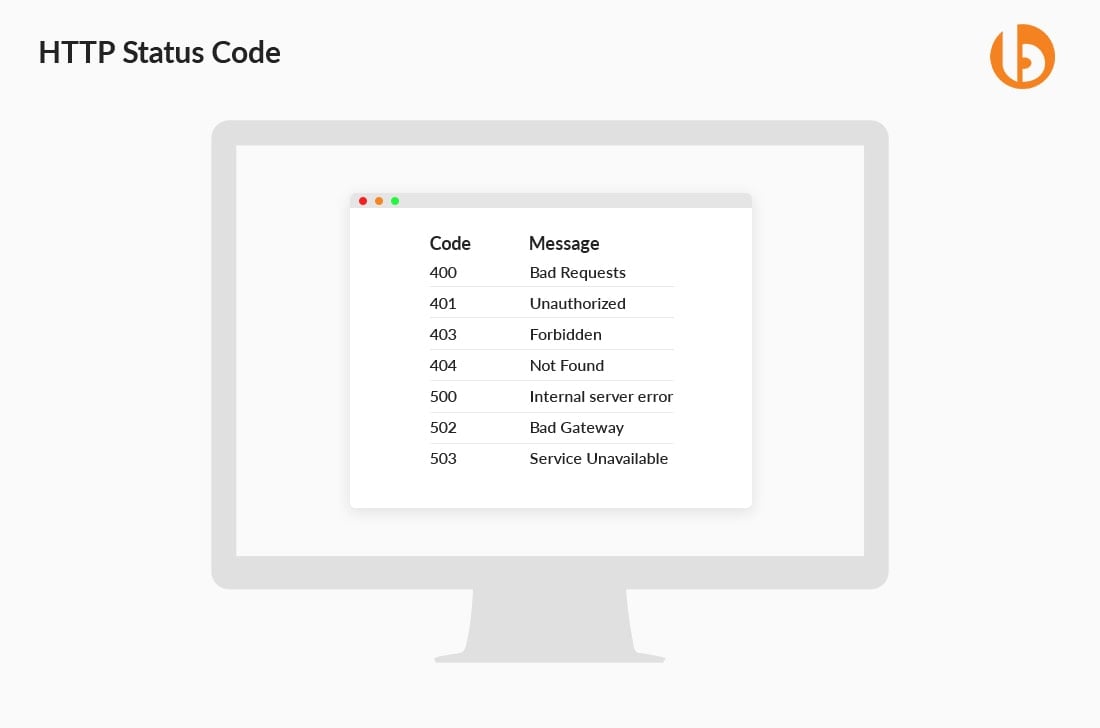
Error codes are required to accompany messages with them so that the API maintainers can obtain sufficient information for troubleshooting the issue. However, attackers cannot utilize the error content for cyberattacks, such as bringing the system down or stealing vital information. If your API stays incomplete, you should send errors along with information to allow users to take corrective actions.
Never skip versioning your API. Versioning enables you to repeat faster, thereby preventing inapplicable requests to hit updated endpoints. Alongside, it assists in smoothing over any complex API version transitions as you can keep offering old API versions for an extended period.
Generally, there are mixed reviews regarding whether an API version must be incorporated in a header or the URL. Well, if we speak academically, it must be situated in the header. However, the version requires to be present in the REST API URL, thereby ensuring the exploration of the browser across several versions, enjoying an easy and simple developer experience.
Ideally, an API can never be stable. Hence, it is a variable. Although the change is unavoidable, what is important is to look at how to manage the change. An excellent practice for plenty of APIs is well-documented and announced depreciation schedules every month.
Few examples of endpoint URI versioning include:
https://api.stripe.com/v1/ (major version indication only)https://us6.api.mailchimp.com/3.0/ (major + minor version indication)https://api.twilio.com/2010-04-01/ (date based indication)https://developer.github.com/v3/ (major version indication only)If a resource has sub-resources, maintain a clear and logical hierarchy in your API design. This is an important REST best practice because it improves readability and makes relationships explicit.
For example, if a user has posts and you want to retrieve a specific post that belongs to that user, you can define the endpoint as:
GET /users/123/posts/1
This endpoint retrieves the post with ID 1 that belongs to the user with ID 123.
Many times, resource objects can be linked with one another or possess some sort of functional hierarchy. It is usually a better idea to restrict the nesting to a single level in the REST API. If you think of implementing too many nested levels, it might not look elegant. Also, by filtering, you can achieve a similar result.
Certain HTTP methods are considered safe because they are designed only to retrieve data and not to modify the server’s state. Methods such as HEAD, TRACE, GET, and OPTIONS fall under this category. By safe, we mean that you can expect to return a representation of a resource without updating, creating, or deleting anything on the server.
However, a common mistake several developers make is misusing these safe methods to perform destructive operations. For instance, use a URI like GET /users/123/delete to remove a user.
While technically it may execute if coded that way, it violates HTTP standards and breaks the expected behaviour of RESTful APIs. It can lead to serious issues, especially while using caching mechanisms, browsers’ prefetching, or automated crawlers that may unintentionally trigger such URLs.
Correct usage would look like this:
app.delete('/users/:id', (req, res) => {
 // logic to delete user
 res.json({ message: "User deleted successfully" });
});
Publishing your API documentation in a clear and accessible way is a vital best practice for REST API Design. Not only will the documentation help developers, but users as well. When you publish the API documentation, developers view what they are dealing with while making an implementation. Besides this, publishing enables potential users to look into what is made available through your API.
API Documentation must offer information regarding the existing methods and endpoints, potential response codes, request/response examples, existing throttling or limits, and information about authorization. An excellent idea for this is to publish the documentation in a browsable web page format that has engaging options, playground, and curl examples.
Bear in mind that the API documentation even represents your organization. A comprehensive, well-written, and exceptionally presented document will be acknowledged by the developers and partners, thereby creating an example of how it must be created. However, if a clumsy and poorly designed documentation that has no examples has plenty of errors and is outdated, it may eventually harm the image of your organization.
Some excellent examples of API documentation are,
Security is a crucial aspect of API development. You must design your API in such a way that it protects sensitive data and prevents unauthorized access. A security-focused API ensures that only authenticated and authorized users can access specific resources.
You can implement authentication mechanisms, such as JWT (JSON Web Tokens), OAuth, or API keys to validate users before granting access. Another essential point is input validation. If you do not validate user inputs properly, attackers may inject malicious scripts or SQL queries that can harm your application.
For instance, in Express, you can secure routes using JWT middleware:
const jwt = require('jsonwebtoken');

function authenticateToken(req, res, next) {
 const token = req.headers['authorization'];
 if (!token) return res.sendStatus(401);

 jwt.verify(token, process.env.SECRET_KEY, (err, user) => {
   if (err) return res.sendStatus(403);
   req.user = user;
   next();
 });
}

app.get('/profile', authenticateToken, (req, res) => {
 res.json({ message: "Secure profile data" });
});
With this approach, only users with valid tokens can access protected routes.
Rate limiting helps you control how many requests a user or client can send to your API within a specific time frame. This prevents abuse, brute-force attacks, and server overload. Throttling ensures fair usage and keeps your API stable even under heavy traffic.
Without rate limiting, malicious users can send thousands of requests in seconds, which may crash your server or exhaust system resources.
For example, Express provides middleware like express-rate-limit to control API usage:
const rateLimit = require('express-rate-limit');

const limiter = rateLimit({
 windowMs: 15 * 60 * 1000, // 15 minutes
 max: 100 // limit each IP to 100 requests per window
});

app.use(limiter);
With this configuration, each IP address can only make 100 requests every 15 minutes. This ensures better stability and prevents misuse.
API usage logging and monitoring are key REST API best practices that can help you understand how your API performs in real scenarios. It enables you to track requests, identify errors, detect unusual activity, and enhance performance.
However, when something goes wrong in production, logs become valuable resources. Without proper logging, debugging issues becomes time-consuming and difficult. You can use logging libraries like Morgan or Winston in Express to record API activity:
const morgan = require('morgan');

app.use(morgan('combined'));
This middleware logs request details, such as HTTP method, URL, status code, and response time.
For monitoring, use DevOps tools like Prometheus or third-party services to track metrics like response time, CPU usage, and error rates. With proper monitoring, you can detect performance bottlenecks early and take corrective action before users are affected.
When you update your API, you must ensure that existing users are not affected. Backward compatibility allows older clients to continue functioning even after new features or changes are introduced.
If you remove or modify endpoints without planning, it may break applications that depend on your API. This can lead to user dissatisfaction and integration failures.
One common approach is API versioning. You can include version numbers in the URL so that older and newer versions can run simultaneously.
For example:
app.get('/api/v1/users', (req, res) => {
 res.json({ message: "Version 1 user data" });
});

app.get('/api/v2/users', (req, res) => {
 res.json({ message: "Version 2 user data with extra fields" });
});
With versioning, users who rely on v1 can continue using it, while new users can migrate to v2. This ensures smooth transitions and long-term API stability.
To properly design a REST API, it takes time, resources, and effort, but the result is worth it in the long run. Paying attention to small details around naming, versioning, error handling, rate limiting, and authentication can have a big impact once your API is used at scale.
Further, implementing a structured design with consistent conventions and secure access controls can make your REST APIs easier to consume and maintain. And, on top of this, adding monitoring, logging, and performance controls helps prevent issues before they become production problems.
And, if you need help implementing these REST API best practices in your ongoing and upcoming projects, hire REST API developers from Bacancy to support you in building secure, scalable, and well-structured APIs.
An API is considered RESTful when it follows the core architectural principles defined for REST, such as client–server separation, stateless communication, cacheability, a uniform interface, layered architecture, and optional code-on-demand. In practice, being RESTful also means using HTTP methods correctly, keeping endpoints consistent, and ensuring predictable request and response formats.
REST is an architectural style defined by Roy Fielding. A RESTful API is one that follows the principles and constraints of that architectural style. In simple terms, REST is the concept, and RESTful APIs are its implementation.
Some common REST API design mistakes include misusing HTTP methods (for example, using GET to perform deletions), ignoring proper status codes, returning inconsistent response formats, skipping versioning, and exposing overly complex endpoints. Other frequent issues include poor naming conventions, lack of authentication and rate limiting, and sending too much data in a single response. Avoiding these mistakes helps keep APIs predictable, secure, and easier to maintain.
REST APIs use standard HTTP methods to perform actions on resources: GET for retrieving data, POST for creating resources, PUT or PATCH for updating resources, and DELETE for removing resources. Using the correct HTTP method for each operation improves clarity, consistency, and interoperability.

Technical Lead at Bacancy
Veteran .NET developer delivering innovative, high-performance, and client-focused solutions.
MORE POSTS BY THE AUTHOR
Your Success Is Guaranteed !
We accelerate the release of digital product and guaranteed their success
We Use Slack, Jira & GitHub for Accurate Deployment and Effective Communication.