Quick Summary
This detailed guide is written for CTOs, data platform leaders, and healthcare compliance teams running or planning to run PHI workloads on Databricks. It covers key requirements for Databricks HIPAA compliance, the shared responsibilities of Databricks, your cloud provider, and your team, and steps to implement the right security controls. It also covers five common Databricks compliance gaps and how to keep your controls working as your workspaces, data pipelines, and use cases grow.
Table of Contents
Introduction
Healthcare organizations are increasingly using Databricks to bring electronic health records (EHRs), insurance claims, lab results, and machine learning workloads into a unified data platform. While this approach helps teams analyze healthcare data more efficiently, it also raises important questions about how safe the platform is for storing and accessing sensitive patient information.
Databricks HIPAA Compliance is therefore a key consideration for healthcare organizations that want to use the platform while safeguarding protected health information (PHI) and meeting regulatory needs.
According to IBM’s Cost of a Data Breach Report 2026, a healthcare breach costs $6.64 million on average, the highest of any industry for the 13th year running. The same report found that 27% of breaches targeting AI models or applications involved cloud misconfigurations, and another 27% involved compromised APIs, applications or plug-ins. Both risks apply directly to healthcare teams building connected data and AI environments on Databricks.
So, is Databricks HIPAA compliant? Databricks adds security controls and a Business Associate Agreement for eligible services and configurations. But, just by using these add ons does not make your environment automatically HIPAA-compliant. Your team still needs to configure the HIPAA compliance security profile on every workspace processing PHI, verify that features and integrations are eligible for HIPAA workloads, enforce appropriate access controls, and protect data moving between connected systems.
This guide walks through each of these steps, starting with the core requirements every PHI workspace in Databricks must meet.
Core Requirements for Databricks HIPAA Compliance
These four major requirements form the foundation of HIPAA compliance in Databricks. Every other control in this guide builds on them, so verify all four before processing PHI in any workspace.
| Requirement
| What It Means in Practice
| Common Gap
|
|---|
| BAA with Databricks and your cloud provider
| On AWS and GCP, sign a BAA with Databricks and with your cloud provider. On Azure, the BAA is with Microsoft.
| The team assumes one BAA covers everything.
|
| Compliance security profile on every PHI workspace
| Enable the HIPAA compliance in Databricks security profile on every workspace processing PHI, including development and test environments.
| Production is covered, but development and test workspaces are overlooked.
|
| Supported features only
| Verify that all features processing PHI are permitted under Databricks’ HIPAA requirements for your region.
| Engineers enable preview features without checking eligibility.
|
| Cloud-specific rules (AWS, Azure, GCP)
| Follow cloud-specific requirements for encryption, notebook results storage, and feature eligibility.
| Teams reuse one cloud’s configuration without checking another’s requirements.
|
The core requirements stay the same on every cloud, but the setup details differ.
Databricks HIPAA Compliance on AWS vs Azure vs GCP
Before you reuse a configuration across clouds, check how HIPAA compliance in Databricks works on your provider.
| Area
| AWS
| Microsoft Azure | Google Cloud Platform |
|---|
| Cloud BAA
| Databricks BAA plus AWS BAA
| Microsoft BAA
| Databricks BAA plus Google Cloud BAA
|
| How to Enable
| Compliance security profile with HIPAA, set in the account console
| Compliance security profile with HIPAA, set in the Azure portal or an ARM template
| Compliance security profile with HIPAA, set in the account console
|
| Compute encryption | Databricks enforces AWS Nitro instances, which encrypt data in transit and at rest
| Databricks enforces only instance types supported by the profile
| Google encrypts data at rest and in transit within GCE clusters
|
| Key thing to check
| Use customer-managed keys or store notebook results in your own AWS account | Same key or notebook results choice as AWS. The profile has been mandatory for PHI since September 1, 202. Azure Virtual Network encryption will also be required, with enforcement starting February 1, 2027.
| Many AI features, such as Model Serving and Vector Search, are available in fewer regions |
Shared Responsibility Model Across Databricks, Your Cloud Provider, and Your Team
The fundamentals depend on three parties, i.e Databricks, your cloud provider, and your organization. Each has specific needs and an understanding of who owns each control, helping prevent security and compliance gaps.
What Databricks Handles
Databricks protects healthcare information within its control through encryption in transit and at rest. It also enforces approved instance types through the UI and API. When instances terminate, Databricks deprovisions them so the cloud provider can wipe them.
What Your Cloud Provider Handles
AWS, Microsoft Azure, or Google Cloud provides the core infrastructure and meets its applicable obligations under its Business Associate Agreements. This includes supplying HIPAA-eligible infrastructure and implementing the required security protections. On AWS, Nitro instances support hardware-based encryption, while instance termination triggers the applicable cleanup of keys and data. On Azure, Azure Databricks is a Microsoft service, so your BAA is with Microsoft.
What Your Team Handles
Your team is responsible for configuring and managing Databricks HIPAA compliance. This includes enabling the compliance security profile on every workspace that processes PHI, using customer-managed keys or storing notebook results in your own cloud account, restricting unnecessary outbound traffic, keeping PHI access credentials in Databricks secrets, and verifying encryption across connected systems. Your team must also protect workspace storage and backups and address HIPAA obligations such as risk analysis, minimum necessary access, workforce training, and breach notification.
Note: The responsibility that teams often overlook is to keep PHI out of customer-defined metadata. The workspace names, compute names, tags, job names, job run names, and Git repository URLs must not contain sensitive personal information of patients because these fields might fall outside the intended compliance boundary.
Who Owns Each HIPAA Compliance Control
The distribution of clear ownership helps ensure that every HIPAA requirement has someone accountable for implementing, monitoring, and reviewing it. Once you assign responsibilities across legal, engineering, governance, and security teams, it makes compliance easier to manage and audit.
| Role
| Primary Responsibility
|
|---|
| Legal
| BAAs with Databricks and the cloud provider (Microsoft on Azure), and with every third party that handles PHI
|
| Platform engineering
| Security profile, network isolation, encryption keys, workspace templates
|
| Data governance
| PHI classification, Unity Catalog tags, masking, row filters, de-identification
|
| Security engineering
| Audit monitoring, alerts, egress reviews, incident response
|
| Program manager
| Risk analysis schedule, control ownership, review dates, audit evidence
|
Databricks HIPAA Compliance Readiness Checklist
Use this checklist to assess your Databricks environment against key HIPAA compliance requirements. You can answer each question with Yes, Partially, or No. Every Partially or No is a gap that needs a named owner and a target date. You can use this checklist when setting up a new environment or reviewing an existing one that processes PHI.
1. Is there an active BAA with Databricks and with your cloud provider (AWS, Azure, or GCP)?
2. Is the compliance security profile with the HIPAA standard enabled on every workspace that processes PHI, including dev and test?
3. Is every Databricks feature that touches PHI listed as supported in the regional support table, with no preview features in use?
4. Have you mapped where PHI enters, sits, moves, and leaves Databricks, and completed a risk analysis?
5. Is PHI kept out of workspace, compute, and job names, tags, and Git repository URLs?
6. Is PHI encrypted at rest in workspace storage and in transit to connected systems, with notebook results covered by customer-managed keys or stored in your own account?
7. Is outbound access limited to reviewed destinations, covering compute-plane egress, external locations, and connected third-party tools, with PHI access keys held in Databricks secrets?
8. Are PHI columns tagged and covered by masks or row filters in Unity Catalog, and has access been tested for each role?
9. Do pipelines and ML jobs run under service principals, with dev and test using de-identified or synthetic data?
10. Can you show who accessed PHI over the last 12 months, and does each control have a named owner and review date?
Note: The Databricks audit log system table keeps 365 days of events by default. HIPAA requires you to keep security documentation, such as risk analyses and activity reviews, for six years. Export audit logs to your own storage, or extend retention where configurable retention is available, so the evidence behind those reviews is still there when an auditor asks.
Get Expert Support to Close Your Databricks HIPAA Compliance Gaps
Talk to our Databricks consultants about your checklist results. They will review your BAAs, workspace settings, PHI data flows, access controls, and audit logs, confirm what is already in place, and help you fix what is missing.
How to Approach HIPAA Compliance in Databricks
To achieve HIPAA compliance in Databricks, you need more than just opting for security settings. You require a clear implementation sequence, such as confirming contractual needs, defining the PHI boundary, securing the infrastructure, enforcing access controls, and validating each safeguard before release. Here, learn about all in detail:
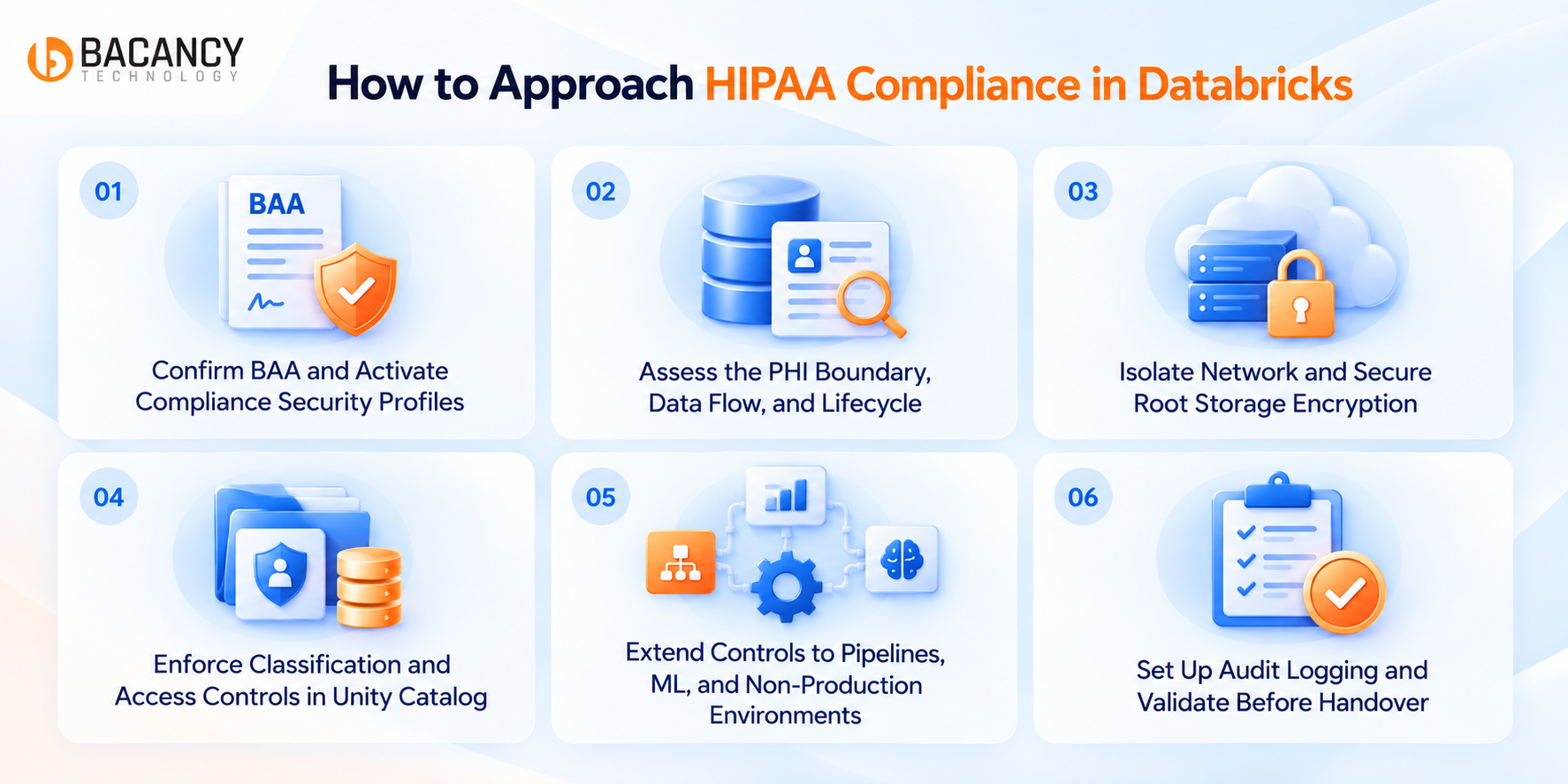
1. Confirm BAA and Activate Compliance Security Profiles
Before any protected health information enters Databricks, confirm that the right Business Associate Agreements are in place. On AWS and GCP, that means the Databricks BAA and a BAA with your cloud provider. On Azure, the BAA is with Microsoft. Then enable the compliance security profile with the HIPAA standard on every workspace that processes PHI. You can configure it through the account console, or the Azure portal on Azure, and where supported, set it as the default for new workspaces.
The profile requires the Enhanced Security and Compliance add-on, which adds cost. On Azure Databricks, Microsoft lists it at 10% of list price on top of the workspace’s Databricks spend, and it is available only on the Premium tier.
2. Assess the PHI Boundary, Data Flow, and Lifecycle
Before applying technical controls, map where PHI enters, resides, moves through, and leaves the Databricks environment. You need to document each stage so you can identify where controls are required.
Entry points: EHR extracts, HL7 or FHIR feeds, SFTP transfers, and Lakeflow Connect pipelines.
Storage locations: Unity Catalog catalogs, schemas, tables, and volumes.
Movement paths: Delta Sharing, clean rooms, and downstream data pipelines.
Exit points: BI platforms, exported files, external systems, and model endpoints.
If you’re moving healthcare data and workloads from legacy systems to Databricks, our Databricks migration services can help plan the migration, validate data accuracy, and establish appropriate security and governance controls.
3. Isolate Network and Secure Root Storage Encryption
You need to restrict how users, workloads, and connected systems communicate with your environment to ensure HIPAA compliant Databricks environment. Where supported, use private connectivity options such as AWS PrivateLink, Azure Private Link, or Google Cloud Private Service Connect. You can limit outbound traffic from classic and serverless compute to approved destinations, and review external connections before allowing them to handle PHI.
Also configure workspace root storage encryption according to your cloud provider needs. On AWS and Azure, verify all applicable needs for customer-managed keys and interactive notebook results storage. Your organization must also enforce encryption, access, and backup controls across workspace storage and every external location containing PHI.
4. Enforce Classification and Access Controls in Unity Catalog
Identification of PHI is the first step. You need to control who can access it and what they can see. You can classify sensitive columns in Unity Catalog, then apply appropriate permissions, masking policies, and row filters.
Connect identity management to your organization’s identity provider using SCIM where supported, enforce multi-factor authentication (MFA), and test access for each role so every role reaches only the PHI its job requires. Treat MFA as a baseline control today. The HIPAA Security Rule update that would make MFA and encryption mandatory was proposed in January 2025 and is still not final, with final action now targeted for July 2027.
5. Extend Controls to Pipelines, ML, and Non-Production Environments
Your team’s security controls need to cover the entire data lifecycle that includes scheduled pipelines, machine learning workloads, and development environments. You can run production jobs under service principals rather than individual user accounts to maintain consistent access management and clearer audit trails.
Use de-identified or synthetic data in development and testing by default. If those environments must process PHI, apply the same controls as production. Also review machine learning logs and inference tables, because request payloads and inference records can contain PHI depending on your configuration.
For more idea, read our insight on RAG on Databricks, which covers two healthcare cases where PHI reached the wrong users through an AI assistant, and how our engineers fixed them.
6. Set Up Audit Logging and Validate Before Handover
Before launching a workload, confirm that your controls work and that you can prove it. Enable audit log delivery and use Databricks system tables, starting with system.access.audit, to investigate security events, data access, and permission changes.
Stream these audit events to your SIEM so your security team can correlate them with activity from other systems and own the alerting.
Test role-based permissions, validate masking and row filters, review outbound access, and document the results. Then prepare an evidence package containing the BAAs, workspace security settings, PHI data flow map, risk analysis, access test results, and control ownership records.
5 Common HIPAA Compliance Gaps in Databricks and How to Fix Them
The majority of gaps are due to configuration mistakes, overlooked data exposure, or inconsistent processes rather than platform failures. Here are the five key HIPAA compliance challenges that our Databricks engineers come across most often, and the solutions they suggest.
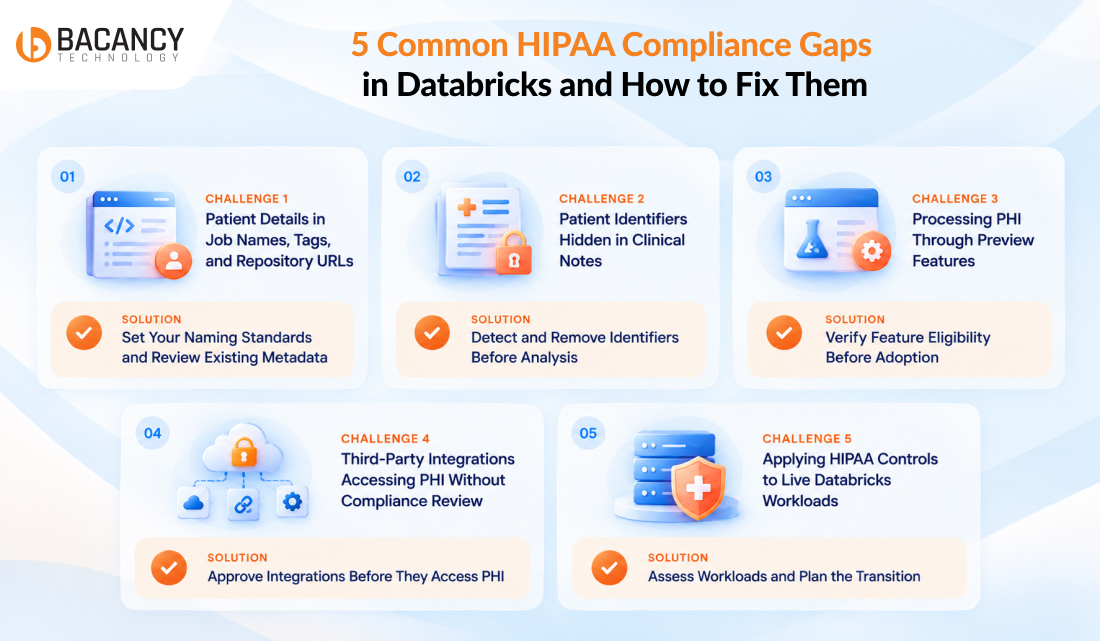
An engineer might include a patient’s name or medical record number in a job name or cluster tag while debugging. This can expose PHI through metadata, even if no one accesses the actual patient records.
Solution: Set Your Naming Standards and Review Existing Metadata
To maintain HIPAA compliance in Databricks, set naming standards that use project codes instead of patient information.. Enforce tag values through cluster policies, and enforce job and resource names through infrastructure-as-code reviews. Then scan existing workspace, job, job run, cluster, tag and Git URL metadata with the Databricks APIs, and remove any patient identifiers you find.
Challenge 2: Patient Identifiers Hidden in Clinical Notes
The column masks can protect structured fields such as patient name, but they do not automatically remove names, medical record numbers (MRNs), or admission dates embedded in clinical notes. Without dedicated safeguards, unstructured text can expose PHI data during analytics or model training.
Solution: Detect and Remove Identifiers Before Analysis
As a solution, integrate a de-identification step before clinical notes enter analytics or model training workflows. Use approved natural language processing (NLP) entity detection tools, including Databricks AI functions where your region supports them for HIPAA workloads. Follow the HIPAA safe Harbor method or expert determination, as required.
Challenge 3: Processing PHI Through Preview Features
Databricks releases new capabilities quickly, like with Genie, Agent Bricks and model serving recently. Many are now supported for HIPAA, but support varies by region, and new features usually launch in preview, which cannot process PHI. Teams can switch on a feature and connect it to PHI without checking either.
Solution: Verify Feature Eligibility Before Adoption
Ensure feature eligibility checks are mandated before processing PHI. Also review the Databricks HIPAA compliance documentation for your specific cloud and region and confirm the feature’s release status. Restrict preview access in your workspaces that handle PHI, and restrict release eligibility whenever new capabilities are introduced.
Challenge 4: Third-Party Integrations Accessing PHI Without Compliance Review
BI tools, reverse ETL platforms, notebook extensions, and chat integrations can move PHI beyond Databricks through tokens or external connections. But connecting a tool to Databricks does not automatically make its handling of PHI compliant. The organization must assess the integration and applicable contractual requirements.
Solution: Approve Integrations Before They Access PHI
You should maintain an integration register that records each tool, its BAA status where applicable, accessible data, and accountable owner. Use service principals with least-privilege permissions instead of personal access tokens wherever possible. Also restrict outbound connections to approved destinations so unreviewed integrations cannot access PHI.
Challenge 5: Applying HIPAA Controls to Live Databricks Workloads
The permission you allow for a compliance security profile in an existing workspace can affect running workloads. The scheduled cluster updates may cause restarts, while instance type enforcement may conflict with existing cluster policies. The profile also cannot be removed from a workspace once it has processed regulated data, so plan the change before you make it.
Solution: Assess Workloads and Plan the Transition
Register cluster policies, jobs, and SQL warehouses before enabling the profile. Also update unsupported instance types, schedule maintenance around critical workloads, and test whether streaming jobs can recover from restarts. You need to roll out changes in stages, starting with development, and validate each PHI workspace against the readiness checklist before declaring it ready for production.
How to Keep Your Databricks HIPAA Compliant as the Environment Grows
Databricks HIPAA compliance needs ongoing attention, because one successful deployment is not enough. As you add workspaces, onboard teams, and adopt new AI features, regular reviews help prevent configuration gaps and keep security controls effective. These six practices can help you maintain compliance as your environment scales.
1. Standardize Workspace Provisioning With Infrastructure as Code
You need to use a shared Terraform module to configure every workspace that processes PHI. It includes a compliance security profile, network settings, encryption keys, and cluster policies. The standardized templates make configurations easier to review, reduce manual errors, and help prevent security gaps when new workspaces are created.
2. Scale Access Controls With Tag-Based Policies in Unity Catalog
Applying masking policies table by table stops scaling as your data grows. Tag PHI columns with governed tags once, then use attribute-based access control (ABAC) policies so every tagged column gets the same mask automatically, including in tables created later.
3. Establish Continuous Audit Monitoring for PHI Access
Use scheduled queries on the audit log system table and alerts to detect unusual access patterns, unexpected permission changes, grants to new principals and changes to security settings. Route alerts through your SIEM to your security team’s incident response workflow so issues are investigated promptly. Also review the alert rules regularly so they match your current data environment.
4. Review Changes to Supported Features and Cloud Requirements
Databricks features and cloud-specific requirements can change over time. So assign responsibility for reviewing HIPAA feature eligibility, regional support, and cloud-specific security requirements at least quarterly. Before introducing a new feature, confirm that it is supported for your intended PHI workload and configured appropriately.
5. Reassess Controls and Update Documentation After Major Changes
You need to review your risk analysis and update your PHI data flow map whenever your environment changes. This includes adding a new data source, expanding into another cloud region, launching an AI use case, or connecting third-party tools.
6. Plan Emergency (Break-Glass) Access to PHI
HIPAA requires an emergency access procedure for ePHI, and most teams meet it with break-glass access. Define how an engineer gets emergency access to PHI during an incident. Make that access time-limited, approved by a second person, logged and reviewed after use, so an urgent fix never turns into standing access.
How Bacancy Technology Can Help with HIPAA Compliance in Databricks
The management of Databricks HIPAA compliance needs more than configuring security settings, and most teams running PHI at scale pair those settings with HIPAA compliance software so the evidence stays current between audits. Healthcare organizations need to secure PHI, manage access, validate controls, and maintain documentation as their data environments evolve. As part of our HIPAA compliance services, our Databricks certified experts help teams meet these requirements in four areas:
- Compliance Assessment: Our Databricks consultants first review your Databricks workspaces, PHI data flows, access controls, and integrations to identify compliance gaps and define clear remediation priorities.
- Security Implementation: We configure compliance security profiles, network protections, encryption settings, Unity Catalog permissions, and standardized workspace provisioning with Terraform.
- Testing and Documentation: Our Databricks engineers test access controls, masking policies, and security configurations, then deliver an evidence package for your auditors.
- Ongoing Compliance Support: Through regular reviews of access and audit activity, we help your team reassess risks and update controls as your workloads, Databricks features, and cloud requirements evolve.
Databricks can support secure healthcare analytics, but HIPAA compliance depends on proper configuration, access controls, and regular monitoring. You can take help of our checklist to identify gaps, assign responsibilities, and review security measures regularly to protect patient information and healthcare data. If you need help closing those gaps or preparing for an audit, our Databricks team can take you from assessment to an audit-ready environment.
Frequently Asked Questions (FAQs)
Databricks supports HIPAA workloads on AWS, Azure, and GCP, and it signs a BAA. But the platform alone doesn’t make it compliant. Databricks HIPAA compliance depends on enabling the compliance security profile, using only supported features, and configuring your own controls correctly.
Yes. Databricks offers a Business Associate Agreement for eligible HIPAA workloads. The agreement covers Databricks’ responsibilities, but you may also need a separate BAA with your cloud provider and other third-party vendors that access PHI.
The Compliance Security Profile adds security controls such as hardened compute images, enhanced monitoring, and approved encryption modules. It is required for workspaces processing PHI.
Yes. The Compliance Security Profile requires the Enhanced Security and Compliance add-on, which may increase your Databricks costs. But pricing varies by cloud provider and contract.
Most preview features cannot process PHI. Databricks only allows the preview features listed in its HIPAA regional support table for your cloud. AI features such as Model Serving, Vector Search, and AI Functions can process PHI, but only in regions where they’re listed as supported for HIPAA, and coverage varies by cloud.
The responsibility is shared among all. Databricks secures its platform, the cloud provider manages its underlying infrastructure, and your team handles access controls, data protection, configurations, risk assessments, and other HIPAA obligations.
Yes. Every cloud needs a BAA, the compliance security profile with HIPAA and supported features only, but the details differ. On AWS and Google Cloud you sign a BAA with Databricks and with the cloud provider; on Azure the BAA is with Microsoft. AWS and Azure both require customer-managed keys or notebook results stored in your own account, and Azure has made the profile mandatory for PHI. On Google Cloud, some AI features are supported in fewer regions.
Review each workspace in Databricks that holds PHI to confirm the compliance security profile with the HIPAA standard is enabled. Then check Unity Catalog access controls, audit logs, customer-defined metadata such as job names and tags, and every third-party integration connected to the workspace.